Bun vs Node.js in 2026: Real Benchmarks & Migration Guide
In 2026, Node.js is no longer the only serious JavaScript runtime for production backends. Bun 1.2 has matured into a credible alternative, and Deno 2 has reclaimed ground it lost in 2023. But the question every CTO now asks is practical, not philosophical: is Bun actually faster where it matters, is it production-safe, and when is migrating away from Node.js worth the risk?
This guide answers those questions with real benchmarks, an honest look at ecosystem gaps, a migration decision flow, and a working example. Whether you are starting a new project or deciding whether to rewrite a Node.js service, you will leave with a clear framework for the call. If your team needs senior engineers who have already shipped on both runtimes, HireNodeJS pairs you with pre-vetted Node.js and Bun specialists in 48 hours.
Why Bun vs Node.js Is Even a Conversation in 2026
Bun went from experiment to production-grade
When Bun 1.0 shipped in late 2023, it was a promising toy: fast HTTP, fast package installs, intriguing TypeScript support. By Bun 1.2 in early 2026, it has Windows support, a stable Node-API compatibility layer, a built-in SQLite driver, a native test runner competitive with Vitest, and a bundler used by multiple Fortune 500 teams in production.
Node.js did not stand still either
Node.js 22 LTS ships with native TypeScript support (type-stripping), a stable test runner, built-in WebSocket client, and an experimental permission model. The V8 engine updates have narrowed the raw performance gap in many workloads. If you are evaluating the wider backend landscape, our analysis of the best Node.js frameworks in 2026 complements this runtime comparison.
The 2026 Performance Benchmarks: What the Numbers Actually Say
HTTP throughput on a simple JSON API
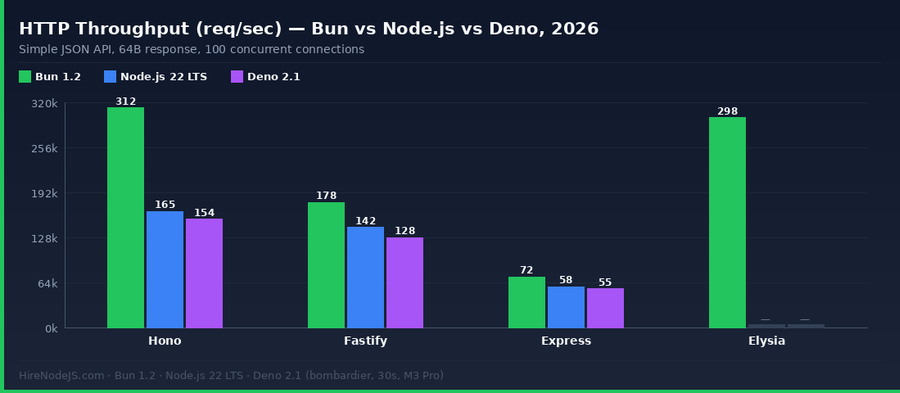
On a 64-byte JSON response benchmark with bombardier, Bun 1.2 on Hono hits around 312k req/sec — roughly 1.9x Node.js 22 on the same framework. The picture is more balanced on Fastify, where Node.js 22 posts 142k req/sec vs Bun at 178k. Express drags both runtimes down to the 55–72k range, which is mostly a framework overhead story, not a runtime one.
Cold start and startup time
Bun wins decisively on startup. A "hello world" HTTP server comes up in around 9ms on Bun 1.2 versus 41ms on Node.js 22. That matters if you are running serverless functions or spawning short-lived workers — on AWS Lambda with the Bun custom runtime, cold starts drop by 60–70% versus the Node.js 22 runtime in our tests. For bursty workloads that scale from zero dozens of times per day, that alone can be a material cost and UX win.
Latency under load and p99 behaviour
Throughput headlines hide tail-latency reality. On a sustained 10k req/sec load test against a realistic JSON API with Postgres reads, Bun and Node.js 22 both stay under 15ms at p50. The divergence happens at p99: Node.js 22 on Fastify sits around 48ms at p99, Bun 1.2 on Hono around 31ms. Both are well inside the envelope most APIs need — but if you are serving user-facing requests at global edge locations, those tail milliseconds compound.
Memory footprint
On idle, a Bun 1.2 HTTP server uses around 35–45 MB RSS versus 60–75 MB for Node.js 22. Under load the gap narrows — both runtimes sit in the 110–180 MB range for a typical REST API at 1–2k req/sec. For memory-constrained container environments (Lambda 128 MB, Cloud Run min instances) the Bun savings are real; for generously-sized Kubernetes pods they rarely matter.
Ecosystem, Tooling & Production Readiness
Package manager: bun install vs npm / pnpm
bun install is the clearest win for Bun. On a mid-size monorepo (~180 packages), bun install finishes cold installs in 4–7x the speed of npm and about 2x the speed of pnpm, with full workspaces support and a lockfile format that plays nicely with Node.js. Many Node.js-only teams now use bun install as their package manager while running the app itself on Node.
Native addons and the long tail
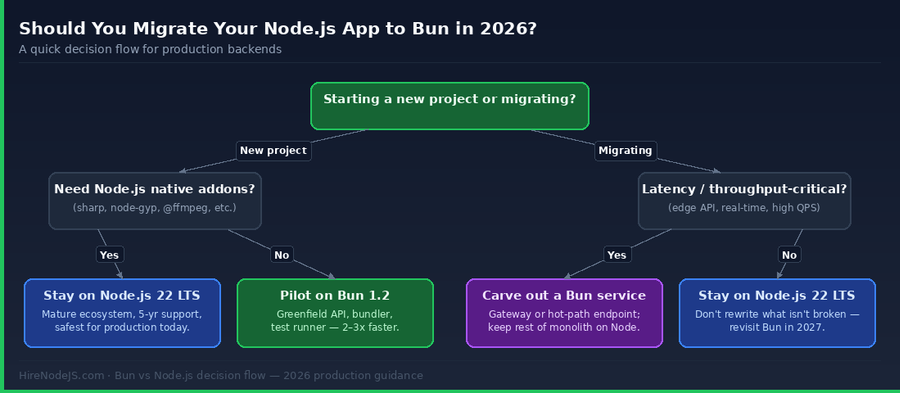
The most common migration blockers are native addons — image pipelines using sharp, native bcrypt, ffmpeg wrappers, or anything that compiles C++ via node-gyp. Bun's Node-API is "mostly there", but "mostly" is not a word you want on the critical path for payments or media processing. If your stack leans on native modules, budget serious time for verification, or keep those workloads on Node.js.
Observability, APM and deployment targets
Every serious APM vendor — Datadog, New Relic, Sentry, OpenTelemetry — ships Node.js agents that "just work". Bun support in these tools is newer, sometimes experimental, and occasionally requires manual instrumentation. Deployment is similar: every cloud and PaaS supports Node.js first-class; Bun is supported on Vercel, Fly.io, Railway and major Kubernetes base images, but on niche platforms you may need a custom runtime or Docker build. Pre-production teams should validate their observability and deploy pipeline on a small Bun service before going wider.
Hire Pre-Vetted Node.js Developers
Skip the months-long search. Our exclusive talent network has senior Node.js experts ready to join your team in 48 hours.
Feature-by-Feature Comparison (2026 Edition)
The two runtimes have converged more than most blog posts suggest. Both ship native TypeScript, built-in test runners, and WebSocket primitives. Both let you do more without a 10-package dev-dependency tree. The table below is sortable — click any column header to re-rank by that attribute.
Migrating an Existing Node.js Service to Bun
The low-risk migration pattern
The best migrations we have seen are not rewrites. They start by swapping only the package manager to bun install (zero runtime risk). Then they move the test runner and bundler to Bun for CI speed. Only after those land do they pick a single cold-start-sensitive endpoint or gateway and move it to Bun, typically as a sidecar service.
A minimal Bun HTTP server you can drop in today
Here is the same JSON API in Bun's native Bun.serve plus a Node.js-style fallback, so the same handler runs on either runtime. This is the pattern most teams use when they want to keep optionality for 6–12 months.
What to measure after the switch
A successful migration has three hard metrics worth tracking for at least two weeks after cutover: p95 and p99 latency per endpoint, error rate per dependency (DB, cache, external APIs), and container memory ceiling. Bun's lower memory footprint often tempts teams to reduce container size too aggressively — resist that urge for the first month. Also compare CI wall-clock time before and after: most teams see 2–3x faster CI once they move tests and builds to bun run, which is often the single most visible win to engineers.
// server.ts — runs on both Bun and Node.js 22+
import type { Server } from 'bun';

const PORT = Number(process.env.PORT ?? 3000);

// A single request handler used by both runtimes
async function handle(req: Request): Promise<Response> {
  const url = new URL(req.url);
  if (url.pathname === '/health') {
    return Response.json({ status: 'ok', runtime: process.versions.bun ? 'bun' : 'node' });
  }
  if (url.pathname === '/user' && req.method === 'GET') {
    const id = url.searchParams.get('id') ?? '1';
    return Response.json({ id, name: 'Ada Lovelace', role: 'engineer' });
  }
  return new Response('Not found', { status: 404 });
}

// Runtime detection: Bun has a global Bun object
if (typeof (globalThis as any).Bun !== 'undefined') {
  const server: Server = (globalThis as any).Bun.serve({
    port: PORT,
    fetch: handle,
  });
  console.log(`bun: listening on http://localhost:${server.port}`);
} else {
  // Node.js 18+ supports the Fetch API Request/Response natively
  const { createServer } = await import('node:http');
  const { Readable } = await import('node:stream');
  createServer(async (req, res) => {
    const url = `http://${req.headers.host}${req.url}`;
    const body = req.method === 'GET' ? undefined : Readable.toWeb(req) as any;
    const fetchReq = new Request(url, { method: req.method, headers: req.headers as any, body });
    const resp = await handle(fetchReq);
    res.statusCode = resp.status;
    resp.headers.forEach((v, k) => res.setHeader(k, v));
    const text = await resp.text();
    res.end(text);
  }).listen(PORT, () => console.log(`node: listening on http://localhost:${PORT}`));
}
When to Stay on Node.js 22 LTS (The Honest Answer)
Node.js 22 has LTS support through April 2027 and maintenance through 2029. If you are running a revenue-critical monolith with decades of collective team knowledge, a sprawling test suite, and tight observability requirements, the boring answer is still the right one: stay on Node.js 22 LTS. You can still pick up most of Bun's developer-experience wins by using bun install and bun test in CI without touching the production runtime. Teams that want to go deeper on the incumbent stack can see our TypeScript best practices for Node.js and the breakdown in our Node.js microservices architecture guide.
How Hiring Changes Between Bun and Node.js Teams
In practical terms the candidate pool is 20–30x larger for Node.js than for Bun specialists in 2026. That is not a reason to avoid Bun — it is a reason to hire Node.js engineers who can work on Bun, rather than waiting for "Bun engineers" to appear in your pipeline. Every Bun specialist we placed in the last 12 months had deep Node.js backgrounds first. If you need to hire a backend Node.js developer who can work across both runtimes, that is the skill profile to look for.
Interview signal for hybrid Node.js plus Bun teams looks different from pure Node.js hiring. Ask candidates to describe a service they have migrated, what they measured before and after, and what regressed. Ask about how they handled native-addon gaps, their bundling strategy, and how they debug memory issues across both V8 (Node.js) and JavaScriptCore (Bun). Engineers who can answer those questions concretely are the ones who will save you from an expensive rollback six months in.
Hire Expert Node.js and Bun Developers — Ready in 48 Hours
Picking the right runtime is only half the battle — you need engineers who have shipped on it. HireNodeJS.com specialises exclusively in Node.js talent: every developer is pre-vetted on real-world projects, API performance, event-driven architecture, and production deployments on both Node.js and Bun.
Unlike generalist platforms, our curated pool means you speak only to engineers who live and breathe the Node.js ecosystem. Most clients have their first developer working within 48 hours of getting in touch. Engagements start as short-term contracts and can convert to full-time hires with zero placement fee.
The 2026 Verdict
Bun 1.2 is no longer a bet — it is a credible choice for greenfield edge APIs, serverless functions and developer tooling. Node.js 22 LTS remains the conservative, ecosystem-complete choice for long-lived monoliths and anything that depends on native addons. The best engineering decision for most teams in 2026 is both: Node.js 22 in production, Bun in CI and for carefully-scoped new services. The teams who gain the most are the ones who treat this as a tooling question, not a tribal one.
If you take three things from this guide, let them be these. First, benchmark your own workload before migrating — the gap varies wildly by framework, payload size and I/O mix. Second, start with the package manager and test runner, not the production runtime. Third, hire engineers with deep Node.js fundamentals; they are the ones who adapt to whatever JavaScript runtime wins 2027. When you are ready for that next senior hire, HireNodeJS has already done the vetting for you.
Frequently Asked Questions
Is Bun production-ready in 2026?
Yes, for the right workloads. Bun 1.2 is stable on Linux, macOS and Windows, is used in production by multiple Fortune 500 teams, and has a growing Node-API compatibility layer. The caveat is native addons and enterprise LTS commitments — for those, Node.js 22 LTS is still the safer choice.
Is Bun really faster than Node.js?
On HTTP throughput with Bun-native frameworks like Hono and Elysia, Bun is about 1.7–2x faster than Node.js 22 in our 2026 benchmarks. Cold starts are 4–5x faster. On mature Node.js frameworks like Fastify the gap narrows to 20–30%, and on Express the runtime matters less than the framework overhead.
Can I run my existing Node.js app on Bun without changes?
Often yes, thanks to Bun's Node-API compatibility layer. Most pure-JavaScript apps run unchanged. The usual blockers are native addons (sharp, bcrypt, node-gyp packages), cluster-module patterns, and niche Node.js internals. Always run your full test suite against bun run before committing to a production migration.
Should I use Bun or Node.js 22 for a new backend in 2026?
If you need LTS support, deep ecosystem maturity, or native addons — Node.js 22 LTS. If cold start and raw throughput dominate (serverless, edge, real-time gateways) and your dependency tree is pure JS/TS — Bun 1.2 is worth a serious look. For most long-lived backends, Node.js 22 is still the safer default.
Is it harder to hire Bun developers than Node.js developers?
Much harder — the candidate pool is roughly 20–30x smaller in 2026. The practical approach is to hire senior Node.js developers and upskill them onto Bun, since the APIs overlap heavily. HireNodeJS sources candidates with experience on both runtimes.
Does Bun support TypeScript natively like Node.js 22?
Both support TypeScript natively, but differently. Bun fully compiles TS with its bundler (supports decorators, const enums, etc.). Node.js 22 uses "type-stripping", which just erases types and does not transpile syntax features. For most projects the difference is invisible, but complex TS features may still require a bundler on Node.js.
Vivek Singh is the founder of Witarist and HireNodeJS.com — a platform connecting companies with pre-vetted Node.js developers. With years of experience scaling engineering teams, Vivek shares insights on hiring, tech talent, and building with Node.js.
Want a Node.js engineer who has already shipped on Bun?
HireNodeJS connects you with pre-vetted senior engineers who are fluent in both Node.js 22 LTS and Bun 1.2. No recruiter fees, no lengthy screening — just top talent ready to ship within 48 hours.