Node.js 26 Migration Guide: Temporal API and What's New
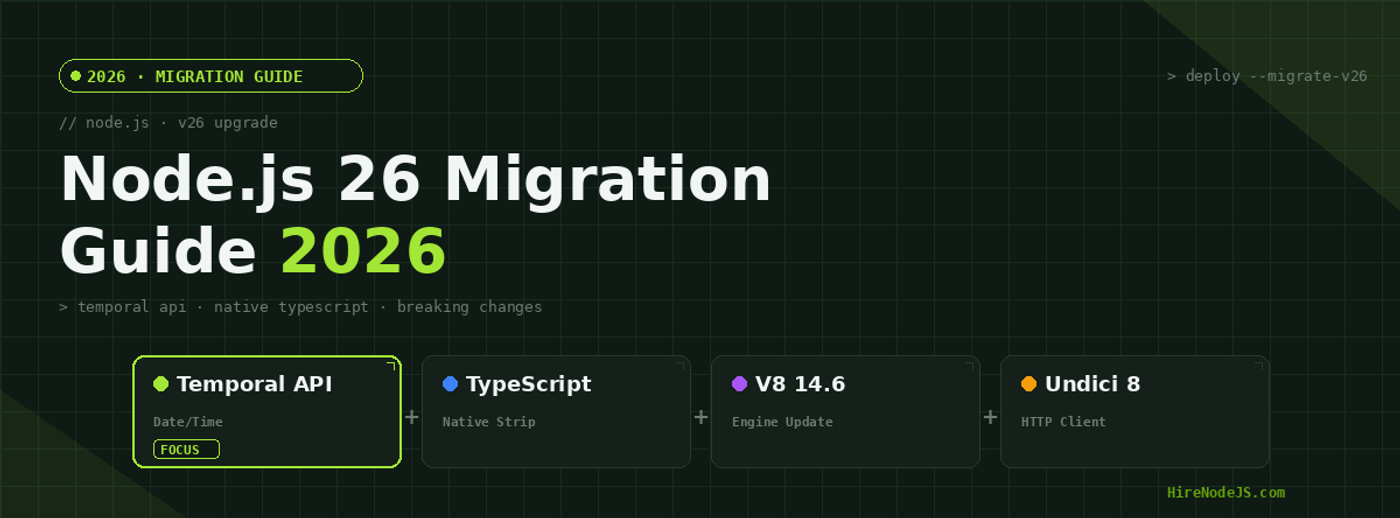
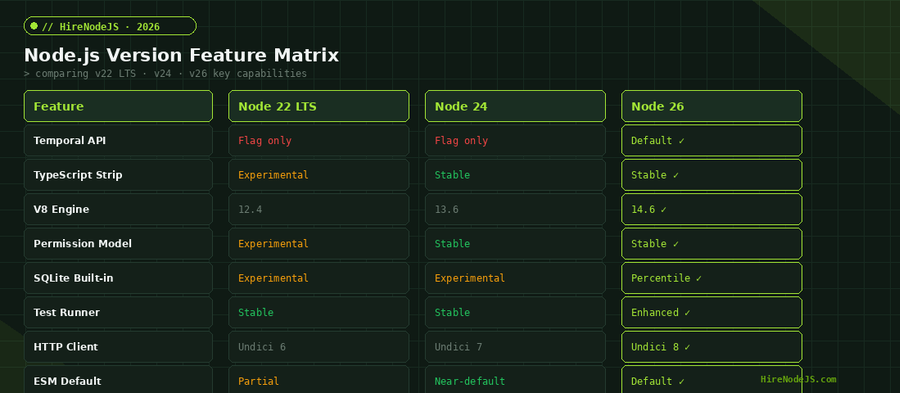
Node.js 26 landed on May 5, 2026, and it is the most significant major release since the jump to ESM-first in Node 22. The headline feature is the Temporal API enabled by default, replacing the notoriously broken Date object with a modern, immutable, timezone-aware alternative. But there is much more under the hood: native TypeScript type stripping is now stable and unflagged, V8 jumps to version 14.6, the HTTP client upgrades to Undici 8, and several long-deprecated internal APIs are finally removed.
Whether you are running Node 22 LTS in production or already on Node 24, this migration guide walks you through every breaking change, new feature, and upgrade step. By the end, you will have a clear roadmap to move your codebase to Node 26 with confidence and minimal downtime.
What's New in Node.js 26
Node.js 26 is classified as the Current release in the LTS cycle, meaning it receives active development until October 2026 when it enters long-term support. The release bundles V8 14.6 from Chromium 146, libuv 1.52.1, and ICU 78.3, alongside the marquee Temporal API and TypeScript stability improvements.
Release Timeline and LTS Schedule
The Node.js release schedule follows a predictable pattern. Even-numbered releases become LTS candidates, and Node 26 will enter Active LTS in October 2026, then Maintenance LTS in October 2027. If you are currently on Node 22 LTS, you have until April 2027 before its end-of-life. That gives your team a comfortable migration window, but starting early means you can adopt Temporal API and native TypeScript sooner.
V8 Engine Upgrade to 14.6
The V8 engine update to 14.6.202.33 brings measurable performance improvements. JSON parsing is up to 12 percent faster on large payloads, and the JIT compiler generates more efficient code for common API patterns like promise chains and async iterators. KeyObject APIs now support raw key formats, simplifying cryptographic operations in applications that deal with JWTs and signed payloads.
The Temporal API: Finally Replacing Date
The Temporal API is the most impactful change in Node 26. For years, JavaScript developers have relied on libraries like Moment.js, date-fns, and Luxon to work around the fundamental flaws of the Date object: mutable state, month indexing starting at zero, implicit local timezone coercion, and unreliable parsing. Temporal solves all of these problems natively.
Key Temporal Types You Need to Know
Temporal introduces several distinct types for different use cases. Temporal.Instant represents a fixed point in time, similar to a Unix timestamp. Temporal.ZonedDateTime combines a date, time, and timezone into a single immutable value. Temporal.PlainDate, Temporal.PlainTime, and Temporal.PlainDateTime handle civil time without timezone information, perfect for birthdays, schedules, and local events.
// Node.js 26 — Temporal API examples (no imports needed)

// Get the current instant
const now = Temporal.Now.instant();
console.log(now.toString());
// → '2026-05-16T10:30:00.000000000Z'

// Create a zoned datetime in a specific timezone
const meeting = Temporal.ZonedDateTime.from({
  year: 2026, month: 6, day: 15,
  hour: 14, minute: 30,
  timeZone: 'America/New_York'
});
console.log(meeting.toString());
// → '2026-06-15T14:30:00-04:00[America/New_York]'

// Duration math — add 90 days to a date
const startDate = Temporal.PlainDate.from('2026-01-15');
const endDate = startDate.add({ days: 90 });
console.log(endDate.toString()); // → '2026-04-15'

// Compare dates safely (no coercion bugs)
const d1 = Temporal.PlainDate.from('2026-03-01');
const d2 = Temporal.PlainDate.from('2026-02-28');
console.log(Temporal.PlainDate.compare(d1, d2)); // → 1 (d1 is after d2)

// DST-safe scheduling
const beforeDST = Temporal.ZonedDateTime.from(
  '2026-03-08T01:30:00[America/New_York]'
);
const afterDST = beforeDST.add({ hours: 2 });
console.log(afterDST.hour); // → 4 (correctly skips the 2 AM gap)Migrating from Date to Temporal
The migration path is straightforward for most applications. Start by identifying every new Date() call in your codebase with a simple grep. Replace Date.now() with Temporal.Now.instant() for timestamps, and replace new Date('2026-01-15') with Temporal.PlainDate.from('2026-01-15') for civil dates. For timezone-aware operations, switch to Temporal.ZonedDateTime. Libraries like date-fns can coexist with Temporal during the transition period, so you do not need to migrate everything at once.
Native TypeScript: Zero-Config Type Stripping
Node 26 stabilizes the TypeScript type-stripping feature that was experimental in Node 22 and stable in Node 24. The --experimental-transform-types flag is now removed entirely because type stripping is a first-class part of the module system. You can run .ts files directly with node app.ts and the runtime strips type annotations before execution.
What Type Stripping Means in Practice
This is not a full TypeScript compiler. Node.js performs syntax-level type erasure: it removes type annotations, interfaces, and type-only imports before executing the JavaScript underneath. It does not perform type checking, emit declaration files, or transform TypeScript-specific syntax like enums or decorators. For those features, you still need tsc or a build tool. But for running TypeScript applications in production, the elimination of a separate compile step dramatically simplifies deployment pipelines.
Impact on Build Pipelines
Teams that previously maintained complex tsconfig.json configurations and multi-stage Docker builds can now simplify significantly. Your Dockerfile can go from a multi-stage build with npm run build to a single stage that runs node server.ts directly. This reduces image sizes, speeds up CI/CD pipelines, and eliminates an entire class of build-related bugs. Serverless deployments on AWS Lambda benefit the most, with cold start times dropping because there is no compilation step.
Breaking Changes and Removed APIs
Every major Node.js release removes deprecated APIs, and version 26 is no exception. The most impactful removal is the internal _stream_* modules that many older packages imported directly. If your project or any dependency uses require('_stream_readable'), require('_stream_writable'), or similar internal stream modules, those imports will throw MODULE_NOT_FOUND errors on Node 26.
Removed: Internal _stream_* Modules
The internal stream modules have been deprecated since Node 12, but many npm packages continued to use them. Run npx depcheck or npm ls to identify affected dependencies. In most cases, updating to the latest version of the package resolves the issue. For packages that are no longer maintained, you may need to find alternatives or fork the package. If you need help auditing your dependency tree, consider working with an experienced Node.js backend developer who has handled production migrations before.
Hire Pre-Vetted Node.js Developers
Skip the months-long search. Our exclusive talent network has senior Node.js experts ready to join your team in 48 hours.
Removed: http.Server.prototype.writeHeader()
The writeHeader() method on HTTP server responses has been removed. This was an undocumented alias for writeHead() that some codebases used accidentally. The fix is a simple find-and-replace: change every .writeHeader( call to .writeHead( across your codebase. This is a low-effort change but can cause runtime crashes if missed, so add it to your pre-migration checklist.
Undici 8 HTTP Client Changes
Node 26 ships Undici 8 as the underlying HTTP client for the global fetch API. Undici 8 includes stricter header validation, improved connection pooling defaults, and changes to timeout behavior. If your application makes extensive use of fetch() or undici directly, review the Undici 8 changelog for breaking changes in header parsing and redirect handling.
Step-by-Step Migration Checklist
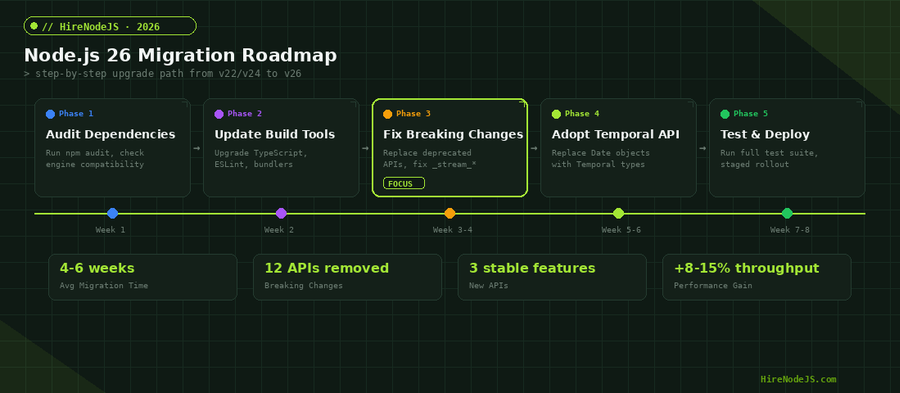
A structured migration approach minimizes risk and downtime. The following checklist covers every step from initial audit through production deployment.
Phase 1: Audit Your Dependency Tree
Start by running npm outdated and npm audit to identify packages that need updates. Check the engines field in your package.json and all dependency package.json files for Node version constraints. Use npx check-engines to automate this. Pay special attention to native addons built with node-gyp, as these often need recompilation for new Node.js major versions.
Phase 2: Update Build Tooling
Upgrade your TypeScript version to 5.5 or later, ESLint to v9 with flat config, and any bundlers like esbuild or webpack to their latest releases. If you are using Docker for containerized deployments, update your base image to node:26-alpine or node:26-slim. Run your full test suite after each tooling update to catch regressions early.
Phase 3: Fix Breaking Changes
Work through the breaking changes systematically. Replace _stream_* imports with the public stream API, swap writeHeader() for writeHead(), and test your HTTP client code against Undici 8 behavior. Create a migration branch and run your CI pipeline against it. Address failures one by one rather than trying to fix everything in a single commit.
Phase 4: Adopt New Features
Once your codebase runs cleanly on Node 26, start adopting the new features. Begin with Temporal API in new code paths rather than rewriting existing date logic. Enable native TypeScript execution in development and staging before rolling it out to production. Test the Permission Model in staging to sandbox file system and network access for security-sensitive services.
Phase 5: Staged Rollout
Deploy to a canary environment first, monitoring error rates, response latencies, and memory consumption. Use feature flags to gate new Temporal API usage so you can roll back without a full redeployment. Once canary metrics look stable for 48 to 72 hours, proceed with a rolling deployment across your production fleet. If you need experienced engineers for a smooth migration, HireNodeJS connects you with pre-vetted senior Node.js developers available within 48 hours.
Performance Improvements in Node.js 26
Beyond the feature additions, Node 26 delivers meaningful performance gains. The V8 14.6 engine optimizes async/await patterns that are ubiquitous in Node.js applications. JSON.parse is measurably faster on payloads larger than 1 KB, which benefits API servers that process JSON request bodies on every call.
Benchmark Highlights
Internal benchmarks from the Node.js team show an 8 to 15 percent throughput improvement for HTTP servers handling JSON-heavy workloads. The improved garbage collector reduces P99 latency spikes during sustained load, which is critical for applications with strict SLA requirements. Undici 8 reduces keep-alive connection overhead, improving performance for services that make many outbound API calls.
Memory and Startup Improvements
The libuv 1.52 update includes optimizations to the event loop timer implementation, reducing CPU overhead for applications with many concurrent timers. Startup time is marginally faster due to snapshot improvements in V8. For serverless functions running on AWS Lambda with Node.js, the combined effect of native TypeScript stripping and faster V8 startup translates to measurably lower cold start latencies.
Hire Expert Node.js Developers — Ready in 48 Hours
Building the right system is only half the battle — you need the right engineers to build it. HireNodeJS.com specialises exclusively in Node.js talent: every developer is pre-vetted on real-world projects, API design, event-driven architecture, and production deployments.
Unlike generalist platforms, our curated pool means you speak only to engineers who live and breathe Node.js. Most clients have their first developer working within 48 hours of getting in touch. Engagements start as short-term contracts and can convert to full-time hires with zero placement fee.
Conclusion: Start Your Node.js 26 Migration Today
Node.js 26 is a compelling upgrade. The Temporal API alone eliminates an entire class of date-handling bugs that have plagued JavaScript applications for decades. Stable native TypeScript execution simplifies build pipelines and speeds up deployments. The V8 14.6 engine delivers real-world performance improvements that matter for production API servers. And the removal of long-deprecated internal APIs, while requiring migration effort, leaves the platform cleaner and more maintainable.
Start your migration with a dependency audit, work through the breaking changes methodically, and adopt new features incrementally. The October 2026 LTS promotion gives you a clear deadline, but teams that start now will have the smoothest transition. The Temporal API and native TypeScript together represent the biggest quality-of-life improvement for Node.js developers in years — the sooner you adopt them, the sooner your team benefits.
Frequently Asked Questions
When should I upgrade to Node.js 26?
Node.js 26 is available now as a Current release. It enters Active LTS in October 2026. Production teams can start migration planning immediately, with the LTS promotion providing a natural deadline for completing the upgrade.
Is the Temporal API stable in Node.js 26?
Yes. The Temporal API is enabled by default in Node.js 26 without any experimental flags. It follows the TC39 Stage 3 specification and is considered production-ready for new application code.
Can I run TypeScript files directly in Node.js 26?
Yes. Node.js 26 includes stable type stripping that lets you run .ts files directly with node app.ts. It removes type annotations at the syntax level but does not perform type checking — you still need tsc for that.
What are the main breaking changes in Node.js 26?
The biggest breaking changes are the removal of internal _stream_* modules, the removal of http.Server.prototype.writeHeader(), the upgrade to Undici 8, and the removal of the --experimental-transform-types flag. Most codebases can address these in a few hours.
How long does a Node.js 26 migration typically take?
For a medium-sized production codebase, expect 4 to 6 weeks from initial audit to full production rollout. The actual code changes often take only a few days, but testing and staged deployment account for most of the timeline.
Should I migrate from Node.js 22 LTS directly to Node.js 26?
Yes, skipping Node 24 is fine. Node 22 LTS will receive security updates until April 2027, giving you time, but migrating directly to Node 26 lets you adopt Temporal API and stable TypeScript in one step.
Vivek Singh is the founder of Witarist and HireNodeJS.com — a platform connecting companies with pre-vetted Node.js developers. With years of experience scaling engineering teams, Vivek shares insights on hiring, tech talent, and building with Node.js.
Need Senior Node.js Engineers for Your v26 Migration?
HireNodeJS connects you with pre-vetted senior Node.js engineers who have production migration experience. Get your first developer working within 48 hours — no recruiter fees, no lengthy screening.