Node.js AbortController in 2026: Cancellation Done Right
Every backend does work that nobody is waiting for anymore. A user closes a tab mid-request, a mobile client drops off the network, an upstream API hangs past any reasonable deadline — and yet the database query, the file stream, and the third-party call all keep running, burning CPU and holding connections for a response that will never be read. In 2026, with serverless billing by the millisecond and AI inference calls that can run for seconds, that wasted work is no longer a rounding error. It is a line item.
Node.js solved this years ago with a small, standards-based pair of primitives: AbortController and AbortSignal. They are now woven through fetch, timers, streams, the filesystem, EventEmitter, and most modern libraries. Used well, they let a single cancellation signal cascade through an entire request and shut down orphaned work the instant it becomes pointless. This guide walks through the primitives, the patterns that hold up in production, and the mistakes that quietly leak memory and money.
Why Cancellation Matters in 2026
Cancellation used to be an optimization you reached for only under load. That has changed. Three shifts have moved it from nice-to-have to baseline hygiene: pay-per-millisecond serverless platforms, long-running AI and streaming workloads, and stricter reliability budgets where a single slow upstream can exhaust your connection pool. When work is not cancellable, a client that disconnects after 200ms can still cost you four seconds of inference time — and you pay for every one of those seconds.
The cost of orphaned work
Consider a report endpoint that runs a database query, then renders a PDF, then streams it back. If the client disconnects after the query starts, a naive handler still finishes the query, still renders the PDF, and only fails when it tries to write to a closed socket. Multiply that across thousands of abandoned requests and you have a service that spends a meaningful fraction of its compute producing output that goes straight into the void.
Teams feel this most acutely when they scale. The fix is rarely more hardware — it is propagating cancellation correctly. If you are growing a backend and need people who think this way by default, it is worth working with senior backend engineers who treat resource cleanup as part of the feature, not an afterthought.
The AbortController and AbortSignal Primitives
The whole model rests on two objects. An AbortController is the producer: you hold it, and calling controller.abort(reason) is how you say "stop." Its controller.signal is the consumer-facing AbortSignal, which you hand to any function that knows how to listen. The signal exposes signal.aborted (a boolean), signal.reason (whatever you passed to abort), and an 'abort' event you can subscribe to. That is the entire surface area — everything else is composition.
One controller, many consumers
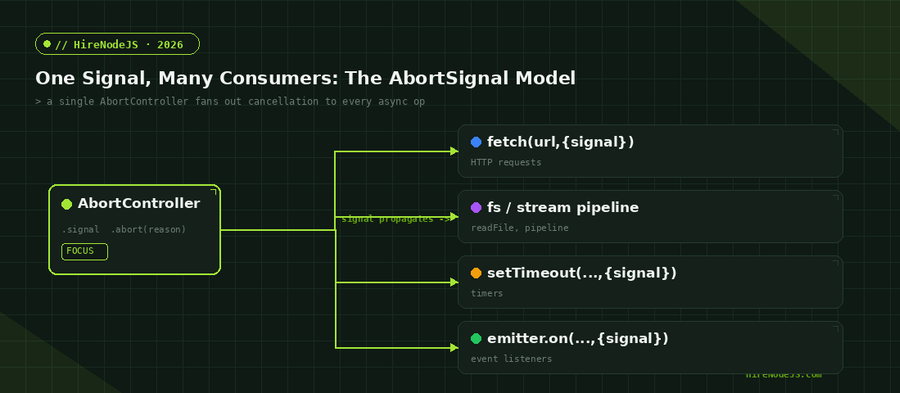
The power of the design is fan-out. You create one controller, pass its signal into a fetch call, a timer, a stream pipeline, and a set of event listeners, and a single abort() tears all of them down at once. The signal is the contract; the controller is the trigger. Keeping those two roles distinct in your head is the key to using the API without confusion.
// A minimal cancellable fetch with a manual trigger
const controller = new AbortController();

async function loadUser(id) {
  try {
    const res = await fetch(`https://api.example.com/users/${id}`, {
      signal: controller.signal,
    });
    return await res.json();
  } catch (err) {
    if (err.name === 'AbortError') {
      console.log('Request cancelled — no work wasted.');
      return null;
    }
    throw err; // a real failure, not a cancellation
  }
}

// Later: the user navigated away, or a newer request superseded this one.
controller.abort();Cancelling fetch, Timers, and Streams
Once you understand the signal contract, the same pattern shows up everywhere in the standard library. The built-in fetch accepts { signal }. The promisified timers in node:timers/promises accept { signal } so a sleep can be aborted. The stream pipeline() helper and fs methods like readFile take a signal too. You almost never need to write your own cancellation plumbing — you just need to thread the signal through.
Timers and event listeners
setTimeout from node:timers/promises rejects with an AbortError if the signal fires before the delay elapses, which makes cancellable backoff trivial. EventEmitter goes a step further: passing { signal } to emitter.on() auto-removes the listener when the signal aborts, so you no longer have to track and call removeListener() by hand. That single feature eliminates a whole category of listener leaks.
The line chart below shows why threading the signal all the way through matters. When cancellation propagates, in-flight operations collapse to zero almost immediately after a client disconnects; when it does not, orphaned work lingers for seconds.
Composing Signals with AbortSignal.any() and AbortSignal.timeout()
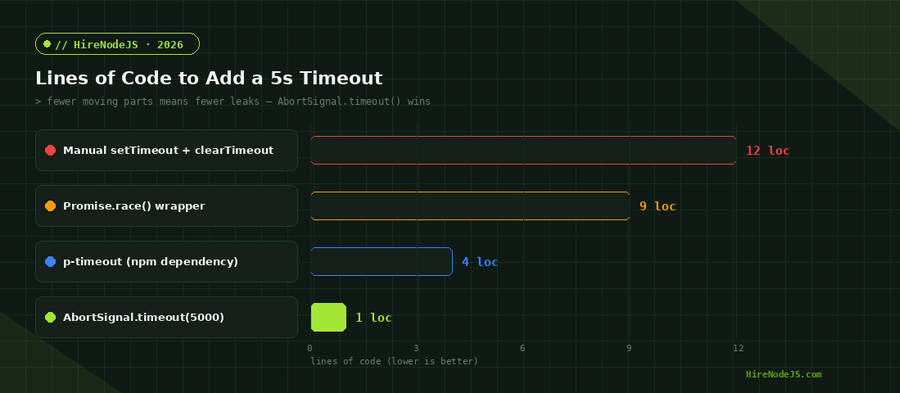
Real requests rarely have a single reason to stop. You usually want "abort if the caller cancels, OR if a deadline passes, OR if a parent operation fails." Two static helpers make this clean. AbortSignal.timeout(ms) returns a signal that aborts itself with a TimeoutError after the given delay — no controller, no manual clearTimeout, no leak. AbortSignal.any([...signals]) combines several signals into one that fires as soon as any input fires.
A request budget in three lines
Combining the two gives you a per-request time budget that still respects caller cancellation. Compared to the old approaches — a manual setTimeout paired with clearTimeout, or a Promise.race() wrapper — the composed version is dramatically less code and has no dangling timer to forget. The chart that follows quantifies that difference.
// Cancel if the caller aborts OR if 5s elapse — whichever comes first.
async function fetchWithBudget(url, userSignal) {
  const timeout = AbortSignal.timeout(5_000);
  const signal = AbortSignal.any([userSignal, timeout]);

  try {
    const res = await fetch(url, { signal });
    if (!res.ok) throw new Error(`HTTP ${res.status}`);
    return await res.json();
  } catch (err) {
    if (err.name === 'TimeoutError') console.warn('Upstream too slow — aborted at 5s.');
    else if (err.name === 'AbortError') console.warn('Caller cancelled the request.');
    throw err;
  }
}Hire Pre-Vetted Node.js Developers
Skip the months-long search. Our exclusive talent network has senior Node.js experts ready to join your team in 48 hours.
Propagating Cancellation Through Your Backend
Primitives are easy; propagation is where teams slip. The goal is for one disconnect at the edge to flow all the way down to the database driver. Frameworks help: Node's HTTP layer and many web frameworks expose a request-scoped signal that aborts when the client disconnects. Your job is to combine that with a deadline and pass the result into every downstream call.
From HTTP request to database query
The pattern is to build one composed signal at the top of the handler and thread it through every awaited call — the DB query, the render step, any outbound fetch. If the client leaves, the query is cancelled, the render is cancelled, and you return quietly without trying to write to a dead socket. Drivers like node-postgres, the MongoDB driver, and undici all accept a signal for exactly this reason.
import express from 'express';
const app = express();

app.get('/report/:id', async (req, res) => {
  // Combine the request lifetime with a hard server-side deadline.
  const signal = AbortSignal.any([
    req.signal,                  // aborts when the client disconnects
    AbortSignal.timeout(10_000), // and never run longer than 10s
  ]);

  try {
    const rows = await db.query(
      'SELECT * FROM events WHERE report = $1',
      [req.params.id],
      { signal },
    );
    const pdf = await renderReport(rows, { signal });
    res.type('application/pdf').send(pdf);
  } catch (err) {
    if (signal.aborted) return;  // client gone or timed out — stop quietly
    res.status(500).json({ error: 'report_failed' });
  }
});

app.listen(3000);
This style of end-to-end signal threading is second nature to TypeScript-first Node.js teams, where the signal becomes just another typed parameter that flows through the call graph. Once it is in your service layer's function signatures, correct cancellation becomes the default rather than something you remember to add.
Common Pitfalls and How to Avoid Them
The API is small, but a few traps recur often enough to be worth calling out. Most stem from treating cancellation as an error condition or from forgetting that an aborted operation still needs cleanup.
Swallowing real errors
The most common mistake is a bare catch that hides everything. If you catch an AbortError and silently return, but use the same branch for genuine failures, you will mask real bugs. Always inspect err.name (or compare against the signal's reason) and only treat true cancellations as benign.
Leaking abort listeners
If you manually add an 'abort' listener to a long-lived signal — for example one shared across many operations — remove it when your operation finishes, or attach it with its own { signal } so it cleans itself up. On a shared, never-aborting signal, forgotten listeners accumulate and look exactly like a slow memory leak in a heap snapshot.
Never testing the cancel path
Cancellation is a code path like any other, and it is almost always the least-tested one. A handler that looks correct can still fail to actually stop downstream work because the signal was dropped somewhere in the middle of the call graph. Write a test that aborts a controller mid-flight and asserts that the database query, the outbound fetch, and any timers all rejected with an AbortError. If you cannot prove cancellation propagates, assume it does not — a leaked query under load behaves very differently from the same query in a quiet test suite, and the difference only shows up in production at the worst possible time.
Getting cancellation right end-to-end is a good litmus test for backend maturity — it shows a team thinks about the whole lifecycle of a request, not just the happy path. If you are building a Node.js system and want engineers who already work this way, HireNodeJS connects you with pre-vetted senior developers available within 48 hours, without the recruiter overhead.
Hire Expert Node.js Developers — Ready in 48 Hours
Building the right system is only half the battle — you need the right engineers to build it. HireNodeJS.com specialises exclusively in Node.js talent: every developer is pre-vetted on real-world projects, API design, event-driven architecture, and production deployments — including the unglamorous parts like cancellation, backpressure, and graceful shutdown.
Unlike generalist platforms, our curated pool means you speak only to engineers who live and breathe Node.js. Most clients have their first developer working within 48 hours of getting in touch. Engagements start as short-term contracts and can convert to full-time hires with zero placement fee.
Conclusion: Cancellation as a First-Class Concern
AbortController and AbortSignal turn cancellation from a bespoke chore into a standard, composable contract. Create a controller, hand its signal to every async consumer, compose deadlines with AbortSignal.timeout() and AbortSignal.any(), and thread that one signal from the HTTP edge down to your database driver. Do that and abandoned work stops the moment it becomes pointless instead of running on someone else's dime.
The pieces are small and the API is stable in 2026 — the hard part is discipline. Make the signal a first-class parameter in your service layer, branch correctly on cancellation versus failure, and clean up listeners, and you will reclaim real compute while making your services noticeably more resilient under load.
Frequently Asked Questions
What is AbortController in Node.js?
AbortController is a built-in object that produces an AbortSignal. You pass the signal into async APIs like fetch, timers, and streams, then call controller.abort() to cancel all of them at once. It is the standard way to cancel asynchronous work in Node.js.
How do I cancel a fetch request in Node.js?
Create an AbortController, pass controller.signal as the signal option to fetch, and call controller.abort() when you want to stop. The fetch promise rejects with an AbortError, which you should handle separately from real failures.
What is the difference between AbortSignal.timeout() and AbortSignal.any()?
AbortSignal.timeout(ms) creates a signal that aborts itself after a delay with a TimeoutError. AbortSignal.any([...]) merges several signals into one that fires when any of them fires. They are often combined to enforce a deadline while still respecting caller cancellation.
Does cancelling a request actually save server resources?
Yes, if the signal is propagated. When the request signal is threaded into the database query, render step, and outbound calls, those operations stop the moment the client disconnects instead of running to completion, which reclaims CPU and frees connections.
Can I reuse an AbortController after calling abort()?
No. Once a controller is aborted its signal stays aborted permanently, and any new operation given that signal rejects immediately. Create a fresh AbortController for each logical operation — they are cheap to allocate.
How do I add a timeout without leaking a timer?
Use AbortSignal.timeout(ms) instead of a manual setTimeout paired with clearTimeout. It uses an unref'd timer, cleans itself up, and removes the risk of forgetting clearTimeout on an error path.
Vivek Singh is the founder of Witarist and HireNodeJS.com — a platform connecting companies with pre-vetted Node.js developers. With years of experience scaling engineering teams, Vivek shares insights on hiring, tech talent, and building with Node.js.
Want a Node.js engineer who ships fast, resilient APIs?
HireNodeJS connects you with pre-vetted senior Node.js engineers who treat cancellation, backpressure, and graceful shutdown as part of the job. Available within 48 hours — no recruiter fees.