Node.js API Versioning Strategies: The 2026 Production Guide
APIs are contracts between services, and breaking that contract can cascade failures across an entire distributed system. As Node.js continues to dominate backend development in 2026, the question is no longer whether to version your APIs but how to do it without creating a maintenance nightmare for your team and your consumers.
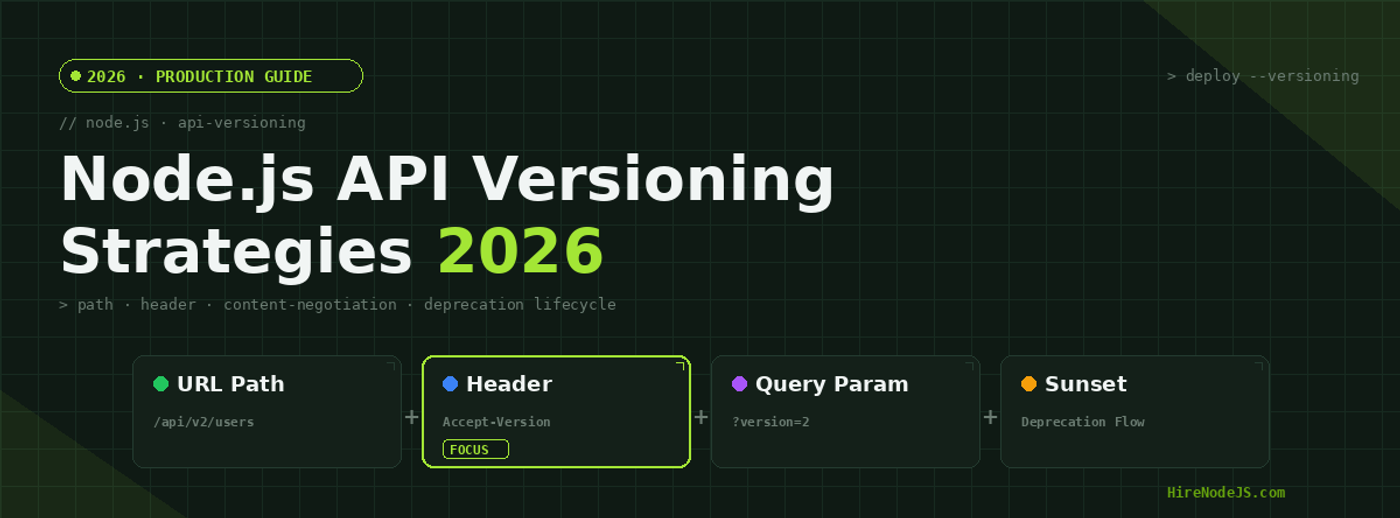
In this guide, we cover the four major versioning strategies used in production Node.js applications — URL path versioning, header-based versioning, query parameter versioning, and content negotiation. We compare their trade-offs across cacheability, client compatibility, and scalability, and walk through real implementation code you can deploy today.
Why API Versioning Matters in 2026
The Node.js ecosystem has matured significantly, and the expectations around API stability have risen accordingly. When your API serves mobile apps, third-party integrations, and internal microservices simultaneously, a breaking change without proper versioning can take down production systems and erode developer trust.
Modern APIs are consumed by clients you do not control. A mobile app released six months ago is still making requests to your endpoints. A partner integration built last year expects a specific response shape. Without versioning, you are forced to either never evolve your API or break every consumer when you do.
The Cost of Not Versioning
Teams that skip versioning often end up with informal versioning through feature flags, conditional logic scattered across controllers, and undocumented behavioral changes. This hidden complexity is worse than explicit versioning because it is invisible to consumers and creates debugging nightmares for your own engineers.
URL Path Versioning — The Industry Standard
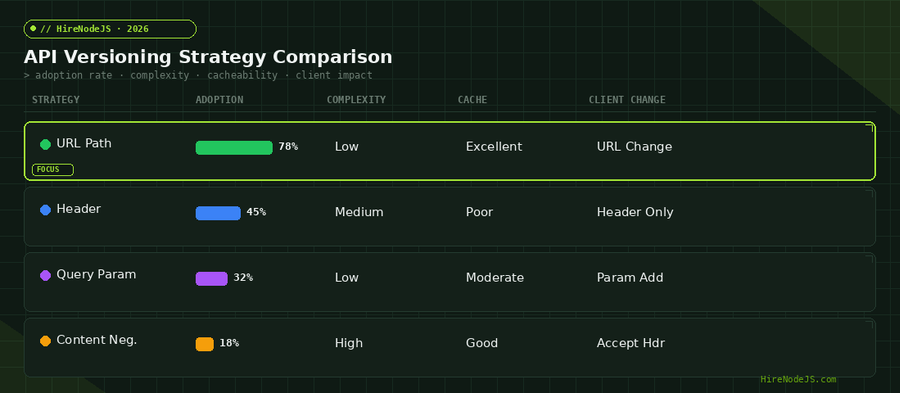
URL path versioning embeds the version number directly in the route: /api/v1/users, /api/v2/users. It is by far the most popular approach, used by roughly 78% of production APIs according to recent surveys. Its popularity comes from three key properties: clarity, cacheability, and simplicity.
Implementation in Express and Fastify
In Express, you can organize versioned routes using the Router class, mounting each version at its own path prefix. This keeps version-specific logic isolated and makes it straightforward to deprecate or remove an old version.
import express from 'express';
import { createServer } from 'http';

const app = express();

// v1 routes — original contract
const v1Router = express.Router();
v1Router.get('/users', (req, res) => {
  res.json({
    users: [{ name: 'Alice', email: 'alice@example.com' }],
    // v1 returns flat array
  });
});

// v2 routes — paginated response with metadata
const v2Router = express.Router();
v2Router.get('/users', (req, res) => {
  const page = parseInt(req.query.page) || 1;
  const limit = parseInt(req.query.limit) || 20;
  res.json({
    data: [{ id: 1, name: 'Alice', email: 'alice@example.com', role: 'admin' }],
    pagination: { page, limit, total: 1, totalPages: 1 },
    _links: {
      self: `/api/v2/users?page=${page}&limit=${limit}`,
      next: null,
    },
  });
});

// Deprecation middleware for v1
const deprecationMiddleware = (sunset) => (req, res, next) => {
  res.set('Deprecation', 'true');
  res.set('Sunset', sunset);
  res.set('Link', '</api/v2>; rel="successor-version"');
  next();
};

app.use('/api/v1', deprecationMiddleware('Sat, 01 Nov 2026 00:00:00 GMT'), v1Router);
app.use('/api/v2', v2Router);

createServer(app).listen(3000, () => {
  console.log('API running on :3000 — v1 (deprecated) + v2 (current)');
});
When to Choose URL Path Versioning
URL path versioning works best when you have external consumers who need clear, discoverable API documentation. It plays well with CDN caching because each version is a distinct URL, and it makes load balancer routing trivial. The downside is URL pollution — your routes carry version baggage forever.
Header-Based Versioning — Clean URLs, Hidden Complexity
Header-based versioning keeps URLs clean by moving the version information into HTTP headers. The client sends a custom header like Accept-Version: 2 or uses content negotiation through the Accept header. This approach is favored by larger enterprises — about 45% of mid-size and 58% of enterprise teams use it.
Custom Header vs Accept Header
You can implement header versioning two ways: a custom header like X-API-Version or API-Version, or through the standard Accept header with vendor media types like application/vnd.hirenodejs.v2+json. The custom header approach is simpler to implement, while the Accept header approach follows HTTP standards more closely.
Trade-offs to Consider
Header-based versioning is harder to test manually — you cannot simply paste a URL into a browser. API documentation tools need extra configuration. Caching proxies may not vary on custom headers by default, leading to stale responses. If you are building APIs that will be consumed by backend developers with experience in HTTP semantics, header versioning can be elegant. For public APIs consumed by junior developers or frontend teams, the additional friction may not be worth the clean URLs.
Query Parameter and Content Negotiation Approaches
Query parameter versioning appends the version as a URL parameter: /api/users?version=2. This approach is used by about 32% of startups because it requires minimal routing changes. However, it suffers from caching ambiguity and can conflict with other query parameters.
Content Negotiation — The Purist Approach
Content negotiation uses the HTTP Accept header with vendor-specific media types. A client requests application/vnd.company.resource.v2+json, and the server responds with the appropriate version. This is the most RESTful approach but also the most complex to implement and the hardest for consumers to adopt.
Choosing Between the Four Strategies
Hire Pre-Vetted Node.js Developers
Skip the months-long search. Our exclusive talent network has senior Node.js experts ready to join your team in 48 hours.
The right choice depends on your audience. Public APIs serving diverse clients benefit from URL path versioning. Internal APIs between microservices can use header-based versioning for cleaner service meshes. If you are scaling a Node.js team and need to standardize quickly, URL path versioning gives you the fastest time-to-implementation with the lowest cognitive overhead.
Managing the API Deprecation Lifecycle
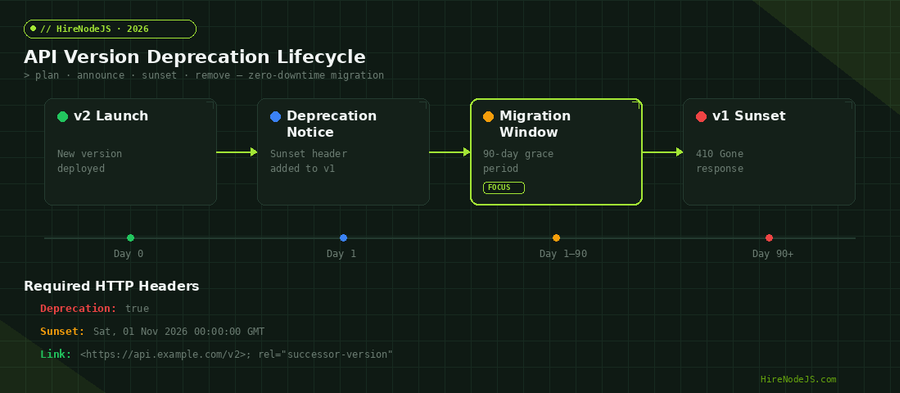
Versioning is only half the story — you also need a clear deprecation policy. Without one, you end up maintaining five API versions indefinitely, each with its own bugs and security patches. A well-defined deprecation lifecycle gives consumers confidence and gives your team permission to remove old code.
The Four-Phase Deprecation Model
The industry standard is a four-phase approach: launch the new version, announce deprecation of the old version with HTTP headers, provide a migration window of 60 to 90 days, and then sunset the old version by returning 410 Gone responses. Each phase should be communicated through both HTTP headers and your developer changelog.
Sunset Headers and RFC 8594
RFC 8594 standardized the Sunset HTTP header, which communicates when a resource or API version will become unavailable. Combined with the Deprecation header and the Link header pointing to the successor version, your API communicates its lifecycle programmatically. Clients can build automated alerting around these headers.
Production Best Practices for Node.js API Versioning
Version from Day One
Even if you have a single consumer, start with /api/v1. The cost of adding versioning later is dramatically higher because you need to migrate all existing consumers. Versioning from day one is a five-minute decision that saves weeks of migration work later.
Support N and N-1 Only
The sweet spot for most teams is supporting two versions: the current version and the previous one. This gives consumers a full release cycle to migrate while keeping your maintenance burden manageable. Enterprise teams with contractual obligations may need to extend this to N-2.
Centralize Version Logic
Use a middleware layer or a versioning library like express-version-route to centralize version detection. This prevents version-specific logic from leaking into your business logic layer. A clean architecture pattern keeps your controllers version-agnostic, which is something experienced Node.js engineers implement as a standard practice.
Testing Strategies for Versioned APIs
Versioned APIs need versioned test suites. Each supported version should have its own integration tests that verify the contract. Contract testing with tools like Pact is particularly valuable here because it lets consumers define their expectations and producers verify they still meet them across versions.
Automated Compatibility Checks
Set up CI pipelines that run tests for all supported versions on every deployment. Tools like Supertest paired with TypeScript type definitions can catch breaking changes before they reach production. If a v1 test fails after a code change, you know you have introduced a backward-incompatible modification.
Hire Expert Node.js Developers — Ready in 48 Hours
Building the right API architecture is only half the battle — you need the right engineers to build it. HireNodeJS.com specialises exclusively in Node.js talent: every developer is pre-vetted on real-world projects, API design, event-driven architecture, and production deployments.
Unlike generalist platforms, our curated pool means you speak only to engineers who live and breathe Node.js. Most clients have their first developer working within 48 hours of getting in touch. Engagements start as short-term contracts and can convert to full-time hires with zero placement fee.
Conclusion
API versioning is not a technical luxury — it is infrastructure that protects your consumers, your team, and your ability to evolve. URL path versioning remains the safest default for most Node.js teams in 2026, with header-based versioning as a strong alternative for internal APIs and enterprise integrations.
Whatever strategy you choose, pair it with a clear deprecation lifecycle, Sunset headers, and versioned test suites. Your future self — and every consumer of your API — will thank you.
Frequently Asked Questions
What is the best API versioning strategy for Node.js?
URL path versioning is the most widely adopted strategy, used by 78% of production APIs. It provides clear, discoverable endpoints and works seamlessly with CDN caching and load balancers.
How do I deprecate an API version in Node.js?
Use a four-phase approach: launch the new version, add Deprecation and Sunset HTTP headers to the old version, provide a 60-90 day migration window, then return 410 Gone responses after the sunset date.
Should I version my API from the beginning?
Yes. Starting with /api/v1 is a five-minute decision that prevents weeks of migration work later. Retrofitting versioning onto an existing API is significantly harder because all consumers must be migrated simultaneously.
What is the difference between URL path and header-based versioning?
URL path versioning puts the version in the URL (/api/v2/users) making it explicit and cache-friendly. Header-based versioning keeps URLs clean but hides the version in HTTP headers, making it harder to test and cache.
How many API versions should I support simultaneously?
Most teams should support two versions: current (N) and previous (N-1). This gives consumers a full release cycle to migrate while keeping maintenance manageable. Enterprise teams may need N-2 for contractual reasons.
How much does it cost to hire a Node.js developer for API work?
Senior Node.js developers with API design experience typically cost between $60-120/hour depending on region and expertise. HireNodeJS connects you with pre-vetted engineers available within 48 hours.
Vivek Singh is the founder of Witarist and HireNodeJS.com — a platform connecting companies with pre-vetted Node.js developers. With years of experience scaling engineering teams, Vivek shares insights on hiring, tech talent, and building with Node.js.
Need a Node.js Engineer Who Understands API Architecture?
HireNodeJS connects you with pre-vetted senior Node.js engineers who have built versioned, production-grade APIs. Available within 48 hours — no recruiter fees, no lengthy screening.