Node.js on AWS Lambda: The Complete Serverless Guide for 2026
AWS Lambda with Node.js is the fastest way to ship production APIs in 2026 — but only if you know how to tame cold starts, pick the right memory size, and stay inside the execution model. Teams keep shipping Lambda functions that feel fine at 10k requests a day and fall apart at 10 million. The difference isn't magic; it's a handful of patterns that senior engineers learn the hard way.
This guide walks through the full production playbook: how a Node.js Lambda is actually executed, the cold start numbers you should expect on Node 20 and the new LLRT runtime, architecture patterns that scale past the free tier, and the cost model that decides whether serverless is cheaper than EC2 or Fargate for your workload. If you're looking to hire a Node.js developer with real serverless experience, the final section covers exactly what to screen for.
How Node.js Actually Runs on AWS Lambda
A Node.js Lambda is a single-threaded Node process running inside a Firecracker microVM. When a request arrives, AWS either routes it to a warm execution environment (sub-5ms overhead) or provisions a fresh one — the dreaded cold start. The microVM boots, the Node.js runtime initialises, your handler module is loaded, and only then does your code run. Everything outside the handler — imports, DB clients, JSON parsing — runs once per microVM, not once per request.
The execution model in one diagram
Each microVM handles exactly one request at a time. Concurrent traffic spawns more microVMs. Each microVM lives for roughly 45 minutes of idle time before AWS recycles it. This is why connection pools, HTTP keep-alive, and DB clients must be initialised outside the handler: you'll reuse them across thousands of warm invocations on the same microVM.
What counts as a cold start
Three events trigger a cold start: the first invocation of a function, a scale-out event (existing microVMs are busy), or a configuration change (new version deployed, env vars changed, memory adjusted). For steady traffic the cold-start rate is typically 0.1–1% of invocations; for spiky traffic it can climb past 10%.
Designing the Serverless Node.js Architecture
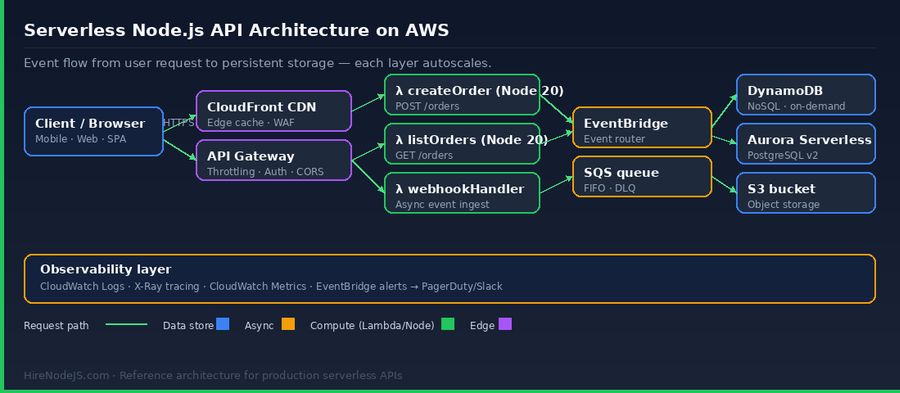
A production Lambda API almost never lives on its own. It sits behind API Gateway or CloudFront, publishes events to EventBridge or SQS, and persists data to DynamoDB or Aurora Serverless. The diagram below is the reference architecture we recommend to every client working with our backend developers; it scales from 10 requests/day to 10 million without rework.
Event sources determine everything
API Gateway is the default for synchronous HTTP APIs. For async ingestion, EventBridge gives you schema-based routing; SQS gives you durable queues with DLQs. Each source has its own limits — API Gateway caps payloads at 10 MB, SQS at 256 KB, and the 29-second timeout on API Gateway v1 is the single biggest footgun for new Lambda teams.
Stateless always, idempotent when async
Lambdas must be stateless between invocations and idempotent for any async source. Retries are not optional — SQS will redeliver, EventBridge will replay, and API Gateway will retry on 5xx. Write your handlers so a double invocation produces the same result: upserts over inserts, conditional writes on DynamoDB, and idempotency keys on webhook endpoints.
Cold Start Optimisation: The Techniques That Actually Work
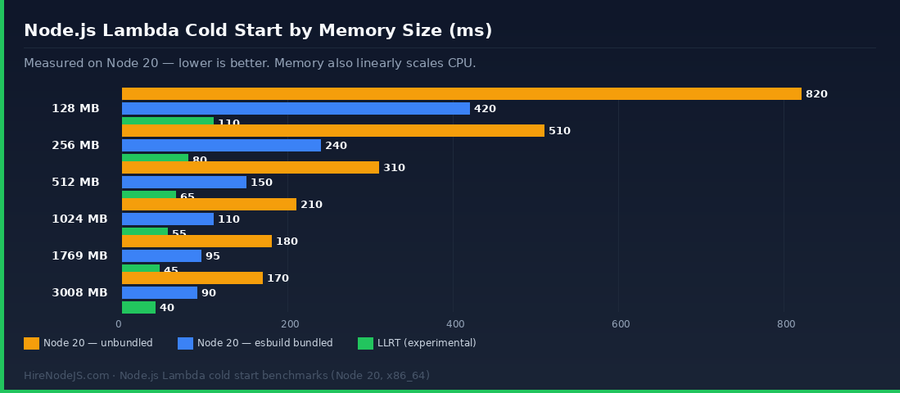
Most articles list 20 cold start tips; only four of them matter in practice. Bundle your code, skip the AWS SDK v2 if you're on Node 18+ (the v3 tree-shakeable modules are dramatically smaller), use provisioned concurrency only on latency-critical paths, and pick the right memory size — which is actually picking the right CPU allocation.
Bundle with esbuild or AWS Lambda Web Adapter
A freshly scaffolded Express Lambda with all the common middleware pulled in can weigh 18 MB as a raw node_modules zip. Bundled and minified with esbuild, the same code is typically 400–800 KB. Smaller zip = faster download into the microVM = faster cold start. This is the single biggest lever.
// esbuild.config.js — the minimum viable Lambda bundler
import { build } from 'esbuild';

await build({
  entryPoints: ['src/handler.ts'],
  bundle: true,
  minify: true,
  sourcemap: 'external',
  platform: 'node',
  target: 'node20',
  format: 'esm',
  outfile: 'dist/handler.mjs',
  // Exclude AWS SDK v3 — it's pre-bundled in the Node 20 runtime
  external: ['@aws-sdk/*'],
  banner: {
    // ESM needs this shim for __dirname/require to work inside Lambda
    js: "import { createRequire } from 'module'; const require = createRequire(import.meta.url);",
  },
});

console.log('Bundled handler.mjs ready for deployment');
The Cost Model Nobody Explains Correctly
Lambda pricing has two components: invocation count ($0.20 per million) and GB-seconds ($0.0000166667 per GB-second on x86). The trap is that cost scales linearly with traffic — which is fantastic until it isn't. Above roughly 1.5 million requests per month per endpoint at 200ms/1024 MB, Fargate or a modestly sized EC2 instance becomes cheaper. The chart below shows the exact crossover for a realistic Node.js API workload. For teams planning a migration, our DevOps engineers regularly model this against your real traffic pattern.
The GB-second calculation, demystified
GB-seconds = memory_in_GB × duration_in_seconds × invocations. A 1024 MB Lambda running 200 ms, invoked 10 million times a month, consumes 10M × 1 × 0.2 = 2M GB-seconds, costing ~$33. Add $2 for invocation count. Every millisecond of latency you remove saves real money at scale.
When serverless stops being the cheapest option
Steady, high-volume traffic (>50M req/month) on long-running handlers (>500ms) is where Fargate and EC2 win. Spiky traffic, scheduled jobs, webhook receivers, and anything under 10M req/month are almost always cheaper on Lambda. The operational savings — no patching, no auto-scaling groups, no load balancers — usually dwarf the compute cost either way.
Hire Pre-Vetted Node.js Developers
Skip the months-long search. Our exclusive talent network has senior Node.js experts ready to join your team in 48 hours.
Production-Ready Patterns for Node.js Lambda Handlers
Writing a handler that works is easy; writing one that survives production traffic is a different job. These are the five patterns we see in every high-performing Node.js codebase running on Lambda.
1. Lazy-initialise expensive clients outside the handler
Database clients, secret manager calls, and module-level config loading should happen once per microVM — not once per request. Put them at the top of your module, not inside the handler.
2. Use the AWS SDK v3 modular imports
Importing the whole `aws-sdk` package adds 50+ MB to cold start time. The v3 modular client — `@aws-sdk/client-dynamodb` — is a few hundred KB. Always prefer the named client imports.
3. Structured JSON logs for CloudWatch Insights
CloudWatch can parse JSON log lines automatically. Emit one structured log per request with requestId, latency, status, and any business dimensions. This is the difference between a 10-minute incident debug and a two-hour one.
If you're pairing Lambda with a relational store, PostgreSQL through Aurora Serverless v2 and the Data API is the typical choice — it dodges the classic Lambda+Postgres connection-exhaustion problem. For low-latency key/value access, pair with a Redis cache fronting the Lambda; a single warm Redis connection per microVM handles thousands of requests per second.
Observability: You Can't Fix What You Can't See
A Lambda function that runs in isolation for 200 ms and disappears is hard to debug the traditional way. You need three pillars: structured logs in CloudWatch Logs, distributed traces in X-Ray (or OpenTelemetry to Honeycomb/Datadog), and business metrics as CloudWatch Embedded Metric Format (EMF) — all emitted from within the handler.
The three-line observability setup
Add AWS Lambda Powertools for TypeScript. It gives you logger, tracer, and metrics in one dependency, all tuned for Lambda — correct context propagation, automatic cold-start annotations, and EMF metrics that render as native CloudWatch metrics without extra infra.
Alarms that catch real problems
Don't alarm on invocation errors alone; alarm on the error rate. A 0.5% error rate is usually noise from retries; a 5% rate is an incident. Use CloudWatch composite alarms to combine latency P99, error rate, and throttle count into a single meaningful signal.
Deployment: IaC, CI/CD, and Canary Releases
Lambda deployments used to be a zip-upload affair. In 2026, every serious team uses infrastructure-as-code: AWS CDK for TypeScript-native definitions, SST for full-stack apps, or the Serverless Framework v4 for framework-agnostic YAML. Terraform is the fourth option and dominant outside the Node ecosystem.
Canary releases with CodeDeploy
Lambda supports native weighted aliases: point 10% of traffic at the new version, watch the error rate for 10 minutes, then shift to 100% if clean or roll back if not. This is built into CodeDeploy and available in every major IaC tool — there's no reason to do a hard deploy to a live endpoint.
Hire Expert Node.js Developers — Ready in 48 Hours
Building serverless Node.js on AWS is only half the battle — you need engineers who have actually shipped it. HireNodeJS.com specialises exclusively in Node.js talent: every developer is pre-vetted on real-world Lambda work, API design, event-driven architecture, and production deployments.
Unlike generalist platforms, our curated pool means you speak only to engineers who live and breathe Node.js. Most clients have their first developer working within 48 hours of getting in touch. Engagements start as short-term contracts and can convert to full-time hires with zero placement fee.
Summary: When Lambda Is the Right Call for Node.js
Lambda with Node.js is the correct default for every new API in 2026 under about 50 million requests per month. Cold starts are solvable with esbuild bundling and a sane memory size; cost is predictable; and the operational savings — no servers, no patching, no auto-scaling groups — free your team to ship features instead of tuning fleets. The shape of a good serverless Node.js app isn't mysterious: stateless handlers, lazy-initialised clients, structured logging, IaC from day one, and canary deploys.
Where teams go wrong is treating Lambda as a drop-in for Express on EC2 — same bundle, same handler pattern, same synchronous flows. The engineers who get the most out of serverless are the ones who think in events, idempotency, and per-microVM initialisation. That mental model is what separates a Node.js developer who can use Lambda from one who can ship production systems on it.
Frequently Asked Questions
Is AWS Lambda cheaper than EC2 for a Node.js API?
For APIs under roughly 10 million requests per month with spiky or unpredictable traffic, Lambda is usually cheaper than EC2 once you include operational overhead. Past 50 million monthly requests on steady traffic, a well-sized EC2 or Fargate cluster often costs less per request.
What memory size should I pick for a Node.js Lambda?
1024 MB is the right default for most Node.js APIs — it gives you a full vCPU worth of compute and keeps cold starts under 200ms with bundled code. Tune up for CPU-heavy workloads (JWT, image processing) and down only if profiling shows you are idle.
How do I reduce Node.js Lambda cold starts?
The three biggest levers are bundling your code with esbuild, importing only the modular AWS SDK v3 clients you use, and picking 1024 MB+ memory. Provisioned concurrency is a last resort for latency-critical paths — it removes cold starts entirely but costs you always-on capacity.
Can I use Express.js inside AWS Lambda?
Yes, via AWS Lambda Web Adapter or @vendia/serverless-express. It works, but you take a cold-start penalty from the Express bootstrap and middleware chain. For greenfield APIs, a lightweight native handler or a framework like Hono is faster and cheaper.
Does Node.js 20 give better Lambda performance than Node 18?
Yes — Node 20 cold starts are measurably lower than Node 18 thanks to V8 improvements and a smaller runtime image. Node 22 is supported in 2026 and gives another 5–10% improvement on startup-heavy workloads.
What databases work best with Node.js on Lambda?
DynamoDB is the first-class choice — it scales without connection pooling concerns. For PostgreSQL, Aurora Serverless v2 with the Data API avoids the classic Lambda connection-exhaustion problem. Traditional RDS works but requires RDS Proxy to survive spiky traffic.
Vivek Singh is the founder of Witarist and HireNodeJS.com — a platform connecting companies with pre-vetted Node.js developers. With years of experience scaling engineering teams, Vivek shares insights on hiring, tech talent, and building with Node.js.
Need a serverless-savvy Node.js engineer?
HireNodeJS connects you with pre-vetted senior Node.js engineers with real AWS Lambda and serverless experience — available within 48 hours. No recruiter fees, no lengthy screening.