Node.js + Biome in 2026: The Rust Toolchain Guide
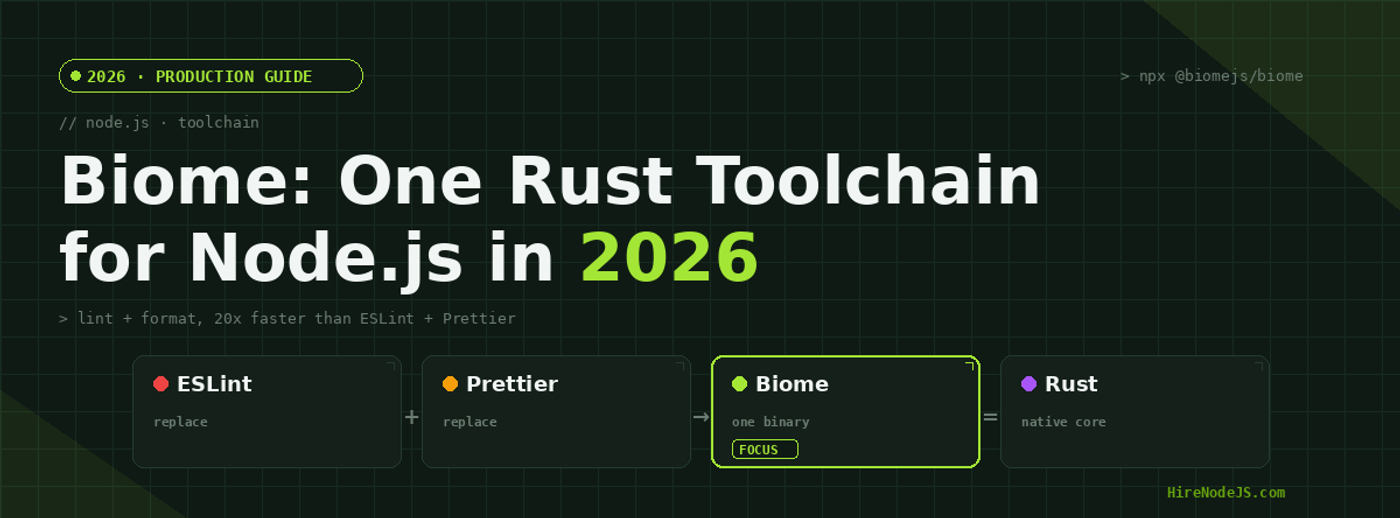
For nearly a decade, the default Node.js code-quality stack meant wiring ESLint together with Prettier, juggling overlapping rules, plugin version conflicts, and a config sprawl that grew with every new framework. In 2026 that arrangement is finally being challenged by Biome — a single Rust binary that lints, formats, and organizes imports for JavaScript, TypeScript, JSX, CSS, and GraphQL, with no Node.js process to spin up and no plugin tree to maintain.
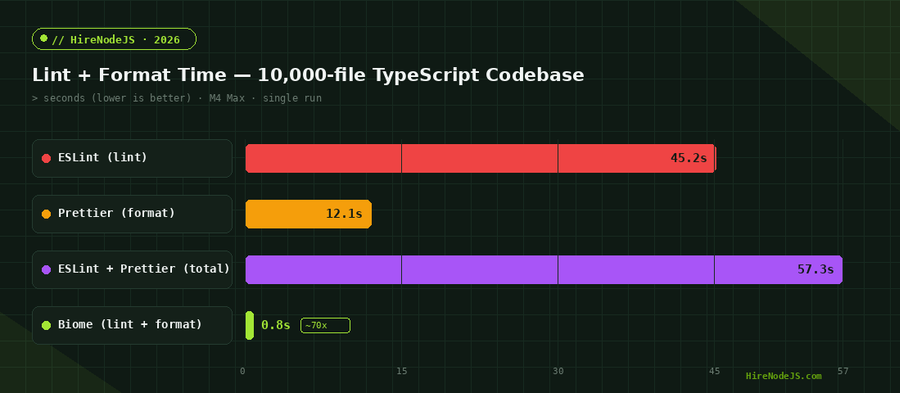
Biome v2 shipped in early 2026 with a stable plugin API, first-class CSS and GraphQL support, and benchmarks that are hard to ignore: on a 10,000-file TypeScript codebase it lints and formats in under a second where the ESLint + Prettier stack takes the better part of a minute. This guide walks through what Biome is, how to adopt it in a real Node.js project, how to migrate without breaking your team's workflow, and where it still falls short. If you are scaling a backend and want engineers who already work this way, you can hire vetted Node.js developers who bring modern tooling habits from day one.
Why the Node.js Toolchain Needed Consolidation
The classic setup asks a lot of every project. ESLint parses your code into an AST and runs hundreds of rules; Prettier reparses the same files to reformat them; eslint-config-prettier exists purely to stop the two from fighting. Add eslint-plugin-import, a TypeScript parser, and a framework preset, and a fresh repository can carry forty or more dev dependencies before you write a single line of business logic.
Death by a thousand configs
Every tool in that chain has its own config file, its own ignore file, and its own update cadence. A minor ESLint major version can cascade into broken plugins, and resolving the conflict often costs an afternoon. Multiply that across a monorepo with a dozen packages and the maintenance tax becomes real engineering time.
Speed is a developer-experience problem
Slow linting is not just an annoyance — it changes behavior. When a pre-commit hook takes fifteen seconds, developers start passing --no-verify. When CI lint takes a minute, people stop running it locally. A toolchain that returns results in milliseconds keeps the feedback loop tight enough that quality checks actually get run.
What Biome Actually Is
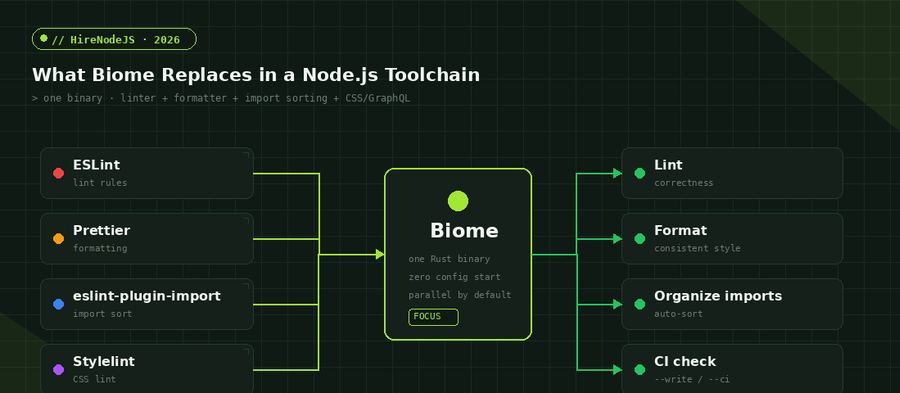
Biome is a toolchain — a single executable that bundles a linter, a formatter, and an import organizer behind one command and one configuration file. It is written in Rust, distributed as a platform-native binary, and processes files in parallel across all available cores by default. There is no JavaScript runtime to boot and no node_modules graph to resolve at lint time.
One binary, one config
Instead of five tools and five configs, Biome uses a single biome.json. The same binary powers the CLI, the CI check, and the editor extension, so the rules your IDE shows are exactly the rules CI enforces — no drift between local and pipeline behavior.
Compatible where it counts
Biome's formatter is intentionally close to Prettier's output, so adopting it rarely produces a giant reformat diff. Its linter ships hundreds of rules, many ported from ESLint and typescript-eslint, grouped into clear categories. For most application code the rule coverage is already more than sufficient.
Setting Up Biome in a Node.js Project
Adoption is deliberately fast. You add one dev dependency, generate a config, and wire two npm scripts. The snippet below sets up Biome from scratch and shows the canonical commands for checking and fixing a codebase.
# add Biome as a dev dependency
npm install --save-dev --save-exact @biomejs/biome

# generate a biome.json with sensible defaults
npx @biomejs/biome init

# check formatting + lint without writing changes (CI mode)
npx @biomejs/biome ci .

# format, lint, and organize imports, writing fixes in place
npx @biomejs/biome check --write .
The generated biome.json is small and readable. You opt into the recommended rule set, enable the formatter, and turn on import organization in a handful of lines:
{
  "$schema": "https://biomejs.dev/schemas/2.0.0/schema.json",
  "files": { "ignoreUnknown": true },
  "formatter": { "enabled": true, "indentStyle": "space", "indentWidth": 2, "lineWidth": 100 },
  "linter": {
    "enabled": true,
    "rules": {
      "recommended": true,
      "suspicious": { "noExplicitAny": "warn" },
      "style": { "useConst": "error", "noNonNullAssertion": "off" }
    }
  },
  "organizeImports": { "enabled": true }
}
Wire the same commands into your package.json scripts so the whole team runs identical checks. This pattern pairs especially well with a strict TypeScript configuration, where Biome catches style and correctness issues the compiler does not.
Hire Pre-Vetted Node.js Developers
Skip the months-long search. Our exclusive talent network has senior Node.js experts ready to join your team in 48 hours.
Migrating from ESLint and Prettier
You do not have to migrate everything at once. Biome ships migration assistants that read your existing ESLint and Prettier configuration and translate the overlapping settings into biome.json, so most teams reach parity in an afternoon rather than a sprint.
# import your existing Prettier options into biome.json
npx @biomejs/biome migrate prettier --write

# translate compatible ESLint rules into Biome's equivalents
npx @biomejs/biome migrate eslint --write

# verify the result, then remove the old toolchain
npx @biomejs/biome check --write .
npm uninstall eslint prettier eslint-config-prettier eslint-plugin-import
Handle the gaps deliberately
A few ESLint plugins have no Biome equivalent yet — deep framework-specific or accessibility rule sets being the usual examples. For those, you can run Biome for formatting and the bulk of linting while keeping a thin ESLint config for the handful of rules that matter, then retire it as Biome's coverage grows.
Biome in CI/CD and Pre-commit Hooks
Biome's speed pays off most in automation. A pre-commit hook that once added ten seconds now adds a few hundred milliseconds, and a CI lint stage that gated every pull request for a minute becomes effectively instant. The biome ci command is purpose-built for pipelines: it checks formatting and lint together and exits non-zero on any violation without modifying files.
A minimal CI step
name: quality
on: [push, pull_request]
jobs:
  biome:
    runs-on: ubuntu-latest
    steps:
      - uses: actions/checkout@v4
      - uses: actions/setup-node@v4
        with: { node-version: 22 }
      - run: npm ci
      - run: npx @biomejs/biome ci .
Because the same binary runs locally, in the pre-commit hook, and in CI, there is a single source of truth for what 'clean' means. Teams that build backend services and APIs benefit most: fast checks mean reviewers focus on logic instead of style nits, and the pipeline stays green for the right reasons. If you want to understand how vetted engineers are matched to this kind of work, see how the hiring process works.
Limitations and When to Stay on ESLint
Biome is not a universal replacement yet. ESLint's plugin ecosystem is enormous, and some specialized rule sets — exhaustive React Hooks dependency checking, certain accessibility linters, and bespoke organizational rules written as custom ESLint plugins — do not have Biome counterparts in 2026. If your codebase leans heavily on those, a hybrid setup is the pragmatic answer.
Custom rules and niche plugins
Biome's plugin API is stable but younger than ESLint's, so the library of community plugins is far smaller. If you maintain a large catalogue of custom lint rules encoding domain conventions, budget time to port them or keep ESLint scoped to just those rules.
Modernizing a toolchain is straightforward; finding engineers who keep your stack current without being told is harder. If you are building a Node.js system and need that kind of judgment, HireNodeJS connects you with pre-vetted senior developers available within 48 hours — without the recruiter overhead.
Hire Expert Node.js Developers — Ready in 48 Hours
Building the right system is only half the battle — you need the right engineers to build it. HireNodeJS.com specialises exclusively in Node.js talent: every developer is pre-vetted on real-world projects, API design, event-driven architecture, and production deployments.
Unlike generalist platforms, our curated pool means you speak only to engineers who live and breathe Node.js. Most clients have their first developer working within 48 hours of getting in touch. Engagements start as short-term contracts and can convert to full-time hires with zero placement fee.
Conclusion: A Faster, Simpler Default
Biome represents the same consolidation that esbuild and Vite brought to bundling: take a slow, fragmented JavaScript-based toolchain and replace it with a single fast native binary. For most Node.js and TypeScript projects in 2026, starting with Biome means less configuration, dramatically faster checks, and one source of truth across editor, hook, and CI.
The honest caveat is ecosystem maturity — if you depend on niche ESLint plugins, run a hybrid setup and retire ESLint as Biome's coverage grows. But for greenfield projects and most existing codebases, the migration is low-risk, reversible, and pays for itself the first time a developer runs the check command and gets results before they can blink.
Frequently Asked Questions
Is Biome a full replacement for ESLint and Prettier?
For most Node.js and TypeScript projects, yes — Biome handles formatting, linting, and import organization in one binary. The exception is codebases that rely on niche ESLint plugins with no Biome equivalent, where a hybrid setup is best.
How much faster is Biome than ESLint plus Prettier?
Biome is typically 10–25x faster because it is written in Rust, runs as a native binary, and processes files in parallel. On a 10,000-file codebase it finishes in under a second versus nearly a minute for the traditional stack.
Will migrating to Biome create a huge reformat diff?
Usually a small, one-time one. Biome's formatter is intentionally close to Prettier's output, but not byte-identical, so isolate the reformat in its own commit on a dedicated branch to keep code review clean.
Does Biome work with TypeScript and JSX?
Yes. Biome supports JavaScript, TypeScript, JSX, TSX, JSON, CSS, and GraphQL natively, with no extra parser or plugin to install.
Can I use Biome only for formatting and keep ESLint for linting?
Absolutely. A common adoption path is running Biome for formatting and core lint rules while keeping a narrowly scoped ESLint config for rules Biome cannot yet express, then retiring ESLint over time.
How do I run Biome in CI?
Use the biome ci command, which checks formatting and lint together and exits non-zero on any violation without modifying files. A single GitHub Actions step running npx @biomejs/biome ci . is enough.
Vivek Singh is the founder of Witarist and HireNodeJS.com — a platform connecting companies with pre-vetted Node.js developers. With years of experience scaling engineering teams, Vivek shares insights on hiring, tech talent, and building with Node.js.
Want a Node.js engineer who keeps your toolchain modern?
HireNodeJS connects you with pre-vetted senior Node.js engineers available within 48 hours — developers who bring fast, modern tooling habits like Biome from day one. No recruiter fees, no lengthy screening.