Node.js Built-in SQLite with node:sqlite in 2026
For most of Node.js history, adding a SQL database to a side project meant the same ritual: pick a driver, install a native module, hope the prebuilt binary matched your platform, and wire up a connection. SQLite was always the lightweight favourite, but it still arrived as a third-party dependency. That changed when Node.js shipped a SQLite database engine inside the runtime itself, exposed through the node:sqlite module.
As of 2026, node:sqlite is a Release Candidate (Stability 1.2) and ships with every modern Node.js build — no npm install, no compiler toolchain, no postinstall scripts. For CLIs, tests, local-first apps, prototypes, and a surprising number of production services, that is a meaningful simplification. This guide walks through how node:sqlite works, the full DatabaseSync API, how it compares to better-sqlite3 and libSQL, and the production patterns that keep a synchronous database engine from blocking your event loop.
Why Built-in SQLite Matters in 2026
Zero dependencies, zero native build step
The headline benefit is that node:sqlite has no install footprint. The SQLite C library is compiled into the Node.js binary, so there is no node-gyp, no prebuilt-binary roulette, and nothing to break when you bump your Node version or switch from x64 to ARM. For teams that hire Node.js developers to ship fast, that removes an entire class of "works on my machine" dependency problems.
A short history of node:sqlite
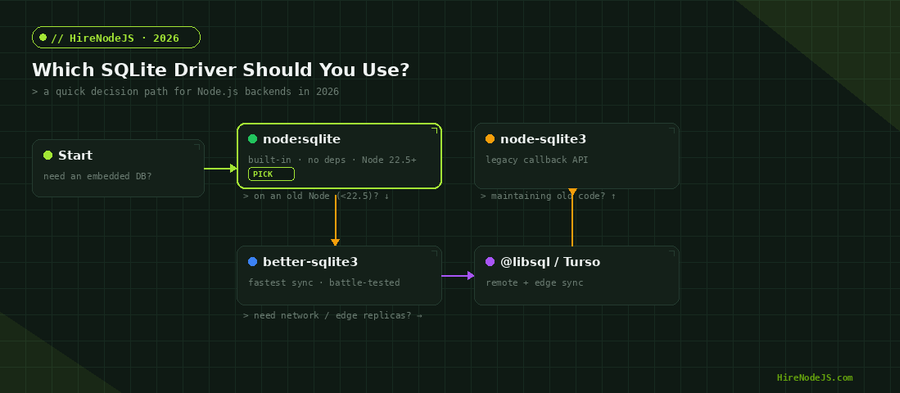
The module first landed in Node.js v22.5.0 behind the --experimental-sqlite flag. In v22.13.0 and v23.4.0 the flag was dropped, though the API remained experimental. By v25.7.0 it was promoted to Release Candidate, and that is where it sits today: stable enough that the public API is unlikely to change, but still maturing. Knowing exactly which Node version a feature landed in matters when you support multiple runtimes, which is why the driver-selection chart below starts with your Node version.
Getting Started with node:sqlite
Opening a database and running your first query
The API centres on one class: DatabaseSync. You construct it with a file path (or the special :memory: name for an in-memory database), run schema statements with exec(), and compile reusable queries with prepare(). Everything is synchronous, which makes the code read like plain procedural logic with no callbacks or await.
import { DatabaseSync } from 'node:sqlite';

// Open (or create) a database file. Use ':memory:' for a throwaway DB.
const db = new DatabaseSync('app.db');

// exec() runs one or more statements with no return value.
db.exec(`
  CREATE TABLE IF NOT EXISTS users (
    id    INTEGER PRIMARY KEY,
    email TEXT NOT NULL UNIQUE,
    name  TEXT
  ) STRICT;
`);

// prepare() compiles SQL once; reuse the statement for speed + safety.
const insert = db.prepare(
  'INSERT INTO users (email, name) VALUES (?, ?)'
);
insert.run('ada@example.com', 'Ada Lovelace');

const byEmail = db.prepare('SELECT * FROM users WHERE email = ?');
console.log(byEmail.get('ada@example.com'));
// -> { id: 1, email: 'ada@example.com', name: 'Ada Lovelace' }

db.close();
A prepared StatementSync exposes three core read/write methods: run() for writes (returning the number of changes and the last insert row id), get() for a single row, and all() for an array of rows. There is also iterate(), which returns a lazy iterator so you can stream large result sets without materialising them in memory.
The node:sqlite API, End to End
Type conversion you need to know
SQLite has only five storage classes — NULL, INTEGER, REAL, TEXT, and BLOB — so node:sqlite maps JavaScript types onto that small set. Strings become TEXT, numbers become INTEGER or REAL, Buffers and TypedArrays become BLOB, and null becomes NULL. Large integers can be read back as BigInt via setReadBigInts(true) on a statement, which matters when you store values beyond Number.MAX_SAFE_INTEGER. Anything outside this set — a Date, a plain object, undefined — throws, so you serialise those yourself (ISO strings for dates, JSON.stringify for objects).
Beyond CRUD: functions, aggregates, and backups
DatabaseSync is more capable than a thin query wrapper. You can register custom SQL functions with function(), define custom aggregates with aggregate(), take consistent online snapshots with the module-level backup() helper, and even load SQLite extensions. For backend systems where these patterns show up — reporting, analytics rollups, scheduled snapshots — it pays to hire backend developers who understand both SQL and the runtime.
Transactions are manual — and that's fine
Unlike better-sqlite3, node:sqlite does not ship a .transaction() helper. You control transactions with explicit BEGIN / COMMIT / ROLLBACK via exec(). Wrapping a batch of writes in a single transaction is the single biggest performance lever in SQLite: without it, every insert is its own durable transaction with an fsync; with it, thousands of rows commit together.
Hire Pre-Vetted Node.js Developers
Skip the months-long search. Our exclusive talent network has senior Node.js experts ready to join your team in 48 hours.
// Batch inserts inside one transaction = 10-100x faster than autocommit.
function bulkInsert(db, rows) {
  const stmt = db.prepare(
    'INSERT INTO events (type, payload) VALUES (?, ?)'
  );
  db.exec('BEGIN');
  try {
    for (const row of rows) {
      stmt.run(row.type, JSON.stringify(row.payload));
    }
    db.exec('COMMIT');
  } catch (err) {
    db.exec('ROLLBACK');
    throw err;
  }
}node:sqlite vs better-sqlite3 vs libSQL
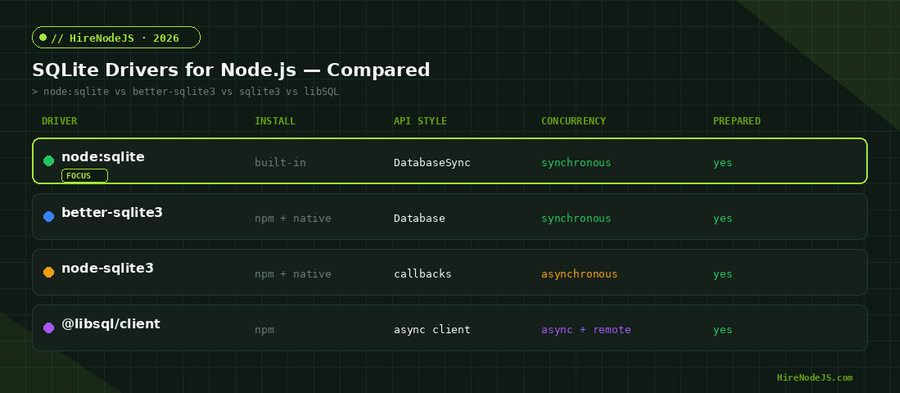
node:sqlite borrows its synchronous, prepared-statement design directly from better-sqlite3, the long-standing community favourite. In day-to-day code they feel similar. The practical differences come down to maturity, raw throughput, and feature surface.
When better-sqlite3 still wins
better-sqlite3 has years of production hardening, a slightly faster hot path, and ergonomic extras like a built-in .transaction() wrapper, user-defined functions with richer options, and tighter control over BigInt and safe-integer handling. If you are on a Node version older than 22.5, or you need a feature node:sqlite has not stabilised yet, better-sqlite3 remains the safe pick.
When libSQL / Turso makes more sense
If your workload needs network access, replicas, or edge deployment, a local file engine is the wrong tool. libSQL (the SQLite fork behind Turso) gives you an embedded-compatible API plus remote and edge-replicated databases. For caching-heavy or globally distributed systems you may also reach for Redis alongside it. The decision flowchart above captures the short version: stay local with node:sqlite by default, and only graduate when concurrency or geography forces your hand.
Production Patterns and Gotchas
Turn on WAL mode
By default SQLite uses a rollback journal that takes an exclusive lock on every write. Write-Ahead Logging (WAL) lets readers and a writer work concurrently and dramatically improves throughput for web workloads. Set it once, right after opening the database, along with a sensible busy timeout so transient locks retry instead of throwing.
const db = new DatabaseSync('app.db');

// Concurrency-friendly defaults for a server process.
db.exec('PRAGMA journal_mode = WAL;');   // readers + writer don't block
db.exec('PRAGMA busy_timeout = 5000;');  // wait up to 5s on a lock
db.exec('PRAGMA foreign_keys = ON;');    // enforce referential integrity
db.exec('PRAGMA synchronous = NORMAL;'); // safe + fast under WALOne connection per thread
A DatabaseSync handle is not safe to share across worker threads. The clean pattern is one connection per process or per worker, opened at startup and closed on graceful shutdown. Because the engine is in-process, opening a connection is cheap — there is no pool to manage, no network handshake, and no idle-connection tuning.
If you are building a Node.js system on SQLite and need engineers who understand transactions, indexing, and the trade-offs between an embedded engine and a networked database, HireNodeJS connects you with pre-vetted senior developers available within 48 hours — without the recruiter overhead.
Hire Expert Node.js Developers — Ready in 48 Hours
Building the right system is only half the battle — you need the right engineers to build it. HireNodeJS.com specialises exclusively in Node.js talent: every developer is pre-vetted on real-world projects, API design, data modelling, and production deployments.
Unlike generalist platforms, our curated pool means you speak only to engineers who live and breathe Node.js. Most clients have their first developer working within 48 hours of getting in touch. Engagements start as short-term contracts and can convert to full-time hires with zero placement fee.
Conclusion: A Real Database, Built In
node:sqlite turns SQLite from a dependency into a runtime feature. For CLIs, tests, local-first apps, and many production services, it removes install friction entirely while giving you a fast, fully-featured SQL engine with prepared statements, transactions, custom functions, and online backups. Treat it like the synchronous, in-process engine it is — WAL mode on, queries indexed and short, heavy work on worker threads — and it will quietly handle far more than its zero-setup simplicity suggests.
As the module graduates from Release Candidate to fully stable, expect node:sqlite to become the default starting point for data persistence in Node.js. Start with it, keep your data layer thin, and reach for better-sqlite3 or libSQL only when a concrete requirement — an older runtime, a missing feature, or networked replicas — demands it.
Frequently Asked Questions
Is node:sqlite ready for production in 2026?
It is a Release Candidate (Stability 1.2), meaning the API is stable and unlikely to change. Many teams use it in production for CLIs, local-first apps, and services with embedded data, while keeping a thin data layer so they can swap to better-sqlite3 if needed.
Do I need to install anything to use node:sqlite?
No. SQLite is compiled into the Node.js binary. You import { DatabaseSync } from 'node:sqlite' with no npm install and no native build step, on Node.js v22.5 and later.
How is node:sqlite different from better-sqlite3?
Both are synchronous and use prepared statements, so the code looks similar. better-sqlite3 is more mature, slightly faster, and adds conveniences like a .transaction() helper. node:sqlite wins on zero setup because it ships with Node itself.
Does node:sqlite block the event loop?
Yes — every query is synchronous and blocks until it returns. This is fine for fast indexed lookups but bad for slow scans. Keep queries short and indexed, and run heavy work in a worker thread with its own connection.
Can node:sqlite handle concurrent requests?
Enable WAL mode with PRAGMA journal_mode = WAL so readers and a writer can work concurrently, and set a busy_timeout so transient locks retry. For high write concurrency or networked replicas, consider libSQL/Turso instead.
How do I store dates or objects in node:sqlite?
SQLite only supports NULL, INTEGER, REAL, TEXT, and BLOB. Serialise other types yourself — store dates as ISO strings and objects as JSON.stringify output — then parse them on read.
Vivek Singh is the founder of Witarist and HireNodeJS.com — a platform connecting companies with pre-vetted Node.js developers. With years of experience scaling engineering teams, Vivek shares insights on hiring, tech talent, and building with Node.js.
Need a Node.js engineer who knows data layers cold?
HireNodeJS connects you with pre-vetted senior Node.js developers who understand SQLite, transactions, indexing, and when to graduate to a networked database — available within 48 hours.