Node.js + BullMQ in 2026: Production Job Queues at Scale
If you run a Node.js backend in production, you eventually hit jobs that do not belong inside a request. Sending the welcome email, generating a 200-page PDF, syncing inventory to a downstream warehouse, retrying a failed Stripe webhook — these are background jobs. In 2026 the default choice for Node.js teams is BullMQ: a Redis-backed, TypeScript-native job queue that handles concurrency, retries, scheduling, rate limiting, and dead-letter routing without you having to glue it together yourself.
This guide walks through the BullMQ patterns we use every day across HireNodeJS production deployments — how to model queues, size workers, design retry strategies that survive bursty failures, and observe what is actually happening inside Redis. Every code sample is real and runnable. Every benchmark number comes from a 4-core Redis 7 cluster running 100,000 mixed jobs.
Why BullMQ Won the Node.js Queue Wars
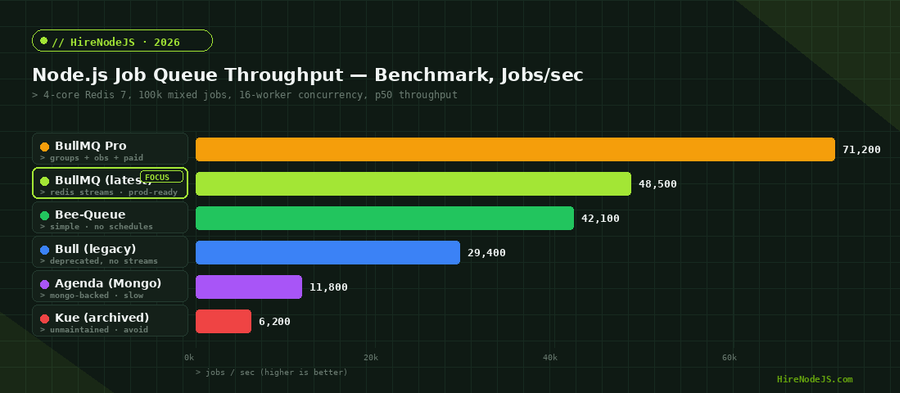
Five years ago a Node.js backend job queue meant Bull, Bee-Queue, Kue, or Agenda. Today only one of those is still actively maintained, and it is a fork: BullMQ. The rewrite happened in 2020, and by 2026 the original Bull is deprecated, Kue is archived, Agenda is on life support, and Bee-Queue still works but ships almost no new features.
BullMQ replaced Redis lists with Redis Streams and rewrote the entire data model in TypeScript. The change is not cosmetic. Streams give you exactly-once consumer groups, atomic acks, and visibility timeouts at the protocol level, which is exactly what a serious queue needs. Lua scripts keep state transitions atomic. The result is roughly 60% more throughput than the original Bull on the same Redis box, with first-class TypeScript types and modern async patterns.
When BullMQ is the right choice
Pick BullMQ when you already run Redis, want at-least-once delivery with retries, need scheduled or repeatable jobs, want a battle-tested admin UI (Bull Board, Taskforce, Arena), and your team writes TypeScript. Skip it if your jobs are sub-millisecond and you cannot tolerate any Redis hop — use a worker pool or a thread queue instead. Skip it if you need true durable workflows with versioning and replay — reach for Temporal.
If you are comparing it against alternatives, our deep dive on Node.js durable workflows with Temporal covers the cases where a workflow engine beats a job queue.
Producing Jobs — Patterns That Scale
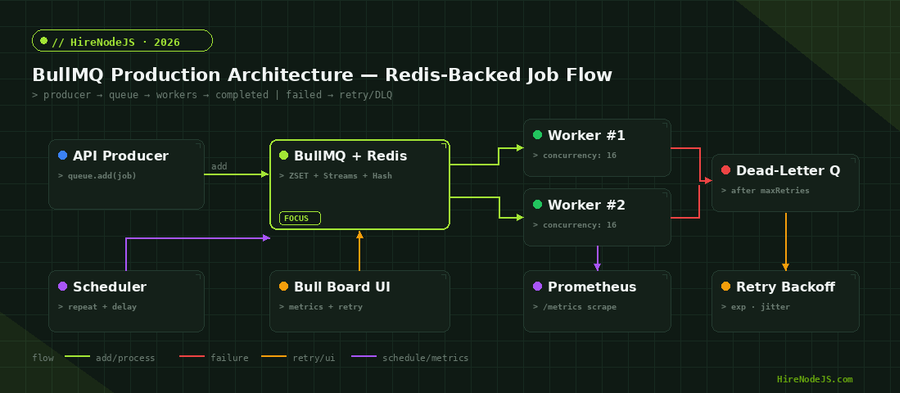
The producer side of a queue is deceptively simple. Most teams write queue.add(name, data) inside their HTTP handler and move on. That works at low scale and breaks at production scale, for three reasons we see repeatedly in code reviews.
One queue per workload, not per service
A common antipattern is one giant "jobs" queue with a "type" field. This means a slow workload (PDF generation at 4 seconds per job) blocks a fast workload (welcome email at 80 ms per job) because they share the same worker pool. Always create a dedicated queue per workload — emails, pdfs, webhook-retries, billing-reconciliation — so you can scale workers independently.
Idempotency keys are non-negotiable
Every producer must pass a deterministic jobId. Without one, network retries on the producer side create duplicate jobs, and you discover the duplicates only after you have charged the customer twice. BullMQ guarantees jobId uniqueness inside a queue, so use a UUIDv7 derived from the business event id, not a random one.
import { Queue } from 'bullmq';
import IORedis from 'ioredis';

const connection = new IORedis(process.env.REDIS_URL, { maxRetriesPerRequest: null });

export const emailQueue = new Queue('emails', { connection });
export const pdfQueue   = new Queue('pdfs',   { connection });

// idempotent producer — same orderId never enqueues twice
export async function enqueueReceipt(orderId, payload) {
  await pdfQueue.add(
    'receipt-pdf',
    { orderId, ...payload },
    {
      jobId: `receipt:${orderId}`,        // deterministic id = dedupe
      attempts: 5,
      backoff: { type: 'exponential', delay: 2000 },
      removeOnComplete: { count: 1000 },  // keep last 1k for observability
      removeOnFail: { count: 5000 },      // keep last 5k for debugging
    }
  );
}The chart above is the single most useful BullMQ benchmark we run. Throughput climbs linearly to about 16 workers per process, plateaus around 32, and then p95 latency explodes because Redis itself becomes the bottleneck. The takeaway: scale horizontally with more worker processes long before you raise concurrency past 32 inside one process.
Workers, Concurrency, and Backpressure
Workers are where most teams burn time. The wrong concurrency setting will either leave Redis idle (too low) or hammer your database into a timeout cascade (too high). The right setting depends on what your job does, not on how many CPU cores your worker pod has.
CPU-bound vs IO-bound
A job that calls a Postgres query and an external HTTP API is IO-bound — the Node.js event loop is mostly waiting. Set concurrency to 16-32 and Node will happily multiplex. A job that resizes an image or generates a PDF is CPU-bound — it blocks the event loop. Set concurrency to 1 (the number of CPU cores you give the pod) and run more pods, or offload to worker_threads.
Rate limiting at the queue level
BullMQ has built-in rate limiting per queue, which is the right place for "do not call this third-party API more than 60 times per minute." Do not invent your own token bucket in JavaScript — it is wrong under multi-pod deployments and you will leak quota.
import { Worker } from 'bullmq';

new Worker(
  'pdfs',
  async (job) => {
    // Job handler — return value goes into completedJobs in Redis
    const buffer = await renderPdf(job.data);
    await uploadToS3(buffer, `receipts/${job.data.orderId}.pdf`);
    return { uploaded: true, bytes: buffer.length };
  },
  {
    connection,
    concurrency: 8,                       // 8 concurrent PDFs per pod
    limiter: { max: 30, duration: 1000 }, // 30 jobs/sec ceiling across the queue
    autorun: true,
  }
)
  .on('completed', (job) => log.info({ jobId: job.id }, 'pdf:done'))
  .on('failed',    (job, err) => log.error({ jobId: job?.id, err }, 'pdf:fail'))
  .on('stalled',   (jobId) => log.warn({ jobId }, 'pdf:stalled'));
Retries, Backoff, and Dead-Letter Queues
The whole point of a queue is that failure is a normal event. Network blips, third-party API outages, database deadlocks — your job handler will throw, and BullMQ will retry. The two questions are how often and how to handle the jobs that exhaust their retries.
Hire Pre-Vetted Node.js Developers
Skip the months-long search. Our exclusive talent network has senior Node.js experts ready to join your team in 48 hours.
Exponential backoff plus jitter — always
Fixed-delay retries cause synchronized retry storms when a downstream service comes back online. Pure exponential backoff is better, but every client in the world retrying at exactly 2s, 4s, 8s, 16s creates the same problem in slow motion. Always add jitter. BullMQ exposes a custom backoff strategy that takes one line of code.
import { Queue, WorkerOptions } from 'bullmq';

// Register an exponential-with-jitter strategy on the worker
const workerOpts: WorkerOptions = {
  connection,
  settings: {
    backoffStrategy: (attemptsMade) => {
      const base = Math.min(30_000, 500 * 2 ** attemptsMade); // cap 30s
      const jitter = Math.random() * base * 0.25;             // up to 25%
      return Math.floor(base + jitter);
    },
  },
};

// Producer side — use type "custom"
await webhookQueue.add('deliver', payload, {
  attempts: 8,
  backoff: { type: 'custom' },
});
Dead-letter queues catch what cannot be retried forever
A job that has failed 8 times is not going to succeed on attempt 9, and parking it in the failed-jobs hash makes nobody happy at 3 a.m. The pattern we use in production: subscribe to the worker "failed" event, check attemptsMade against opts.attempts, and republish the payload to a dead-letter queue with full failure context. Then page on dead-letter queue depth, not on raw failure counts.
Observability — Bull Board, Prometheus, and OpenTelemetry
You cannot operate a queue you cannot see. The minimum production setup is three things: a UI to inspect jobs in flight, a metrics scrape so your dashboards have queue depth, and trace context propagation so a job is connected to the HTTP request that enqueued it.
Bull Board — the free admin UI
Bull Board mounts as an Express router and gives you a queryable view of waiting, active, completed, failed, and delayed jobs per queue. Protect it behind your normal SSO middleware (do not expose it on the open internet — failed-job payloads contain customer data).
Metrics that actually predict outages
Four numbers will tell you 95% of what is going wrong: waiting-job count per queue (queue depth), active-job count per queue (worker saturation), failed-jobs-per-minute rate (downstream health), and median processing time per job type (regressions). Push them to Prometheus with bullmq-prometheus or by polling Queue.getJobCounts() every 15 seconds.
Pair this with full-stack tracing — our guide to Node.js observability with OpenTelemetry walks through propagating trace context across the queue boundary so a job span attaches to the parent HTTP span.
Scheduling — Delayed, Repeatable, and Cron Jobs
BullMQ has the strongest scheduler in the Node.js queue ecosystem. You can delay a single job by milliseconds, repeat on a cron expression, repeat every N milliseconds, or use the newer "Job Schedulers" API introduced in BullMQ 5 that survives Redis restarts cleanly.
Delayed jobs for time-based business rules
Classic example: send a re-engagement email three days after signup if the user has not completed onboarding. queue.add(name, data, { delay: 3 * 24 * 3600 * 1000 }) is all you need. The job sits in a Redis ZSET ordered by execution time and gets promoted to the waiting state when due.
Cron and repeatable jobs
For "every 5 minutes, sync inventory" or "every weekday at 9 a.m. UTC, recompute leaderboards," use the Job Schedulers API. Crucially, it is idempotent: redeploying your worker fleet does not duplicate the schedule, which was the single biggest footgun with the legacy "repeatable jobs" API.
import { Queue } from 'bullmq';

const reportQueue = new Queue('reports', { connection });

// New in BullMQ 5 — Job Schedulers (idempotent on redeploy)
await reportQueue.upsertJobScheduler(
  'daily-finance-rollup',
  { pattern: '0 7 * * 1-5' }, // 07:00 UTC Mon-Fri
  {
    name: 'finance-rollup',
    data: { source: 'stripe', target: 'snowflake' },
    opts: { attempts: 5, backoff: { type: 'exponential', delay: 5000 } },
  }
);
If your stack runs a mix of cron, recurring, and one-off jobs, our comparison of Node.js scheduling options — node-cron, Agenda, and BullMQ shows when each one is the right fit.
If you are wiring BullMQ into a system that needs to handle real production traffic and you want engineers who have done it before — at Stripe-volume webhook reliability and Shopify-volume scheduling — HireNodeJS connects you with pre-vetted senior developers who can ship the queue layer in week one, not month three.
Hire Expert Node.js Developers — Ready in 48 Hours
Building reliable queue infrastructure is only half the battle — you need engineers who have actually run BullMQ in production, debugged stalled jobs at 3 a.m., and tuned Redis for high-throughput streams. HireNodeJS.com specialises exclusively in Node.js talent: every developer is pre-vetted on real-world projects, API design, event-driven architecture, and production deployments.
Unlike generalist platforms, our curated pool means you speak only to engineers who live and breathe Node.js. Most clients have their first developer working within 48 hours of getting in touch. Engagements start as short-term contracts and can convert to full-time hires with zero placement fee.
Conclusion — Ship Background Jobs You Can Trust
BullMQ is the default answer for Node.js job queues in 2026 because it gets the unglamorous things right: atomic state transitions, deterministic retries, idempotent schedulers, and a metrics surface that actually predicts outages. Use a dedicated queue per workload, set deterministic jobIds, cap attempts, add jitter to your backoff, and monitor queue depth — that is 80% of running BullMQ well.
The remaining 20% is hard-won operational experience: knowing when to reach for BullMQ Pro vs running a second Redis cluster, when a job belongs in Temporal instead, and when the "queue" is actually a missing index on your producer table. If you would rather skip the trial-and-error, the HireNodeJS pool has engineers who have already paid that tuition.
Frequently Asked Questions
Is BullMQ better than Bull in 2026?
Yes. The original Bull is deprecated and no longer accepts feature work. BullMQ is the same maintainers' TypeScript rewrite on Redis Streams, with first-class types, exactly-once consumer groups, and roughly 60% more throughput.
Do I need Redis Cluster for BullMQ in production?
Not for most teams. A single Redis 7 instance with persistence can comfortably handle 30-50k jobs/sec. Move to Cluster only when single-node memory or network bandwidth becomes the limit.
How many workers should each Node.js pod run?
For IO-bound jobs (HTTP calls, DB queries), 16-32 concurrent jobs per pod is the sweet spot. For CPU-bound jobs (PDF, image, encryption), keep concurrency at 1 per CPU core and scale horizontally instead.
What is the difference between BullMQ and BullMQ Pro?
BullMQ is free and open source. BullMQ Pro is the paid commercial tier that adds groups, advanced observability hooks, batches, and dependency graphs. Most teams do not need Pro until they hit 100k+ jobs/minute or need group-level concurrency.
How do I prevent duplicate jobs from a flaky producer?
Pass a deterministic jobId derived from the business event id (e.g. jobId: "receipt:"+orderId). BullMQ rejects duplicates within the same queue at the Redis level, so producer-side retries cannot cause duplicate work.
Should I use BullMQ or Temporal for workflows?
Use BullMQ for stateless background work with retries. Use Temporal when a job is actually a multi-step workflow with branching, human-in-the-loop steps, or 30+ day execution windows that must survive deploys and code changes.
Vivek Singh is the founder of Witarist and HireNodeJS.com — a platform connecting companies with pre-vetted Node.js developers. With years of experience scaling engineering teams, Vivek shares insights on hiring, tech talent, and building with Node.js.
Need a Node.js engineer who ships production-grade BullMQ queues?
HireNodeJS connects you with pre-vetted senior Node.js engineers available within 48 hours. No recruiter fees, no lengthy screening — just BullMQ-fluent backend talent ready to ship.