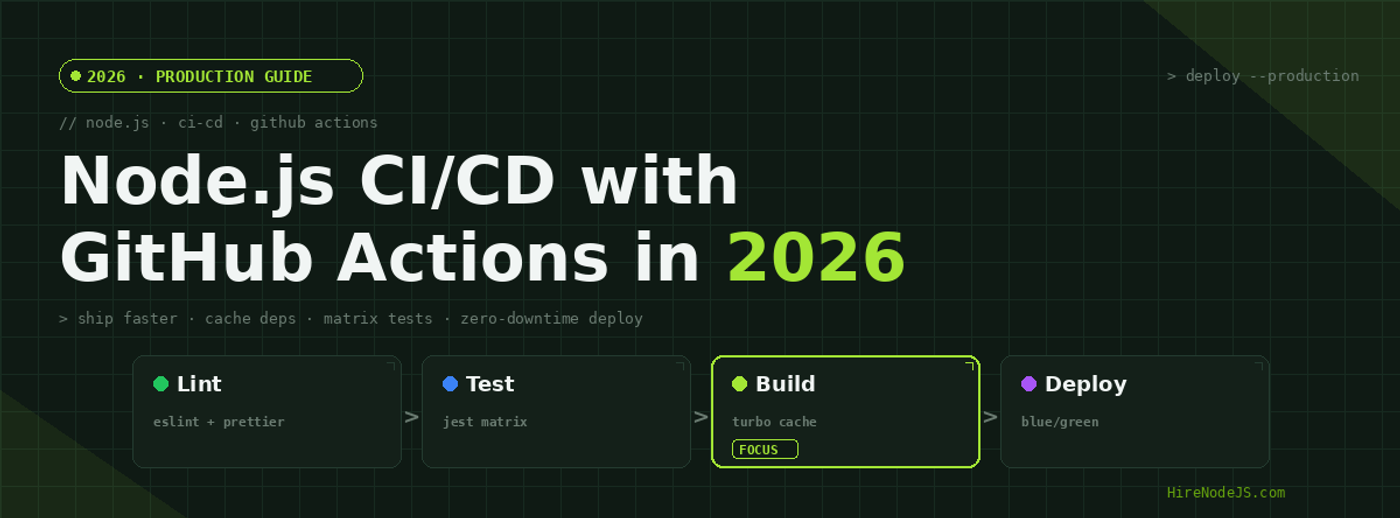
Node.js CI/CD with GitHub Actions in 2026: The Production Pipeline Guide
Shipping Node.js code in 2026 means more than just running tests on push. Modern teams are expected to lint, type-check, run a matrix of unit and integration tests across multiple Node versions, build optimized container images, scan for vulnerabilities, and deploy with zero downtime — all in under three minutes for the typical pull request.
GitHub Actions has become the default CI/CD substrate for Node.js work, partly because of its tight integration with the language's tooling and partly because of its generous free tier. But a default pipeline copy-pasted from the docs is rarely fast enough or safe enough for production. This guide walks through the patterns we use at HireNodeJS when we drop senior engineers into client teams: caching strategy, OIDC-based deploys, matrix sharding, container optimization, and the deployment patterns that survive Friday afternoons.
Why GitHub Actions Wins for Node.js in 2026
Node.js teams have moved decisively to GitHub Actions over Jenkins, CircleCI, and GitLab CI for three reasons: zero-infrastructure setup, a vast marketplace of pre-built actions for the JavaScript ecosystem, and native support for OpenID Connect (OIDC) federation with cloud providers. The combination means you can go from an empty repo to a deployed application without ever provisioning a CI server or managing static cloud credentials.
The shape of a modern Node.js pipeline
A 2026-grade Node.js pipeline has six logical stages: validate (lint + type-check), test (matrix across Node versions), build (compile and bundle), package (Docker image with cosign signature), promote (push to registry), and deploy (blue/green with automatic rollback). Each stage runs in parallel where possible and depends on a shared cache layer for node_modules and build artifacts.
What changed since 2024
Three big shifts: Node 22 is now the LTS baseline (Node 18 reached EOL in April 2025), GitHub-hosted ARM runners (Linux on Graviton) are generally available and 30–60% cheaper than x86, and native ECMAScript modules are no longer a fringe choice — most new Node.js services ship as ESM by default.
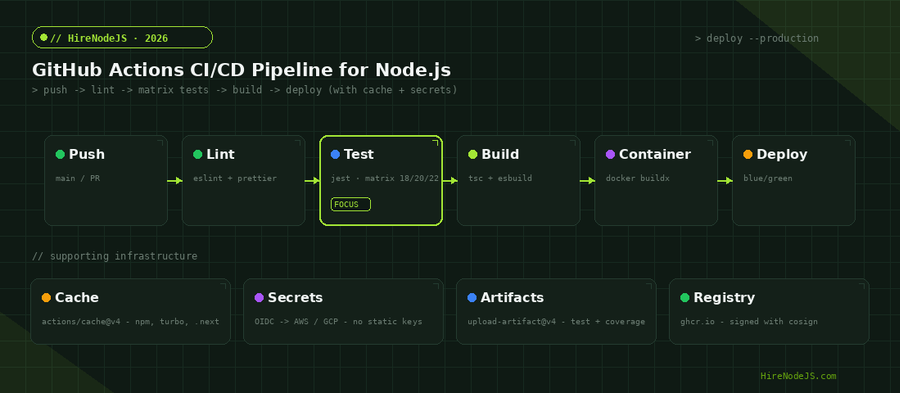
The Anatomy of a Production Workflow File
Most Node.js workflows start as a single .github/workflows/ci.yml file and stay that way long past the point where they should have been split. The rule of thumb in 2026: separate workflows for CI (runs on every push), Release (runs on tag), and Deploy (runs on merge to main). Sharing common steps via reusable workflows keeps the YAML readable without sacrificing isolation.
Pinning actions and runners
Always pin third-party actions to a full-length commit SHA, not a tag. Tags are mutable: a malicious maintainer or a compromised account can repoint v3 to point at a different commit that exfiltrates your GITHUB_TOKEN. A pinned SHA is immutable. Dependabot can keep pinned SHAs current without the supply-chain risk.
Minimal permissions by default
Set permissions: read-all at the workflow level, then expand selectively per-job. The default GITHUB_TOKEN has write access to every API in the repo, which is more privilege than a unit test job needs. Locking it down prevents a compromised dependency from creating a release tag or pushing to main.
name: ci

on:
  pull_request:
  push:
    branches: [main]

permissions:
  contents: read

concurrency:
  group: ci-${{ github.ref }}
  cancel-in-progress: true

jobs:
  validate:
    runs-on: ubuntu-24.04
    steps:
      - uses: actions/checkout@b4ffde65f46336ab88eb53be808477a3936bae11   # v4.1.1
      - uses: actions/setup-node@1d0ff469b7ec7b3cb9d8673fde0c81c44821de2a # v4.0.2
        with:
          node-version: '22'
          cache: 'npm'
      - run: npm ci --prefer-offline --no-audit --fund=false
      - run: npm run lint
      - run: npm run type-check

  test:
    runs-on: ubuntu-24.04
    needs: validate
    strategy:
      fail-fast: false
      matrix:
        node: ['20', '22']
        shard: [1, 2, 3, 4]
    steps:
      - uses: actions/checkout@b4ffde65f46336ab88eb53be808477a3936bae11
      - uses: actions/setup-node@1d0ff469b7ec7b3cb9d8673fde0c81c44821de2a
        with:
          node-version: ${{ matrix.node }}
          cache: 'npm'
      - run: npm ci --prefer-offline --no-audit --fund=false
      - run: npm test -- --shard=${{ matrix.shard }}/4
      - uses: actions/upload-artifact@65462800fd760344b1a7b4382951275a0abb4808 # v4.3.3
        with:
          name: coverage-${{ matrix.node }}-${{ matrix.shard }}
          path: coverage/
Caching: Where 80% of CI Speedups Live
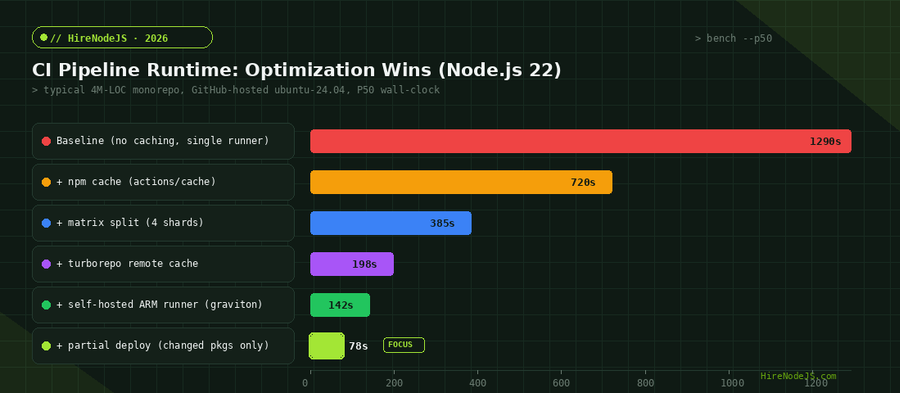
The single biggest lever in any Node.js CI pipeline is dependency caching. A cold npm ci on a 4M-LOC monorepo can take four minutes; a warm one takes eighteen seconds. The actions/setup-node action ships with cache: 'npm' built in, but for serious gains you want layered caching across npm, build outputs, and tools like Turborepo or Nx remote cache.
Cache keys that actually invalidate correctly
The cache key should be a hash of every input that affects the output. For node_modules that means package-lock.json AND .npmrc AND .nvmrc. For build artifacts it includes source files. The biggest CI bug we see in audits is a stale build cache because someone hashed only package.json — patch updates flow through without busting the cache, and you ship code built against the wrong dependency tree.
Turborepo remote cache as a free CI accelerator
If you have a monorepo, Turborepo remote cache will turn unchanged packages into no-ops. A typical web + api + worker monorepo where only the worker changed will skip 80% of the build and test work. The cache lives on Vercel's CDN (free tier is generous) or self-hosted on S3 if you prefer.
Secrets in 2026: Use OIDC, Not Static Keys
Storing AWS_ACCESS_KEY_ID as a GitHub secret is a 2020 pattern. In 2026, every cloud provider supports OpenID Connect federation with GitHub Actions, which means your workflow can assume an IAM role on AWS, GCP, Azure, Vercel, Cloudflare, or any sane platform without ever holding a long-lived credential. If a compromised dependency exfiltrates your GITHUB_TOKEN, the blast radius is whatever GitHub permissions you scoped — not your entire AWS account.
Wiring up AWS OIDC in 90 seconds
Create an IAM OIDC identity provider for token.actions.githubusercontent.com, attach a role with a trust policy scoped to your repo and branch, and reference it in your workflow with permissions: id-token: write. The aws-actions/configure-aws-credentials action handles the rest. No more rotating access keys, no more secrets sitting in repo settings.
Scope the trust policy tightly
Hire Pre-Vetted Node.js Developers
Skip the months-long search. Our exclusive talent network has senior Node.js experts ready to join your team in 48 hours.
The trust policy should pin the sub claim to repo:my-org/my-repo:ref:refs/heads/main, not to the wildcard repo:my-org/*:*. A loose policy lets any branch in any repo in your org assume the production role — which means anyone who can push a branch can push to production.
deploy:
  runs-on: ubuntu-24.04
  needs: [validate, test, build]
  if: github.ref == 'refs/heads/main'
  permissions:
    id-token: write   # required for OIDC
    contents: read
  steps:
    - uses: actions/checkout@b4ffde65f46336ab88eb53be808477a3936bae11
    - uses: aws-actions/configure-aws-credentials@e3dd6a429d7300a6a4c196c26e071d42e0343502 # v4.0.2
      with:
        role-to-assume: arn:aws:iam::123456789012:role/github-actions-deploy
        aws-region: us-east-1
    - uses: actions/download-artifact@c850b930e6ba138125429b7e5c93fc707a7f8427 # v4.1.4
      with:
        name: build-output
        path: dist/
    - run: aws s3 sync dist/ s3://prod-app-artifacts/$GITHUB_SHA/ --delete
    - run: |
        aws ecs update-service \
          --cluster prod \
          --service api \
          --force-new-deployment
Container Images: Multi-Stage Builds and Cache Mounts
Most Node.js Dockerfiles are 5–10x larger than they need to be. The default node:22 image is 1.1 GB; a properly configured multi-stage build with node:22-alpine and pruned node_modules ships at 110 MB — and ARM-native builds shave another 20% off cold start latency on Graviton hosts. For deeper coverage of containerization, see our guide to Node.js Docker production builds.
BuildKit cache mounts cut npm install to seconds
Inside a Dockerfile, RUN --mount=type=cache,target=/root/.npm npm ci persists the npm cache between builds without baking it into the image. A second build of an unchanged package.json takes a few hundred milliseconds. Pair this with docker/build-push-action's cache-from: type=gha and your CI Docker builds reach the speed of incremental compilation.
Sign every image with cosign
After pushing to ghcr.io or ECR, sign the image with sigstore/cosign in keyless mode. The signature is verifiable in production by your admission controller, which means a compromised registry can't push a malicious image without also compromising the OIDC trust path. This is the same pattern used by every major OSS project in 2026.
Deployment Patterns That Survive Friday Afternoons
The fastest CI in the world is useless if your deployment strategy can't roll back in seconds. Three patterns work well for Node.js services in 2026: blue/green for stateful APIs, canary with feature flags for high-traffic endpoints, and direct edge swaps for Cloudflare Workers or Vercel-hosted code. The right choice depends on your runtime — for help picking the right deployment topology, see our guide on Node.js on Kubernetes in production.
Blue/green with health-gated promotion
Deploy the new version to the green environment, run a 60-second health check, and only flip the load balancer if all health endpoints return 200. If anything is wrong, the green environment is destroyed and traffic stays on blue — no users see a 5xx. AWS CodeDeploy, Kubernetes Argo Rollouts, and Vercel previews all implement this pattern natively.
Automatic rollback on error budget breach
Wire your deployment to your observability stack: if the post-deploy error rate exceeds 1% over five minutes, the workflow automatically reverts to the previous SHA. This is one of the highest-leverage patterns in 2026 — it reduces incident MTTR from 25 minutes (find the on-call, get them to a laptop, push a revert) to roughly 90 seconds.
What to Look for When Hiring CI/CD-Capable Node.js Engineers
CI/CD has quietly become a senior backend skill in 2026. The best Node.js engineers don't just write the application code — they design the pipeline that ships it. When you hire a Node.js developer, screen for these specific signals: have they written reusable workflows? Have they implemented OIDC for at least one cloud provider? Can they explain the difference between a cache hit and a cache miss in setup-node?
Red flags in a Node.js CI/CD interview
Candidates who store AWS keys as repo secrets in 2026 are working from a 2020 mental model. Candidates who have never used a matrix strategy haven't shipped at scale. Candidates who can't explain why concurrency: cancel-in-progress matters for PR workflows have probably never had to deal with cost overruns. None of these are deal-breakers individually, but the pattern matters.
The hiring signal that actually predicts senior-level CI work
Ask candidates to walk through a pipeline they have personally improved — what was slow, what they changed, and what the measured result was. Engineers who can describe a P50 number, before and after, are the engineers you want owning your delivery infrastructure. Want to skip the screening? HireNodeJS pre-vets every developer on real-world CI/CD problems before they ever reach your inbox.
Hire Expert Node.js Developers — Ready in 48 Hours
Building the right pipeline is only half the battle — you need the right engineers to maintain it. HireNodeJS.com specialises exclusively in Node.js talent: every developer is pre-vetted on real-world projects, API design, event-driven architecture, container builds, and production deployments.
Unlike generalist platforms, our curated pool means you speak only to engineers who live and breathe Node.js. Most clients have their first developer working within 48 hours of getting in touch. Engagements start as short-term contracts and can convert to full-time hires with zero placement fee.
Conclusion: Pipelines Are Product
Node.js CI/CD with GitHub Actions in 2026 is no longer a side concern. The teams shipping fastest treat their pipeline as a first-class product: caches are profiled, secrets are federated, deploys are automated, and rollbacks happen in seconds. Cumulative savings of 15–20 minutes per engineer per day add up to roughly six developer-weeks per year on a five-engineer team — without writing a single new feature.
Start with the basics: pin your actions, cache your dependencies, and migrate to OIDC. Then add matrix sharding, a remote build cache, and ARM runners. Wire up automatic rollback and image signing. Within a sprint, your default pipeline will look like the kind of infrastructure that senior candidates ask about during interviews — which is the best signal that you're hiring at the level you want to hire at.
Frequently Asked Questions
What is the best CI/CD platform for Node.js in 2026?
GitHub Actions is the default choice for most Node.js teams in 2026. It has the largest action marketplace, native OIDC support for every major cloud, and a generous free tier for public repos. Self-hosted ARM runners on Graviton can reduce costs by 60% for high-volume teams.
How long should a Node.js CI pipeline take?
A well-optimized Node.js CI pipeline for a typical service should complete in under three minutes for a pull request. With matrix sharding, dependency caching, and Turborepo remote cache, even large monorepos can hit 90 seconds. Pipelines longer than ten minutes are usually a sign of missing cache layers.
Should I use OIDC or stored secrets for cloud deploys?
Always OIDC in 2026. OpenID Connect federation eliminates long-lived static credentials in your repo settings. AWS, GCP, Azure, Cloudflare, and Vercel all support GitHub OIDC, and the trust policy can be scoped to a specific branch in a specific repo for minimum blast radius.
What Node.js versions should my matrix test against in 2026?
Test against Node 20 (current LTS) and Node 22 (active LTS) at minimum. Node 18 reached end-of-life in April 2025, so dropping it from the matrix is safe for new projects. If you maintain a library, also test against Node 24 in nightly builds to catch regressions early.
How do I prevent supply-chain attacks in my GitHub Actions workflow?
Pin every third-party action to a full-length commit SHA (not a tag), set permissions: read-all at the workflow level, scope OIDC trust policies to specific branches, and never interpolate user-controlled values like PR titles into shell commands. Dependabot can keep pinned SHAs current safely.
What is the cheapest way to run GitHub Actions for Node.js at scale?
Self-hosted ARM runners on AWS Graviton instances are roughly 65% cheaper than GitHub-hosted Linux runners and run most Node.js workloads slightly faster. For teams running more than 50,000 minutes per month, the break-even is usually within the first month after setup.
Vivek Singh is the founder of Witarist and HireNodeJS.com — a platform connecting companies with pre-vetted Node.js developers. With years of experience scaling engineering teams, Vivek shares insights on hiring, tech talent, and building with Node.js.
Need a Node.js engineer who ships through bullet-proof pipelines?
HireNodeJS connects you with pre-vetted senior Node.js engineers who own CI/CD as a first-class skill. Available within 48 hours — no recruiter fees, no lengthy screening.