Node.js Compression in 2026: Gzip vs Brotli vs Zstd
Every byte your Node.js service sends over the wire costs money, time, and battery. In 2026, response compression is no longer an optional micro-optimisation — it is table stakes for any API that serves JSON, HTML, or text at scale. A well-tuned compression layer can shrink a typical JSON payload by 70-85%, slashing egress bills and shaving hundreds of milliseconds off page loads for users on slow mobile networks.
What has changed is the menu. For years the choice was effectively gzip versus Brotli. Now Zstandard (zstd) — Facebook's high-performance compressor — ships natively in the Node.js zlib module, giving backend engineers a third option that often beats both on the speed-versus-ratio frontier. This guide benchmarks all three, shows the exact code to wire them into Express and Fastify, and gives you a decision framework for picking the right algorithm per route.
Why Response Compression Still Wins in 2026
The economics of smaller payloads
Compression is one of the rare optimisations that improves three metrics at once: bandwidth cost, latency, and perceived performance. A 1 MB JSON response compressed to 200 KB transfers roughly five times faster over a constrained connection, and your cloud provider bills you for one fifth of the egress. For a service pushing terabytes per month, that difference alone can fund an engineer.
Where the CPU budget goes
The trade-off is CPU. Every compressed response spends cycles encoding bytes, so the goal is to maximise the ratio you get per millisecond of CPU. This is exactly the kind of production tuning a seasoned backend engineer reasons about instinctively — and it is why measuring on your real payloads matters more than trusting any benchmark table.
Gzip vs Brotli vs Zstd: How They Differ
gzip — the universal baseline
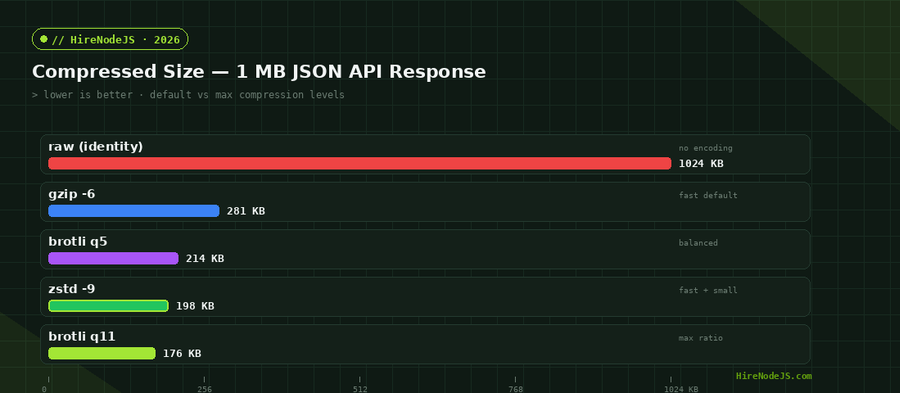
Gzip (DEFLATE) is supported by every HTTP client and proxy on earth. It is fast, predictable, and good enough for most APIs. Levels run 1-9; level 6 is the sensible default, balancing speed and ratio. If you do nothing else, enabling gzip is the single highest-leverage change you can make.
Brotli — best ratio for static content
Brotli, built into Node's zlib since v11, reaches higher compression ratios than gzip thanks to a built-in dictionary and larger window. At quality 11 it produces the smallest text payloads of the three — but q11 is slow, so it shines for static assets you compress once at build time and serve many times from a CDN.
Zstd — the speed/ratio sweet spot
Zstandard landed natively in the Node.js zlib module with v22.15.0 and the v23.8.0 Current release, exposing zstdCompress, zstdCompressSync, and their decompress counterparts. Zstd's headline feature is its frontier: at low-to-mid levels it compresses dramatically faster than Brotli while reaching comparable ratios, making it ideal for dynamically generated API responses that cannot be precomputed.
Using the Built-in node:zlib Module
One-shot and streaming APIs
You do not need a third-party package to compress in Node.js. The node:zlib module exposes one-shot helpers for buffers and Transform streams for piping. Streaming is what you want for HTTP responses, because it lets you compress chunks as they are produced without buffering the whole payload in memory.
import { gzip, brotliCompress, zstdCompress, constants } from 'node:zlib';
import { promisify } from 'node:util';

const gz   = promisify(gzip);
const br   = promisify(brotliCompress);
const zstd = promisify(zstdCompress);

const payload = Buffer.from(JSON.stringify(bigObject));

// gzip at level 6 (default)
const gzipped = await gz(payload, { level: 6 });

// brotli tuned for text, quality 5 (fast) up to 11 (max)
const brotlied = await br(payload, {
  params: {
    [constants.BROTLI_PARAM_QUALITY]: 5,
    [constants.BROTLI_PARAM_SIZE_HINT]: payload.length,
  },
});

// zstd at level 9 — fast with a strong ratio (Node 22.15+/23.8+)
const zstded = await zstd(payload, {
  params: { [constants.ZSTD_c_compressionLevel]: 9 },
});

console.log({ raw: payload.length, gzipped: gzipped.length,
  brotlied: brotlied.length, zstded: zstded.length });
Checking what your runtime supports
Because zstd is recent, guard for it at startup. If the symbols are missing, fall back gracefully rather than crashing on an older Node version. A tiny capability check keeps your service portable across deployment targets that may pin different Node releases.
Wiring Compression Into Express and Fastify
Express with negotiated encoding
Hire Pre-Vetted Node.js Developers
Skip the months-long search. Our exclusive talent network has senior Node.js experts ready to join your team in 48 hours.
The classic compression middleware handles gzip and Brotli out of the box. To add zstd you negotiate on Accept-Encoding yourself. If you are standing up a new Node.js API today, build the negotiation in from day one rather than retrofitting it later.
import express from 'express';
import { zstdCompressSync, brotliCompressSync, gzipSync, constants } from 'node:zlib';

const app = express();

function encode(req, buf) {
  const accept = req.headers['accept-encoding'] || '';
  if (accept.includes('zstd'))
    return ['zstd', zstdCompressSync(buf, { params: { [constants.ZSTD_c_compressionLevel]: 9 } })];
  if (accept.includes('br'))
    return ['br', brotliCompressSync(buf)];
  if (accept.includes('gzip'))
    return ['gzip', gzipSync(buf, { level: 6 })];
  return ['identity', buf];
}

app.get('/api/report', (req, res) => {
  const buf = Buffer.from(JSON.stringify(buildReport()));
  if (buf.length < 1024) return res.json(buildReport()); // skip tiny
  const [enc, out] = encode(req, buf);
  res.setHeader('Content-Encoding', enc);
  res.setHeader('Vary', 'Accept-Encoding');
  res.setHeader('Content-Type', 'application/json');
  res.end(out);
});

app.listen(3000);
Fastify with @fastify/compress
Fastify's first-party plugin streams responses and negotiates encodings automatically, which is why many high-performance Node.js teams reach for it. Set a global threshold and let the plugin pick the best supported encoding per request.
Tuning Levels and Thresholds for Production
Pick the knee of the curve
Compression ratio has diminishing returns. Going from zstd level 3 to level 9 buys you most of the ratio at modest latency cost; pushing to level 19 or 22 doubles or triples encode time for single-digit-percent gains. For dynamic responses, levels 6-9 are almost always the right home. Reserve the highest levels for static assets compressed offline.
Set a sensible minimum size
A 1 KB threshold is a good default. Below it, the framing overhead and CPU cost outweigh the savings. Most middleware exposes this as a single option — set it explicitly rather than relying on defaults that vary between libraries.
Cache compressed static assets
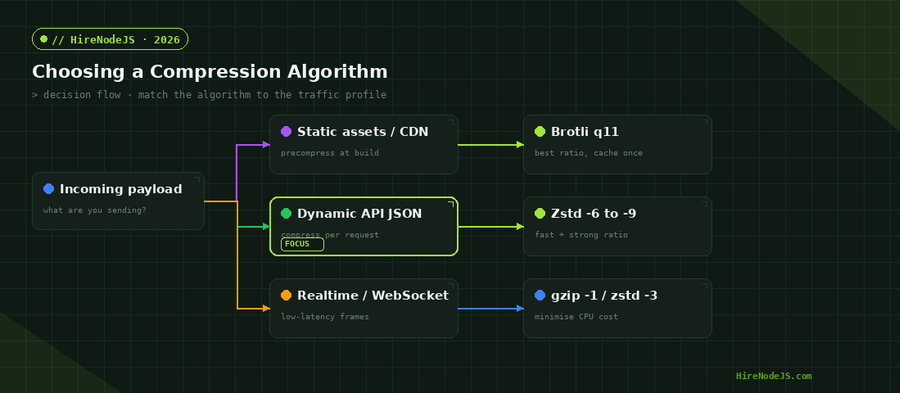
For static files, compress once at build or deploy time and store the .br and .zst variants next to the original, then let your CDN or reverse proxy serve the precompressed file. This removes compression from the request path entirely, giving you Brotli q11 ratios at zero per-request CPU.
Common Pitfalls and How to Avoid Them
The missing Vary header
If you negotiate encodings, you must send Vary: Accept-Encoding. Without it, a shared cache can serve a Brotli body to a client that only understands gzip, producing garbled responses. This is the single most common compression bug in production.
Double compression at the proxy
If Nginx or your CDN already compresses responses, do not also compress in Node — you pay the CPU twice and gain nothing. Decide where compression lives (app or edge) and disable it everywhere else.
Blocking the event loop
Synchronous compression of large buffers blocks the event loop. For big payloads or high concurrency, use the async streaming APIs so encoding happens off the main thread via libuv's thread pool.
Getting compression right across dozens of routes, runtimes, and CDNs is the kind of detail that separates a fast service from a slow one. If you are building or scaling a Node.js backend and want engineers who tune this without being asked, HireNodeJS connects you with pre-vetted senior developers available within 48 hours — without the recruiter overhead.
Hire Expert Node.js Developers — Ready in 48 Hours
Building the right system is only half the battle — you need the right engineers to build it. HireNodeJS.com specialises exclusively in Node.js talent: every developer is pre-vetted on real-world projects, API design, performance tuning, and production deployments.
Unlike generalist platforms, our curated pool means you speak only to engineers who live and breathe Node.js. Most clients have their first developer working within 48 hours of getting in touch. Engagements start as short-term contracts and can convert to full-time hires with zero placement fee.
Conclusion: Compress Smart, Not Hard
Compression in 2026 is a three-horse race, and the winner depends on the workload. Use gzip as your universal floor, Brotli q11 for static assets you compress once and cache forever, and Zstd at levels 6-9 for dynamic API responses where speed and ratio both matter. Negotiate per request, set a size threshold, always send Vary, and never compress twice.
Wire these patterns in once and they pay dividends on every response your service ever sends. Measure on your own payloads, pick the knee of the curve, and let the savings compound across millions of requests.
Frequently Asked Questions
Which compression algorithm is fastest in Node.js?
Zstd at low-to-mid levels is the fastest of the three for a given ratio, often encoding several times faster than Brotli. gzip level 1 is also extremely fast but gives a weaker ratio. For dynamic responses, zstd levels 3-9 hit the best speed/ratio balance.
Is Zstd built into Node.js or do I need a package?
Zstd is built into the node:zlib module natively as of Node.js v22.15.0 and the v23.8.0 Current release. You get zstdCompress, zstdCompressSync, and their decompress counterparts with no third-party dependency.
Should I use Brotli or Zstd for my API?
For dynamically generated API responses, Zstd at levels 6-9 usually wins because it compresses fast enough to run per request. Brotli q11 reaches a slightly better ratio but is too slow for the request path, so reserve it for static assets you compress once and cache.
Why is my compressed response sometimes larger than the original?
Compressing very small payloads (under ~1 KB) or already-compressed data like images and video adds framing and CPU overhead without shrinking the bytes. Set a minimum size threshold and skip compression for binary content types.
Do I need the Vary header when compressing responses?
Yes. If you negotiate encodings based on Accept-Encoding, you must send Vary: Accept-Encoding so caches store separate variants per encoding. Omitting it can cause a cache to serve a Brotli body to a gzip-only client.
Should compression run in Node.js or at the reverse proxy?
Pick one. If your CDN or Nginx already compresses, disable it in Node to avoid paying CPU twice. For static assets, precompressing at build time and serving the stored variants from the edge is the most efficient option.
Vivek Singh is the founder of Witarist and HireNodeJS.com — a platform connecting companies with pre-vetted Node.js developers. With years of experience scaling engineering teams, Vivek shares insights on hiring, tech talent, and building with Node.js.
Want a Node.js engineer who ships fast, optimised APIs?
HireNodeJS connects you with pre-vetted senior Node.js engineers available within 48 hours. No recruiter fees, no lengthy screening — just performance-minded talent ready to ship.