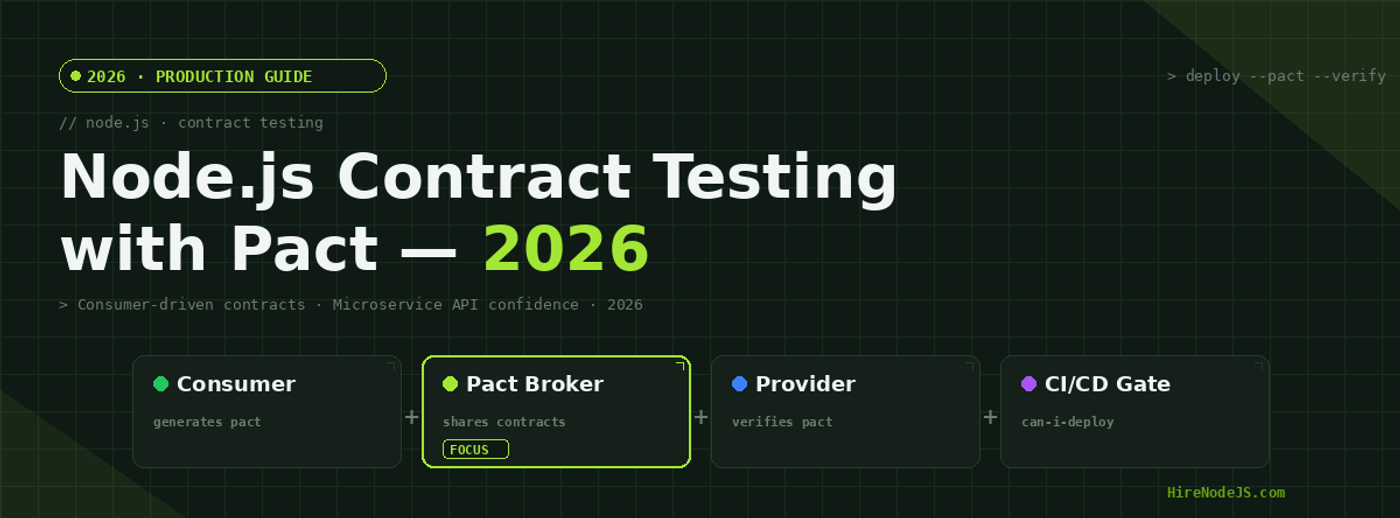
Node.js Contract Testing with Pact in 2026: Complete Guide
Microservices have transformed how teams ship software — but they've introduced a hidden tax: integration confidence. When Service A updates an API endpoint, Service B breaks in production. When the user service changes a response field, the order service crashes. These failures are embarrassingly common, and they share a root cause: no automated contract between services. Consumer-driven contract testing with Pact solves this at the CI level — before any code reaches production.
In 2026, pact-js has become the de facto standard for Node.js microservice contract testing. Adopted by teams at Atlassian, Canva, and thousands of scale-ups, it replaces fragile shared test environments with lightweight contract files that travel through your CI pipeline. This guide covers everything: how the Pact workflow fits into a Node.js project, how to write consumer and provider tests with pact-js, setting up the Pact Broker, integrating with GitHub Actions, and the can-i-deploy gate that prevents mismatched services from ever reaching production.
What Is Contract Testing and Why Does Node.js Need It?
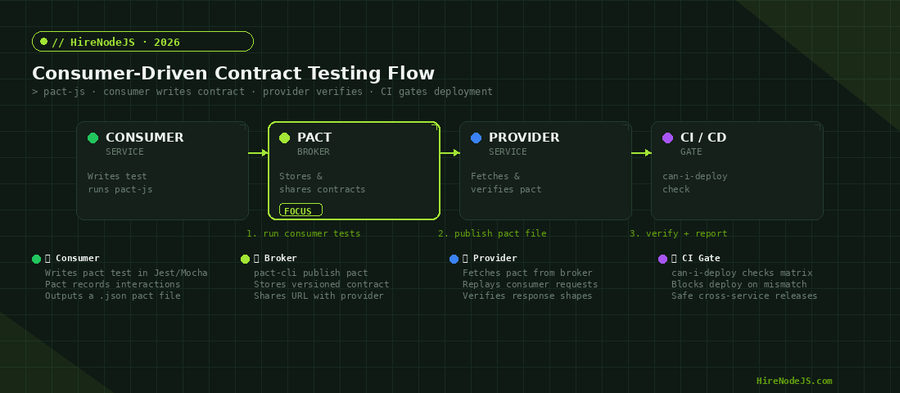
Contract testing is a technique where each consumer of a service writes a formal specification — a "contract" — of the API interactions it depends on. The provider then verifies it can fulfil those contracts, independently and without the consumer running. Unlike end-to-end tests, contracts run fast (milliseconds per interaction), require no shared environment, and give precise blame attribution when something breaks.
The Integration Testing Pyramid Problem
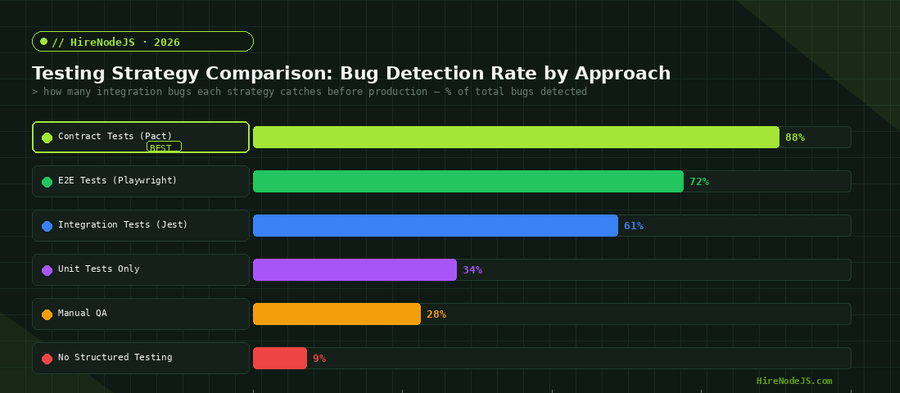
The classic test pyramid recommends many unit tests, some integration tests, and few E2E tests. But in a microservices world, the integration layer explodes in complexity. Shared staging environments become a bottleneck — one team's broken deploy blocks everyone's CI. Contract tests sit between unit and E2E: they're as fast as unit tests but verify cross-service API compatibility. Teams that adopt Pact typically shrink their E2E suite by 40–60% while gaining higher confidence in service boundaries.
Consumer-Driven vs Provider-Driven Contracts
The "consumer-driven" part is key. Rather than the API owner dictating the contract, each consumer declares exactly what fields and response shapes it actually uses. This prevents the provider from breaking consumers with changes to fields that nobody reads — and it documents real usage patterns in executable form. Pact is the leading CDCT implementation, with first-class support for pact-js in the Node.js ecosystem.
Setting Up pact-js in Your Node.js Project
pact-js (the official Node.js Pact library) supports both the classic V2/V3 DSL and the newer Rust-backed V4 consumer API. For new projects in 2026, use V4 — it's faster, supports message pacts, and has full TypeScript types. Install with your package manager of choice:
# Install pact-js and its peer dependencies
npm install --save-dev @pact-foundation/pact

# For TypeScript projects, types are bundled
# For Jest integration
npm install --save-dev jest ts-jest
Writing Your First Consumer Test
A consumer test in pact-js uses the PactV3 class (or the V4 fluent API) to set up a mock provider. Your consumer code runs against this mock, and Pact records the interaction to a .json pact file. Here's a realistic example for an order service consuming a user service API:
// order-service/tests/consumer/user.pact.spec.ts
import { PactV3, MatchersV3 } from '@pact-foundation/pact';
import { getUserById } from '../../src/clients/user-client';

const { like, string } = MatchersV3;

const provider = new PactV3({
  consumer: 'OrderService',
  provider: 'UserService',
  dir: './pacts',
  logLevel: 'error',
});

describe('OrderService → UserService', () => {
  it('fetches a user by ID', async () => {
    await provider
      .given('User 42 exists')
      .uponReceiving('a request for user 42')
      .withRequest({ method: 'GET', path: '/users/42' })
      .willRespondWith({
        status: 200,
        headers: { 'Content-Type': 'application/json' },
        body: {
          id: like(42),
          email: string('alice@example.com'),
          name: like('Alice'),
        },
      })
      .executeTest(async (mockServer) => {
        const user = await getUserById('42', mockServer.url);
        expect(user.email).toBeTruthy();
        expect(user.id).toBe(42);
      });
  });
});
Provider Verification
On the provider side (the user service), you run a verification step that fetches the pact from the Pact Broker and replays each interaction against your real server. The Verifier confirms that your provider returns responses that match every consumer's contract. Provider tests typically run in under 5 seconds for dozens of interactions — far faster than any E2E suite.
// user-service/tests/provider/pact.verify.spec.ts
import { Verifier } from '@pact-foundation/pact';
import { app } from '../../src/app';
import * as http from 'http';

describe('UserService Provider Verification', () => {
  let server: http.Server;
  let port: number;

  beforeAll(async () => {
    server = app.listen(0);
    port = (server.address() as any).port;
  });

  afterAll(() => server.close());

  it('satisfies all consumer contracts', async () => {
    const opts = {
      provider: 'UserService',
      providerBaseUrl: `http://localhost:${port}`,
      pactBrokerUrl: process.env.PACT_BROKER_URL,
      pactBrokerToken: process.env.PACT_BROKER_TOKEN,
      publishVerificationResult: true,
      providerVersion: process.env.GIT_SHA,
      providerVersionBranch: process.env.GIT_BRANCH,
    };
    await new Verifier(opts).verifyProvider();
  });
});Setting Up the Pact Broker
The Pact Broker is the central hub that stores pact files, tracks verification results, and powers the can-i-deploy check. You can run it self-hosted (Docker) or use PactFlow (the hosted SaaS). For most teams, the open-source Docker image is the fastest path to get started:
# docker-compose.yml — Pact Broker self-hosted
version: "3"
services:
  pact-broker:
    image: pactfoundation/pact-broker:latest
    ports:
      - "9292:9292"
    environment:
      PACT_BROKER_DATABASE_URL: "postgres://pact:pact@db/pact"
      PACT_BROKER_BASIC_AUTH_USERNAME: admin
      PACT_BROKER_BASIC_AUTH_PASSWORD: password
    depends_on: [db]
  db:
    image: postgres:15-alpine
    environment:
      POSTGRES_USER: pact
      POSTGRES_PASSWORD: pact
      POSTGRES_DB: pact
Publishing Pacts from CI
After consumer tests run and generate pact files in ./pacts/, publish them to the broker using the pact-broker CLI or the pact-js publishPacts helper. Best practice is to tag pacts with the consumer's Git branch name so the provider knows which version to verify.
# Publish pacts using the pact-broker CLI
pact-broker publish ./pacts \
  --broker-base-url $PACT_BROKER_URL \
  --broker-token $PACT_BROKER_TOKEN \
  --consumer-app-version $GIT_SHA \
  --branch $GIT_BRANCH
can-i-deploy: Your Deployment Gate
The can-i-deploy command checks the Pact Broker matrix to verify that the version of a service you want to deploy is compatible with all other services currently deployed in that environment. This is the keystone of the Pact workflow — it transforms contract testing from a testing strategy into a deployment safety net.
# Check if order-service@$GIT_SHA can deploy to production
pact-broker can-i-deploy \
  --pacticipant OrderService \
  --version $GIT_SHA \
  --to-environment production \
  --broker-base-url $PACT_BROKER_URL \
  --broker-token $PACT_BROKER_TOKEN

# Exits 0 if safe, 1 if incompatible → blocks CI pipelineHire Pre-Vetted Node.js Developers
Skip the months-long search. Our exclusive talent network has senior Node.js experts ready to join your team in 48 hours.
Integrating Pact with GitHub Actions
The real power of contract testing emerges when it's wired into every pull request. Here's a battle-tested GitHub Actions workflow that runs consumer pact generation on the consumer repo and triggers provider verification as a webhook-based workflow on the provider repo:
# .github/workflows/pact-consumer.yml
name: Consumer Pact Tests
on: [push, pull_request]
jobs:
  pact:
    runs-on: ubuntu-latest
    steps:
      - uses: actions/checkout@v4
      - uses: actions/setup-node@v4
        with: { node-version: 22, cache: npm }
      - run: npm ci
      - name: Run consumer pact tests
        run: npm test -- --testPathPattern=pact
      - name: Publish pacts
        run: |
          npx pact-broker publish ./pacts \
            --broker-base-url ${{ vars.PACT_BROKER_URL }} \
            --broker-token ${{ secrets.PACT_BROKER_TOKEN }} \
            --consumer-app-version ${{ github.sha }} \
            --branch ${{ github.ref_name }}
      - name: can-i-deploy
        run: |
          npx pact-broker can-i-deploy \
            --pacticipant OrderService \
            --version ${{ github.sha }} \
            --to-environment production \
            --broker-base-url ${{ vars.PACT_BROKER_URL }} \
            --broker-token ${{ secrets.PACT_BROKER_TOKEN }}
Triggering Provider Verification Automatically
When a new pact is published, you want the provider to verify it immediately — not wait for its own next PR. PactFlow supports webhook-triggered provider verification out of the box. For self-hosted setups, configure a Pact Broker webhook that POSTs to your provider's repository dispatch endpoint, triggering a verification workflow run.
If you need experienced engineers to design and implement this CI pipeline, hire a senior Node.js developer on HireNodeJS — every engineer in our network has production CI/CD experience and can hit the ground running within 48 hours.
Advanced Pact Patterns for Production Node.js Systems
Message Pacts for Event-Driven Architectures
Modern Node.js microservices communicate via Kafka, SQS, or RabbitMQ messages. Pact V4 supports message pacts — contracts that describe the shape of async messages rather than HTTP requests. This is transformative for event-driven systems where a schema change in a Kafka event can silently break downstream consumers for hours before anyone notices.
// Message pact example — Kafka OrderCreated event
import { PactV4, MatchersV4 } from '@pact-foundation/pact';

const { like, integer, string } = MatchersV4;

describe('NotificationService consumes OrderCreated', () => {
  it('handles a valid OrderCreated message', async () => {
    const pact = new PactV4({
      consumer: 'NotificationService',
      provider: 'OrderService',
      dir: './pacts',
    });

    await pact
      .expectsToReceive('an OrderCreated event')
      .withContent({
        orderId: integer(12345),
        customerId: string('cust-abc'),
        totalAmount: like(99.99),
        currency: string('USD'),
      })
      .withMetadata({ 'content-type': 'application/json' })
      .verify(async (message) => {
        const parsed = JSON.parse(message.contents.toString());
        await handleOrderCreated(parsed); // must not throw
      });
  });
});
Pact with TypeScript and Zod Validation
Combining pact-js with Zod for TypeScript + Node.js development gives you two layers of contract safety: Pact validates the shape at the HTTP level, and Zod validates it at runtime in production. This two-layer approach means you catch contract violations in CI and bad data in production — a complete defence. For teams building at scale, our Node.js backend engineers can implement this pattern as part of a broader API reliability initiative.
Common Pact Pitfalls and How to Avoid Them
Overly Specific Matchers
The most common mistake with pact-js is using exact value matching instead of type matchers. If your consumer contract specifies that the response body must contain email: "alice@example.com", the provider test will fail the moment any other user is used in the provider state. Always use like(), string(), integer(), and array matchers to specify shape rather than exact values.
Skipping Provider States
Provider states (the given() clause) are not optional decoration — they're essential for reproducible verification. If your consumer test says given("User 42 exists"), your provider's state handler must seed the test database with that user before replaying the request. Missing or mismatched state handlers are the #1 cause of flaky provider verification runs.
Not Versioning Pacts Properly
Pact files must be published with the consumer's exact Git SHA and branch name. Never publish a pact with a hard-coded version string like "1.0.0" — this prevents the broker from tracking which deployed version a verification applies to, breaking the can-i-deploy matrix. Use $GITHUB_SHA or $(git rev-parse HEAD) consistently across consumer and provider pipelines.
Hire Expert Node.js Developers — Ready in 48 Hours
Building the right test infrastructure is only half the battle — you need the right engineers to build and maintain it. HireNodeJS.com specialises exclusively in Node.js talent: every developer is pre-vetted on real-world projects, API design, event-driven architecture, and production deployments.
Unlike generalist platforms, our curated pool means you speak only to engineers who live and breathe Node.js. Most clients have their first developer working within 48 hours of getting in touch. Engagements start as short-term contracts and can convert to full-time hires with zero placement fee.
Summary: Contract Testing Is the Missing Layer in Your Node.js CI
Consumer-driven contract testing with Pact fills the gap between unit tests and slow, brittle E2E tests. By generating contracts from real consumer behaviour, verifying them on the provider side, and gating deployments with can-i-deploy, you get a continuous safety net that scales with your microservice count — not against it. Combine this with Node.js testing best practices like Jest and Vitest for unit coverage, and you'll have a test suite that's both fast and trustworthy.
The implementation investment is real — roughly a sprint to wire up a consumer test suite, deploy the broker, and integrate CI pipelines on both sides. But the payoff is permanent: no more "we broke production because service A changed an API field" post-mortems, no more shared staging environment bottlenecks, and a Pact Broker dashboard that shows exactly which services are safe to deploy at any moment.
Frequently Asked Questions
What is consumer-driven contract testing in Node.js?
Consumer-driven contract testing (CDCT) is a technique where the API consumer writes a formal specification of the interactions it depends on. The provider verifies it satisfies all consumer contracts independently. In Node.js, pact-js is the standard library for implementing CDCT.
What is the difference between Pact and end-to-end testing?
Pact contract tests run in isolation — no shared environment is needed. E2E tests require all services to be running simultaneously. Contract tests run in milliseconds, catch API breaking changes at the schema level, and give precise blame attribution. They replace a large portion of fragile E2E tests.
Do I need a Pact Broker to use pact-js?
For local development, you can use local pact files. But for CI/CD integration and the critical can-i-deploy check, a Pact Broker (self-hosted Docker or PactFlow SaaS) is essential. It stores versioned pacts, tracks verification results, and powers the deployment safety gate.
How long does it take to add Pact to an existing Node.js microservice?
For a single consumer-provider pair, expect 1-2 days for a developer familiar with Jest: writing consumer tests, setting up provider verification, deploying the broker, and wiring CI. Full adoption across a 10-service system typically takes 2-4 sprints, starting with your highest-risk API boundaries.
Can pact-js test Kafka and RabbitMQ message contracts?
Yes. Pact V4 (the current major version) supports message pacts — contracts that describe the shape of async messages rather than HTTP interactions. You write the same consumer-driven contract, but against a message producer instead of an HTTP endpoint.
How does can-i-deploy prevent breaking production?
can-i-deploy queries the Pact Broker matrix — a record of which consumer/provider version combinations have verified contracts. If the version you want to deploy has unverified or failed contracts with any currently-deployed service, can-i-deploy exits with an error, blocking the CI pipeline before anything reaches production.
Vivek Singh is the founder of Witarist and HireNodeJS.com — a platform connecting companies with pre-vetted Node.js developers. With years of experience scaling engineering teams, Vivek shares insights on hiring, tech talent, and building with Node.js.
Need a Node.js Engineer Who Knows Testing at Scale?
HireNodeJS connects you with pre-vetted senior Node.js engineers who have production experience with Pact, Jest, and CI/CD pipelines. Available within 48 hours — no recruiter fees, no lengthy screening.