
Node.js CORS in 2026: Preflight, Credentials & Security
Cross-Origin Resource Sharing is the single most misunderstood part of running a Node.js API in the browser era. Almost every backend engineer has, at some point, slapped Access-Control-Allow-Origin: * on a route to make an error go away — and quietly opened a security hole in the process. In 2026, with credentialed fetches, edge runtimes, and stricter browser defaults, getting CORS right matters more than ever.
This guide explains what CORS actually is, how the preflight handshake works, and how to configure it safely in Express, Fastify, and NestJS. We will cover the mistakes that show up in real audits, the production patterns that scale, and the exact code you can drop into a Node.js service today. By the end you will be able to lock down cross-origin access without breaking your frontend.
What CORS Is and the Same-Origin Policy
CORS is a browser security mechanism, not a server-side firewall. Browsers enforce the same-origin policy, which blocks JavaScript on one origin from reading responses from a different origin unless that other origin explicitly opts in via CORS response headers. An origin is the tuple of scheme, host, and port — so https://app.com and https://api.app.com are different origins, and a request between them is cross-origin.
Simple vs Preflighted Requests
The browser splits cross-origin requests into two categories. Simple requests (GET, HEAD, or POST with a basic content type) are sent immediately, and the browser only checks the response headers afterward. Anything else — a PUT, a DELETE, a JSON body, or a custom header like Authorization — triggers a preflight: an automatic OPTIONS request the browser sends first to ask the server whether the real request is allowed.
Why the Server Can't Bypass It
A common misconception is that CORS protects your server. It does not. Any HTTP client — curl, Postman, another backend — can call your API regardless of CORS headers, because CORS is enforced by browsers on behalf of users. CORS protects your users' credentials from being abused by malicious sites; it is not a substitute for authentication or authorization on the server.
The Preflight Request, Step by Step
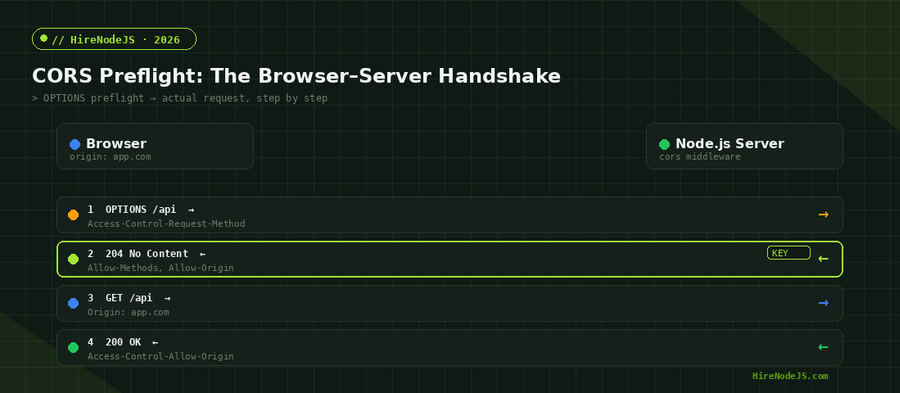
When a preflight is required, the browser sends an OPTIONS request carrying Access-Control-Request-Method and Access-Control-Request-Headers. Your Node.js server must respond with matching Access-Control-Allow-Methods and Access-Control-Allow-Headers, plus an Access-Control-Allow-Origin value. Only if the response satisfies the browser does the real request go out.
The Headers That Matter
Five response headers do the heavy lifting: Access-Control-Allow-Origin (which origin may read the response), Access-Control-Allow-Credentials (whether cookies are allowed), Access-Control-Allow-Methods, Access-Control-Allow-Headers, and Access-Control-Max-Age (how long the browser may cache the preflight result). Forgetting Access-Control-Max-Age means a preflight on every single request, which doubles your round trips.
Configuring CORS in Express with the cors Middleware
The cors package remains the standard for Express in 2026. The dangerous part is the origin option: passing a function lets you validate against an allowlist and reflect only the requesting origin, instead of echoing back whatever the client sends. If you are building out a backend team to own this kind of API surface, this is exactly the rigor you should expect from senior engineers.
A Safe, Allowlist-Driven Setup
The configuration below loads allowed origins from an environment variable, validates each incoming Origin against that list, enables credentials only for trusted origins, and caches preflights for 24 hours. Crucially, it never returns a literal wildcard when credentials are enabled — a combination browsers reject outright.
import express from 'express';
import cors from 'cors';

const app = express();

// Build an allowlist from the environment, never hardcode it.
const allowedOrigins = (process.env.CORS_ORIGINS ?? '')
  .split(',')
  .map((o) => o.trim())
  .filter(Boolean);

const corsOptions = {
  origin(origin, callback) {
    // Same-origin / server-to-server requests have no Origin header.
    if (!origin) return callback(null, true);

    if (allowedOrigins.includes(origin)) {
      return callback(null, true); // reflects THIS origin, not "*"
    }
    return callback(new Error(`Origin ${origin} not allowed by CORS`));
  },
  credentials: true,              // allow cookies / Authorization
  methods: ['GET', 'POST', 'PUT', 'PATCH', 'DELETE'],
  allowedHeaders: ['Content-Type', 'Authorization'],
  maxAge: 86400,                  // cache preflight for 24h
};

app.use(cors(corsOptions));

// Vary: Origin is set automatically by the cors package when the
// origin is dynamic, so shared caches do not leak the wrong header.
app.get('/api/health', (_req, res) => res.json({ ok: true }));

app.listen(3000, () => console.log('API listening on :3000'));
CORS in Fastify and NestJS
Express is not the only game in town. Fastify ships @fastify/cors, and NestJS exposes enableCors() on the application instance. The mental model is identical — validate origin, scope credentials, cache preflights — but the wiring differs slightly.
Fastify
Register @fastify/cors as a plugin and pass the same origin-validation function. Fastify's hook system means the CORS logic runs before your route handlers, and its schema-based design keeps the OPTIONS handling fast even under load.
Hire Pre-Vetted Node.js Developers
Skip the months-long search. Our exclusive talent network has senior Node.js experts ready to join your team in 48 hours.
NestJS
In NestJS, call app.enableCors(corsOptions) in main.ts, or pass the options object to NestFactory.create. Because NestJS sits on top of Express or Fastify, the underlying behavior is the same — but centralizing it in the bootstrap file keeps the policy in one auditable place. For teams standardizing on Nest, a dedicated Node.js engineer will usually wrap this in a config module so the allowlist is testable.
Common CORS Mistakes and Security Pitfalls
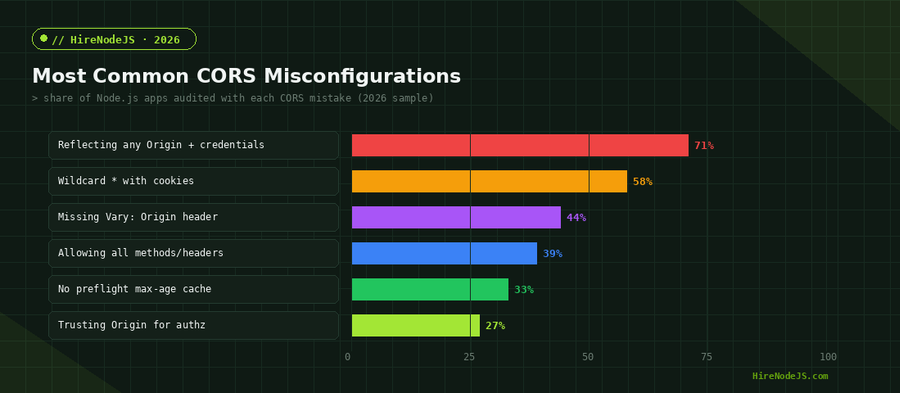
Most CORS vulnerabilities come from over-permissive configuration, not from the protocol itself. The chart above shows the worst offenders; here is why they are dangerous and how to fix each.
Reflecting Any Origin with Credentials
The most severe mistake is reading the Origin header and reflecting it back verbatim while also setting Access-Control-Allow-Credentials: true. This effectively disables the same-origin policy for authenticated requests, letting any website make credentialed calls to your API as the logged-in user. Always validate against a fixed allowlist before reflecting.
Wildcards, Cookies, and the Vary Header
A wildcard origin cannot be combined with credentials, and when you reflect a dynamic origin you must send Vary: Origin so that shared caches and CDNs do not serve one user's allowed-origin header to another. Missing Vary: Origin is a subtle cache-poisoning bug that the cors package avoids automatically.
Production Patterns: Allowlists, Caching, and Debugging
Environment-Driven Allowlists
Keep your allowed origins in configuration, not code, so staging and production can differ without a rebuild. Pair this with a sensible Access-Control-Max-Age and you cut preflight traffic dramatically. The HireNodeJS hiring process screens specifically for engineers who treat config like this as a first-class concern rather than an afterthought.
Debugging CORS Errors Fast
CORS failures surface in the browser console, never in your server logs, because the server happily returns a 200 — the browser just refuses to expose it to JavaScript. When debugging, open the network tab, inspect the OPTIONS request, and confirm the Access-Control-Allow-* headers match what the browser asked for. Nine times out of ten the fix is a missing header or a credentials mismatch.
Hire Expert Node.js Developers — Ready in 48 Hours
Getting CORS right is a small but telling signal of backend craftsmanship — and it is the kind of detail our vetting catches. HireNodeJS.com specialises exclusively in Node.js talent: every developer is pre-vetted on real-world API design, security headers, authentication, and production deployments.
Unlike generalist platforms, our curated pool means you speak only to engineers who live and breathe Node.js. Most clients have their first developer working within 48 hours of getting in touch. Engagements start as short-term contracts and can convert to full-time hires with zero placement fee.
Conclusion: CORS Is Configuration, Not Magic
CORS feels mysterious only until you understand that it is a browser-enforced opt-in controlled by a handful of response headers. Validate origins against an allowlist, scope credentials tightly, cache preflights with Access-Control-Max-Age, and remember to send Vary: Origin when reflecting dynamically. Do that, and cross-origin errors stop being a recurring fire drill.
Treat CORS as part of your security posture rather than a frontend annoyance, and your APIs will be both safer and faster. The patterns here scale from a single Express service to a fleet of Fastify and NestJS microservices behind a shared gateway.
Frequently Asked Questions
What is CORS in Node.js?
CORS (Cross-Origin Resource Sharing) is a browser security mechanism that controls whether JavaScript on one origin can read responses from a different origin. In Node.js you enable it by sending the right Access-Control-* response headers, usually via the cors middleware.
How do I fix a CORS error in Express?
Install the cors package and configure it with an origin allowlist instead of a wildcard. Make sure the Access-Control-Allow-Origin header matches the requesting origin and that credentials are only enabled for trusted origins.
Why does CORS only block the browser and not curl or Postman?
CORS is enforced by browsers to protect a user's credentials, not by your server. Tools like curl and Postman ignore CORS entirely, which is why CORS is never a replacement for authentication and authorization.
Can I use Access-Control-Allow-Origin: * with cookies?
No. Browsers reject the combination of a wildcard origin and credentials. When you need cookies or Authorization headers, you must reflect a specific, validated origin and set Access-Control-Allow-Credentials to true.
What is a CORS preflight request?
A preflight is an automatic OPTIONS request the browser sends before certain cross-origin requests (PUT, DELETE, JSON bodies, custom headers) to ask the server whether the real request is allowed. Caching it with Access-Control-Max-Age reduces overhead.
How much does it cost to hire a Node.js developer who knows API security?
Rates vary by region and seniority, from competitive offshore contract rates to premium senior pricing. HireNodeJS connects you with pre-vetted senior Node.js engineers, often available within 48 hours.
Vivek Singh is the founder of Witarist and HireNodeJS.com — a platform connecting companies with pre-vetted Node.js developers. With years of experience scaling engineering teams, Vivek shares insights on hiring, tech talent, and building with Node.js.
Need Node.js developers with security-first thinking?
HireNodeJS connects you with pre-vetted senior Node.js engineers who ship secure, production-grade APIs — available within 48 hours. No recruiter fees, no lengthy screening.