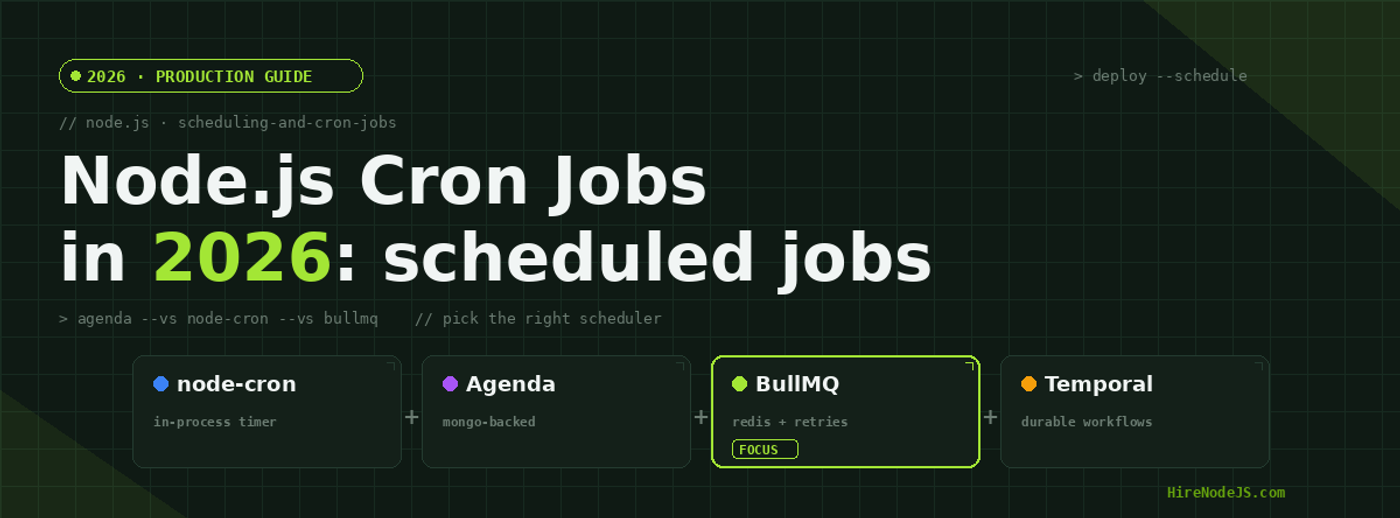
Node.js Cron Jobs in 2026: node-cron vs Agenda vs BullMQ
Cron jobs sound like one of those problems that should have been solved a decade ago — and on a single VM, they were. But the modern Node.js system in 2026 looks nothing like a 2014 monolith. You have multiple replicas behind a load balancer, ephemeral containers that scale to zero, blue/green deploys that recycle pods every few hours, and a backlog of background work that absolutely cannot drop. The naive "I will sprinkle node-cron around my Express app" approach silently doubles up, drops jobs, or pins a single instance as the only one that "owns" the schedule.
This guide compares the four scheduling stacks that actually matter for production Node.js teams in 2026 — node-cron, Agenda, BullMQ, and Temporal — with real benchmarks, code samples, and the hidden gotchas that bite on day 90. If your team is sizing up its background-job stack and you need senior engineers who have shipped these systems, HireNodeJS is the fastest path to vetted Node.js talent.
Why naive cron breaks in distributed Node.js
The classic anti-pattern is putting a node-cron schedule inside your API server. It works on your laptop. It works in staging. Then it ships, you scale to three replicas, and every job runs three times — once per pod. Or worse, only one pod runs the job, and when that pod dies the job stops silently for hours until someone notices the missing report email.
Three things separate "a timer" from "a scheduler":
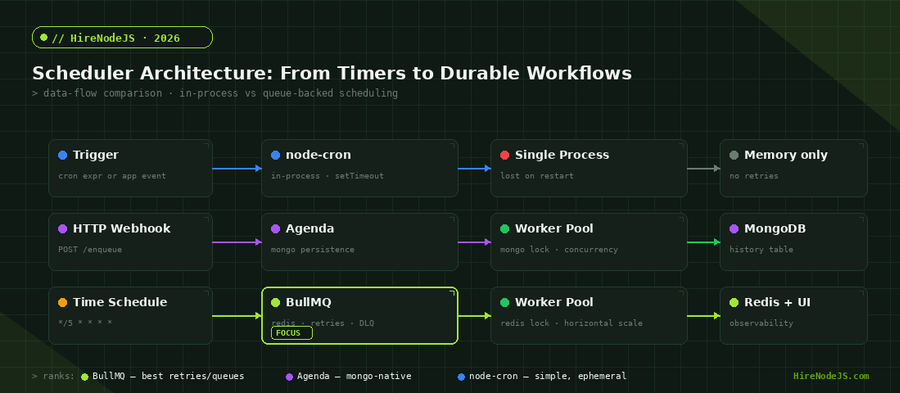
First, persistence — if your process restarts, do scheduled jobs survive? Second, distributed locking — if two replicas tick at the same moment, only one should run the job. Third, retry semantics — when a job fails, does it back off and retry, or vanish? node-cron answers "no" to all three. The other tools answer "yes" with different trade-offs. The same architectural lens we apply to Node.js microservices applies here: every component that holds state needs to be explicit about it.
node-cron: the right tool, in the wrong place
node-cron is a thin wrapper around setTimeout that takes a Unix-style cron expression and fires a callback inside your Node.js process. It is excellent — for what it is. The problem is that 90% of teams reach for it when they actually need a queue.
When node-cron is genuinely fine
Local development scripts. Single-purpose CLI tools that run on a fixed schedule via PM2 or systemd. Internal admin dashboards on a single dedicated host where downtime is acceptable. The signal is simple: if the job will run on exactly one process, forever, and missing a tick during a restart is acceptable, node-cron is fine.
When node-cron silently breaks
The moment you have more than one replica, every cron tick fires N times. The moment you autoscale to zero, scheduled jobs disappear during quiet windows. The moment you do a rolling deploy, you can either miss a tick (if the new pod boots after the cron fires) or run it twice (if both pods overlap during the rollout). Most teams discover this when the monthly billing report goes out three times to every customer.
import cron from 'node-cron';
import { generateMonthlyReport } from './reports.js';

// DON'T do this in a multi-replica deployment.
// Every pod running this code will fire on the 1st of the month.
cron.schedule('0 9 1 * *', async () => {
  await generateMonthlyReport();
}, {
  timezone: 'America/New_York',
});

// If you MUST run node-cron in production, gate it on a leader election
// or pin it to a single dedicated worker process via env flag:
if (process.env.RUN_SCHEDULER === 'true') {
  cron.schedule('0 9 1 * *', generateMonthlyReport);
}Agenda: MongoDB-backed scheduling for Mongo-first stacks
Agenda stores every job as a document in MongoDB. The library polls a jobs collection, picks up due jobs, atomically marks them in-progress, and runs the handler. Persistence is automatic, distributed locking is automatic, and you get a queryable history of every run. If your stack already runs MongoDB, adding Agenda is a 10-minute task with no new infrastructure to operate.
Where Agenda shines
One-off scheduled jobs ("send this email at 3pm tomorrow"), recurring jobs that need an audit trail, low-to-medium throughput workloads (under ~5,000 jobs/minute), and teams already invested in MongoDB ops. The data model is friendly to humans — you can open Compass and see every pending job.
Where Agenda hurts
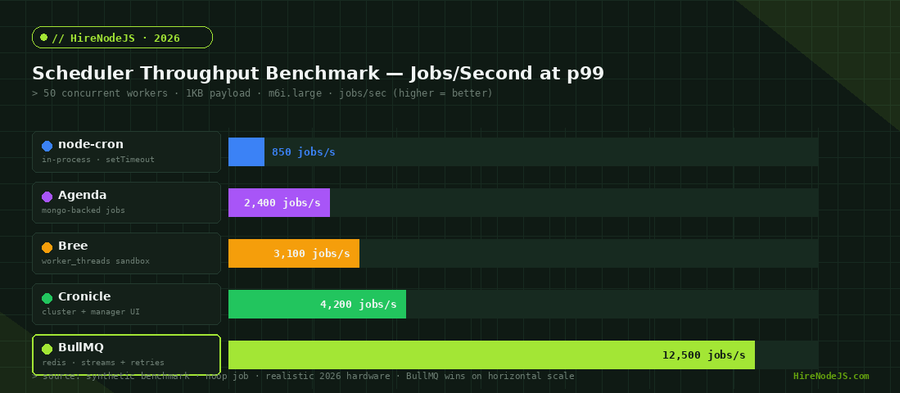
Mongo polling at high frequency means a hot collection and noisy oplog. The lock collection becomes a contention point above ~10k jobs/min. Failure handling is basic: there are retries, but no native dead-letter queue, no backoff curves, and no per-job concurrency limits without writing them yourself. If you cross a few thousand jobs per minute, you outgrow it.
BullMQ: the Redis-backed standard for production cron
BullMQ is the modern successor to Bull and the default choice for serious Node.js scheduling in 2026. It runs on Redis (typically Redis 6+ for Streams), gives you delayed jobs, repeatable jobs (cron-style), exponential backoff, dead-letter queues, rate limiting per queue, priority levels, and a slick Bull Board admin UI for free. It scales horizontally to tens of thousands of jobs per second on commodity Redis.
Repeatable jobs replace cron expressions
Instead of putting a cron expression in your app code, you register a "repeatable job" once at boot. BullMQ keeps the schedule in Redis, deduplicates across workers via atomic Lua scripts, and persists across restarts. You can also use repeat patterns based on a fixed interval ("every 30 seconds") rather than full cron syntax.
import { Queue, Worker, QueueEvents } from 'bullmq';

const connection = { host: 'redis', port: 6379 };

// Define the queue once at boot
const reportQueue = new Queue('reports', { connection });

// Register a repeatable job — BullMQ deduplicates across replicas for you
await reportQueue.add(
  'monthly-report',
  { reportType: 'invoices' },
  {
    repeat: { pattern: '0 9 1 * *', tz: 'America/New_York' },
    attempts: 5,
    backoff: { type: 'exponential', delay: 30_000 },
    removeOnComplete: 100,
    removeOnFail:     500,
  }
);

// Worker — runs in a dedicated process, scales horizontally
new Worker('reports', async (job) => {
  console.log(`Running ${job.name} attempt ${job.attemptsMade + 1}`);
  await generateReport(job.data.reportType);
}, { connection, concurrency: 5 });

// Optional observability: stream events to your logger
const events = new QueueEvents('reports', { connection });
events.on('failed', ({ jobId, failedReason }) => {
  console.error(`job ${jobId} failed: ${failedReason}`);
});Hire Pre-Vetted Node.js Developers
Skip the months-long search. Our exclusive talent network has senior Node.js experts ready to join your team in 48 hours.
Choosing between node-cron, Agenda, BullMQ, and Temporal
A simple decision tree captures 90% of cases:
If you run a single process and missing a tick is acceptable, node-cron is honest. If you run MongoDB and need persistence with low ops overhead, Agenda is the right call. If you need real production guarantees — retries, DLQ, distributed locking, observability — BullMQ is the answer. If you have multi-step long-running workflows that span hours or days with compensating actions, you have outgrown cron and want Temporal.
What about Bree, Cronicle, and Agenda alternatives?
Bree is a beautiful API and a good fit for jobs that need worker_thread isolation, but its persistence story is weaker than BullMQ's. Cronicle is more of a UI-heavy "job server" — fine if you want a Jenkins-like dashboard for cron, less ergonomic in code. Both have a place, but in 2026 the default for greenfield work should be BullMQ unless you have a strong reason otherwise.
Operating cron in production: monitoring, alerts, and runbooks
A scheduler that runs is only half the battle. The other half is knowing when it stops, when it slows down, and when it succeeds but the job inside it failed silently. Pair BullMQ with OpenTelemetry instrumentation to get traces from job enqueue through worker execution, then alert on three signals: queue length crossing a threshold, jobs spending too long in "waiting" state, and failure rate over a rolling window.
Health checks and readiness
Worker pods should expose a /health endpoint that returns 200 only if the worker is connected to Redis and is actively polling. If your readiness probe returns 200 while the worker is wedged on a stuck connection, your scheduler will go silent without your alerting noticing. Treat the worker like an API service: same SLOs, same observability, same on-call rotation.
Time zones, daylight saving, and the 2:30am problem
Every team that runs scheduled jobs eventually trips on daylight saving. A job at 2:30am Eastern runs zero times in spring (the clock skips) and twice in fall (the clock repeats). BullMQ's repeat option accepts a tz field that respects DST rules properly. Agenda relies on the server clock unless you pass a tz. node-cron supports timezone but it depends on your Node version having full ICU. The safest pattern: schedule against UTC internally, and only convert to local time at presentation.
Job priorities and rate limiting
BullMQ supports per-job priority — lower numbers run first — and queue-level rate limiting that throttles how many jobs the worker pool will pick up per window. This is invaluable when your cron triggers a burst of work that downstream services (Stripe, SendGrid, OpenAI) can't absorb. Setting limiter: { max: 100, duration: 60_000 } guarantees the queue never dispatches more than 100 jobs per minute regardless of how many workers are running, which prevents you from cascade-failing the third-party API and tripping its rate limit on your account.
Testing scheduled jobs without waiting for the clock
The biggest unforced error in scheduler code is testing only by hand. Pull every effectful line out of your scheduler callback into a plain async function, then unit-test that function with normal mocks. The cron expression itself is not your code — it is config. Test your handler, not the library. The same discipline applies across Node.js testing in general — keep side effects at the edges and the core logic pure.
Five mistakes teams make with Node.js cron in production
After auditing dozens of Node.js codebases, the same five mistakes show up again and again. First, putting node-cron schedules in the API server process; the fix is a dedicated worker deployment. Second, never bounding removeOnComplete and removeOnFail; the fix is to keep a ring of the last N jobs. Third, no dead-letter queue; the fix is to route permanent failures to a separate queue you actually inspect. Fourth, no alert on a stalled queue; the fix is to alert on queue length growing unbounded. Fifth, scheduling against local time and not noticing daylight saving; the fix is UTC internally, formatted on the way out.
If any of these sound familiar and you want a senior pair of eyes on your scheduler stack — or a full-time engineer who has shipped queue-based scheduling at scale — HireNodeJS has Node.js engineers ready to onboard within 48 hours, no recruiter overhead.
Hire Expert Node.js Developers — Ready in 48 Hours
Building the right scheduler is only half the battle — you need the right engineers to build, deploy, and operate it. HireNodeJS.com specialises exclusively in Node.js talent: every developer is pre-vetted on real-world projects, queue and job-processing systems, distributed locking, and production observability.
Unlike generalist platforms, our curated pool means you only speak to engineers who live and breathe Node.js. Most clients have their first developer working within 48 hours of getting in touch. Engagements start as short-term contracts and can convert to full-time hires with zero placement fee.
Conclusion: pick the scheduler your operations team can sleep through
The right scheduler is not the one with the prettiest API or the highest GitHub star count — it is the one whose failure modes you can live with. node-cron is fine for single-host work and local development. Agenda is a sensible choice for Mongo-first stacks under moderate load. BullMQ is the right default for any Node.js team that needs persistence, retries, distributed workers, and a real observability story in 2026. Temporal lives one tier above when you have multi-step durable workflows.
Whatever you choose, write down the failure modes, instrument the queue, and put a human on-call rotation in front of it. If you need senior Node.js engineers who have already built this twice and want to skip the false starts, HireNodeJS has the bench ready.
Frequently Asked Questions
What is the best Node.js cron job library in 2026?
For most production workloads in 2026, BullMQ is the best choice. It uses Redis for persistence, supports retries with exponential backoff, distributed locking across replicas, and gives you a free admin UI via Bull Board. Use node-cron only on single-host scripts where missing a tick is acceptable.
Why does node-cron run my job multiple times in production?
Because node-cron lives inside your application process and has no concept of distributed locking. If you have three replicas of your API, all three will fire the same cron tick. The fix is either to gate the cron on a single dedicated worker process via an environment flag, or move to a queue-backed scheduler like BullMQ or Agenda that locks the job before running it.
Should I pick Agenda or BullMQ for a new Node.js project?
If your stack already runs MongoDB and your throughput is under a few thousand jobs per minute, Agenda is the lower-friction choice. If you need retries, dead-letter queues, rate limiting, or you expect tens of thousands of jobs per minute, pick BullMQ. Most greenfield Node.js services in 2026 default to BullMQ.
How do I run a cron job exactly once across multiple Kubernetes pods?
Either use a queue-backed scheduler like BullMQ (which atomically locks repeatable jobs in Redis), use a leader election library, or pin the scheduler to a single Kubernetes Deployment with replicas: 1. Avoid relying on a single in-process node-cron schedule across multiple pods.
Does BullMQ support cron expressions?
Yes. BullMQ's repeat option accepts a standard cron pattern (with timezone support) or a fixed-interval every option. Repeatable jobs are stored in Redis so they survive process restarts and deduplicate across worker replicas.
How do I monitor scheduled jobs in production?
Track queue length, job age in waiting state, success/failure rate per queue, and worker connection health. BullMQ emits events for completed, failed, and stalled jobs which you can pipe into OpenTelemetry, Prometheus, or your APM. Add a readiness probe on workers that fails if the Redis connection is broken.
Vivek Singh is the founder of Witarist and HireNodeJS.com — a platform connecting companies with pre-vetted Node.js developers. With years of experience scaling engineering teams, Vivek shares insights on hiring, tech talent, and building with Node.js.
Need a senior Node.js engineer to ship your scheduler?
HireNodeJS connects you with pre-vetted Node.js developers who have built production-grade BullMQ, Agenda, and Temporal systems. First match in 48 hours, no recruiter fees, no lengthy screening.