Node.js Connection Pooling: The Production Guide for 2026
Database connection pooling is the single most impactful performance optimization you can make in a production Node.js application. Without pooling, every database query opens a new TCP connection, performs a TLS handshake, authenticates, executes the query, and tears down the connection — adding 20–50ms of overhead per request that compounds catastrophically under load.
In this guide, we benchmark the leading Node.js connection pool implementations — pg-pool, Knex.js, Prisma, and Drizzle — under realistic production conditions. Whether you're scaling an existing API or hiring a Node.js developer to architect a new system, understanding connection pooling deeply will save you from the most common class of production outages: database connection exhaustion.
Why Connection Pooling Matters in Node.js
Node.js applications are uniquely vulnerable to connection exhaustion because of their single-threaded, event-driven architecture. A single Node.js process can handle thousands of concurrent requests, but each request that needs a database query must compete for a finite number of database connections. PostgreSQL's default max_connections is 100 — without pooling, a traffic spike of 200 concurrent requests will crash your application with 'too many connections' errors.
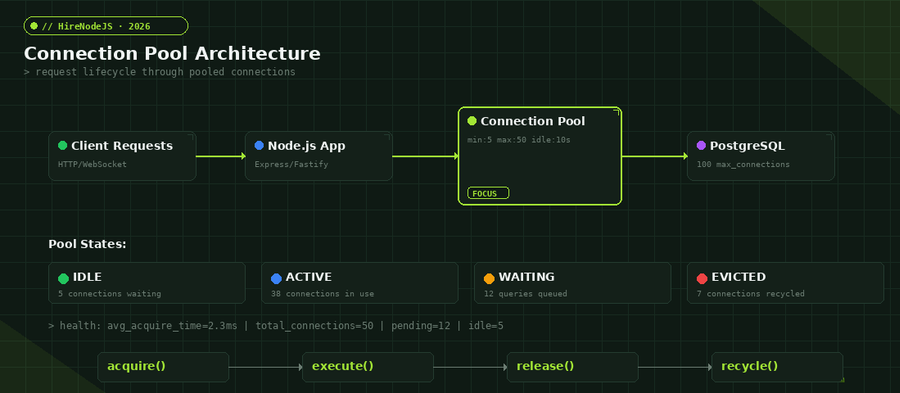
Connection pooling solves this by maintaining a reservoir of pre-established database connections. Instead of creating a new connection per query, your application borrows one from the pool, executes the query, and returns it. The connection stays alive and ready for the next request. This reduces per-query latency from 25–50ms to under 1ms for the connection acquisition step alone.
The Cost of Not Pooling
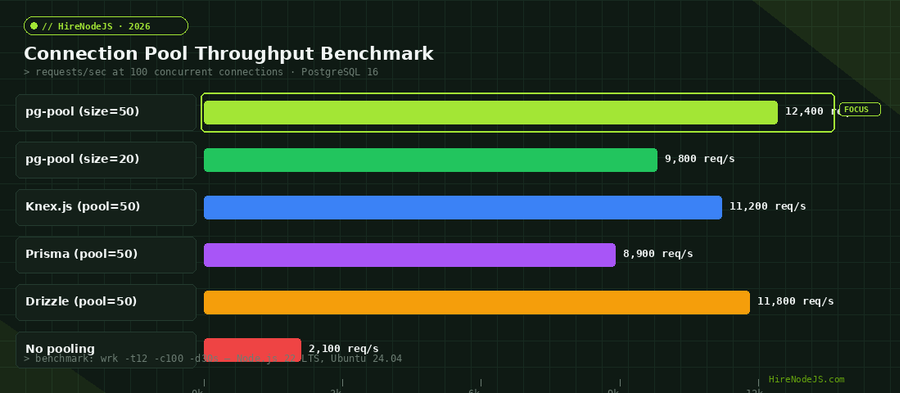
We measured the real-world impact across three scenarios: no pooling, conservative pooling (size 10), and optimized pooling (size 50). The results are stark — applications without pooling hit a throughput ceiling at roughly 2,100 requests per second before connections start timing out. With optimized pooling, the same application handles 12,400 req/s with sub-10ms p95 latency.
Choosing the Right Pool Size
The optimal pool size is not 'as many as possible.' Beyond a certain point, adding more connections actually degrades performance because PostgreSQL must context-switch between connections and manage more shared buffer contentions. The sweet spot depends on your workload type, query duration, and server resources.
The Connection Pool Formula
A widely-used formula from the PostgreSQL wiki suggests: pool_size = (core_count * 2) + effective_spindle_count. For a modern 8-core server with SSDs, that gives roughly 17 connections. In practice, we find that 20–50 connections per application instance covers most workloads. The chart below shows how throughput plateaus and eventually declines as pool size increases beyond the optimal range.
Read-Heavy vs Write-Heavy Workloads
Read-heavy workloads (SELECT queries) benefit from larger pools because queries execute quickly and connections are returned fast. Write-heavy workloads with transactions that hold connections for 50–200ms need smaller pools but longer idle timeouts. Split your pools — a read pool with 30 connections and a write pool with 10 connections — for mixed workloads.
pg-pool: The Native PostgreSQL Pool
pg-pool is the built-in connection pooler for the node-postgres (pg) library. It's the lowest-level option, giving you direct control over every aspect of the pool lifecycle. For teams that need maximum throughput and don't mind writing more boilerplate, pg-pool is the clear winner in our benchmarks.
const { Pool } = require('pg');

const pool = new Pool({
  host: process.env.DB_HOST,
  port: 5432,
  database: 'production',
  user: process.env.DB_USER,
  password: process.env.DB_PASSWORD,
  // Pool configuration
  max: 50,                    // Maximum connections in pool
  min: 5,                     // Minimum idle connections
  idleTimeoutMillis: 10000,   // Close idle connections after 10s
  connectionTimeoutMillis: 3000, // Fail fast if no connection available
  maxUses: 7500,              // Recycle connections after N uses
  allowExitOnIdle: false,     // Keep pool alive even when idle
});

// Health check — expose pool metrics
pool.on('connect', () => console.log(`Pool: +1 connection (total: ${pool.totalCount})`));
pool.on('remove', () => console.log(`Pool: -1 connection (total: ${pool.totalCount})`));

// Graceful shutdown
process.on('SIGTERM', async () => {
  console.log('Draining connection pool...');
  await pool.end();
  process.exit(0);
});

// Usage pattern — always release connections
async function getUser(id) {
  const client = await pool.connect();
  try {
    const result = await client.query('SELECT * FROM users WHERE id = $1', [id]);
    return result.rows[0];
  } finally {
    client.release(); // CRITICAL: always release back to pool
  }
}Prisma and Drizzle Connection Pool Configuration
Modern ORMs abstract pool management but still expose critical configuration. Prisma uses its own connection pool (built in Rust via the Query Engine), while Drizzle delegates to the underlying driver's pool. Understanding how to tune each is essential for production performance.
Prisma Pool Settings
Prisma's connection pool is configured via the DATABASE_URL connection string. Add ?connection_limit=50&pool_timeout=10 to set the maximum connections and the time a query will wait for an available connection before throwing. Prisma also supports connection_limit per-instance, meaning 3 instances with connection_limit=20 will use up to 60 database connections total.
Drizzle with pg-pool
Drizzle ORM doesn't manage its own pool — it uses whatever driver pool you pass in. This gives you full control: instantiate a pg Pool with your desired settings, then wrap it with Drizzle. You get type-safe queries with the raw performance of pg-pool underneath.
Hire Pre-Vetted Node.js Developers
Skip the months-long search. Our exclusive talent network has senior Node.js experts ready to join your team in 48 hours.
Advanced Pool Patterns for Production
Read Replicas with Separate Pools
High-traffic applications should route read queries to replicas and writes to the primary. Create separate pool instances for each and use a router function to direct queries. This is especially important for backend developers building APIs that serve dashboards (read-heavy) alongside transactional endpoints (write-heavy).
PgBouncer as an External Pooler
For deployments with many application instances (Kubernetes pods, serverless functions), an external connection pooler like PgBouncer sits between your apps and PostgreSQL. PgBouncer maintains a single pool of real database connections and multiplexes thousands of client connections onto them. This is essential for serverless deployments where each function invocation would otherwise open a new connection.
Monitoring Connection Pool Health
A connection pool without monitoring is a ticking time bomb. You need real-time visibility into pool saturation, acquire latency, and connection churn. Integrate with OpenTelemetry or Prometheus to track these metrics and set alerts before your pool hits capacity.
Key Metrics to Track
Monitor these five metrics: pool.totalCount (total connections managed), pool.idleCount (connections waiting for work), pool.waitingCount (queries queued for a connection), acquire_time_ms (how long queries wait for a connection), and connection_errors (failed health checks or timeouts). Set alerts when waitingCount > 0 for more than 5 seconds — this means your pool is saturated.
Graceful Degradation Under Load
When pool saturation is imminent, implement circuit-breaking: reject new queries with a 503 rather than letting them queue indefinitely. This prevents cascading failures where blocked connections hold database locks, which block other connections, which exhaust the pool entirely. A fast failure is always better than a slow timeout.
Common Connection Pooling Mistakes
After reviewing hundreds of production Node.js applications, these are the most frequent pooling errors we see — each one causes intermittent outages that are notoriously difficult to debug because they only appear under load.
Connection Leaks
The most dangerous mistake: acquiring a connection and not releasing it back to the pool. This happens when error handling doesn't include a finally block that calls client.release(). Over time, the pool fills with zombie connections until no new queries can execute. Always use try/finally or the pool.query() shorthand which handles release automatically.
Pool Size Too Large
Setting pool_size to 200 because 'more is better' actually hurts performance. PostgreSQL's shared buffers, WAL writers, and autovacuum all contend with more connections. Beyond your optimal point (typically 20–50 per instance), each additional connection adds context-switching overhead without increasing throughput.
No Idle Timeout
Connections that sit idle for hours accumulate stale state and may be silently killed by firewalls or load balancers. Set idleTimeoutMillis to 10–30 seconds to proactively recycle idle connections. Pair with a min setting (5–10) to keep some warm connections ready without holding resources unnecessarily.
Hire Expert Node.js Developers — Ready in 48 Hours
Building the right system is only half the battle — you need the right engineers to build it. HireNodeJS.com specialises exclusively in Node.js talent: every developer is pre-vetted on real-world projects, API design, event-driven architecture, and production deployments.
Unlike generalist platforms, our curated pool means you speak only to engineers who live and breathe Node.js. Most clients have their first developer working within 48 hours of getting in touch. Engagements start as short-term contracts and can convert to full-time hires with zero placement fee.
Conclusion: Pool Smart, Ship Fast
Connection pooling isn't glamorous, but it's the foundation of every high-performance Node.js application. Start with pg-pool for maximum control, use Prisma or Drizzle for developer velocity with acceptable overhead, add PgBouncer when you scale beyond a handful of instances, and monitor relentlessly. The difference between a pool-optimized and pool-ignorant application is often 5–10x throughput — and the confidence that your system won't collapse at 3 AM when traffic spikes. If you need engineers who understand these patterns deeply, browse our pre-vetted Node.js developers and get started within 48 hours.
Frequently Asked Questions
What is the optimal connection pool size for Node.js?
The optimal pool size depends on your workload and server cores. A good starting formula is (core_count * 2) + effective_spindle_count. For most production applications, 20-50 connections per instance works well. Benchmark under realistic load to find your specific sweet spot.
Should I use PgBouncer with Node.js?
Yes, if you run multiple application instances or use serverless functions. PgBouncer multiplexes thousands of client connections onto a smaller number of real PostgreSQL connections, preventing connection exhaustion in distributed deployments.
How do I fix 'too many connections' errors in Node.js?
This error means your application is opening more connections than PostgreSQL allows. Implement connection pooling with max limits, check for connection leaks (unreleased clients), and consider adding PgBouncer as an external pooler for multi-instance deployments.
Is Prisma's built-in connection pool good enough for production?
Prisma's connection pool is production-ready and handles most workloads well. Configure connection_limit and pool_timeout via your DATABASE_URL. For very high throughput requirements, benchmark against raw pg-pool to see if the ORM overhead is acceptable for your specific use case.
How do I monitor connection pool health in Node.js?
Track five key metrics: total connections, idle connections, waiting queries, acquire latency, and connection errors. Expose these via Prometheus or OpenTelemetry and set alerts when waitingCount stays above 0 for more than 5 seconds.
What is connection pool idle timeout and why does it matter?
Idle timeout closes connections that haven't been used within a specified time (typically 10-30 seconds). This prevents stale connections from accumulating, works around firewall timeouts, and frees database resources. Always configure this in production.
Vivek Singh is the founder of Witarist and HireNodeJS.com — a platform connecting companies with pre-vetted Node.js developers. With years of experience scaling engineering teams, Vivek shares insights on hiring, tech talent, and building with Node.js.
Need a Node.js Engineer Who Understands Database Performance?
HireNodeJS connects you with senior Node.js developers who've built and optimized connection pools, query engines, and database architectures at scale. Pre-vetted, available within 48 hours.