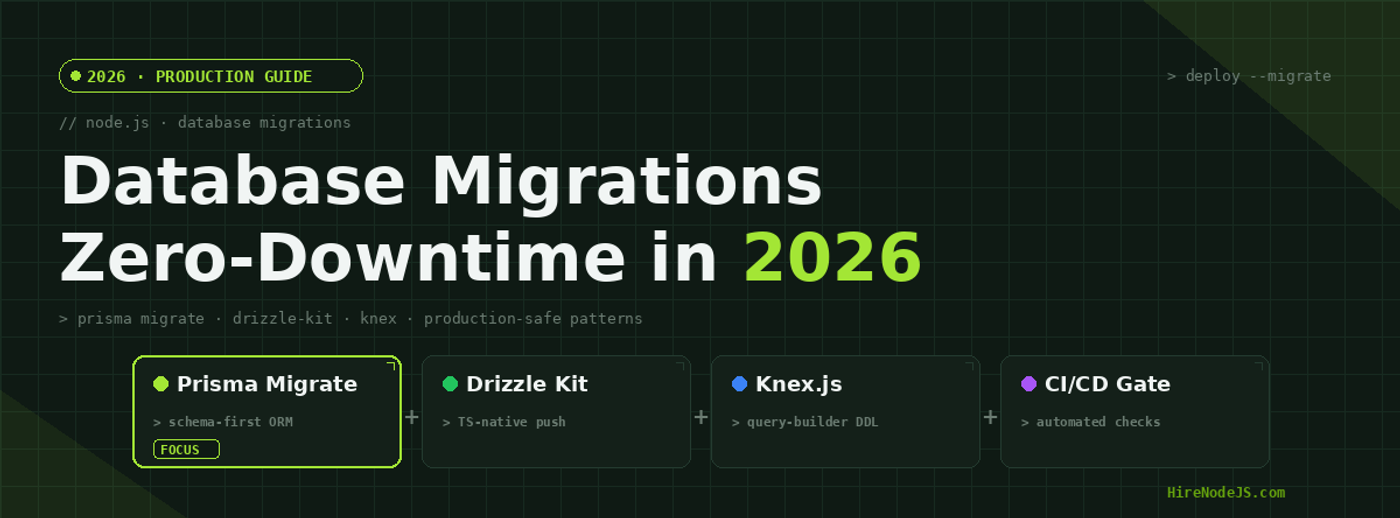
Node.js Database Migrations: Zero-Downtime Strategies for Production
Database migrations are one of the most anxiety-inducing operations in production Node.js systems. A single mismanaged ALTER TABLE on a table with tens of millions of rows can lock your database, spike latency, and bring down your entire application. In 2026, with Node.js powering everything from fintech APIs to real-time collaboration platforms, getting migrations right is not optional — it is a core engineering competency.
This guide covers the three leading migration tools in the Node.js ecosystem — Prisma Migrate, Drizzle Kit, and Knex.js — and the battle-tested patterns that experienced Node.js engineers use to deploy schema changes with zero downtime. Whether you are running PostgreSQL, MySQL, or SQLite, these strategies will keep your production database safe.
Why Database Migrations Break Production Systems
Most migration failures come down to three root causes: table locks from DDL operations, missing rollback strategies, and inadequate testing against production-scale data. Understanding these failure modes is the first step toward building a migration pipeline that never takes your application offline.
The Table Lock Problem
When PostgreSQL executes an ALTER TABLE statement, it acquires an ACCESS EXCLUSIVE lock on the target table. This blocks all reads and writes until the operation completes. On a table with 50 million rows, adding a column with a default value can hold this lock for minutes — an eternity for a production API serving thousands of requests per second.
Schema Drift and Environment Mismatch
Schema drift occurs when your development, staging, and production databases fall out of sync. This typically happens when developers apply ad-hoc changes directly to a database, bypass the migration tool, or merge branches with conflicting schema changes. The result is migrations that pass in staging but fail catastrophically in production.
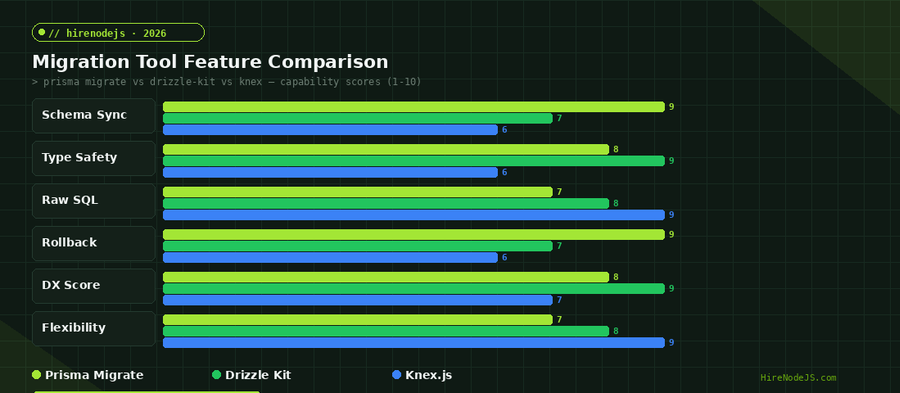
Prisma Migrate — Schema-First Migrations for TypeScript Teams
Prisma Migrate takes a declarative, schema-first approach. You define your data model in the Prisma schema file, and Prisma generates the SQL migration files automatically. This approach eliminates the manual SQL writing that leads to errors and makes schema changes reviewable in pull requests.
How Prisma Migrate Works Under the Hood
When you run prisma migrate dev, Prisma compares your current schema file against the shadow database — a temporary database it creates to compute the diff. It generates a timestamped SQL migration file, applies it to the shadow database to verify correctness, then applies it to your development database. This two-phase approach catches errors before they reach your actual data.
Production Deployment with prisma migrate deploy
In production, you use prisma migrate deploy instead of prisma migrate dev. This command only applies pending migrations — it never creates new ones or modifies existing migration files. Pair it with a CI/CD pipeline that runs migrations as a pre-deployment step, and you get predictable, auditable schema changes.
import { execSync } from 'child_process';
import { PrismaClient } from '@prisma/client';

const prisma = new PrismaClient();

async function runMigration() {
  console.log('Checking pending migrations...');

  try {
    // Dry run — list pending migrations without applying
    const pending = execSync('npx prisma migrate status', { encoding: 'utf-8' });
    console.log(pending);

    if (pending.includes('No pending migrations')) {
      console.log('Database is up to date.');
      return;
    }

    // Apply pending migrations
    const result = execSync('npx prisma migrate deploy', { encoding: 'utf-8' });
    console.log('Migration applied:', result);

    // Verify database connectivity post-migration
    await prisma.$queryRaw`SELECT 1`;
    console.log('Post-migration health check passed.');

  } catch (error) {
    console.error('Migration failed:', error.message);
    process.exit(1);
  } finally {
    await prisma.$disconnect();
  }
}

runMigration();Drizzle Kit — TypeScript-Native Schema Management
Drizzle Kit takes a different philosophy from Prisma. Instead of a custom schema language, you define your database schema directly in TypeScript. This means your schema definitions are real TypeScript code — you get full IDE support, type inference, and the ability to compose schemas programmatically.
Push vs Generate — Two Migration Strategies
Drizzle Kit offers two distinct workflows. The push command applies schema changes directly to the database — ideal for rapid development. The generate command creates SQL migration files that you can review, edit, and commit to version control. For production systems, always use generate to maintain an auditable migration history.
Drizzle Kit and Zero-Downtime Patterns
Drizzle Kit generates standard SQL migration files, which means you can manually edit them to use production-safe patterns. For example, you can split a single ALTER TABLE into an expand-migrate-contract sequence, add CREATE INDEX CONCURRENTLY directives, or insert data backfill steps. This flexibility is a major advantage for teams managing large-scale databases.
Knex.js — The Battle-Tested Query Builder Approach
Hire Pre-Vetted Node.js Developers
Skip the months-long search. Our exclusive talent network has senior Node.js experts ready to join your team in 48 hours.
Knex.js has been the workhorse of Node.js database migrations for nearly a decade. Its imperative, JavaScript-based migration files give developers maximum control over every DDL statement. For teams that need to support multiple database engines or require complex migration logic, Knex remains a strong choice. Many backend developers still prefer Knex for its simplicity and flexibility.
Writing Reversible Migrations
Every Knex migration file exports an up function and a down function. The up function applies the change, and the down function reverts it. This symmetry is critical for production safety — if a migration causes issues, you can roll back to the previous state with a single command. Always write your down function to be the exact inverse of up, and test both directions before deploying.
Batch Tracking and Selective Rollback
Knex groups migrations into batches. When you run knex migrate:latest, all pending migrations run as a single batch. Rolling back with knex migrate:rollback undoes the entire batch, not individual migrations. This batch behavior is important to understand — if you deploy three migrations in one release and need to roll back, all three revert together.
The Expand-Migrate-Contract Pattern for Zero-Downtime Deployments
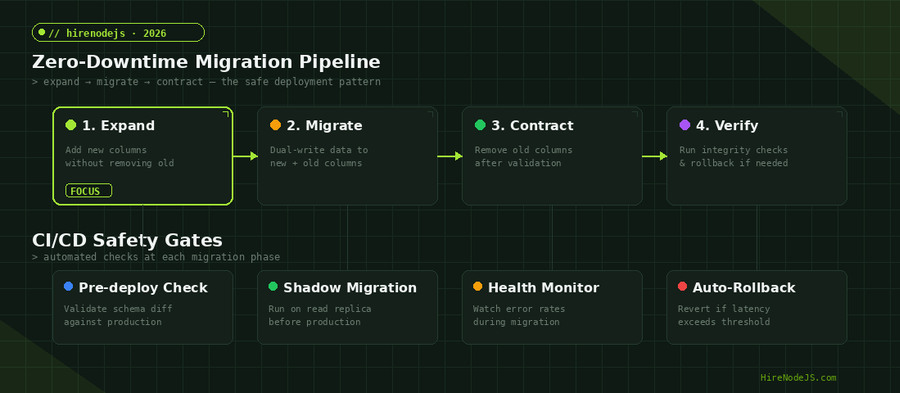
The expand-migrate-contract pattern is the gold standard for deploying schema changes without downtime. Instead of making breaking changes in a single migration, you split the change into three phases that can be deployed independently, with your application continuing to serve traffic throughout.
Phase 1 — Expand
Add the new column, table, or index without removing or modifying anything existing. New columns should be nullable or have a server-side default that does not require a full table rewrite. In PostgreSQL 11 and later, adding a column with a constant default is an O(1) operation — it does not rewrite the table. Deploy your application code to start writing to both the old and new columns.
Phase 2 — Migrate
Backfill the new column with data from the old column. Run this as a batched operation — process 10,000 rows at a time with a short sleep between batches to avoid overwhelming the database. Your application should continue reading from the old column but writing to both old and new columns during this phase.
Phase 3 — Contract
Once all data is backfilled and your application code has been updated to read from the new column exclusively, drop the old column. This final step is the only potentially disruptive operation, but by this point, no running code depends on the old column. Add a NOT NULL constraint if needed — in PostgreSQL, this requires a full table scan but does not acquire an exclusive lock.
Integrating Migrations into Your CI/CD Pipeline
A robust CI/CD pipeline is non-negotiable for production migrations. Your pipeline should validate migration files, run them against a staging database with production-scale data, check for dangerous patterns, and gate deployment on passing health checks. Teams that hire DevOps engineers with Node.js experience can set this up in days rather than weeks.
Automated Migration Linting
Tools like squawk (for PostgreSQL) and atlas (by Ariga) can lint your migration SQL files for dangerous patterns. They flag operations like adding NOT NULL columns without defaults, creating indexes without CONCURRENTLY, and altering column types on large tables. Integrate these linters as a CI check that blocks merging pull requests with unsafe migrations.
Shadow Database Testing
Before applying a migration to production, run it against a shadow database that mirrors your production schema and data volume. This catches issues like migrations that take too long on large tables, queries that break due to schema changes, and constraint violations that only appear with real data. Restore a production backup to your staging environment weekly to keep the shadow database realistic.
Hire Expert Node.js Developers — Ready in 48 Hours
Building the right system is only half the battle — you need the right engineers to build it. HireNodeJS.com specialises exclusively in Node.js talent: every developer is pre-vetted on real-world projects, API design, event-driven architecture, and production deployments.
Unlike generalist platforms, our curated pool means you speak only to engineers who live and breathe Node.js. Most clients have their first developer working within 48 hours of getting in touch. Engagements start as short-term contracts and can convert to full-time hires with zero placement fee.
Conclusion — Migrate with Confidence
Database migrations do not have to be terrifying. With the right tool — whether that is Prisma Migrate for schema-first teams, Drizzle Kit for TypeScript purists, or Knex.js for maximum control — and the expand-migrate-contract pattern, you can deploy schema changes to tables with hundreds of millions of rows without a single second of downtime. The key is investing in your CI/CD pipeline, testing against production-scale data, and building rollback into every migration from the start. If your team needs senior Node.js developers who have shipped zero-downtime migrations at scale, HireNodeJS can connect you with pre-vetted engineers ready to start within 48 hours.
Frequently Asked Questions
What is the safest way to run database migrations in Node.js production?
Use the expand-migrate-contract pattern: add new columns without removing old ones, backfill data in batches, then remove old columns once all application code reads from the new schema. Always run migrations in CI/CD with automated rollback.
How do I choose between Prisma Migrate, Drizzle Kit, and Knex.js?
Choose Prisma Migrate for schema-first workflows with strong TypeScript integration. Pick Drizzle Kit if you want to define schemas in pure TypeScript with maximum type safety. Use Knex.js when you need full SQL control or multi-database support.
Can I run database migrations without downtime in Node.js?
Yes. Use nullable columns or server-side defaults to avoid table rewrites, create indexes with CONCURRENTLY, backfill data in batches, and split breaking changes into expand-migrate-contract phases deployed across multiple releases.
How long does a database migration take on a large PostgreSQL table?
It depends on the operation. Adding a nullable column is instant. Adding a column with a default on 100M rows can take 8-15 minutes. Creating an index concurrently on 100M rows typically takes 5-10 minutes depending on hardware.
Should I use Prisma Migrate or raw SQL for production migrations?
Prisma Migrate generates SQL files that you can review and edit before deploying. For most teams, this is the best balance of safety and productivity. Use raw SQL only when you need operations Prisma cannot express, like partial indexes or custom constraints.
How do I roll back a failed database migration in Node.js?
With Knex.js, use knex migrate:rollback. With Prisma, you need to create a new migration that reverses the change. Always test your rollback strategy in staging before deploying to production.
Vivek Singh is the founder of Witarist and HireNodeJS.com — a platform connecting companies with pre-vetted Node.js developers. With years of experience scaling engineering teams, Vivek shares insights on hiring, tech talent, and building with Node.js.
Need Node.js Engineers Who Ship Safe Migrations?
HireNodeJS connects you with pre-vetted senior Node.js engineers experienced in zero-downtime deployments, database architecture, and production-grade migration pipelines. Get your first developer within 48 hours.