Node.js DataLoader in 2026: Solve GraphQL N+1 Queries
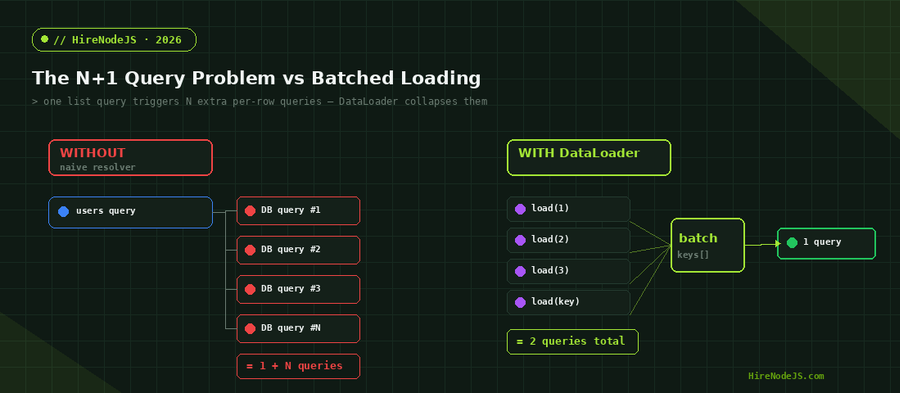
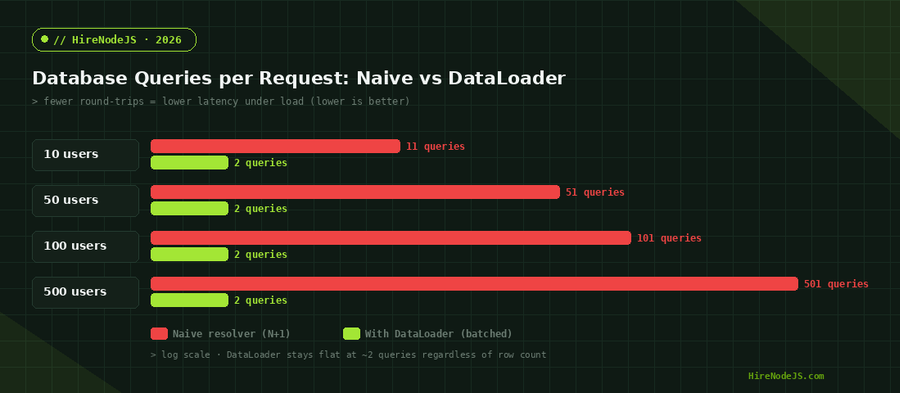
If you run GraphQL on Node.js, the N+1 query problem is probably the single biggest reason your API gets slow under load. A query that asks for a list of users and each user's team looks innocent, but behind the scenes your resolvers fire one database query for the list and then one more query for every single row. Ten users become eleven queries; five hundred users become five hundred and one. The schema looks elegant and the database melts.
DataLoader is the standard fix, and in 2026 it remains the most reliable way to keep GraphQL resolvers fast without rewriting your whole data layer. It works by batching the individual loads triggered during a single tick of the event loop into one query, then caching the results for the lifetime of the request. This guide walks through why N+1 happens, how DataLoader's batching and per-request caching eliminate it, how to wire it into a Node.js GraphQL server, and the production patterns that separate a toy example from something you can ship.
What the N+1 Query Problem Actually Is
Where the extra queries come from
In a GraphQL server every field can have its own resolver. When you request a list and then a nested field on each item, GraphQL executes the nested resolver once per item. There is no built-in coordination between those calls, so each one talks to the database independently. The result is one query for the parent list plus N queries for the children — the classic 1+N (often written N+1) pattern. The same trap appears in REST when you loop over results and call a service per row, but GraphQL's per-field resolution makes it almost the default behaviour.
Why it stays hidden until production
On a development database with twenty rows, N+1 is invisible: the extra queries return in microseconds and nobody notices. The pattern only bites when real traffic arrives, datasets grow, and the database is a network hop away. Suddenly p95 latency tracks the number of rows in the response, connection pools saturate, and the database CPU spikes from thousands of nearly identical lookups. Because the schema and resolvers look correct, teams often misdiagnose this as a database scaling problem rather than an application access pattern.
How DataLoader Solves N+1 With Batching and Caching
Batching within a single event-loop tick
DataLoader exposes a load(key) method that returns a promise. Instead of hitting the database immediately, it collects every key requested during the current tick of the event loop into an array. At the end of the tick it calls your batch function once with the full list of keys, you run a single query such as SELECT * FROM teams WHERE id = ANY($1), and DataLoader maps each result back to the promise that asked for it. Dozens or hundreds of individual load calls collapse into one round-trip, which is exactly what removes the N from N+1.
Per-request caching that prevents duplicate work
DataLoader also memoises by key for the life of the loader instance. If three different parts of a query all ask for user 42, the database is touched once and the other two calls are served from an in-memory cache. The critical rule is that loaders are created per request, not shared globally, so this cache never leaks data between users and never serves stale rows across requests. A fresh loader per request gives you correctness and speed at the same time.
Setting Up DataLoader in a Node.js GraphQL Server
Writing a correct batch function
The one rule that catches everyone: your batch function must return an array the same length as the keys array, in the same order. If a key has no matching row, return null (or an Error) in that slot — never skip it, or every result after the gap will be misaligned. The snippet below shows a production-shaped loader for an authors table using node-postgres, including the re-ordering step that keeps results aligned to the requested keys.
import DataLoader from 'dataloader';
import { pool } from './db.js';

// Batch function: receives ALL ids requested in one tick.
// MUST return results in the same order/length as `ids`.
async function batchAuthors(ids) {
  const { rows } = await pool.query(
    'SELECT * FROM authors WHERE id = ANY($1)',
    [ids]
  );
  const byId = new Map(rows.map((r) => [r.id, r]));
  // Re-map to the original key order; missing keys -> null.
  return ids.map((id) => byId.get(id) ?? null);
}

// Create a FRESH loader per request (see createLoaders below).
export function createLoaders() {
  return {
    authors: new DataLoader(batchAuthors),
  };
}

// In your GraphQL context factory:
export function buildContext() {
  return { loaders: createLoaders() };
}

// Resolver — no manual batching, just call load():
export const resolvers = {
  Post: {
    author: (post, _args, ctx) => ctx.loaders.authors.load(post.authorId),
  },
};
Per-Request Caching and Lifecycle Rules
Hire Pre-Vetted Node.js Developers
Skip the months-long search. Our exclusive talent network has senior Node.js experts ready to join your team in 48 hours.
Why loaders must be created per request
Sharing one DataLoader instance across requests is the fastest way to leak data between users, because the cache would persist rows from one user into another user's response. Always build loaders inside your GraphQL context factory so each request gets its own set. If you are designing the data layer for a larger service, the same per-request scoping discipline applies to your backend architecture more broadly — request-scoped state is what keeps caching safe.
Priming and clearing the cache
DataLoader lets you prime the cache with rows you already have (for example after a list query) using loader.prime(key, value), which avoids re-fetching data you just read. After a mutation that changes a record, call loader.clear(key) so subsequent loads in the same request see fresh data. These two methods cover the vast majority of consistency edge cases you will hit when mixing reads and writes inside a single GraphQL operation.
Production Patterns and Common Pitfalls
maxBatchSize, error handling, and non-Postgres stores
For data stores that limit how many ids you can pass in one call, set maxBatchSize so DataLoader splits large batches into several queries instead of one oversized one. When a single key fails, return an Error object in that slot rather than throwing from the whole batch — DataLoader will reject only the promise for that key, leaving the rest of the response intact. The batch pattern works identically against Redis MGET, an HTTP microservice that accepts a list of ids, or a document store; DataLoader does not care what the backing store is, only that you can fetch many keys at once.
Combining DataLoader with a shared cache layer
DataLoader's cache is per-request and dies when the request ends. For data that is expensive and rarely changes, pair it with a longer-lived cache such as Redis. The pattern is simple: the batch function checks Redis first, fetches only the misses from the database, and writes them back. DataLoader handles the within-request deduplication, while Redis handles the across-request reuse.
Measuring the Impact in Real Workloads
The charts above use representative numbers, but the shape is what holds in practice: a naive resolver's query count and latency grow linearly with the number of rows returned, while a DataLoader-backed resolver flattens to a small constant — typically the list query plus one batched query per relationship. The win compounds with nesting. A query three relationships deep over a hundred rows can drop from several hundred database calls to a handful, which is the difference between a 1,700 ms response and a sub-50 ms one.
To make these gains durable, measure them. Add query-count assertions to your integration tests so a regression that reintroduces N+1 fails CI, and watch database round-trips per request in your observability stack. If you want a deeper look at end-to-end request tracing, our guide to instrumenting Node.js services covers the tooling; and when you need to validate a candidate's grasp of these patterns, structured interview questions surface whether they actually understand batching or just memorised the API.
If you are building a GraphQL API on Node.js and want engineers who already know how to keep resolvers fast under load, HireNodeJS connects you with pre-vetted senior developers available within 48 hours — without the recruiter overhead or months of screening.
Hire Expert Node.js Developers — Ready in 48 Hours
Building the right system is only half the battle — you need the right engineers to build it. HireNodeJS.com specialises exclusively in Node.js talent: every developer is pre-vetted on real-world projects, API design, GraphQL performance, and production deployments.
Unlike generalist platforms, our curated pool means you speak only to engineers who live and breathe Node.js. Most clients have their first developer working within 48 hours of getting in touch. Engagements start as short-term contracts and can convert to full-time hires with zero placement fee.
Conclusion: Make Batching the Default
The N+1 problem is not a database flaw — it is an access-pattern flaw in how resolvers talk to data, and DataLoader fixes it at exactly the right layer. By batching every load in a tick into one query and caching results per request, it turns a response that scales with row count into one that scales with relationship depth. Create loaders per request, write batch functions that return one ordered result per key, set a sensible maxBatchSize, and pair it with a shared cache when reuse spans requests.
Do that and your GraphQL API stays fast as your data grows, your database stops drowning in duplicate lookups, and the elegant schema you designed actually performs the way it looks. Batching should be the default in every resolver that touches a relationship — not an optimisation you bolt on after the incident.
Frequently Asked Questions
What is the N+1 problem in GraphQL?
It is when a resolver runs one query for a list and then one additional query for every item in that list. Ten rows trigger eleven queries, so latency and database load grow with the size of the response.
How does DataLoader fix the N+1 problem?
DataLoader collects every load(key) call made during a single event-loop tick, runs your batch function once with all the keys, and maps results back. Many individual lookups collapse into one batched query.
Should I create a new DataLoader per request?
Yes. Always create loaders inside your GraphQL context factory so each request gets its own instance. A shared loader would leak cached rows between users and serve stale data.
Does DataLoader work without GraphQL?
Absolutely. DataLoader is just a batching-and-caching utility. You can use it in any Node.js code that makes many keyed lookups, including REST endpoints, background jobs, or microservice calls.
Can DataLoader cache data across requests?
Its built-in cache is per-request only. For longer-lived caching, have the batch function read from and write to a shared store like Redis, while DataLoader handles within-request deduplication.
What is the most common DataLoader bug?
Returning results from the batch function in the wrong order or with the wrong length. The returned array must have exactly one entry per key, in the same order, with null for missing keys.
Vivek Singh is the founder of Witarist and HireNodeJS.com — a platform connecting companies with pre-vetted Node.js developers. With years of experience scaling engineering teams, Vivek shares insights on hiring, tech talent, and building with Node.js.
Looking for a Node.js + GraphQL performance expert?
HireNodeJS connects you with pre-vetted senior Node.js engineers who know how to keep GraphQL resolvers fast under load — available within 48 hours, no recruiter fees, no lengthy screening.