Node.js Date and Time Handling in 2026: The Temporal Guide
Almost every Node.js application touches dates. You stamp records with createdAt, schedule jobs, expire tokens, render "3 hours ago", and bill customers across continents. And almost every Node.js application gets dates wrong at some point — an off-by-one day near midnight, a meeting that lands an hour off after daylight saving, a report that silently uses the server's local time zone instead of the user's. These bugs are quiet, hard to reproduce, and embarrassing when they reach a customer.
In 2026 the landscape finally looks different. The Temporal API — a complete redesign of date and time in JavaScript — has reached TC39 Stage 4 and is shipping in modern Node.js builds, the legacy Moment.js library is officially in maintenance mode, and lean alternatives like date-fns and Luxon have matured. This guide walks through the Date object's limitations, the library options, how Temporal changes the game, and the time-zone pitfalls that cause most production incidents.
Why Date and Time Handling Breaks in Production
Date bugs rarely show up on a developer's laptop. Your machine, your test runner, and your CI box are usually all set to the same time zone with the same locale, so a whole class of errors stays invisible until real users in real time zones hit your API. The root causes are remarkably consistent across teams.
Server time zone leaks into business logic
When you call new Date() and then format it without specifying a zone, Node.js uses the host's TZ environment variable. Deploy the same code to a container in UTC and a laptop in Asia/Kolkata and you get different results from identical inputs. Any "what day is it" calculation done in local time is a latent bug.
Daylight saving time is not a rounding error
Adding 24 hours is not the same as adding one calendar day. On DST transition days a country gains or loses an hour, so naive arithmetic on millisecond timestamps drifts. Recurring events — a 9am standup, a monthly invoice — must be computed in a named time zone, never as fixed offsets.
The Built-in Date Object and Its Limitations
JavaScript's Date object was ported from Java in 1995 and has barely changed since. It is mutable, it only understands the user's local zone and UTC, its month index starts at zero, and its parsing behaviour is famously inconsistent across engines. These are not stylistic complaints — they are the source of real defects.
Mutability creates spooky action at a distance
Methods like setDate mutate the object in place, so passing a Date into a function can silently change it for the caller. Most teams end up cloning defensively, which is easy to forget. The newer APIs fix this by being immutable: every operation returns a new value.
The Date Library Landscape in 2026
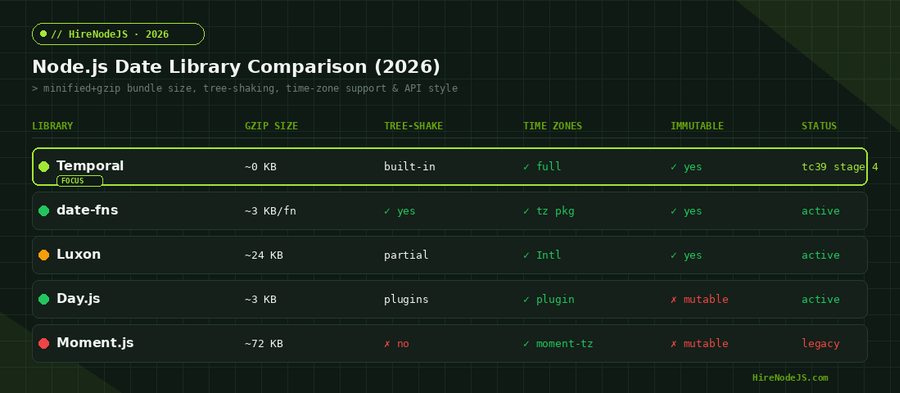
For years the default answer to "how do I handle dates in Node?" was Moment.js. That era is over. Moment is in maintenance mode by its own maintainers' recommendation: it is large, mutable, and not tree-shakeable. The modern field splits into a few clear choices, summarised below.
date-fns, Luxon, and Day.js
date-fns is a collection of small, pure functions you import individually, which keeps bundles tiny and pairs perfectly with a strict TypeScript codebase. Luxon, from a former Moment maintainer, wraps the native Intl APIs for excellent time-zone support with an immutable, chainable API. Day.js mimics Moment's API in roughly 3 KB but stays mutable and leans on plugins. Whichever you pick, the right Node.js developer will reach for an immutable, tree-shakeable option by default.
The Temporal API: JavaScript's New Date Standard
Temporal is the most significant change to date and time in JavaScript's history. Rather than one overloaded Date type, it provides distinct, purpose-built types: Temporal.PlainDate for a calendar date with no time or zone, Temporal.PlainDateTime for a wall-clock time, Temporal.ZonedDateTime for an exact instant in a named zone, Temporal.Instant for a point on the global timeline, and Temporal.Duration for spans. Everything is immutable and DST-aware by design.
Why distinct types prevent bugs
Most date bugs come from conflating concepts: treating a birthday (a PlainDate) like an exact instant, or storing a meeting time without its zone. Temporal makes those mistakes hard because the type system forces you to say what you mean. A ZonedDateTime knows its zone, so adding one day correctly accounts for DST automatically.
// Temporal: DST-safe arithmetic with explicit time zones
// (available in modern Node.js builds; polyfill: @js-temporal/polyfill)

// A meeting at 9:00 AM in New York
const meeting = Temporal.ZonedDateTime.from({
  year: 2026, month: 3, day: 7, hour: 9,
  timeZone: 'America/New_York',
});

// Add one calendar day across the US DST spring-forward (Mar 8, 2026)
const next = meeting.add({ days: 1 });

console.log(next.toString());
// 2026-03-08T09:00:00-04:00[America/New_York]
// Still 9:00 AM local — Temporal handled the lost hour for you.

// Compare two instants safely, regardless of zone
const tokyo = meeting.withTimeZone('Asia/Tokyo');
console.log(meeting.toInstant().equals(tokyo.toInstant())); // true

// Durations are first-class and human-readable
const sprint = Temporal.Duration.from({ weeks: 2 });
console.log(meeting.add(sprint).toPlainDate().toString()); // 2026-03-21
Hire Pre-Vetted Node.js Developers
Skip the months-long search. Our exclusive talent network has senior Node.js experts ready to join your team in 48 hours.
Time Zones, UTC, and the Pitfalls That Cause Bugs
The single most reliable rule in date handling: store and transmit in UTC, convert to a local zone only at the edges for display. Your database, your APIs, and your logs should speak UTC. The user's time zone is presentation, not storage. Breaking this rule is how teams end up with timestamps that mean different things depending on who deployed the service.
Store UTC, render local
Persist an ISO-8601 UTC string or an epoch timestamp, and keep the user's IANA zone (like Europe/London) as a separate field. Convert with Intl or Temporal at render time. For backend and API work specifically, never let a column's meaning depend on the server's locale.
Recurring events need named zones
A daily 8am reminder is not "every 86,400,000 ms." It is 8am in a specific zone, which shifts its UTC offset twice a year. Compute the next occurrence in the named zone, then convert to an instant for scheduling. This is exactly where ZonedDateTime shines.
Formatting and Parsing the Right Way
You may not need a library for formatting at all. The built-in Intl.DateTimeFormat is in every modern Node.js runtime, is locale-aware, and handles time zones natively — for many apps it removes the formatting dependency entirely.
// Locale + time-zone aware formatting with zero dependencies
const when = new Date('2026-03-08T13:30:00Z'); // a UTC instant

const fmt = new Intl.DateTimeFormat('en-GB', {
  dateStyle: 'medium',
  timeStyle: 'short',
  timeZone: 'America/New_York',
});

console.log(fmt.format(when)); // 8 Mar 2026, 09:30

// Relative time ("in 3 days", "2 hours ago") is built in too
const rel = new Intl.RelativeTimeFormat('en', { numeric: 'auto' });
console.log(rel.format(-2, 'hour'));  // 2 hours ago
console.log(rel.format(3, 'day'));    // in 3 days
Scoring the options
No single tool wins every axis. Temporal leads on correctness and bundle cost but is newest; date-fns wins on tree-shaking and ecosystem; Luxon offers the smoothest time-zone API today. The interactive scorecard below lets you weigh the trade-offs for your own project.
Choosing the Right Tool for Your Project
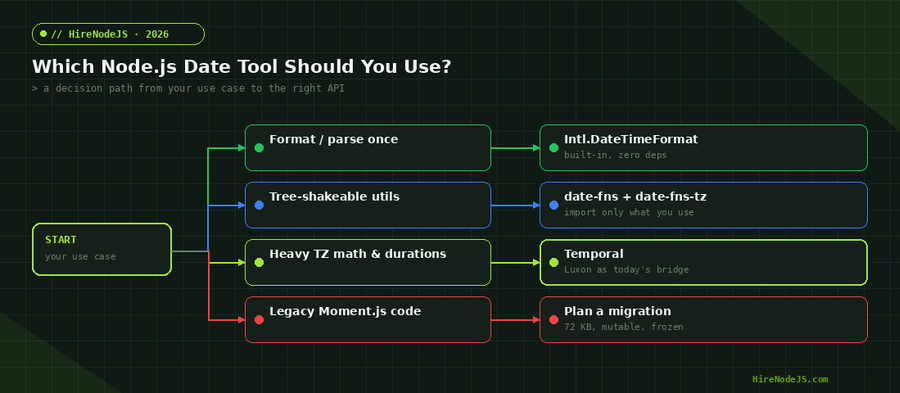
Match the tool to the job. If you only format and parse, reach for Intl and ship nothing extra. If you need a grab-bag of utilities in a bundle-sensitive frontend or shared package, date-fns is the safe default. If you do heavy time-zone math today and want a polished API, Luxon is excellent. And if you are starting fresh or can adopt a polyfill, write against Temporal so your code is future-proof.
A migration plan off Moment.js
Don't rewrite everything at once. Wrap date logic behind a small internal module, swap the implementation there, and migrate call sites incrementally. Add a lint rule to ban new Moment imports, and lean on TypeScript to catch shape mismatches as you go.
Getting date and time right across zones, locales, and DST is the kind of detail that separates senior engineers from the rest. If your team needs that depth, HireNodeJS connects you with pre-vetted senior Node.js developers available within 48 hours — no recruiter overhead, no months-long screening.
Hire Expert Node.js Developers — Ready in 48 Hours
Building the right system is only half the battle — you need the right engineers to build it. HireNodeJS.com specialises exclusively in Node.js talent: every developer is pre-vetted on real-world projects, API design, time-zone-correct data modelling, and production deployments.
Unlike generalist platforms, our curated pool means you speak only to engineers who live and breathe Node.js. Most clients have their first developer working within 48 hours of getting in touch. Engagements start as short-term contracts and can convert to full-time hires with zero placement fee.
Key Takeaways
Date and time handling in Node.js stopped being a guessing game in 2026. Store everything in UTC, treat the user's zone as presentation, and never do calendar math on raw millisecond offsets. Drop Moment.js from new code, default to Intl for formatting, and reach for date-fns or Luxon where you need utilities today.
Most importantly, learn Temporal now. Its distinct types and immutable, DST-aware design eliminate whole categories of bugs, and with the official polyfill you can adopt it today and remove the polyfill later with no code changes. The teams that invest in correct time handling spend far less time chasing the quiet, intermittent bugs that plague everyone else.
Frequently Asked Questions
What is the best way to handle dates and times in Node.js in 2026?
Store and transmit all timestamps in UTC and convert to the user's time zone only for display. Use the built-in Intl API for formatting, and adopt the Temporal API (via the official polyfill if needed) for date arithmetic and time-zone-aware logic.
Should I still use Moment.js in new Node.js projects?
No. Moment.js is in maintenance mode by its maintainers' own recommendation. It is large, mutable, and not tree-shakeable. For new code use date-fns, Luxon, or the Temporal API instead.
What is the Temporal API and is it ready for production?
Temporal is a modern, immutable replacement for JavaScript's Date object with distinct types for dates, times, instants, and durations. It has reached TC39 Stage 4 and ships in modern Node.js builds; for older runtimes use the official @js-temporal/polyfill.
date-fns vs Luxon — which should I choose?
Choose date-fns for tiny, tree-shakeable utility functions in bundle-sensitive code. Choose Luxon for the smoothest immutable, time-zone-aware API today. Both are solid; Luxon leads on zone handling, date-fns on bundle size.
How do I avoid daylight saving time bugs in Node.js?
Never add fixed hour offsets for calendar operations. Compute recurring events in a named IANA time zone (like America/New_York) using Temporal.ZonedDateTime or Luxon, which account for DST transitions automatically.
Do I need a date library just for formatting?
Often no. Intl.DateTimeFormat and Intl.RelativeTimeFormat are built into modern Node.js, are locale-aware, and handle time zones. Reuse formatter instances for performance instead of creating one per row.
Vivek Singh is the founder of Witarist and HireNodeJS.com — a platform connecting companies with pre-vetted Node.js developers. With years of experience scaling engineering teams, Vivek shares insights on hiring, tech talent, and building with Node.js.
Want a Node.js engineer who gets time zones right?
HireNodeJS connects you with pre-vetted senior Node.js engineers available within 48 hours — developers who handle UTC, DST, and Temporal correctly so your timestamps never lie. No recruiter fees, no lengthy screening.