Node.js Deployment Strategies: Zero-Downtime Deploys in 2026
Deploying Node.js applications to production without downtime is no longer a luxury reserved for enterprise teams with dedicated DevOps staff. In 2026, users expect always-on services, and even a few seconds of unavailability can erode trust, spike error rates, and cost real revenue. Whether you are running a single Express API or a fleet of NestJS microservices behind a load balancer, your deployment strategy directly determines how safely and quickly you can ship new code.
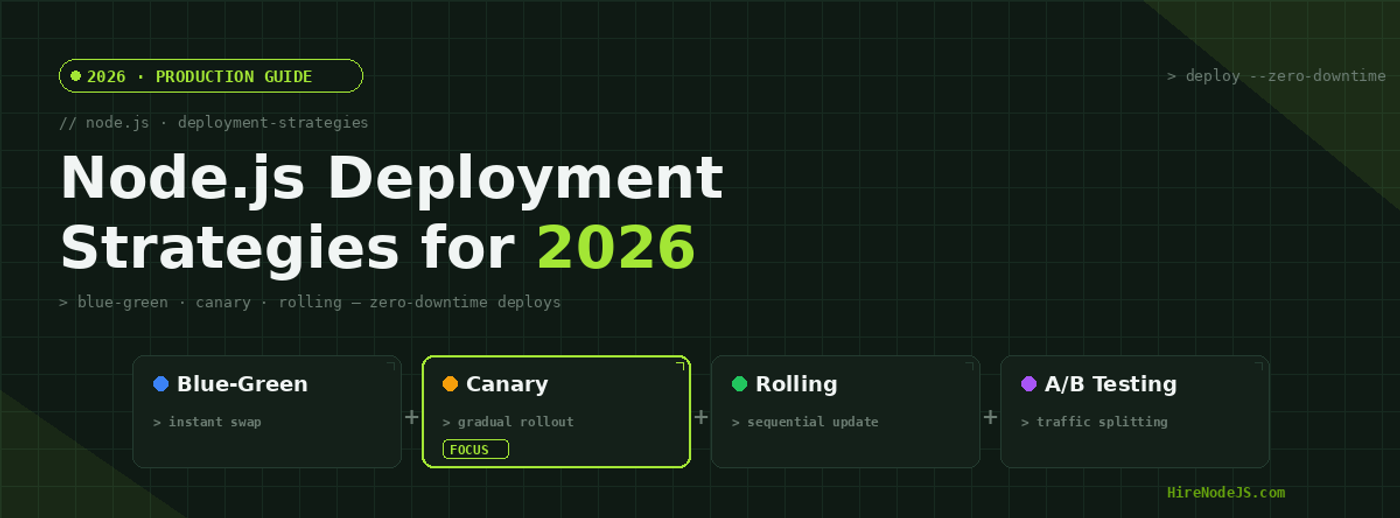
This guide breaks down the four major zero-downtime deployment strategies for Node.js in production: blue-green, canary, rolling, and A/B deployments. We will compare their trade-offs, walk through real implementation code, and help you decide which pattern fits your architecture. If you are looking to hire Node.js developers who understand production deployment pipelines, this is the checklist your engineering team should master.
Why Zero-Downtime Deployments Matter
Traditional deployments that take the application offline, update files, and restart the process are a relic of the early web. Modern Node.js applications serve real-time WebSocket connections, process webhook payloads, and run long-lived background jobs. A deployment that kills active connections mid-flight causes silent data loss, failed payment callbacks, and broken user sessions that are almost impossible to debug after the fact.
Zero-downtime deployments solve this by ensuring that at least one healthy version of your application is always serving traffic during the rollout. The strategies differ in how they manage traffic routing, how many resources they consume, and how quickly you can roll back if something goes wrong. Choosing the right one depends on your traffic volume, infrastructure budget, team size, and risk tolerance.
Teams building backend APIs with Node.js should treat zero-downtime deployment as a non-negotiable baseline, not an optimization to tackle later. The cost of a botched deployment at scale is almost always higher than the cost of setting up a proper pipeline upfront.
Blue-Green Deployments for Node.js
How Blue-Green Works
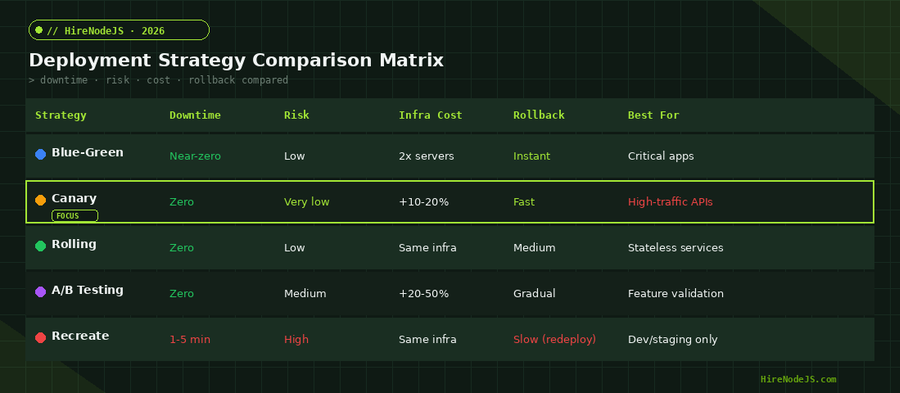
Blue-green deployment maintains two identical production environments. The current live version runs on the Blue environment while the new release is deployed to Green. After Green passes automated smoke tests, health checks, and any manual QA gates, the load balancer or DNS is switched so that all traffic flows to Green instantly. Blue stays running and untouched, serving as an immediate rollback target if anything goes wrong.
The key advantage of blue-green is the instant, atomic switchover. You are never in a mixed state where some users hit the old version and others hit the new one. This makes it ideal for database schema migrations, breaking API changes, or any release where partial rollout would cause inconsistencies.
When to Choose Blue-Green
Blue-green deployments are best suited for mission-critical applications where rollback speed matters more than infrastructure cost. Payment processing services, authentication gateways, and real-time trading platforms benefit most from the instant rollback capability. The trade-off is that you need to maintain two full production environments, which effectively doubles your infrastructure bill during the deployment window.
Canary Deployments — The Safest Path to Production
Progressive Traffic Shifting
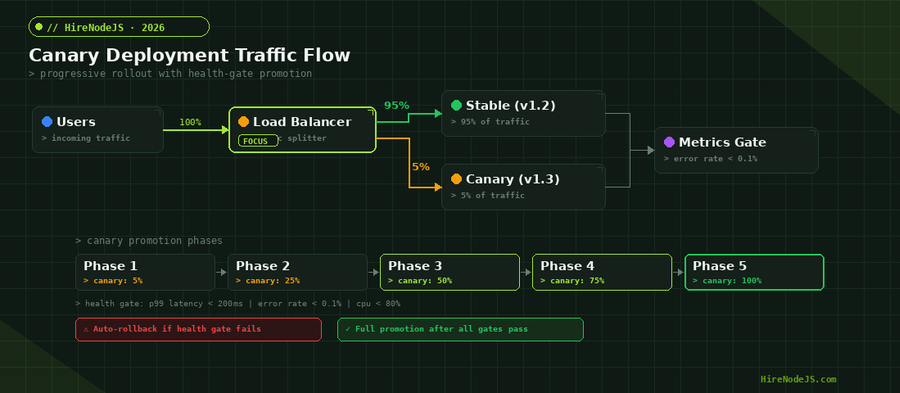
Canary deployments take a fundamentally different approach from blue-green. Instead of switching all traffic at once, the new version receives a small percentage of requests initially — typically 5 to 10 percent — while the stable version handles the rest. Automated health gates monitor error rates, latency percentiles, and resource utilization. If the canary passes all gates, traffic gradually increases through predetermined phases: 5 percent, then 25, then 50, then 75, and finally 100 percent.
This progressive approach means that if the new version has a subtle bug — one that only surfaces under real production traffic patterns — it affects only a fraction of your users. Automated rollback triggers can revert traffic within seconds, and the blast radius of any failure is capped at the current canary percentage.
Health Gates and Automated Rollback
The power of canary deployments comes from the health gates between each phase. A typical gate checks three signals: p99 latency must stay below 200 milliseconds, error rate must remain under 0.1 percent, and CPU utilization cannot exceed 80 percent. If any signal breaches its threshold, the system automatically routes all traffic back to the stable version. Teams that invest in observability and monitoring see the most benefit from canary patterns because the health gates are only as good as the metrics feeding them.
Rolling Deployments for Stateless Node.js Services
Instance-by-Instance Updates
Hire Pre-Vetted Node.js Developers
Skip the months-long search. Our exclusive talent network has senior Node.js experts ready to join your team in 48 hours.
Rolling deployments update instances one at a time across your fleet. The load balancer drains connections from the first instance, deploys the new version, waits for it to pass health checks, and then moves to the next instance. At any point during the rollout, a mix of old and new versions are serving traffic simultaneously.
This strategy uses the least infrastructure overhead because you never need extra instances beyond your normal capacity. For stateless Node.js APIs that do not depend on instance-specific state or in-memory caches, rolling updates are the simplest and most cost-effective path to zero downtime.
Handling Mixed Versions
The main challenge with rolling deployments is API compatibility between versions. During the rollout window, some instances run version 1.2 while others run version 1.3. If the new version changes a response schema or removes an endpoint, clients may get inconsistent results depending on which instance serves their request. The solution is to always deploy backward-compatible changes and use versioned APIs. Teams with strong TypeScript practices find this easier to enforce because type contracts catch breaking changes at compile time.
Implementing Deployment Strategies with Docker and Kubernetes
Kubernetes Rolling Update Configuration
Kubernetes supports rolling updates natively through its Deployment resource. By configuring maxSurge and maxUnavailable, you control how aggressively the rollout proceeds. For Node.js APIs handling real-time traffic, a conservative configuration with maxSurge of 1 and maxUnavailable of 0 ensures that capacity never drops below the current level during the update.
// healthcheck.js — Express health check endpoint for deployment readiness
const express = require('express');
const app = express();

let isReady = false;
let isShuttingDown = false;

// Simulate async startup (DB connections, cache warm-up)
async function initialize() {
  // Connect to database
  await connectToDatabase();
  // Warm up critical caches
  await warmUpCache();
  isReady = true;
  console.log('[deploy] Application ready to serve traffic');
}

// Liveness probe — is the process alive?
app.get('/healthz', (req, res) => {
  if (isShuttingDown) return res.status(503).json({ status: 'shutting-down' });
  res.json({ status: 'alive', version: process.env.APP_VERSION || '1.0.0' });
});

// Readiness probe — should the LB send traffic here?
app.get('/readyz', (req, res) => {
  if (!isReady || isShuttingDown) {
    return res.status(503).json({ status: 'not-ready' });
  }
  res.json({ status: 'ready', uptime: process.uptime() });
});

// Graceful shutdown for rolling/canary deployments
process.on('SIGTERM', () => {
  console.log('[deploy] SIGTERM received — draining connections');
  isShuttingDown = true;
  // Give the load balancer time to stop sending traffic
  setTimeout(() => {
    server.close(() => {
      console.log('[deploy] Server closed — exiting');
      process.exit(0);
    });
  }, 10000); // 10s drain period
});

const server = app.listen(3000, () => {
  console.log('[deploy] Server listening on :3000');
  initialize();
});

async function connectToDatabase() {
  return new Promise(resolve => setTimeout(resolve, 500));
}
async function warmUpCache() {
  return new Promise(resolve => setTimeout(resolve, 300));
}
This health check pattern is essential for all deployment strategies. Kubernetes uses the liveness probe to restart crashed containers and the readiness probe to decide when a new pod can receive traffic. The graceful shutdown handler ensures that in-flight requests complete before the old pod terminates, which is critical for rolling and canary deployments.
Choosing the Right Strategy for Your Node.js Architecture
Decision Framework
The right deployment strategy depends on four factors: your traffic volume, how quickly you need to roll back, your infrastructure budget, and the complexity your team can maintain. A solo developer shipping a side project does not need canary deployments with five-phase health gates. Equally, a payment processing API serving millions of requests per day should not rely on recreate deployments.
For most Node.js teams in 2026, rolling deployments are the best default. They work out of the box with Kubernetes, require no extra infrastructure, and handle the vast majority of stateless API deployments safely. Graduate to canary when your traffic volume is high enough that even a brief outage is unacceptable, or when you are shipping changes that are difficult to validate with automated tests alone.
Strategy by Application Type
REST APIs and GraphQL servers are natural fits for rolling or canary deployments because they handle short-lived, stateless requests. WebSocket servers require more care because long-lived connections must be drained during the rollout. Background workers and job processors are often best served by blue-green deployments because they can finish processing their current batch on the old version before the switchover.
If your architecture combines multiple service types — APIs, workers, and real-time servers — you may want different strategies for different services. A team experienced in Docker and container orchestration can configure per-service deployment policies in Kubernetes, giving you canary for your public API and rolling updates for internal microservices.
Hire Expert Node.js Developers — Ready in 48 Hours
Building the right deployment pipeline is only half the battle — you need the right engineers to build and maintain it. HireNodeJS.com specialises exclusively in Node.js talent: every developer is pre-vetted on real-world projects, API design, event-driven architecture, and production deployments.
Unlike generalist platforms, our curated pool means you speak only to engineers who live and breathe Node.js. Most clients have their first developer working within 48 hours of getting in touch. Engagements start as short-term contracts and can convert to full-time hires with zero placement fee.
Conclusion — Ship Faster, Break Nothing
Zero-downtime deployment is not a single technique but a spectrum of strategies, each with clear trade-offs between safety, speed, cost, and complexity. Blue-green gives you instant rollback at the cost of double infrastructure. Canary gives you maximum safety through progressive rollouts. Rolling updates give you simplicity and cost efficiency for stateless services. The right choice depends on your specific application architecture, traffic patterns, and risk tolerance.
Whatever strategy you adopt, the fundamentals remain the same: implement proper health checks, handle graceful shutdown, make your services stateless, and invest in observability so your deployment gates have real data to work with. If you need engineers who already know how to build and operate these pipelines, HireNodeJS can connect you with senior developers who have shipped zero-downtime deployments at scale.
Frequently Asked Questions
What is the best deployment strategy for a Node.js API in production?
For most Node.js APIs, rolling deployments offer the best balance of simplicity and zero-downtime capability. They work natively with Kubernetes, require no extra infrastructure, and handle stateless services well. Graduate to canary deployments when your traffic volume or risk profile demands progressive rollouts.
How do blue-green deployments work with Node.js applications?
Blue-green deployments maintain two identical production environments. The new release deploys to the idle environment, passes automated tests, then the load balancer switches all traffic instantly. The old environment stays running as a rollback target. This gives you near-zero downtime and instant rollback.
What is a canary deployment and why is it the safest option?
A canary deployment routes a small percentage of traffic (typically 5 percent) to the new version while the stable version handles the rest. Automated health gates monitor error rates and latency, promoting traffic through stages only when metrics stay healthy. If anything fails, traffic automatically reverts to the stable version.
How do I implement graceful shutdown in Node.js for zero-downtime deploys?
Listen for the SIGTERM signal, stop accepting new connections, and allow in-flight requests to complete before exiting. Set a drain timeout of at least 10 seconds for standard APIs and up to 60 seconds for WebSocket or file upload services. This prevents dropped connections during rolling and canary deployments.
Do I need Kubernetes to implement canary or blue-green deployments?
Not necessarily. You can implement blue-green with a simple load balancer and two server groups, and canary with weighted routing rules in Nginx or AWS ALB. Kubernetes makes it easier with native rolling updates and tools like Argo Rollouts for canary, but the concepts work with any orchestration layer.
How much does it cost to hire a Node.js developer who knows deployment strategies?
Senior Node.js developers with DevOps and deployment pipeline experience typically command higher rates than general backend developers. Through HireNodeJS, you can access pre-vetted engineers with production deployment expertise within 48 hours, with engagements starting as short-term contracts.
Vivek Singh is the founder of Witarist and HireNodeJS.com — a platform connecting companies with pre-vetted Node.js developers. With years of experience scaling engineering teams, Vivek shares insights on hiring, tech talent, and building with Node.js.
Need a DevOps-Savvy Node.js Engineer?
HireNodeJS connects you with pre-vetted senior Node.js engineers who know deployment pipelines, Kubernetes, and CI/CD inside out. Available within 48 hours — no recruiter fees, no lengthy screening.