Node.js + Docker in 2026: Production Builds, Multi-Stage & Optimization
Docker is no longer optional for Node.js teams shipping to production in 2026. Whether you deploy to Kubernetes, ECS, Fly.io, Cloud Run, or a fleet of bare-metal VMs, your runtime travels in a container — and how that container is built directly shapes your cold-start latency, your monthly bill, and your security posture.
Yet most Node.js Dockerfiles you find on Stack Overflow are still copy-pasted from 2019: a single FROM line, a COPY . ., an npm install, and a 1 GB image stuffed with build tools, source maps of dev dependencies, and a root user. This guide shows the patterns senior Node.js engineers use today — multi-stage builds, BuildKit caching, distroless and Alpine base images, and the security hardening that gets containers through a real audit.
Why Docker Still Matters for Node.js in 2026
It is true that platform-as-a-service options like Vercel, Railway, and Fly Machines abstract a lot of container plumbing away. But abstraction does not eliminate the container — it just hides it. Behind every modern serverless platform there is still an OCI image being pulled, started, and billed for. The smaller and faster that image is, the better your p95 latency and the lower your costs.
Docker also gives you something serverless rarely does: parity. The same image you build on your laptop runs unchanged in CI, in staging, and in production. That parity is why containers continue to be the deploy unit of choice for any Node.js team larger than two or three engineers, and why Docker fluency is a baseline expectation in every senior backend interview.
Containerizing a Node.js application well requires understanding the runtime as deeply as the orchestrator. When the same container has to start fast under autoscaling, recover gracefully on SIGTERM, and respect a 256 MB memory limit, generic Docker advice will not save you.
Choosing the Right Base Image
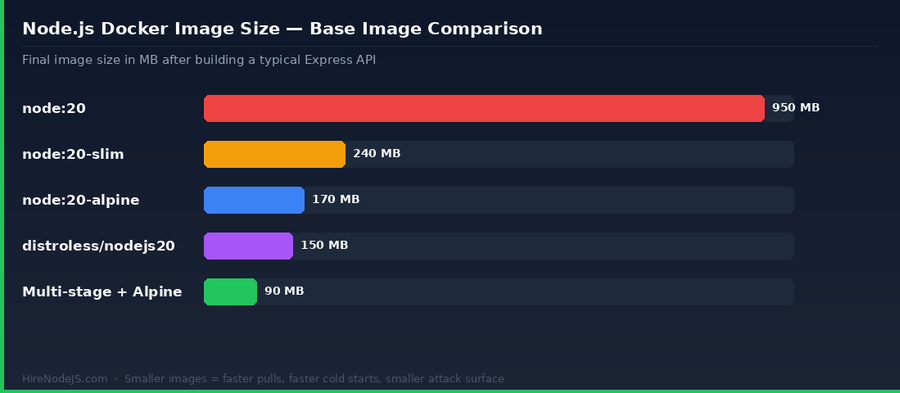
The base image is the single biggest lever you have on size, security, and build speed. There are four serious choices for Node.js workloads in 2026: the default Debian-based node:20, the slim variant, the Alpine variant, and Google's distroless image.
node:20 (Default Debian)
The default tag includes a full Debian userland — bash, apt, build tools, and a long list of system libraries. It is friendly to native modules and easy to debug, but the resulting image weighs in around 950 MB. That is bandwidth you pay for on every CI build, every autoscaler scale-out, and every cold start.
node:20-slim and node:20-alpine
node:20-slim trims to a minimal Debian (~80 MB base, ~240 MB after a typical Express app). node:20-alpine swaps in musl libc and BusyBox to reach ~40 MB base / ~170 MB after install. Alpine is the most popular choice — but musl can break native modules that assume glibc, so test bcrypt, sharp, and any C++ addons before committing.
Distroless
Google's gcr.io/distroless/nodejs20 strips the userland to almost nothing — no shell, no package manager. That is excellent for the attack surface but painful for debugging. Use distroless for the runtime stage of a multi-stage build once your Dockerfile is stable, not while you are still iterating.
Multi-Stage Builds: Cutting Image Size by 80%
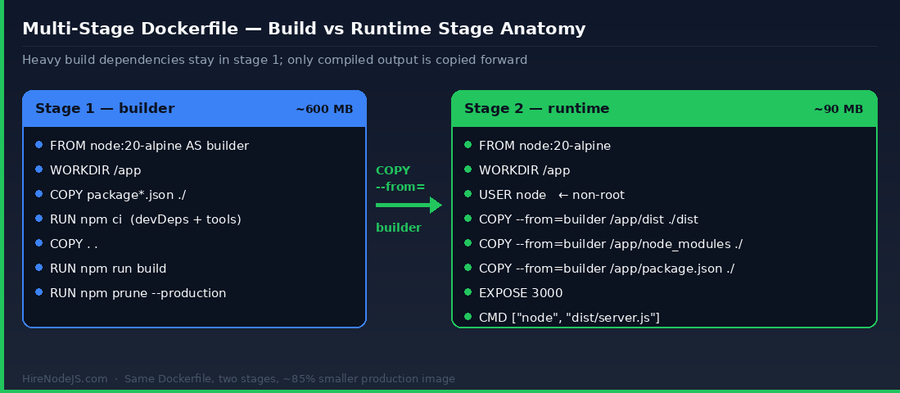
A multi-stage Dockerfile is two (or more) FROM blocks in the same file. The first stage compiles your TypeScript, runs your bundler, and installs everything you need to build. The second stage is a fresh, tiny runtime image that copies only the compiled output and the production node_modules from the build stage.
The win is dramatic: typical Node.js services drop from ~950 MB to ~90 MB. That is faster pulls in CI, faster cold starts in Lambda or Cloud Run, faster autoscaling under load, and a much smaller surface area for vulnerability scanners to flag. The first time a team adopts multi-stage builds, their average deploy time tends to drop by 30–60% with no other changes.
There is a second, less-obvious win: secrets hygiene. Anything you do in the build stage — including npm tokens passed in via build args — does not leak into the final image. Only the explicit COPY --from=builder lines reach production.
A Production-Grade Dockerfile, Annotated
The Dockerfile below is the pattern we recommend for any Node.js HTTP service in 2026. It is multi-stage, uses BuildKit cache mounts, runs as non-root, handles SIGTERM correctly via tini, and ships a healthcheck that orchestrators can use to detect a hung process. It also separates dependency-manifest copying from source copying so a code change does not invalidate the npm-install layer.
# syntax=docker/dockerfile:1.7

# ============ Stage 1: builder ============
FROM node:20-alpine AS builder
WORKDIR /app

# Install only dependency manifests first to maximize layer caching
COPY package*.json ./
COPY tsconfig*.json ./

# ci installs from lockfile and is much faster than install in CI
RUN --mount=type=cache,target=/root/.npm \
    npm ci

# Now copy source and build
COPY . .
RUN npm run build

# Drop devDependencies before we copy node_modules across
RUN npm prune --omit=dev

# ============ Stage 2: runtime ============
FROM node:20-alpine AS runtime
WORKDIR /app

# tini gives us proper PID 1 signal handling for graceful shutdowns
RUN apk add --no-cache tini

# Run as the built-in non-root user that the official image ships
USER node

ENV NODE_ENV=production \
    NODE_OPTIONS="--enable-source-maps" \
    PORT=3000

COPY --from=builder --chown=node:node /app/node_modules ./node_modules
COPY --from=builder --chown=node:node /app/dist         ./dist
COPY --from=builder --chown=node:node /app/package.json ./

EXPOSE 3000

# Healthcheck so orchestrators can detect a dead app, not just a dead container
HEALTHCHECK --interval=30s --timeout=3s --retries=3 \
  CMD wget --quiet --spider http://localhost:3000/healthz || exit 1

ENTRYPOINT ["/sbin/tini", "--"]
CMD ["node", "dist/server.js"]
A few details worth highlighting. The `--mount=type=cache` directive needs BuildKit (`DOCKER_BUILDKIT=1`, on by default in Docker 23+) and persists the npm cache across builds, which alone can cut CI time by 40%. The `tini` entrypoint matters because Node.js handles SIGTERM, but only if it actually receives it — without a proper PID 1, signals are silently dropped and Kubernetes will hard-kill your pod after the grace period.
Security Hardening: From Default to Audit-Ready
By default, containers run as root. That is a finding waiting to happen in any serious security review. The official node images ship a `node` user (UID 1000) for exactly this reason — `USER node` in your runtime stage costs you nothing and closes an entire class of escape vectors.
Hire Pre-Vetted Node.js Developers
Skip the months-long search. Our exclusive talent network has senior Node.js experts ready to join your team in 48 hours.
Run a vulnerability scanner on every push. Trivy, Grype, and Snyk all integrate with GitHub Actions in three lines of YAML. Treat HIGH and CRITICAL CVEs as build failures; treat MEDIUM as tickets. Pinning your base image by digest (`FROM node:20-alpine@sha256:…`) instead of by tag prevents silent base-image drift between builds.
Hardening goes beyond the Dockerfile: signed images via cosign, read-only root filesystems, and tight Pod Security Admission profiles in Kubernetes are all part of the same story. If you are running a non-trivial Node.js service in production and do not have a DevOps engineer who owns this end to end, you have an outage waiting to happen.
Build Performance: BuildKit, Caching, and CI
A slow Docker build is a slow feedback loop, and a slow feedback loop is the single biggest predictor of an unhappy team. The good news is that BuildKit (now the default) gives you most of what you need out of the box — you just need to structure the Dockerfile so it can actually use the cache.
Layer ordering is everything
Copy `package*.json` and run `npm ci` BEFORE you copy your source. That way, a code change reuses the cached install layer. Reverse that order and every commit reinstalls every dependency. This single mistake is responsible for more than half of the slow Node.js Docker builds we see in audits.
Cache mounts and registry caching
BuildKit cache mounts (`--mount=type=cache`) persist directories like `~/.npm` and `/app/node_modules/.cache` across builds. In CI, also enable registry-backed cache with `--cache-from type=registry,ref=…` and `--cache-to`. With both in place, a warm CI build of a 50-dependency Node.js service typically finishes in under 90 seconds.
Running Containers in Production: What You Actually Need to Care About
A great Dockerfile is wasted if the runtime configuration around it is wrong. Three things matter most for Node.js in production: signal handling, memory limits, and graceful shutdown.
Signal handling
Node.js will only run shutdown hooks if SIGTERM actually reaches it. Use tini (or the `--init` flag in plain Docker) so PID 1 forwards signals correctly. Then, in your code, listen for SIGTERM, stop accepting new requests, drain in-flight requests, close database connections, and exit. Anything less leaves connections hanging when Kubernetes rolls a deploy.
Memory limits
Set `--max-old-space-size` to roughly 75% of your container memory limit. Node does not auto-detect cgroup memory limits in older versions, and the V8 heap will happily grow until the OOM killer takes the process. With Node 20+ and the `NODE_OPTIONS` environment variable, this is a one-line fix.
Observability
Healthcheck endpoints, structured JSON logs to stdout, and OpenTelemetry traces are the three legs of the production tripod. The Dockerfile pattern above already wires up the healthcheck; the other two belong in your Node.js app code.
If your team is just getting started with containerized Node.js — or scaling up and finding that nobody owns the Docker layer — bringing in a senior engineer early pays for itself within weeks. Our hiring process is built around exactly this kind of specialist need: pre-vetted Node.js engineers, available within 48 hours, no recruiter fees.
Hire Expert Node.js Developers — Ready in 48 Hours
Building the right Docker setup is only half the battle — you need the right engineers to operate it. HireNodeJS.com specialises exclusively in Node.js talent: every developer is pre-vetted on real-world projects, multi-stage Dockerfiles, BuildKit-backed CI pipelines, and production deployments to Kubernetes, ECS, and Cloud Run.
Unlike generalist freelance platforms, our curated pool means you speak only to engineers who live and breathe Node.js. Most clients have their first developer working within 48 hours of getting in touch. Engagements start as short-term contracts and can convert to full-time hires with zero placement fee.
Final Thoughts
A production-grade Node.js Docker setup is not exotic — it is just disciplined. Multi-stage builds, an Alpine or distroless runtime, a non-root user, BuildKit cache mounts, a proper PID 1, and a healthcheck cover 90% of what auditors and SREs care about. Get those right and you will see deploy times drop, cold starts shrink, and security findings quietly disappear from your scanner reports.
The remaining 10% — distroless adoption, signed images with cosign, SBOM generation, Pod Security Admission profiles — is where senior DevOps-fluent Node.js engineers earn their fee. If you are at that stage, the patterns in this guide will get you started; the experience to operate them at scale is what HireNodeJS.com helps you find.
Frequently Asked Questions
Should I use Alpine or distroless for Node.js Docker images?
Alpine is the best general-purpose choice for Node.js — small (~170 MB), fast to build, and easy to debug. Switch to distroless for the runtime stage of a multi-stage build once your image is stable and you want a minimal attack surface. Test native modules (bcrypt, sharp) on musl before committing to Alpine.
How small can a Node.js Docker image realistically get in 2026?
A typical Express or Fastify API with about 50 dependencies can fit in roughly 90 MB using a multi-stage build on node:20-alpine, or about 60 MB with distroless. The hard floor is dictated by your node_modules; the runtime layer itself is only ~40 MB.
Why is my Node.js Docker build so slow?
Most slow Node.js builds reinstall dependencies on every commit because package.json is copied AFTER source files. Always COPY package*.json and run npm ci before COPY . . — that lets Docker cache the install layer. Then enable BuildKit cache mounts and CI registry caching for another 30–60% speedup.
Do I need multi-stage builds if I deploy to a serverless platform?
Yes. Cloud Run, Lambda container images, and Fly Machines all charge or throttle based on image size, and cold-start time scales directly with image size. A multi-stage build that drops your image from 950 MB to 90 MB will measurably improve cold-start latency on every serverless platform.
What is the right way to handle SIGTERM in a Dockerized Node.js app?
Use tini (or docker run --init) so signals reach Node.js as PID 1. Inside the app, listen for SIGTERM, stop accepting new requests, drain in-flight requests, close DB pools, and call process.exit(0). Without this, Kubernetes will hard-kill your pod after the grace period and active requests will fail.
How do I keep secrets out of my Node.js Docker image?
Never use ENV or COPY for secrets — anything baked in is permanently visible to anyone who pulls the image. Use BuildKit secret mounts (--mount=type=secret) for build-time tokens like npm credentials, and your orchestrators secret store (Kubernetes Secrets, AWS Secrets Manager) for runtime values.
Vivek Singh is the founder of Witarist and HireNodeJS.com — a platform connecting companies with pre-vetted Node.js developers. With years of experience scaling engineering teams, Vivek shares insights on hiring, tech talent, and building with Node.js.
Need a DevOps-savvy Node.js engineer?
HireNodeJS connects you with pre-vetted senior Node.js engineers fluent in Docker, BuildKit, and Kubernetes — available within 48 hours. No recruiter fees, no lengthy screening.