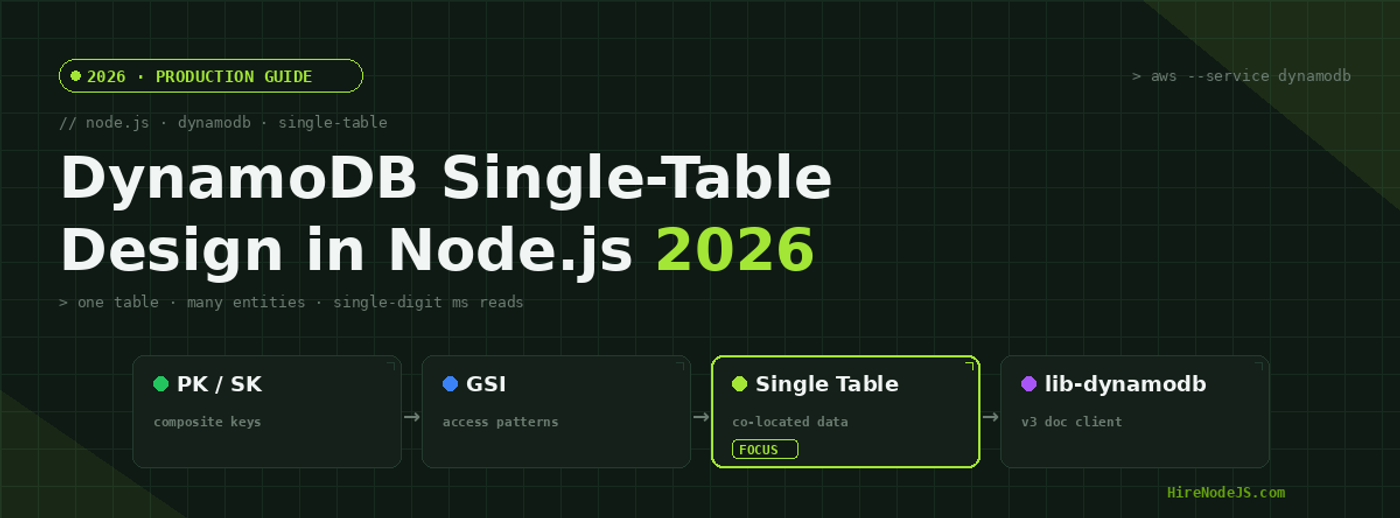
Node.js DynamoDB Single-Table Design: The 2026 Guide
Amazon DynamoDB has quietly become the default database for Node.js teams that need predictable, single-digit-millisecond reads at any scale. But the moment you move beyond a toy CRUD app, the same question surfaces: should every entity get its own table, or should everything live in one? In 2026, the answer that scales — and the one most senior AWS engineers reach for — is single-table design.
Single-table design feels alien if you come from PostgreSQL or MongoDB. You deliberately denormalize, you pre-join data at write time, and you model the table around access patterns instead of entities. Done well, it collapses an entire order page into one Query and keeps your tail latency flat as you grow from 10,000 to 50 million items. Done badly, it becomes an unmaintainable mess of opaque keys. This guide shows the production patterns that make it the former, with runnable Node.js code using the AWS SDK v3 document client.
Why Single-Table Design Wins in DynamoDB
Relational databases reward normalization: you split data into tables and let the query planner stitch it back together with joins. DynamoDB has no joins. Every cross-table read is a separate network round-trip, and round-trips are where latency and cost accumulate. Single-table design answers this by co-locating related items under the same partition key so a single Query returns everything an endpoint needs.
The item collection is the core idea
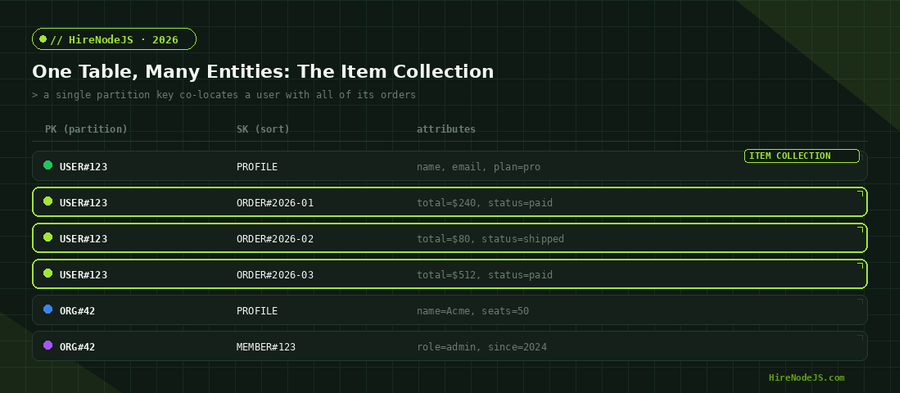
An item collection is the set of all items that share a partition key. If a user and all of their orders share the partition key USER#123, one Query against that partition returns the profile plus every order in a single call. DynamoDB reads items in sort-key order, so you can slice the collection — most recent orders first, a date range, or just the profile — without ever touching another table.
Fewer round-trips, lower tail latency
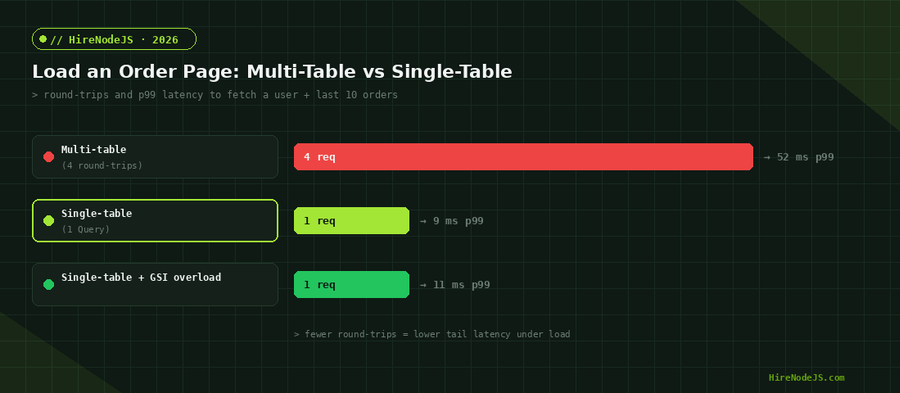
The practical payoff is operational. A normalized design might issue four calls to render an order page — fetch the user, fetch the orders, fetch line items, fetch the org. Each adds latency and a chance to fail. A single-table Query does it in one call, and because it touches one partition, p99 latency stays flat under load instead of compounding across services.
Start With Access Patterns, Not Entities
The cardinal rule of DynamoDB modeling is to write down every access pattern before you design a single key. Unlike SQL, you cannot bolt on an arbitrary query later without a new index. Your key schema is a direct encoding of how the application reads and writes.
List your queries first
For a SaaS app you might need: get a user by id, list a user's orders newest-first, get a single order, list members of an org, and look up an order by its external payment id. Each of these maps to a key condition. Write them as a table — pattern, partition key, sort key — and the schema designs itself.
Encode keys with typed prefixes
Use prefixes like USER#, ORDER#, and ORG# on both the partition and sort keys. Prefixes keep entity types from colliding in the same partition, make items self-describing during debugging, and let you Query a sub-range with begins_with. A sort key of ORDER#2026-01-15#a1b2 sorts chronologically for free because ISO dates are lexicographically ordered.
Implementing Single-Table Design in Node.js
The AWS SDK v3 document client (the @aws-sdk/lib-dynamodb package) marshals plain JavaScript objects to and from DynamoDB's wire format so you never hand-write attribute-value maps. If you are building this into a production service and want engineers who have shipped it before, you can hire backend developers who specialise in event-driven AWS architectures.
Set up the document client correctly
One gotcha bites every team migrating from SDK v2: the v3 document client no longer strips undefined values by default, so a missing optional field throws at write time. Always set removeUndefinedValues to true in marshallOptions. Here is a production-ready client and a single-table repository:
import { DynamoDBClient } from "@aws-sdk/client-dynamodb";
import {
  DynamoDBDocumentClient,
  PutCommand,
  QueryCommand,
  GetCommand,
} from "@aws-sdk/lib-dynamodb";

const base = new DynamoDBClient({ region: process.env.AWS_REGION });

// removeUndefinedValues avoids the classic v3 "undefined" write error.
export const ddb = DynamoDBDocumentClient.from(base, {
  marshallOptions: { removeUndefinedValues: true, convertClassInstanceToMap: true },
});

const TABLE = process.env.TABLE_NAME ?? "AppTable";

// Write a user profile and an order into the SAME item collection.
export async function saveOrder(userId, order) {
  await ddb.send(new PutCommand({
    TableName: TABLE,
    Item: {
      PK: `USER#${userId}`,
      SK: `ORDER#${order.createdAt}#${order.id}`,
      type: "ORDER",
      total: order.total,
      status: order.status,
      // GSI1 lets us look an order up by its payment id later.
      GSI1PK: `PAYMENT#${order.paymentId}`,
      GSI1SK: `ORDER#${order.id}`,
    },
  }));
}

// ONE round-trip: profile + the 10 most recent orders.
export async function getUserWithRecentOrders(userId) {
  const res = await ddb.send(new QueryCommand({
    TableName: TABLE,
    KeyConditionExpression: "PK = :pk AND begins_with(SK, :p)",
    ExpressionAttributeValues: { ":pk": `USER#${userId}`, ":p": "" },
    ScanIndexForward: false, // newest first
    Limit: 11,
  }));
  const items = res.Items ?? [];
  const profile = items.find((i) => i.type === "PROFILE");
  const orders = items.filter((i) => i.type === "ORDER");
  return { profile, orders };
}Secondary Indexes and the GSI Overloading Pattern
A single partition key cannot serve every query. Global Secondary Indexes (GSIs) give you alternate access patterns by projecting items under a different key. The advanced move — GSI overloading — reuses one GSI for many unrelated queries by giving its keys generic names like GSI1PK and GSI1SK and packing different entity types into them.
Hire Pre-Vetted Node.js Developers
Skip the months-long search. Our exclusive talent network has senior Node.js experts ready to join your team in 48 hours.
When to reach for a GSI
Add a GSI when you need to query an item by an attribute that is not its partition key — looking up an order by payment id, listing all paid orders across users, or finding members by email. Project only the attributes the query needs to keep index storage and write costs down; a KEYS_ONLY or INCLUDE projection is often far cheaper than ALL.
Common Pitfalls and How to Avoid Them
Never run a Scan in the hot path
A Scan reads every item and filters afterward, so its cost and latency grow with table size. The latency chart above shows a Scan at roughly 480ms against a table where a Query returns in 9ms. Scans are fine for occasional batch jobs; they are never acceptable on a request path. If you find yourself wanting a Scan, you are missing an access pattern and probably a GSI.
Keep items under control
DynamoDB reads whole items and applies projections afterward, and items are capped at 400KB. Large blobs belong in S3 with only a pointer stored in the table. Splitting a fat document into several items under the same partition key — a vertical partition — keeps individual reads cheap while preserving the single-Query benefit.
Modeling all of this in TypeScript pays off: a discriminated union per entity type plus a thin mapping layer catches malformed keys at compile time. Teams that pair single-table DynamoDB with strict Node.js typing ship far fewer data-shape bugs to production.
Migrating From Multi-Table or Relational Models
Most teams arrive at single-table design from somewhere else — a pile of DynamoDB tables, or a PostgreSQL schema they've outgrown for a specific high-throughput workload. The migration is rarely a big-bang rewrite; it's an incremental backfill behind a feature flag.
Backfill, dual-write, then cut over
Start by writing new data to both the old store and the new single table (dual-write). Backfill historical rows with a one-off job that transforms each record into its prefixed-key form. Once parity is verified, flip reads to the single table behind a flag, watch your metrics, and retire the old path. Keeping the rollback switch alive until you're confident is what separates a calm migration from a 2am incident.
If your current workload still lives in PostgreSQL and only one or two endpoints need DynamoDB's scale, a hybrid approach is perfectly valid — move just the hot path and leave the rest. Read how it works if you'd like a vetted engineer to scope the migration with you.
Single-table design has a real learning curve, and the cost of getting your key schema wrong is a painful re-model later. If you're building a DynamoDB-backed service and want it modeled right the first time, HireNodeJS connects you with pre-vetted senior engineers who've shipped single-table designs in production — available within 48 hours, without the recruiter overhead. For infra-heavy builds you can also hire DevOps engineers who'll handle capacity, autoscaling, and observability.
Hire Expert Node.js Developers — Ready in 48 Hours
Building the right system is only half the battle — you need the right engineers to build it. HireNodeJS.com specialises exclusively in Node.js talent: every developer is pre-vetted on real-world projects, API design, event-driven architecture, and production deployments on AWS.
Unlike generalist platforms, our curated pool means you speak only to engineers who live and breathe Node.js and DynamoDB. Most clients have their first developer working within 48 hours of getting in touch. Engagements start as short-term contracts and can convert to full-time hires with zero placement fee.
Conclusion: Model for Reads, Scale Without Surprises
Single-table design is DynamoDB working as intended. By co-locating related items, encoding access patterns into prefixed keys, and reaching for overloaded GSIs instead of new tables, you trade a steeper upfront modeling effort for reads that stay fast and cheap no matter how large the table grows. The discipline is in the planning: list your access patterns, design keys to serve them, and never let a Scan reach the request path.
Get the foundations right — the document client configuration, prefixed keys, transactions for consistency, and Streams for downstream sync — and you'll have a backend that handles millions of items with predictable single-digit-millisecond latency. That predictability, more than raw speed, is why single-table DynamoDB remains a default choice for serious Node.js teams in 2026.
Frequently Asked Questions
What is single-table design in DynamoDB?
Single-table design stores multiple entity types in one DynamoDB table, using composite partition and sort keys to co-locate related items. This lets a single Query return everything an endpoint needs, optimizing for DynamoDB's lack of joins.
Is single-table design always the right choice?
No. It shines when you have well-understood access patterns and need predictable low-latency reads at scale. For exploratory workloads with shifting query needs, a multi-table or relational model offers more flexibility. Match the pattern to the workload.
How do I look up data by a non-key attribute in DynamoDB?
Create a Global Secondary Index (GSI) keyed on that attribute. The GSI overloading pattern reuses one GSI with generic key names (GSI1PK, GSI1SK) to serve several unrelated queries, keeping index count and cost low.
Why does my AWS SDK v3 DynamoDB write throw on undefined values?
The v3 document client no longer strips undefined values by default. Set removeUndefinedValues to true in marshallOptions when creating the DynamoDBDocumentClient, and the error goes away.
Should I ever use Scan in production?
Avoid Scan on the request path — it reads the whole table and its latency grows with size. Scans are acceptable only for occasional batch jobs. If you need a Scan for a user-facing query, you're missing an access pattern and likely a GSI.
How much does it cost to hire a Node.js DynamoDB developer in 2026?
Rates vary by region and seniority, typically ranging from $40–$90/hour for senior backend engineers with AWS experience. HireNodeJS provides pre-vetted Node.js developers available within 48 hours with no recruiter fees.
Vivek Singh is the founder of Witarist and HireNodeJS.com — a platform connecting companies with pre-vetted Node.js developers. With years of experience scaling engineering teams, Vivek shares insights on hiring, tech talent, and building with Node.js.
Need a Node.js engineer who can model DynamoDB at scale?
HireNodeJS connects you with pre-vetted senior Node.js + AWS engineers who've shipped single-table designs in production — available within 48 hours. No recruiter fees, no lengthy screening.