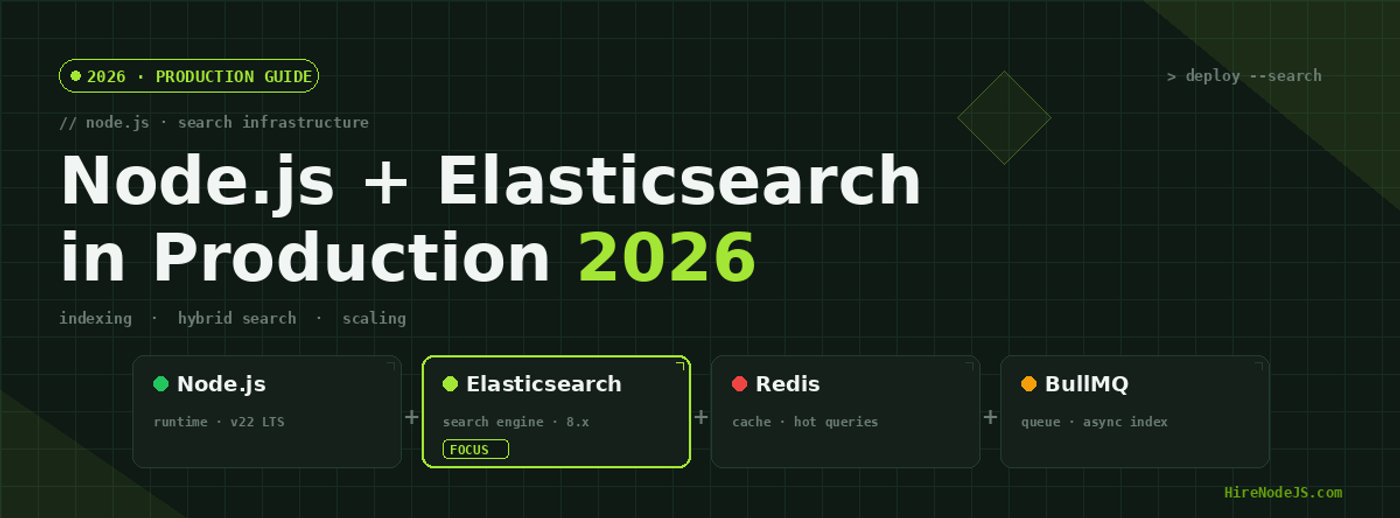
Node.js + Elasticsearch in 2026: Production Search Architecture
Search is one of those features users only notice when it breaks. They type a few characters, expect relevant results in under 100ms, and tolerate nothing else. In 2026, building production search on Node.js means choosing the right index, the right cache, and the right architecture for your scale — and getting any one of these wrong shows up as bounced sessions and abandoned carts.
This guide walks through a battle-tested Node.js + Elasticsearch architecture: how to model documents, index efficiently with BullMQ, design relevant queries with BM25 and kNN, and cache the hot path in Redis. If you'd rather skip the build phase and hire pre-vetted Node.js engineers who've shipped search at scale, that's an option too — but the patterns below work whether you build or buy.
Why Elasticsearch Still Wins for Node.js Search in 2026
Algolia is faster to deploy. Meilisearch is friendlier to self-host. Typesense is cheaper at small scale. So why does Elasticsearch keep winning enterprise Node.js workloads in 2026? Three reasons: query expressiveness (compound queries, function scoring, percolators), operational maturity (rolling indices, snapshots, cross-cluster replication), and the recent integration of dense vector search via the kNN API — which means you can run BM25 + semantic re-ranking on the same cluster without bolting on a separate vector DB.
When Elasticsearch is the wrong choice
If your corpus is under 100K documents and you don't need facets, Postgres full-text search is fine. If you need millisecond-latency typeahead with zero ops, Algolia or Typesense will save you weeks. Elasticsearch is the answer when you're indexing millions of documents, need rich aggregations, want self-hosted control, or are building hybrid search (lexical + semantic).
The Node.js client landscape
Use the official @elastic/elasticsearch client (v8+). It's TypeScript-first, supports request cancellation, has built-in connection pooling, and the response types match the real ES API. Avoid the deprecated `elasticsearch` package — it's been EOL since 2021.
Index Design That Ages Well
Index mappings are the schema you can't easily change. Once you've ingested 50M documents, re-indexing to add a single nested field can take days. Build mappings like you'd build a database schema — explicit field types, no `dynamic: true` in production, and version your indices.
Use index aliases — always
Never let Node.js code reference a real index name like `products_v1`. Always reference an alias (`products`) that points to the real index. When you need to re-index — and you will — you write to a new index, then atomically flip the alias. Zero downtime, zero deploy required.
import { Client } from '@elastic/elasticsearch';

const es = new Client({ node: process.env.ES_URL, auth: { apiKey: process.env.ES_API_KEY } });

// Create a versioned index
await es.indices.create({
  index: 'products_v3',
  settings: {
    number_of_shards: 3,
    number_of_replicas: 1,
    analysis: {
      analyzer: {
        product_search: {
          type: 'custom',
          tokenizer: 'standard',
          filter: ['lowercase', 'asciifolding', 'edge_ngram_2_15']
        }
      },
      filter: {
        edge_ngram_2_15: { type: 'edge_ngram', min_gram: 2, max_gram: 15 }
      }
    }
  },
  mappings: {
    dynamic: 'strict',
    properties: {
      sku:         { type: 'keyword' },
      name:        { type: 'text', analyzer: 'product_search', search_analyzer: 'standard' },
      description: { type: 'text' },
      price_cents: { type: 'integer' },
      tags:        { type: 'keyword' },
      embedding:   { type: 'dense_vector', dims: 1024, similarity: 'cosine' },
      created_at:  { type: 'date' }
    }
  }
});

// Atomic alias swap — zero downtime
await es.indices.updateAliases({
  actions: [
    { remove: { index: 'products_v2', alias: 'products' } },
    { add:    { index: 'products_v3', alias: 'products' } }
  ]
});Bulk Indexing With BullMQ — The Right Way
Indexing one document per HTTP request is the most common Node.js search bug we see. Each ES `index` call is a network round-trip plus a refresh — at 100 docs/sec, you're crushing the cluster's CPU and the producer's event loop. The fix is the bulk API plus an async queue.
The producer side: enqueue, don't index
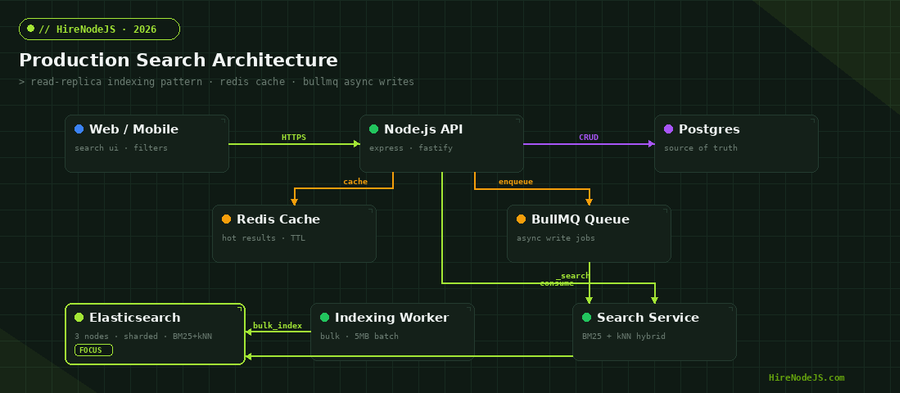
Your Node.js API should never call ES directly during a write request. Push the document to a BullMQ queue backed by Redis, return 202 to the client, and let a worker process do the indexing. This isolates write latency from search-cluster health and lets you absorb traffic spikes.
import { Queue, Worker } from 'bullmq';
import { Client } from '@elastic/elasticsearch';

const queue = new Queue('product-index', { connection: { host: 'redis', port: 6379 } });
const es = new Client({ node: process.env.ES_URL });

// PRODUCER (inside your API)
export async function enqueueIndex(product) {
  await queue.add('upsert', product, { attempts: 5, backoff: { type: 'exponential', delay: 1000 } });
}

// CONSUMER (separate process)
new Worker('product-index', async (job) => {
  // Buffer 500 jobs OR 5MB and flush — whichever comes first
  const batch = await drainBatch(job, { maxJobs: 500, maxBytes: 5_000_000 });
  const ops = batch.flatMap(p => [
    { index: { _index: 'products', _id: p.sku } },
    p
  ]);
  const result = await es.bulk({ operations: ops, refresh: false });
  if (result.errors) {
    const failed = result.items.filter(i => i.index?.error);
    console.error('bulk failures:', failed.length);
    throw new Error('partial bulk failure'); // BullMQ will retry
  }
}, { connection: { host: 'redis', port: 6379 }, concurrency: 4 });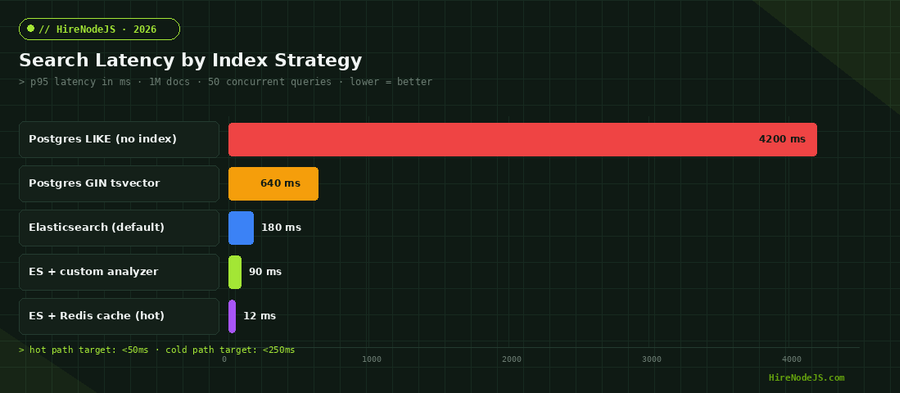
Query Design: BM25, Boosting, and Hybrid Search
Hire Pre-Vetted Node.js Developers
Skip the months-long search. Our exclusive talent network has senior Node.js experts ready to join your team in 48 hours.
A query that returns the 'right' result is worth more than one that returns it 10ms faster. Most production search bugs are relevance bugs — the cluster is healthy, the latency is fine, but users say 'it didn't find what I was looking for'. Solve relevance with field boosting, function scoring, and (in 2026) a kNN re-rank pass.
A real product-search query
const result = await es.search({
  index: 'products',
  query: {
    bool: {
      should: [
        { match: { name: { query, boost: 3, fuzziness: 'AUTO' } } },
        { match: { description: { query, boost: 1 } } },
        { term:  { tags: { value: query.toLowerCase(), boost: 2 } } }
      ],
      filter: [
        { term: { in_stock: true } },
        { range: { price_cents: { gte: minPrice, lte: maxPrice } } }
      ]
    }
  },
  knn: queryEmbedding ? {
    field: 'embedding',
    query_vector: queryEmbedding,
    k: 50,
    num_candidates: 200,
    boost: 0.4
  } : undefined,
  size: 24,
  _source: ['sku', 'name', 'price_cents', 'image_url']
});
Why hybrid (BM25 + kNN) wins
BM25 nails exact-keyword matches. kNN over an embedding (generate with OpenAI's `text-embedding-3-small` or any open model) catches semantic matches the keyword query misses — searches for 'red dress' returning 'crimson gown'. We covered the embedding side in our Node.js + OpenAI guide.
Scaling Reads, Writes, and the Cluster Itself
Elasticsearch doesn't scale 'automatically'. You have to decide on shard count at index creation, plan replicas based on read concurrency, and split hot indices once they cross ~50GB. Here's the playbook we use in production.
Sharding rules of thumb
Start with one primary shard per node, capped at 50GB per shard. For a 3-node cluster with 60GB of data, that's 3 primaries + 1 replica each = 6 shards total. Add nodes (and reshard via the split API) once any shard tops 50GB or any node tops 75% disk. Resist the urge to over-shard — every empty shard still has memory and file-handle overhead.
Read scaling: replicas + Redis cache
Replicas serve reads. Add a replica per node you add. For the truly hot queries — the top 5% of search terms that drive 60% of traffic — cache the response in Redis with a 60-second TTL. We covered the full caching pattern in our Node.js caching guide.
Observability: Knowing When Search Is About to Break
Elasticsearch fails in slow, painful ways. Disk fills up, GC pauses creep up, the indexing queue backs up — none of these throw an obvious error. By the time users complain, you've been broken for hours. The fix is instrumented dashboards on the four metrics that matter.
The four metrics that matter
Track these via OpenTelemetry with Datadog or Grafana: (1) p95 search latency by index, (2) bulk indexing rejection rate, (3) JVM heap usage per data node, and (4) BullMQ queue depth. Alert on the second derivative — sudden upward trends — not on absolute thresholds.
Hire Expert Node.js Developers — Ready in 48 Hours
Building a search system that performs at scale isn't just a code problem — it's a design problem, an ops problem, and a relevance-tuning problem. HireNodeJS.com specialises exclusively in Node.js engineers, and many of them have shipped Elasticsearch, OpenSearch, or vector-search workloads in production. Every developer is pre-vetted on real-world projects, query design, and indexing patterns.
Unlike generalist platforms, our curated pool means you speak only to engineers who live and breathe Node.js. Most clients have their first developer working within 48 hours of getting in touch. Engagements start as short-term contracts and can convert to full-time hires with zero placement fee.
Wrapping Up
A production-grade Node.js + Elasticsearch stack in 2026 has four moving parts: explicit mappings with versioned aliases, async bulk indexing through BullMQ, hybrid BM25 + kNN queries, and Redis-cached hot paths. Get those right and you'll comfortably serve sub-50ms searches at millions-of-documents scale.
Start with a single index, three shards, one replica, and a single worker process. Layer in caching, kNN re-ranking, and observability as load grows. Avoid the trap of premature optimisation — most teams need better mappings far more than they need a bigger cluster.
Frequently Asked Questions
Should I use Elasticsearch or OpenSearch with Node.js in 2026?
OpenSearch is API-compatible with Elasticsearch 7.10 and is a strong choice if you want fully Apache 2.0 licensing. Elasticsearch (post-Elastic License v2 change) gives you newer features faster — including the dense_vector kNN improvements and ELSER. For most Node.js teams, either works; pick based on your licensing posture.
How many shards should my Elasticsearch index have?
Start with one shard per data node, sized to keep each shard under 50GB. A 3-node cluster typically runs 3 primary shards + 1 replica each. Resharding is expensive, so be conservative — you can split shards later if needed.
Do I really need BullMQ between Node.js and Elasticsearch?
Yes for any write-heavy system. Indexing inside the API request couples search-cluster latency to user-facing write latency, and you lose retry semantics. BullMQ buys you backpressure, retries, and the ability to bulk-index multiple documents per ES round-trip.
When should I add kNN/vector search to my Node.js app?
Add kNN once your BM25 queries are returning factually relevant results but missing semantic matches — searches for "red dress" not finding "crimson gown". Generate embeddings via OpenAI text-embedding-3-small and run them as a re-rank stage on the top 50 BM25 hits, not the full corpus.
How much does it cost to hire a Node.js developer with Elasticsearch experience in 2026?
Senior Node.js engineers with production Elasticsearch experience run $80–$140/hour for contract work in 2026, depending on region. HireNodeJS.com offers pre-vetted Node.js + search specialists at competitive rates with no recruiter fees.
Can I use Elasticsearch with TypeScript?
Yes — the official @elastic/elasticsearch client is TypeScript-first, with full request and response typings generated from the ES API specification. Combined with Zod validation on the consumer side, you get end-to-end type safety from API request to indexed document.
Vivek Singh is the founder of Witarist and HireNodeJS.com — a platform connecting companies with pre-vetted Node.js developers. With years of experience scaling engineering teams, Vivek shares insights on hiring, tech talent, and building with Node.js.
Need a Node.js Developer Who's Shipped Elasticsearch?
HireNodeJS connects you with pre-vetted senior Node.js engineers experienced in Elasticsearch, OpenSearch, and vector search at scale — available within 48 hours. No recruiter fees, no lengthy screening.