Node.js ESM Migration in 2026: CommonJS to ES Modules
For most of Node.js history, require() was the only way to load a module. That era is over. As of 2026, ES Modules (ESM) are the default module system in the Node.js ecosystem: the majority of actively maintained npm packages ship native ESM builds, modern tooling assumes import/export, and several popular libraries now publish ESM-only releases that simply cannot be require()d. If your codebase is still CommonJS, you are increasingly swimming against the current.
Migrating from CommonJS to ES Modules is not a cosmetic find-and-replace. It changes how modules load, how files resolve, how you access __dirname, and how your build and test tooling behaves. Done carelessly, an ESM migration breaks production at 2am. Done in phases, it is one of the safest large refactors you can run — reversible at every checkpoint and shippable the whole way through. This guide walks the full path, the traps that bite, and the tooling that makes it painless.
Why ESM Is the Default in 2026
The pressure to migrate is no longer theoretical. Major libraries — including widely used packages for HTTP, testing, and utilities — have shipped ESM-only major versions. When you pin to an old CommonJS-compatible release to avoid the work, you forfeit security patches, performance improvements, and new features. The cost of staying on CommonJS compounds quietly until a CVE forces an emergency upgrade.
Beyond ecosystem pressure, ESM unlocks real capabilities. Static import/export syntax enables effective tree-shaking, so bundlers can drop dead code your CommonJS build always carried. Top-level await lets a module initialise asynchronous resources — a database pool, a secrets fetch — without the wrapper IIFE dance. And import.meta gives you structured metadata that the old __dirname/__filename globals never could.
The ecosystem signal
Adoption tells the story better than any argument. The share of the most-depended-upon npm packages shipping a native ESM build has climbed every year and now sits near 90%. When the libraries you depend on are ESM-first, staying CommonJS means living in a compatibility shim indefinitely.
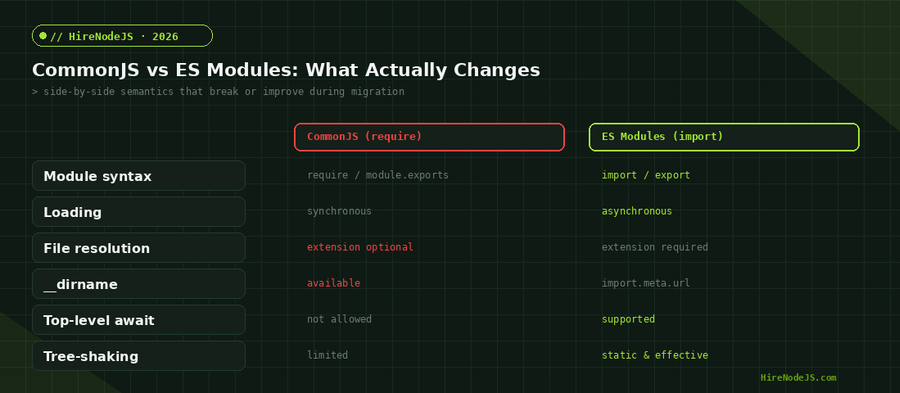
CommonJS vs ESM: The Differences That Bite
It helps to think of CommonJS as imperative and ESM as declarative. A CommonJS module runs top to bottom, executing require() calls as it reaches them, so a module can decide at runtime which dependency to pull in. An ES module declares its imports up front, before any code runs, which is precisely what lets the engine analyse and optimise the graph — but it also means you cannot conditionally import at the top level. Conditional or lazy loading moves to dynamic import(), which returns a promise.
On the surface, ESM looks like CommonJS with nicer syntax. Underneath, the loading model is fundamentally different, and that difference is where migrations go wrong. CommonJS loads modules synchronously and resolves them at runtime; ESM resolves the full dependency graph statically and loads asynchronously. That single change ripples into dynamic requires, conditional imports, and circular dependencies.
File resolution also tightens. In ESM, relative imports must include the file extension — import './util.js', not import './util'. Directory index resolution and extension guessing are gone. This trips up nearly every first migration, because CommonJS quietly let you omit extensions for years.
The globals that disappear
__dirname and __filename do not exist in an ES module. require, module, and exports are likewise absent. Code that reads files relative to its own location, or that lazily requires a module inside a function, needs rewriting against import.meta.url and dynamic import(). We cover the exact replacements below.
The 4-Phase Migration Path
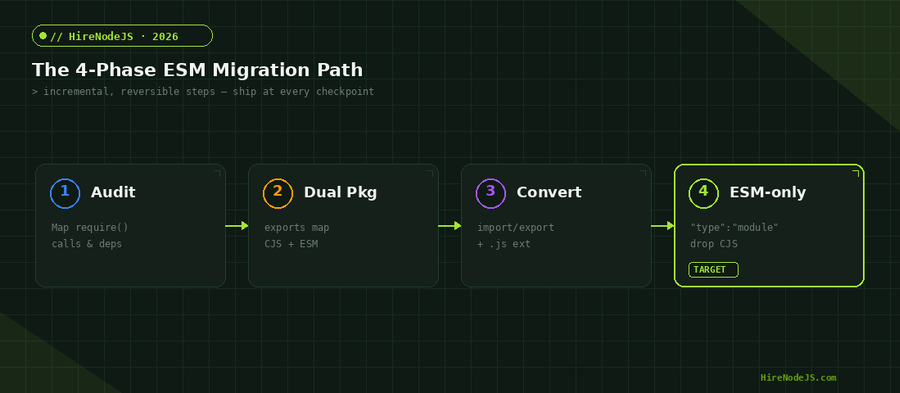
Treat the migration as four reversible phases rather than one big-bang switch. Each phase ships independently, so you never have a long-lived branch diverging from main. If something breaks, you roll back one phase, not the whole effort.
Phase 1 audits your require() usage and dependencies — flag any CommonJS-only packages and dynamic requires. Phase 2 introduces a dual-package exports map so the same package serves both module systems during the transition. Phase 3 converts source files to import/export with explicit extensions. Phase 4 flips package.json to "type": "module", drops the CommonJS build, and deletes the shims.
Why a phased approach wins
Big-bang migrations fail because they create a long-lived branch that drifts from main while the rest of the team keeps shipping. By the time you try to merge, hundreds of files have changed underneath you and the conflicts are unmanageable. A phased migration keeps every change small and on the trunk: each phase is a normal pull request, reviewed and deployed like any other, and your test suite proves the system still works before the next phase begins.
Phase 2: the dual-package exports map
The exports field lets one package expose both an ESM and a CommonJS entry point. Consumers on either system resolve to the right build automatically. This is the bridge that lets you migrate a library without a breaking major version.
{
  "name": "@acme/toolkit",
  "version": "3.0.0",
  "type": "module",
  "exports": {
    ".": {
      "import": "./dist/esm/index.js",
      "require": "./dist/cjs/index.cjs",
      "types": "./dist/index.d.ts"
    }
  },
  "main": "./dist/cjs/index.cjs",
  "module": "./dist/esm/index.js"
}
Handling the Tricky Parts
Hire Pre-Vetted Node.js Developers
Skip the months-long search. Our exclusive talent network has senior Node.js experts ready to join your team in 48 hours.
Three patterns account for most of the manual work in a migration: replacing __dirname, importing JSON, and calling code that only exists as CommonJS. None are hard once you know the replacement, but each appears dozens of times across a real codebase.
For path resolution, derive the directory from import.meta.url. For JSON, use an import attribute. For a stubborn CommonJS-only dependency, createRequire gives you a require() function inside an ES module without abandoning the migration.
import { fileURLToPath } from 'node:url';
import { dirname, join } from 'node:path';
import { createRequire } from 'node:module';

// __dirname replacement
const __dirname = dirname(fileURLToPath(import.meta.url));
const configPath = join(__dirname, 'config', 'default.json');

// JSON import via import attributes (Node 22+)
import pkg from './package.json' with { type: 'json' };
console.log(`Running ${pkg.name}@${pkg.version}`);

// Interop with a CommonJS-only dependency
const require = createRequire(import.meta.url);
const legacy = require('some-cjs-only-package');

// Top-level await: no IIFE wrapper needed
const db = await connectToDatabase(configPath);
export { db };Tooling and TypeScript in an ESM World
Your runtime is only half the story; the build and test toolchain has to agree. In 2026, Node.js can run TypeScript directly via type stripping, and lightweight loaders like tsx make local development a non-event. The key is to keep moduleResolution and module settings aligned with how the code actually ships.
Bundlers matter here too. If you ship a library, tree-shaking only works for your consumers when you publish real ESM with static imports — re-exporting everything through a barrel file can defeat it. Audit your public entry points and prefer named exports over a single default object so downstream bundlers can drop what nobody uses.
TypeScript configuration
Set "module": "nodenext" and "moduleResolution": "nodenext" in tsconfig so the compiler enforces ESM rules — including the requirement to write explicit .js extensions in your TypeScript import paths (yes, .js even though the source is .ts). This feels odd at first but matches what Node resolves at runtime.
{
  "compilerOptions": {
    "module": "nodenext",
    "moduleResolution": "nodenext",
    "target": "es2023",
    "strict": true,
    "verbatimModuleSyntax": true,
    "outDir": "dist"
  }
}Common Migration Pitfalls and How to Avoid Them
A subtler trap is the difference in how the two systems treat the module's default export. A CommonJS module.exports = fn becomes the default export under Node's interop, so import x from 'pkg' gets the function — but named imports may resolve to undefined because the static analyser cannot see properties attached at runtime. When a freshly migrated import looks empty, this interop mismatch is usually why.
The single most common failure is the missing file extension in relative imports. The second is assuming a dependency is ESM-ready when it ships CommonJS-only — always check the package's exports field before you convert the code that uses it. If your team is short on bandwidth for this kind of careful refactor, it is often faster to hire a Node.js developer who has run an ESM migration before than to learn the failure modes in production.
Circular dependencies behave differently under ESM. Because the graph resolves statically, a cycle that silently returned a half-initialised object in CommonJS may now surface as undefined at the top of a module. ESM makes these bugs visible, which is good — but it means a migration is a great time to untangle the cycles your CommonJS build was hiding.
Mixed-format monorepos add another wrinkle: a CommonJS package importing an ESM-only package must use dynamic import(). Plan your conversion order so leaf packages migrate first and consumers follow. For teams building heavily typed services, pairing the migration with a TypeScript tightening pass pays off, and a strong backend developer can do both in one sweep.
An ESM migration is exactly the kind of project where experience compounds: someone who has done it before avoids the extension traps, the circular-dependency surprises, and the test-tooling mismatches that cost days. If you are planning a migration and want it done right the first time, HireNodeJS connects you with pre-vetted senior Node.js engineers available within 48 hours — without the recruiter overhead.
Hire Expert Node.js Developers — Ready in 48 Hours
Building the right system is only half the battle — you need the right engineers to build it. HireNodeJS.com specialises exclusively in Node.js talent: every developer is pre-vetted on real-world projects, module systems, API design, and production deployments — including hands-on ESM migrations.
Unlike generalist platforms, our curated pool means you speak only to engineers who live and breathe Node.js. Most clients have their first developer working within 48 hours of getting in touch. Engagements start as short-term contracts and can convert to full-time hires with zero placement fee.
Conclusion: Migrate in Phases, Ship the Whole Way
ESM is no longer the future of Node.js — it is the present default, and the cost of staying on CommonJS rises every quarter as libraries go ESM-only. The good news is that the migration is one of the most controllable large refactors you can run. Audit first, bridge with a dual-package exports map, convert with explicit extensions, then flip to ESM-only and delete the shims.
Get the file extensions right, replace __dirname with import.meta.url, align your TypeScript and test tooling with how the code actually ships, and run each phase as an independent, reversible release. Do that and your team lands on modern, tree-shakeable, top-level-await-ready Node.js without a single 2am incident.
Frequently Asked Questions
What is the difference between CommonJS and ES Modules in Node.js?
CommonJS uses require() and module.exports and loads modules synchronously at runtime. ES Modules use import/export, load asynchronously, resolve the dependency graph statically, and require explicit file extensions. ESM also enables tree-shaking and top-level await.
How do I replace __dirname when migrating to ESM?
Derive it from import.meta.url: const __dirname = dirname(fileURLToPath(import.meta.url)). Both fileURLToPath and dirname come from node:url and node:path. __dirname and __filename do not exist in ES modules.
Can I still use require() inside an ES module?
Not directly — require, module, and exports are undefined in ESM scope. If you must load a CommonJS-only package, create a require function with createRequire(import.meta.url) and use that explicitly.
Do I have to convert my whole codebase to ESM at once?
No. Migrate in phases: audit dependencies, ship a dual-package exports map, convert files to import/export with explicit extensions, then flip package.json to type:module. Each phase is independently shippable and reversible.
How long does a Node.js ESM migration take?
It depends on codebase size and dependency health, but a phased migration of a mid-sized service typically takes a few days to a couple of weeks. Most time goes to fixing missing file extensions, __dirname usage, and any CommonJS-only dependencies.
Should I use ESM-only or a dual package?
For applications, go ESM-only once your dependencies support it. For libraries with external consumers still on CommonJS, ship a dual package via the exports map until your audience has migrated, then drop the CommonJS build.
Vivek Singh is the founder of Witarist and HireNodeJS.com — a platform connecting companies with pre-vetted Node.js developers. With years of experience scaling engineering teams, Vivek shares insights on hiring, tech talent, and building with Node.js.
Planning an ESM migration? Hire a Node.js expert who's done it before.
HireNodeJS connects you with pre-vetted senior Node.js engineers available within 48 hours — developers who have shipped CommonJS-to-ESM migrations without breaking production. No recruiter fees, no lengthy screening.