Node.js Horizontal Scaling: Clustering, Load Balancing & Auto-Scaling Guide 2026
Node.js runs on a single thread by default, which means a vanilla Express or Fastify server uses exactly one CPU core no matter how many your machine has. For a weekend project that is fine, but the moment real traffic hits — thousands of concurrent connections, CPU-bound middleware, or bursty webhook payloads — that single thread becomes the ceiling. Horizontal scaling removes the ceiling by distributing work across multiple processes, multiple servers, and ultimately across auto-scaling container clusters.
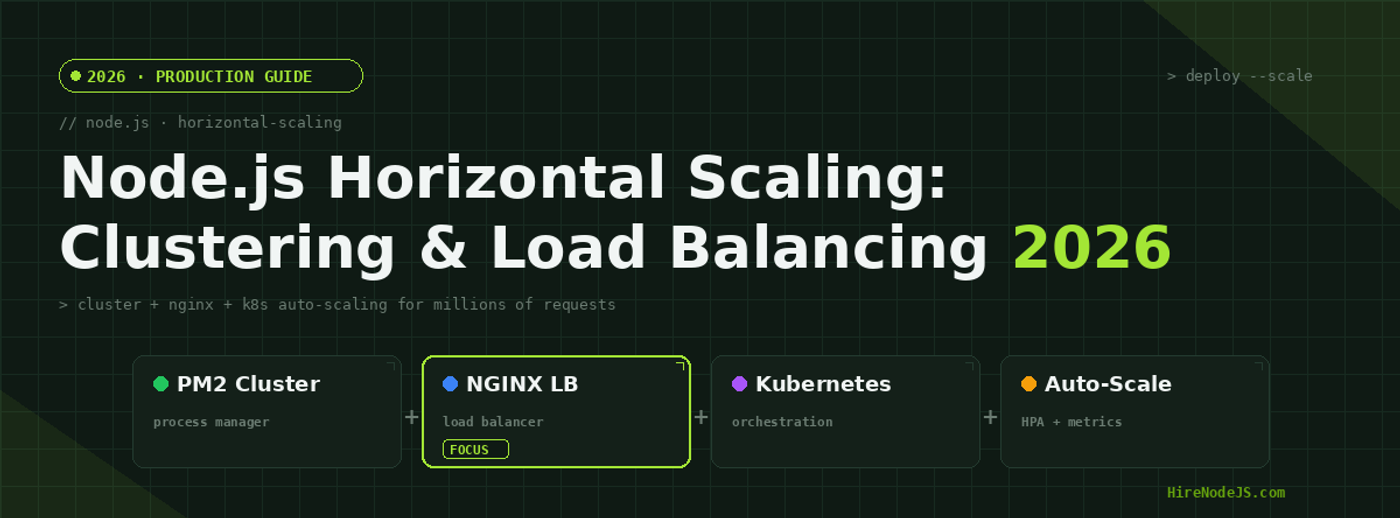
In this guide we walk through every layer of Node.js horizontal scaling: the built-in cluster module, PM2 process management, NGINX load balancing across servers, and Kubernetes auto-scaling with the Horizontal Pod Autoscaler. Whether you are a startup deploying your first production API or a team lead planning capacity for millions of requests, these patterns will help you hire the right Node.js engineers and ship resilient infrastructure.
Why Horizontal Scaling Matters for Node.js
Vertical scaling — adding more RAM or a faster CPU to a single server — has hard physical limits and gets expensive quickly. Horizontal scaling, on the other hand, adds more servers or containers behind a load balancer. Each new node is a commodity unit: if one crashes, the others absorb traffic. This pattern also unlocks geographic distribution, blue-green deployments, and canary releases, all of which are essential for modern production workloads.
The Single-Thread Bottleneck
Node.js uses libuv to handle asynchronous I/O efficiently, but any synchronous computation — JSON parsing large payloads, bcrypt hashing, image resizing — blocks the event loop and stalls every other request queued behind it. Clustering lets you fork multiple worker processes that each get their own event loop, effectively turning an 8-core machine into eight independent Node.js servers sharing a single port.
When to Scale Out vs Scale Up
Scale up vertically when your bottleneck is memory or single-request latency on a CPU-bound task. Scale out horizontally when you need higher aggregate throughput, fault tolerance, or zero-downtime deployments. In practice, most production Node.js systems do both: they run PM2 in cluster mode to use all cores on each machine, then add machines behind NGINX or an AWS Application Load Balancer for true horizontal scaling.
The Node.js Cluster Module — Your First Scaling Layer
The cluster module is built into Node.js and requires zero external dependencies. The primary process forks worker processes — one per CPU core is the standard recommendation. Each worker runs its own instance of your application and has its own V8 heap. The operating system distributes incoming connections across workers using a round-robin algorithm on Linux and a load-aware algorithm on Windows.
Basic Cluster Implementation
import cluster from 'node:cluster';
import { availableParallelism } from 'node:os';
import express from 'express';

const numCPUs = availableParallelism();

if (cluster.isPrimary) {
  console.log(`Primary ${process.pid} forking ${numCPUs} workers`);

  for (let i = 0; i < numCPUs; i++) {
    cluster.fork();
  }

  cluster.on('exit', (worker, code) => {
    console.warn(`Worker ${worker.process.pid} exited (code ${code}). Restarting...`);
    cluster.fork(); // auto-restart crashed workers
  });
} else {
  const app = express();

  app.get('/health', (req, res) => res.json({ pid: process.pid, uptime: process.uptime() }));

  app.get('/api/data', async (req, res) => {
    // Each worker handles requests independently
    const result = await fetchFromDatabase();
    res.json(result);
  });

  app.listen(3000, () => console.log(`Worker ${process.pid} listening on :3000`));
}Graceful Shutdown in Clustered Mode
When deploying new code you need workers to finish in-flight requests before exiting. Send a SIGTERM to each worker, let it close its HTTP server with server.close(), drain connections, then exit. The primary process forks fresh workers in sequence — this gives you zero-downtime rolling restarts without an external orchestrator.
PM2 Cluster Mode — Production-Grade Process Management
While the raw cluster module works, most production teams use PM2 because it adds log aggregation, monitoring, startup scripts, and zero-downtime reloads out of the box. Combined with Node.js observability tools, PM2 gives you full visibility into every worker process.
PM2 Ecosystem Configuration
Define an ecosystem.config.cjs file at the root of your project. Set instances to max to automatically fork one worker per available core. The watch and max_memory_restart options are invaluable for development and for guarding against memory leaks in production respectively.
Zero-Downtime Reloads
Running pm2 reload app-name gracefully restarts workers one at a time. PM2 waits for a listen event from the new worker before killing the old one, guaranteeing that at least N-1 workers are always serving traffic. For large deployments, set listen_timeout and kill_timeout in your ecosystem config to control how long PM2 waits at each step.
NGINX Load Balancing Across Multiple Servers
Hire Pre-Vetted Node.js Developers
Skip the months-long search. Our exclusive talent network has senior Node.js experts ready to join your team in 48 hours.
Once a single server running PM2 cluster mode cannot handle the load, the next step is horizontal scaling across multiple machines. NGINX acts as a reverse proxy and load balancer, distributing incoming requests across an upstream pool of Node.js servers. This layer also handles SSL termination, static asset serving, and HTTP/2 multiplexing — offloading work from your application servers.
Load Balancing Strategies
NGINX supports several load balancing algorithms. Round-robin distributes requests evenly and is the default. Least-connections sends traffic to the server with the fewest active connections, which is better when request durations vary. IP-hash routes the same client IP to the same backend, useful for sticky sessions — though you should prefer stateless architectures with Redis-backed sessions whenever possible.
Health Checks and Failover
Configure NGINX to perform active health checks against your /health endpoint. If a backend fails two consecutive checks, NGINX removes it from the pool and reroutes traffic to healthy nodes. This is critical for fault tolerance — a backend developer experienced with load balancing will implement proper health endpoints that verify database connectivity, Redis availability, and downstream service health.
Kubernetes Auto-Scaling with HPA
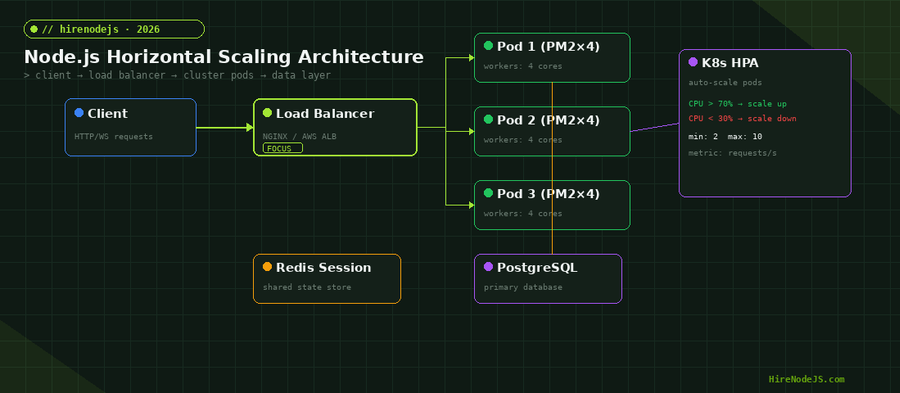
Kubernetes takes horizontal scaling to its logical conclusion: define a desired state — minimum replicas, maximum replicas, target CPU or custom metric — and the Horizontal Pod Autoscaler continuously adjusts the number of running pods to match demand. Combined with the Cluster Autoscaler, which adds or removes nodes from the underlying VM pool, this gives you elastic infrastructure that scales from two pods at night to fifty during a traffic spike, then scales back down to save costs.
HPA Configuration for Node.js
A well-tuned HPA for Node.js targets CPU utilization between 50-70 percent. Setting it too low causes constant scaling churn; too high and pods run hot with degraded response times. For applications with variable request costs, consider scaling on custom metrics like requests-per-second or event-loop lag, exposed via Prometheus and the Kubernetes Metrics Server.
Combining PM2 with Kubernetes
A powerful pattern is running PM2 in cluster mode inside each Kubernetes pod. The pod gets four CPU cores and PM2 forks four workers, maximizing core utilization. Kubernetes then scales the number of pods horizontally based on aggregate metrics. This two-tier approach — vertical within the pod, horizontal across pods — gives you the best of both worlds. Engineers skilled in both Docker containerization and Kubernetes orchestration are essential for implementing this architecture.
Stateless Architecture — The Foundation of Scaling
Horizontal scaling only works if any request can be handled by any server. This means your application must be stateless: no in-memory sessions, no local file uploads, no server-side caches that assume affinity. Every piece of shared state must live in an external store.
Session Management with Redis
Replace express-session's default MemoryStore with connect-redis. Every worker on every server reads and writes sessions to the same Redis instance. This makes sessions survive worker restarts, server reboots, and rolling deployments. Use Redis Cluster or AWS ElastiCache for high availability.
File Storage and Shared Caches
Upload files directly to S3 or a compatible object store — never to the local filesystem. For caching, use a centralized Redis cache or a CDN edge cache. Any data that two workers or two servers might need to share must live in an external service. This principle is non-negotiable for horizontal scaling.
Hire Expert Node.js Developers — Ready in 48 Hours
Building the right system is only half the battle — you need the right engineers to build it. HireNodeJS.com specialises exclusively in Node.js talent: every developer is pre-vetted on real-world projects, API design, event-driven architecture, and production deployments.
Unlike generalist platforms, our curated pool means you speak only to engineers who live and breathe Node.js. Most clients have their first developer working within 48 hours of getting in touch. Engagements start as short-term contracts and can convert to full-time hires with zero placement fee.
Conclusion — Scale Incrementally, Monitor Relentlessly
Horizontal scaling is not a single switch you flip — it is a layered strategy. Start with the cluster module or PM2 to use all CPU cores on a single machine. When that machine maxes out, add NGINX in front of multiple servers. When manual provisioning becomes a bottleneck, move to Kubernetes with HPA for elastic auto-scaling. At every layer, keep your application stateless, externalize shared state to Redis and object stores, and invest in observability so you can see exactly where the next bottleneck will appear.
The most important scaling decision is often not technical — it is hiring engineers who have shipped these patterns in production. If you are building a high-throughput Node.js system and need battle-tested talent, explore HireNodeJS to find pre-vetted developers who can architect and deploy these scaling strategies from day one.
Frequently Asked Questions
How do I horizontally scale a Node.js application?
Start by using the Node.js cluster module or PM2 in cluster mode to utilise all CPU cores on a single server. Then add NGINX or an AWS ALB in front of multiple servers. For elastic scaling, deploy to Kubernetes and configure the Horizontal Pod Autoscaler to add or remove pods based on CPU or custom metrics.
What is the difference between vertical and horizontal scaling in Node.js?
Vertical scaling means upgrading a single server with more CPU or RAM. Horizontal scaling adds more servers or containers behind a load balancer. Horizontal scaling offers better fault tolerance, no single point of failure, and theoretically unlimited throughput — making it the preferred strategy for production Node.js deployments.
Can I use PM2 cluster mode inside a Kubernetes pod?
Yes, this is a recommended pattern. PM2 cluster mode maximises core utilisation within each pod, while Kubernetes scales the number of pods horizontally. Set PM2 instances to match your pod CPU limit and let the HPA manage pod count based on aggregate metrics.
How many requests per second can a clustered Node.js server handle?
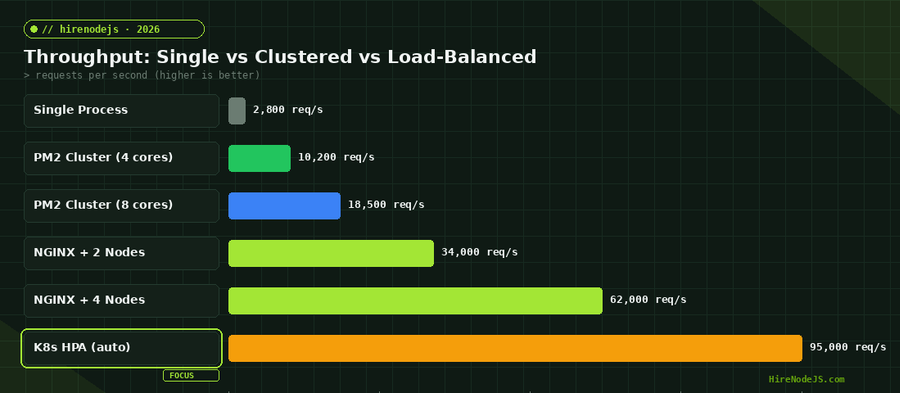
A single Node.js process typically handles 2,000-4,000 req/s for a JSON API. PM2 cluster mode on an 8-core machine can reach 15,000-20,000 req/s. With NGINX load-balancing across multiple servers, throughput scales linearly — four servers can handle 60,000+ req/s for the same workload.
Do I need Redis when scaling Node.js horizontally?
Yes, if your application uses sessions, caching, or any shared state. In a horizontally-scaled setup, requests can land on any server, so in-memory data is unreliable. Redis provides a fast, shared data store that all nodes can read from and write to, making it essential for stateless architectures.
How much does it cost to hire a Node.js developer experienced with scaling?
Senior Node.js developers with production scaling experience typically command 80-150 USD per hour for contract work, or 120,000-180,000 USD per year for full-time roles in 2026. Platforms like HireNodeJS.com offer pre-vetted developers available within 48 hours, eliminating lengthy recruitment cycles.
Vivek Singh is the founder of Witarist and HireNodeJS.com — a platform connecting companies with pre-vetted Node.js developers. With years of experience scaling engineering teams, Vivek shares insights on hiring, tech talent, and building with Node.js.
Need a Node.js Engineer Who Understands Scaling?
HireNodeJS connects you with pre-vetted senior Node.js engineers experienced in clustering, load balancing, and Kubernetes deployments. Get your first developer within 48 hours — no recruiter fees, no lengthy screening.