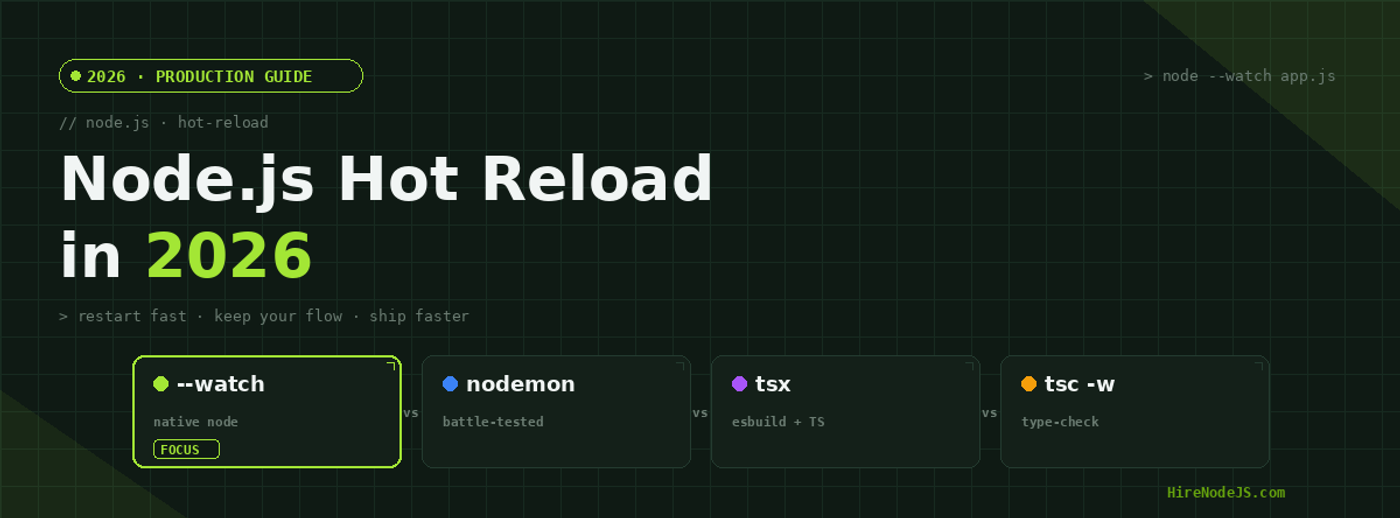
Node.js Hot Reload in 2026: --watch vs nodemon vs tsx
Few things kill backend momentum faster than waiting on a slow restart. Every time you save a file, the gap between hitting save and seeing your change run is pure dead time — and on a real TypeScript codebase, that gap used to stretch into seconds. In 2026, Node.js has finally made hot reloading a first-class, built-in concern, but the ecosystem tools that filled the gap for a decade haven't gone anywhere. The result is a genuine decision to make: native `node --watch`, the esbuild-powered `tsx`, or the venerable `nodemon`.
This guide breaks down how each option actually works, benchmarks their restart latency on small, medium, and large projects, and shows you exactly how to wire them into a modern TypeScript ESM workflow. By the end you'll know which tool fits your stack, why the differences matter for developer velocity, and where the remaining sharp edges are. If you're scaling a backend team, the tooling choices here compound: a faster inner loop across ten engineers is real shipped throughput.
Why Hot Reload Matters More Than Ever in 2026
Hot reload — more precisely, fast process restart on file change — is the heartbeat of the backend inner loop. Unlike the browser, Node.js has no native hot module replacement that preserves in-memory state, so "hot reload" in the server world almost always means: detect a change, tear the process down, and start it again as quickly as possible. The faster that cycle, the more often you experiment, and the less you context-switch while waiting.
The State Saving Problem
A server restart wipes in-memory state: open database pools, cached config, warmed JIT code paths. For most APIs that's fine — your state lives in Postgres or Redis, not the process. But it means restart speed is the only lever that matters, because you pay the cold-start cost on every single save. Shaving a 2-second restart down to 180ms changes how you work: you stop batching edits and start iterating freely.
TypeScript Changed the Math
Most production Node.js teams now write TypeScript, and that adds a transpilation step to every restart. The tool you pick has to either strip types, compile them, or hand off to a fast transpiler like esbuild or SWC. This is the single biggest differentiator between the options — a watcher that shells out to tsc pays the full type-checker cost on every save, while one built on esbuild skips type-checking entirely and just emits JavaScript in milliseconds.
node --watch: The Native Option
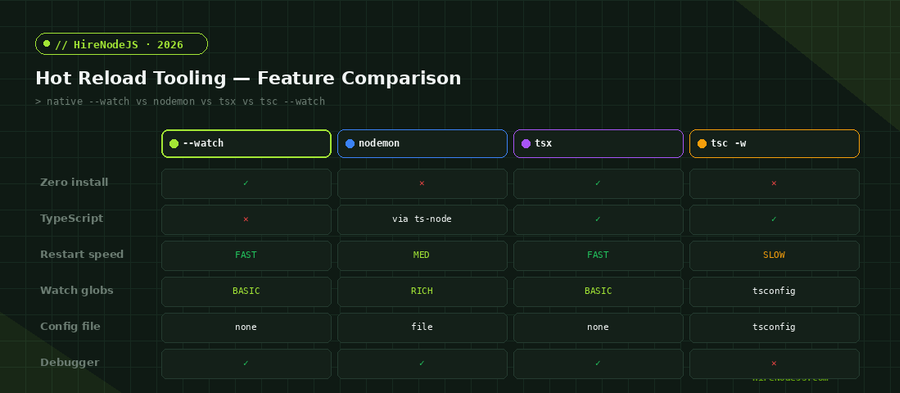
Since Node.js 18 (stabilised in 20+ and refined through the 22/24 lines), the runtime ships its own watcher behind the `--watch` flag. Run `node --watch app.js` and Node restarts the process whenever a required/imported file changes. There is nothing to install, nothing to configure, and no dependency in your `package.json` to audit or update.
What --watch Watches
By default `--watch` tracks the files your app actually loads — the dependency graph reachable from the entry point — plus the entry file itself. That's smart: editing an unused file won't trigger a needless restart. You can add paths explicitly with `--watch-path`, and you can keep specific output quiet with `--watch-preserve-output` so your console history survives each restart.
The TypeScript Catch
On its own, --watch runs JavaScript. To run TypeScript directly you pair it with Node's native type-stripping (--experimental-strip-types, now on by default for many setups in the 24+ line) or with a loader. Native type stripping is fast because it deletes type annotations without type-checking — the same trade-off tsx makes. For a deeper look at running TypeScript without a separate build step, our team's Node.js backend engineers lean on this pattern heavily in 2026.
tsx: esbuild-Powered Reload for TypeScript
`tsx` is a thin, batteries-included runner that uses esbuild under the hood to transpile TypeScript and ESM on the fly. Run `tsx watch app.ts` and you get sub-second restarts on a TypeScript entry point with zero `tsconfig` gymnastics. It has become the default choice for teams that want the native-watch experience but with first-class TypeScript and ESM/CJS interop handled for them.
Why It Feels Instant
esbuild transpiles TypeScript roughly an order of magnitude faster than `tsc` because it skips type-checking entirely — it just strips and lowers syntax. That's the same reason `tsx` restarts in roughly the same league as native `--watch`: the bottleneck isn't transpilation anymore, it's process startup. You run a separate `tsc --noEmit` in CI or your editor to catch type errors, and let the runtime stay fast.
Watch Mode Ergonomics
`tsx watch` clears and restarts cleanly, supports `--clear-screen=false` to preserve logs, and respects standard signal handling so graceful shutdown logic still fires. It also plays nicely with the Node inspector, so `tsx watch --inspect app.ts` gives you a debuggable, auto-restarting server in one command.
One more ergonomic win: because tsx handles ESM and CommonJS interop transparently, you can mix import and legacy require-based dependencies during development without wrestling with tsconfig module settings. That removes a whole category of works-in-build, breaks-in-dev friction that used to eat afternoons, and it is a big part of why tsx became the de facto default for TypeScript dev loops.
nodemon: Still the Most Configurable
`nodemon` predates all of this and remains the most flexible watcher in the ecosystem. It doesn't run TypeScript itself — you pair it with `tsx`, `ts-node`, or a build step — but its watching logic is the richest available: glob include/exclude patterns, extension lists, debounce delay, manual restart via typing `rs`, and per-project config in `nodemon.json`.
Hire Pre-Vetted Node.js Developers
Skip the months-long search. Our exclusive talent network has senior Node.js experts ready to join your team in 48 hours.
When nodemon Still Wins
If your dev workflow needs to watch non-code assets (GraphQL schemas, `.env` files, SQL migrations, template files) and run a custom command on change, nodemon's `exec` and glob controls are unmatched. Pairing `nodemon --exec tsx app.ts` gives you esbuild-speed transpilation with nodemon's superior watch control — the best of both worlds when you need fine-grained rules.
The Cost of Flexibility
That flexibility comes with a dependency to maintain and a config file to reason about. For a brand-new service, many teams now skip it entirely in favour of native --watch or tsx. Understanding the Node.js hiring trade-offs here matters: a senior engineer will reach for the simplest tool that meets the project's actual watching needs, not the most powerful one by reflex.
Benchmarks and a Production-Ready Setup
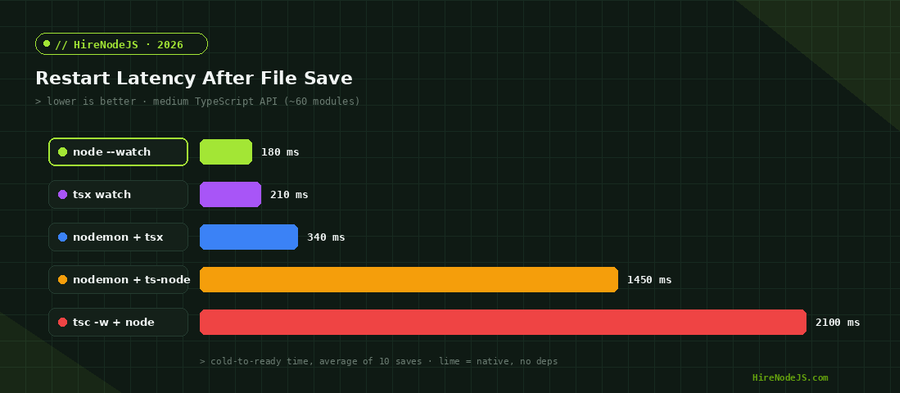
The numbers above tell a consistent story: native `--watch` and `tsx watch` sit in the same fast tier because both avoid type-checking on restart, nodemon adds a small watching overhead, and anything routing through `tsc` or `ts-node`'s type-checker is dramatically slower. For the inner loop, never type-check on restart — check types in your editor and in CI instead.
Containerized Dev Loops
If you develop inside Docker, the same rules apply but watching gets trickier across the container boundary. File-change events from a bind-mounted host directory don't always propagate to the container's filesystem reliably, so native --watch and tsx may miss saves. The fix is usually enabling polling or using a named volume with a watcher that supports usePolling. Teams running Node.js on Kubernetes or Docker for production often keep a separate, simpler dev compose file precisely so the hot reload loop stays fast and predictable.
A Recommended package.json
Here's a clean 2026 setup that gives you a fast dev loop, a debuggable variant, and a separate type-check that never blocks restarts:
// package.json scripts — fast dev loop, types checked separately
{
  "type": "module",
  "scripts": {
    // Native watcher + native type stripping (Node 24+)
    "dev": "node --watch --watch-preserve-output src/server.ts",

    // Alternative: tsx for broad TS/ESM interop on older Node
    "dev:tsx": "tsx watch --clear-screen=false src/server.ts",

    // Debuggable auto-restart server
    "dev:debug": "tsx watch --inspect src/server.ts",

    // Type-check ONLY — runs in editor + CI, never on restart
    "typecheck": "tsc --noEmit",

    "build": "tsc -p tsconfig.build.json",
    "start": "node dist/server.js"
  }
}
And a minimal server that shuts down cleanly so restarts don't leak ports or connections:
// src/server.ts — graceful shutdown survives every hot restart
import http from 'node:http';

const server = http.createServer((req, res) => {
  res.writeHead(200, { 'content-type': 'application/json' });
  res.end(JSON.stringify({ ok: true, pid: process.pid, ts: Date.now() }));
});

server.listen(3000, () => {
  console.log(`up on :3000 (pid ${process.pid})`);
});

// Without this, --watch/tsx can leave the old listener holding the port
function shutdown(signal: string) {
  console.log(`\n${signal} -> closing server`);
  server.close(() => process.exit(0));
  // Force-exit if connections hang past 5s
  setTimeout(() => process.exit(1), 5000).unref();
}

process.on('SIGTERM', () => shutdown('SIGTERM'));
process.on('SIGINT', () => shutdown('SIGINT'));Choosing the Right Tool for Your Stack
Pick native `--watch` when you're on a recent Node.js line, want zero dependencies, and either write JavaScript or use native type stripping. Pick `tsx watch` when you want the same speed with bulletproof TypeScript and ESM/CJS interop handled for you — it's the safest default for most TypeScript services in 2026. Reach for `nodemon` only when you need to watch non-code files or run custom commands on change that the native options can't express.
Whatever you choose, keep one rule: transpile fast on the hot path, type-check elsewhere. That single principle explains the entire benchmark spread and is the difference between a 180ms loop and a 2-second one.
Getting this inner loop right is exactly the kind of detail that separates senior backend engineers from the rest. If you're building a Node.js system and want people who already know these trade-offs cold, HireNodeJS connects you with pre-vetted senior developers available within 48 hours — without the recruiter overhead. You can also see how the vetting process works before you commit.
Hire Expert Node.js Developers — Ready in 48 Hours
Building the right system is only half the battle — you need the right engineers to build it. HireNodeJS.com specialises exclusively in Node.js talent: every developer is pre-vetted on real-world projects, API design, event-driven architecture, and production deployments.
Unlike generalist platforms, our curated pool means you speak only to engineers who live and breathe Node.js. Most clients have their first developer working within 48 hours of getting in touch. Engagements start as short-term contracts and can convert to full-time hires with zero placement fee.
Conclusion: A Faster Inner Loop Pays Off Every Day
Hot reload stopped being a third-party concern the moment Node.js shipped `--watch`, but the right answer in 2026 depends on your stack. Native `--watch` and `tsx` deliver the sub-200ms restarts that make iteration feel effortless, while nodemon still earns its place when you need surgical control over what triggers a restart. The common thread is simple: keep transpilation fast and push type-checking off the hot path.
Adopt one of these setups today and the time savings compound on every save, for every developer, on every project. That's a small change with an outsized effect on how fast your team ships.
Frequently Asked Questions
What is hot reload in Node.js?
In Node.js, hot reload means automatically restarting your server process when a source file changes. Unlike the browser, Node doesn't preserve in-memory state, so the goal is the fastest possible restart rather than true module swapping.
Is node --watch good enough to replace nodemon?
For most new TypeScript and JavaScript services in 2026, yes. Native --watch has zero dependencies and restarts as fast as tsx. You only need nodemon when you must watch non-code files or run custom commands on change.
How do I run TypeScript with node --watch?
Pair --watch with native type stripping on Node 24+ (node --watch src/server.ts), or use tsx watch, which transpiles TypeScript with esbuild. Both skip type-checking on restart, so they stay fast.
Why is nodemon with ts-node so slow to restart?
ts-node type-checks your code on every restart, which is the most expensive step in the pipeline. Switching to tsx or native type stripping skips type-checking and cuts restart time from seconds to well under 300ms.
Should I type-check during development?
Yes, but not on the restart hot path. Run tsc --noEmit in your editor and in CI for continuous type feedback, while your watcher uses a fast transpiler. This gives you both instant restarts and full type safety.
What is the fastest hot reload setup for a TypeScript API in 2026?
Native node --watch with type stripping, or tsx watch — both deliver sub-200ms restarts on medium projects. Add a separate tsc --noEmit --watch for type errors and you have the best of both worlds.
Vivek Singh is the founder of Witarist and HireNodeJS.com — a platform connecting companies with pre-vetted Node.js developers. With years of experience scaling engineering teams, Vivek shares insights on hiring, tech talent, and building with Node.js.
Want a Node.js engineer who ships fast, optimised APIs?
HireNodeJS connects you with pre-vetted senior Node.js engineers available within 48 hours. No recruiter fees, no lengthy screening — just top talent ready to ship.