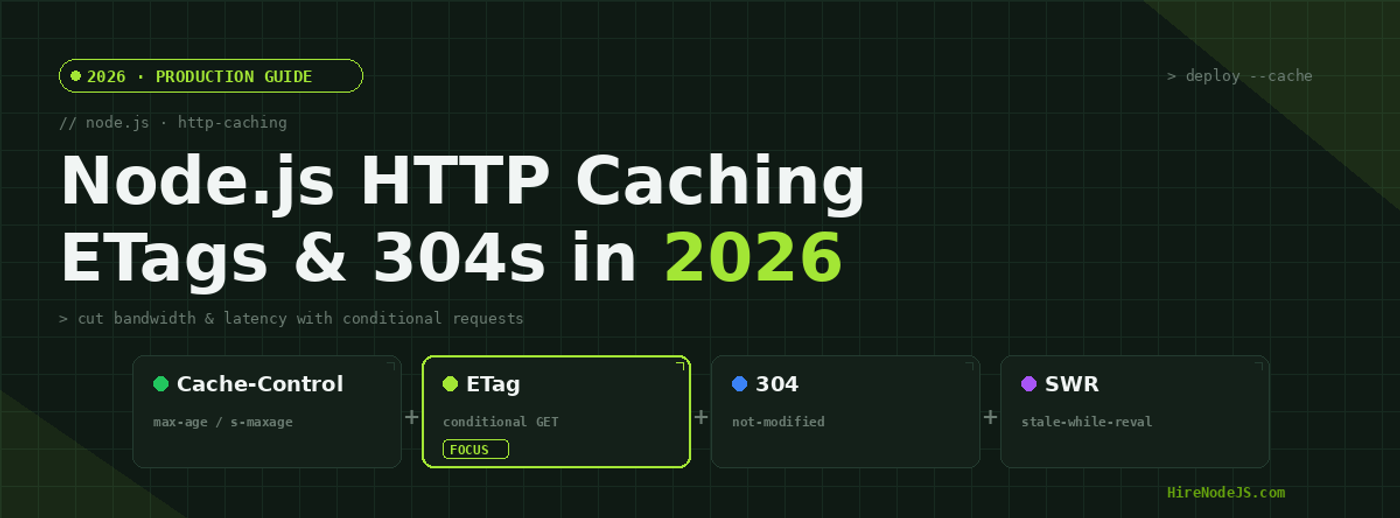
Node.js HTTP Caching in 2026: ETags, Cache-Control & 304s
Every Node.js API you ship answers the same questions over and over again. The product catalogue hasn't changed in twenty minutes, yet a thousand clients just re-downloaded it byte for byte. The user's avatar is identical to the one fetched four seconds ago, but your event loop serialized it again anyway. HTTP caching is the discipline of teaching the web to stop asking for things it already has — and in 2026 it remains the single highest-leverage performance win available to a backend engineer, ahead of any database index or rewrite in a faster language.
The mechanics are deceptively simple: a handful of response headers tell browsers, proxies and CDNs how long a response stays fresh and how to cheaply revalidate it once it goes stale. Get them right and you cut bandwidth by orders of magnitude, collapse p95 latency, and offload most traffic before it ever reaches your origin. Get them wrong and you serve stale prices, leak private data into shared caches, or revalidate so aggressively that caching buys you nothing. This guide walks through Cache-Control, ETags, conditional requests and stale-while-revalidate with production-ready Node.js code.
Why HTTP Caching Still Wins in 2026
The cheapest request is the one you never serve
Compute is cheaper than ever, but the laws of physics haven't moved: a packet still takes real milliseconds to cross a continent, and your Node.js process still spends CPU cycles serializing JSON, compressing it and writing it to a socket. HTTP caching attacks all three costs at once. A fresh cached response is served from the client or an edge node with zero round trips to your origin. A revalidated response trades a full payload for a tiny 304 Not Modified. And an offloaded request frees an event-loop tick your process can spend on traffic that genuinely needs it.
Caching is a correctness tool, not just a speed tool
Teams often treat caching as an optional optimisation bolted on at the end. In reality, explicit caching headers are how you state intent: this response is public and immutable, that one is private and must never be stored, this other one may be served stale for an hour while you refresh it in the background. Without those declarations, intermediaries guess — and their guesses are where the scary bugs live. Declaring your caching policy is as much a part of API design as your status codes.
Cache-Control: The Directives That Matter
Freshness lifetime: max-age and s-maxage
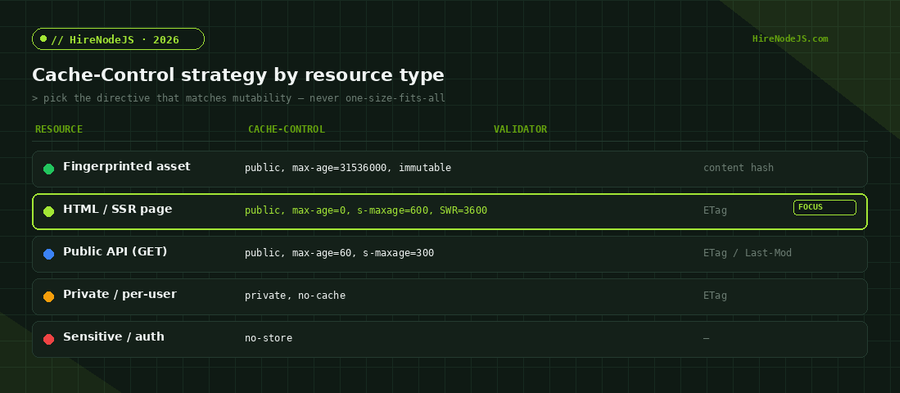
The Cache-Control header is the heart of HTTP caching. max-age=N sets how many seconds a response is considered fresh for private caches like the browser, while s-maxage=N overrides that value for shared caches such as a CDN. Splitting the two lets you keep browsers conservative while letting your edge cache aggressively — for example a sixty-second browser window paired with a five-minute CDN window. If you are building these APIs at scale, our Node.js engineers treat cache headers as a first-class part of the contract.
public, private, no-cache and no-store
These four directives are constantly confused. public means any cache may store the response, including CDNs. private restricts storage to the end user's browser — essential for per-user data. no-cache is the most misnamed directive in HTTP: it allows storage but forces revalidation before every reuse, which is exactly what you want for HTML you change frequently. no-store is the only directive that truly forbids caching anywhere, reserved for sensitive responses like authentication tokens or banking data.
immutable and the fingerprinted-asset pattern
For build artefacts whose URL contains a content hash — app.9f3a1c.js — the content can never change without the URL changing. Mark these public, max-age=31536000, immutable and browsers will skip even the revalidation request for a full year. This single pattern eliminates the vast majority of conditional requests a typical single-page app would otherwise make on every reload.
ETags and Conditional Requests
How a 304 round trip actually works
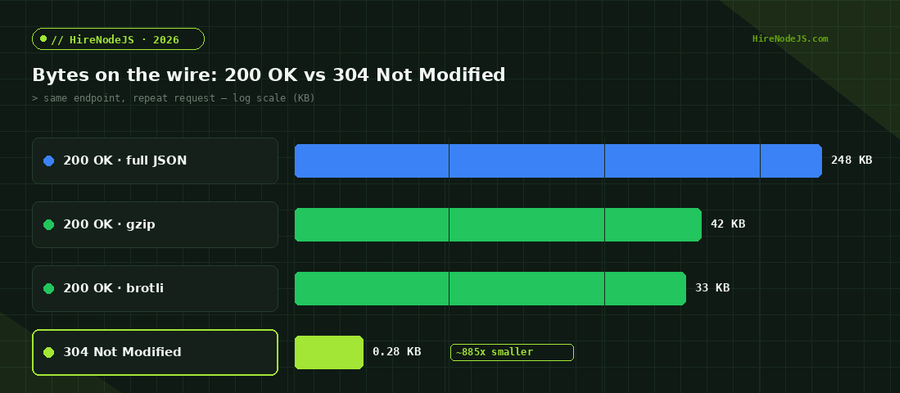
An ETag is an opaque validator — usually a hash of the response body — that the server sends alongside a cacheable response. When the cached copy goes stale, the client doesn't blindly re-download; it sends a conditional GET with If-None-Match set to the stored ETag. If the server computes the same ETag, it answers 304 Not Modified with empty body and the client reuses what it already has. The full payload might be 248 KB; the 304 is a few hundred bytes of headers. Last-Modified and If-Modified-Since provide the same dance using timestamps when a strong content hash is impractical.
Strong vs weak ETags
A strong ETag guarantees byte-for-byte equality and is required for range requests. A weak ETag, prefixed with W/, only promises semantic equivalence — useful when gzip or whitespace differences would otherwise change a strong hash for content that is logically the same. Express and most frameworks generate weak ETags by default, which is the right call for JSON APIs where you care about meaning, not bytes.
Implementing Caching in Express and Fastify
A reusable ETag + Cache-Control middleware
Hire Pre-Vetted Node.js Developers
Skip the months-long search. Our exclusive talent network has senior Node.js experts ready to join your team in 48 hours.
Here is a focused Express middleware that sets an appropriate Cache-Control header, computes a weak ETag from the serialized payload, and short-circuits to a 304 when the client's If-None-Match matches. It is small, dependency-light and easy to reason about.
const crypto = require("node:crypto");

// Express middleware: JSON responses with revalidation via ETag.
function jsonCache({ maxAge = 60, sMaxAge = 300, swr = 3600 } = {}) {
  return (req, res, next) => {
    const send = res.json.bind(res);
    res.json = (body) => {
      const payload = JSON.stringify(body);
      const etag =
        'W/"' + crypto.createHash("sha1").update(payload).digest("base64") + '"';

      res.set(
        "Cache-Control",
        `public, max-age=${maxAge}, s-maxage=${sMaxAge}, stale-while-revalidate=${swr}`
      );
      res.set("ETag", etag);

      // Conditional GET: client already has this exact version.
      if (req.headers["if-none-match"] === etag) {
        return res.status(304).end();
      }
      res.set("Content-Type", "application/json");
      return res.send(payload);
    };
    next();
  };
}

module.exports = { jsonCache };
Wiring it into a route
Drop the middleware in front of any read-heavy GET route and the framework does the rest. For private, per-user endpoints, switch public to private, no-cache so a shared CDN never stores one user's data for another. Backend teams we place through our backend developer hiring track wire this pattern into a shared response layer so every endpoint is cache-correct by default rather than by accident.
const express = require("express");
const { jsonCache } = require("./cache-middleware");

const app = express();

// Public catalogue: cache hard at the edge, revalidate cheaply.
app.get("/api/products", jsonCache({ maxAge: 60, sMaxAge: 300 }), async (req, res) => {
  const products = await db.products.findMany();
  res.json(products); // ETag + 304 handled automatically
});

// Private dashboard: browser may store, but must revalidate every time.
app.get("/api/me/orders", jsonCache({ maxAge: 0, sMaxAge: 0, swr: 0 }), async (req, res) => {
  res.set("Cache-Control", "private, no-cache");
  res.json(await db.orders.forUser(req.user.id));
});

app.listen(3000);stale-while-revalidate and CDN Layering
Serving stale while you refresh in the background
stale-while-revalidate is the directive that makes caching feel instant without serving genuinely old data. With Cache-Control: max-age=60, stale-while-revalidate=3600, a cache serves the fresh copy for sixty seconds, then for up to an hour afterwards it serves the stale copy immediately while fetching a new version in the background. Users never wait on a cache miss, and your origin sees a steady trickle of refreshes instead of a thundering herd the instant the TTL expires.
Letting the edge absorb the herd
A shared CDN multiplies every one of these wins. When a thousand users request the same product page within your s-maxage window, the edge answers all of them and your Node.js process serves exactly one origin fetch. Combine that with a Redis layer for data your CDN can't cache and you have a defence-in-depth caching strategy that keeps origins idle even under heavy load.
Common Caching Pitfalls
Caching errors and personalised responses
Two mistakes cause most caching incidents. The first is caching non-200 responses: a transient 500 that gets stored with a long max-age will haunt you long after the bug is fixed. Always send no-store on error paths. The second is forgetting that a logged-in, personalised response looks cacheable to a CDN unless you explicitly mark it private. Audit every authenticated route specifically for this.
Over-revalidation and ETag churn
If your ETag is derived from something that changes on every request — a timestamp down to the millisecond, a random nonce, or a non-deterministic JSON key order — every conditional request misses and you revalidate constantly. The fix is to derive validators from stable, content-based inputs and to serialize deterministically so identical data always produces an identical ETag.
If your team is repeatedly shipping cache bugs, it is usually a sign you need engineers who have run high-traffic Node.js systems before. HireNodeJS connects you with pre-vetted senior developers available within 48 hours — without the recruiter overhead — and you can see exactly how the process works on our how it works page.
Hire Expert Node.js Developers — Ready in 48 Hours
Building the right caching layer is only half the battle — you need the right engineers to design and operate it. HireNodeJS.com specialises exclusively in Node.js talent: every developer is pre-vetted on real-world projects, API design, event-driven architecture, and production deployments.
Unlike generalist platforms, our curated pool means you speak only to engineers who live and breathe Node.js. Most clients have their first developer working within 48 hours of getting in touch. Engagements start as short-term contracts and can convert to full-time hires with zero placement fee.
Key Takeaways
HTTP caching in 2026 comes down to three coordinated layers: Cache-Control to declare freshness and storage policy, ETags with conditional requests to revalidate cheaply once content goes stale, and stale-while-revalidate plus a CDN to absorb traffic spikes without ever blocking a user. Match each directive to the mutability of the resource, derive validators from stable inputs, and treat private and no-store as load-bearing security controls rather than afterthoughts.
Done well, these headers cost almost nothing to ship and routinely cut origin traffic by 90% or more while shaving p95 latency to single-digit milliseconds for cached paths. There is no cheaper performance win in your stack — and once your caching contract is explicit, it becomes far easier to reason about correctness, security and scale together.
Frequently Asked Questions
What is the difference between Cache-Control no-cache and no-store in Node.js?
no-cache allows a response to be stored but forces revalidation with the origin before every reuse, so you still benefit from cheap 304s. no-store forbids caching entirely and is reserved for sensitive data like auth tokens.
How do ETags reduce bandwidth in a Node.js API?
An ETag lets a client send a conditional request with If-None-Match. If the content is unchanged, the server returns a 304 Not Modified with an empty body — a few hundred bytes instead of the full payload, often hundreds of kilobytes smaller.
Should I use strong or weak ETags for a JSON API?
Weak ETags (prefixed with W/) are usually right for JSON APIs because they assert semantic equivalence and tolerate gzip or whitespace differences. Use strong ETags only when you need byte-exact validation, such as for range requests.
What does stale-while-revalidate do in Cache-Control?
It lets a cache serve a stale response instantly while fetching a fresh copy in the background. Users never wait on a cache miss, and your origin sees a steady trickle of refreshes instead of a spike when the TTL expires.
How can I avoid caching private user data on a CDN?
Mark personalised or authenticated responses with Cache-Control: private, no-cache (or no-store for sensitive data). Never send public on user-specific responses, or a shared CDN may serve one user's data to another.
How much can HTTP caching improve Node.js performance?
Well-tuned caching routinely offloads 90% or more of origin traffic and drops p95 latency to single-digit milliseconds for cached paths, making it one of the highest-leverage optimisations available to a backend team.
Vivek Singh is the founder of Witarist and HireNodeJS.com — a platform connecting companies with pre-vetted Node.js developers. With years of experience scaling engineering teams, Vivek shares insights on hiring, tech talent, and building with Node.js.
Want a Node.js engineer who ships fast, optimised APIs?
HireNodeJS connects you with pre-vetted senior Node.js engineers who design caching, CDN and performance layers that scale — available within 48 hours, no recruiter fees.