Node.js Job Queues 2026: BullMQ vs RabbitMQ vs Kafka
Background jobs are the quiet backbone of every serious Node.js application. Every password reset email, every Stripe webhook, every nightly report generator, every image resize — if it takes longer than a few hundred milliseconds, it belongs in a queue. Put it in the request cycle and your API latency tanks; put it in a queue and your system stays fast, resilient, and observable.
In 2026, three names dominate the Node.js queueing conversation: BullMQ for straightforward Redis-backed job queues, RabbitMQ for flexible message routing across services, and Apache Kafka for high-volume event streaming with replay. They solve overlapping problems with very different trade-offs — and choosing the wrong one adds months of rework. This guide walks through when each shines, shows real code, and helps you decide. If you're staffing a project right now, you can always hire a Node.js developer who already lives in this stack.
Why Every Node.js App Eventually Needs a Queue
Node.js runs on a single event loop. That's a feature when you're handling thousands of concurrent connections — but it becomes a liability the moment you need to do real work per request. Send a transactional email synchronously and your p99 latency is pinned to whatever SendGrid is doing this afternoon. Process a 20MB CSV upload in-line and a single user can block every other request on the box.
The three workloads that belong in a queue
First, slow third-party calls — email providers, SMS gateways, Stripe, Twilio, OpenAI completions. Second, CPU-bound or I/O-heavy work — image and video transcoding, PDF generation, large CSV ingests, ML inference. Third, scheduled and deferred work — nightly reports, cron-like recurring jobs, welcome drips, subscription renewals. If any of those touch your HTTP handlers directly, you have a reliability problem that only a queue fixes.
What a good queue gives you
A good queue is more than a FIFO list. You want durable persistence (work survives a crash), retries with exponential backoff, dead-letter queues for poison messages, delayed and scheduled jobs, rate limiting per worker, at-least-once or exactly-once semantics depending on the workload, and first-class observability so you can see why a job failed at 3am. BullMQ, RabbitMQ, and Kafka each deliver these in different shapes.
BullMQ: The Default for Most Node.js Apps
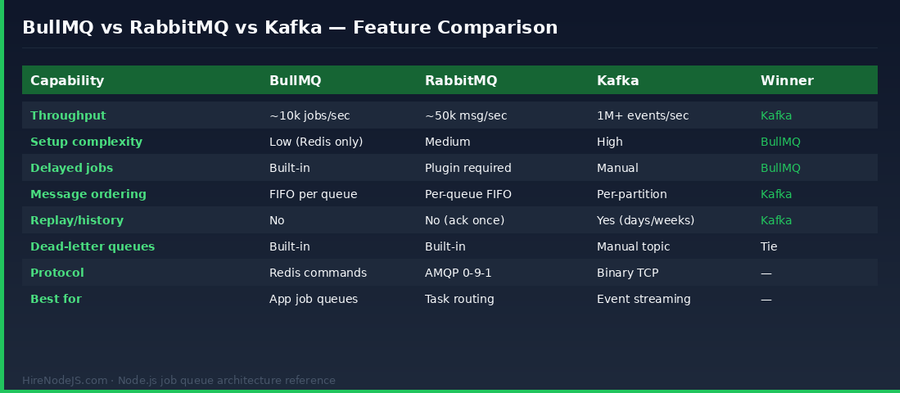
BullMQ is the modern successor to Bull, rewritten in TypeScript with a cleaner API, better performance, and first-class flows (parent/child jobs). It rides on Redis — which you probably already run for caching or sessions — so there's nothing new to operate. For 90% of Node.js backends, BullMQ is the correct answer and anything else is over-engineering.
Strengths
Dead-simple setup — one npm install and a Redis connection string. Built-in delayed jobs, repeatable (cron-style) jobs, job priorities, concurrency controls per worker, rate limiting, and a polished BullMQ Board UI for monitoring. The Node SDK is TypeScript-native with strong types on job data and return values, which catches a whole class of bugs at compile time. Throughput sits comfortably at 10–15k jobs/second on a modest Redis — more than enough for most SaaS workloads.
Weaknesses
Redis-bound. If you need to process a million events per second, or you need weeks of replayable event history, or you need to fan a single event out to dozens of independent consumer services, BullMQ is the wrong tool. It's a job queue, not an event bus.
// producer.js — enqueue a job with BullMQ
import { Queue, Worker, QueueEvents } from 'bullmq';

const connection = { host: '127.0.0.1', port: 6379 };

// 1. Define the queue (once, at boot)
const emailQueue = new Queue('emails', { connection });

// 2. Add a delayed, retried, idempotent job
await emailQueue.add(
  'welcome-email',
  { userId: 42, template: 'welcome' },
  {
    delay: 60_000,                      // wait 60s before processing
    attempts: 5,                        // retry up to 5 times
    backoff: { type: 'exponential', delay: 2000 },
    removeOnComplete: { age: 3600 },    // tidy up after 1h
    removeOnFail: { count: 1000 },
    jobId: 'welcome-42'                 // idempotent — dupes are ignored
  }
);

// 3. Worker — processes jobs with concurrency 10
new Worker('emails', async (job) => {
  await sendEmail(job.data);            // your business logic
  return { sent: true };
}, { connection, concurrency: 10 });

// 4. Observability — listen to lifecycle events
const events = new QueueEvents('emails', { connection });
events.on('failed', ({ jobId, failedReason }) =>
  console.error('Job failed', jobId, failedReason)
);RabbitMQ: When Routing Matters More Than Raw Throughput
RabbitMQ is the classic message broker — a mature, battle-tested implementation of AMQP 0-9-1 that has been in production at banks, airlines, and telcos for over a decade. Its superpower isn't speed; it's routing. Exchanges, bindings, and routing keys let you describe message flows that would take hundreds of lines of code to express on top of Redis.
Strengths
Four exchange types — direct, topic, fanout, and headers — give you declarative routing. A single `order.created` event can land simultaneously in an inventory queue, a billing queue, and a notifications queue with zero producer-side code. RabbitMQ handles per-message acknowledgements, publisher confirms, and priority queues out of the box. The management UI is excellent, and the ops story is well-understood after fifteen years in production.
Weaknesses
Messages are gone once acked — there's no replay. Delayed messages require the delayed-message-exchange plugin, which isn't as polished as BullMQ's native delays. The Node.js ecosystem around RabbitMQ is smaller than BullMQ's: `amqplib` works well but isn't TypeScript-first, and you'll write more boilerplate for things like retries and DLQs.
Apache Kafka: Event Streaming and Replay at Scale
Hire Pre-Vetted Node.js Developers
Skip the months-long search. Our exclusive talent network has senior Node.js experts ready to join your team in 48 hours.
Kafka isn't really a queue — it's a distributed, partitioned, replicated commit log. Messages persist for days or weeks (configurable), consumers track their own position, and multiple independent consumer groups can read the same stream in parallel. That architecture gives you two things nothing else does at scale: raw throughput measured in millions of events per second, and replay — the ability to rewind a consumer and reprocess events from any point in history.
Strengths
Horizontal scalability via partitions. Kafka routinely handles 1M+ events per second on commodity hardware. Consumer groups let you scale out processing while preserving per-key ordering. The log-based model is perfect for CDC (change data capture), analytics pipelines, event sourcing, and any system where you need to replay history after a bug fix. KafkaJS is the go-to Node.js client — pure JavaScript, no native bindings, works everywhere.
Weaknesses
Operational overhead is real. Even with KRaft mode replacing ZooKeeper, running a Kafka cluster is a specialist job — partitions, replication factors, retention tuning, consumer lag monitoring, compacted topics. If your workload is under 10k messages/second and you don't need replay, Kafka is overkill and you'll regret it in the first on-call rotation.
Hybrid Architectures: Why Real Systems Use All Three
Once you're past the prototype stage, the interesting question isn't 'BullMQ or Kafka?' — it's 'how do I combine them?' A typical mid-stage startup running Node.js ends up with something like this: Kafka as the event backbone carrying domain events between services, RabbitMQ for cross-service command routing with complex matching rules, and BullMQ inside each service for that service's own background jobs.
A concrete example
An e-commerce platform publishes `order.placed` to Kafka. Three consumer services (inventory, billing, notifications) each read it and push service-local jobs to their own BullMQ queues — image resizes, PDF invoice generation, email sends. The notifications service uses RabbitMQ topic exchanges to route to per-channel consumers (email, SMS, push). Each tool is doing exactly what it's best at, and no single one is being asked to stretch outside its strengths.
This kind of layered architecture is exactly the territory a senior backend Node.js developer should be fluent in — not just the code, but the operational trade-offs of running each piece at 3am when something is on fire.
Production Gotchas Every Team Hits
Poison messages and dead-letter queues
Any message that throws the same exception on every retry will loop forever unless you have a DLQ. BullMQ moves jobs to `failed` after `attempts` is exhausted — wire up an alert on that set. In Kafka, you need to manually publish to a `.dlq` topic and commit the offset. RabbitMQ uses the `x-dead-letter-exchange` argument on the original queue. Whichever tool you pick, configure the DLQ on day one, not after the first incident.
Idempotency and at-least-once semantics
Every queue covered here delivers at-least-once — duplicates are possible under certain failure modes. Your handlers must be idempotent. The cheapest pattern: wrap the side effect in a `SELECT ... FOR UPDATE` that checks a processed-jobs table keyed by `jobId`, and skip if it's already there. This one pattern prevents 95% of 'we charged the customer twice' post-mortems.
Observability
You need three metrics on every queue: depth (messages waiting), age of oldest message, and processing rate. If any of these drifts, something is wrong. Ship them to Datadog, Grafana, or whatever you already run. Don't rely on the broker's built-in UI for production monitoring — you'll miss the alert that matters.
Hire Expert Node.js Developers — Ready in 48 Hours
Building the right queueing layer is only half the battle — you need engineers who have actually operated these systems in production. HireNodeJS.com specialises exclusively in Node.js talent: every developer is pre-vetted on real-world projects, API design, event-driven architecture, and production queue operations — including BullMQ, RabbitMQ, and Kafka.
Unlike generalist platforms, our curated pool means you speak only to engineers who live and breathe Node.js. Most clients have their first developer working within 48 hours of getting in touch. Engagements start as short-term contracts and can convert to full-time hires with zero placement fee.
Conclusion: Start with BullMQ, Add the Rest When You Need Them
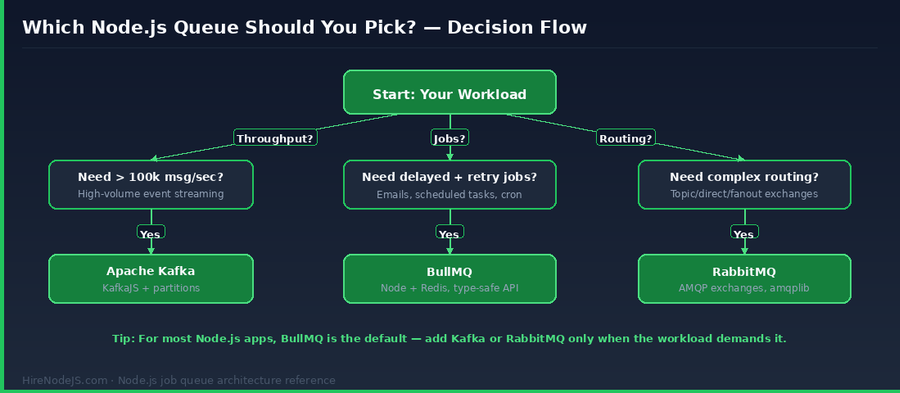
If you take one thing away from this guide, let it be this: start with BullMQ. It's the fastest path from zero to a reliable, observable background job system, it runs on infrastructure you already have, and it will carry most Node.js SaaS products well past the point where other architectural constraints matter more than queueing.
Reach for RabbitMQ when you need genuinely declarative message routing across services — fanout, topic patterns, or header-based matching. Reach for Kafka when your workload is measured in hundreds of thousands of events per second, or when replayable history is a first-class requirement for your architecture. And when you do, make sure you have the right people on the team to operate it. You can always hire a Node.js expert who's shipped exactly this kind of system before — typically within 48 hours.
Frequently Asked Questions
Which Node.js job queue should I start with in 2026?
BullMQ. For most Node.js applications, it covers every background-job need — delayed jobs, retries, priorities, rate limiting — while only depending on Redis, which you likely already run. Reach for RabbitMQ or Kafka only when a specific capability (routing, replay, ultra-high throughput) demands it.
Is BullMQ good enough for production at scale?
Yes. BullMQ reliably handles 10,000+ jobs per second on modest Redis hardware and powers mission-critical background work at many high-traffic SaaS companies. The hard ceiling is Redis itself — if you exceed what a single Redis cluster can serve, it's time to add Kafka for event streaming rather than stretch BullMQ.
When should I use Kafka instead of BullMQ in a Node.js system?
Use Kafka when you need event replay, message retention for days or weeks, hundreds of thousands of events per second, or the same event consumed by many independent services. Kafka is an event log, not a job queue — don't use it for delayed or retried jobs.
Can I use BullMQ, RabbitMQ, and Kafka in the same system?
Absolutely, and most mature Node.js systems do. A common pattern: Kafka as the cross-service event backbone, RabbitMQ for complex command routing, and BullMQ inside each service for that service's own background work. Each tool plays to its strengths.
What is the best Node.js client for Kafka?
KafkaJS is the de facto standard — pure JavaScript, no native bindings, supports all modern Kafka features including KRaft, SASL, and the admin API. It's actively maintained and works with Confluent Cloud, Amazon MSK, and self-hosted clusters.
How do I handle failed jobs and poison messages?
Configure a dead-letter queue on day one. In BullMQ, monitor the `failed` set and alert when it grows. In RabbitMQ, set `x-dead-letter-exchange` on the main queue. In Kafka, manually publish unprocessable messages to a `.dlq` topic and commit the offset. Always pair DLQs with alerts so poison messages get human attention.
Vivek Singh is the founder of Witarist and HireNodeJS.com — a platform connecting companies with pre-vetted Node.js developers. With years of experience scaling engineering teams, Vivek shares insights on hiring, tech talent, and building with Node.js.
Building an event-driven Node.js system? Hire engineers who've shipped it.
HireNodeJS connects you with pre-vetted senior Node.js engineers fluent in BullMQ, RabbitMQ, and Kafka — available within 48 hours. No recruiter fees, no lengthy screening, just top backend talent ready to ship.