Node.js on Kubernetes in 2026: The Production Deployment Playbook
Kubernetes has become the default control plane for production Node.js services. In 2026 the question is no longer whether to use it — it is how to use it well. Node.js has unique characteristics that punish naive Kubernetes setups: the single-threaded event loop is brutally exposed when CPU limits are wrong, restarts during long-poll connections trigger cascading 5xx storms, and the typical npm dependency surface makes startup time the silent killer of every rolling update.
This playbook walks through the patterns the team behind HireNodeJS sees in real production clusters running thousands of pods: writing a sane Dockerfile, choosing the right deployment strategy, configuring probes for the event-loop reality, autoscaling on the right signal, designing for graceful shutdown, and keeping the bill predictable. Code samples are real and runnable; the architecture is the one we recommend to clients hiring senior Node.js engineers in 2026.
1. Why Kubernetes Is Worth the Complexity for Node.js
Node.js was built for I/O concurrency, not raw throughput. A single process saturates one CPU core and then politely refuses to do more work. Kubernetes turns that limitation into an asset: replicate the process horizontally, place pods across availability zones, and let the scheduler handle failure. You get linear scaling without writing a worker pool, native rolling updates without a load-balancer dance, and a uniform deployment surface across every cloud you might want to switch to.
Where Node.js shops still get burned
The mistakes are predictable. Teams set CPU limits below one core and watch p99 latency double. They forget that a Node.js process with a memory leak will quietly grow until the OOM killer hits — and then the readiness probe is fine right up to the moment the pod dies. They write a Dockerfile that copies node_modules from the host, and the image is six times larger than it needs to be. None of these mistakes are Kubernetes' fault, but Kubernetes amplifies them: a small inefficiency multiplied by 40 pods becomes a real cloud bill.
The 2026 baseline expectation
Hiring managers in 2026 expect Node.js engineers to know more than 'kubectl apply'. They expect them to write a multi-stage Dockerfile, configure liveness and readiness probes for an event-loop world, understand HPA versus Karpenter, design for graceful shutdown, and own the SLOs of their service. The rest of this playbook is the syllabus.
2. Building the Image: Dockerfile Patterns That Actually Help
Image size and startup time are the two metrics that pay for themselves a hundred times over the life of a service. A 90 MB image versus a 1.4 GB image is the difference between a rolling update finishing in 20 seconds and one that takes nearly a minute, multiplied by every restart the pod ever does. Use multi-stage builds, install dependencies separately from copying source, and never ship tests, source maps, or the .git directory.
A production-grade Dockerfile
# syntax=docker/dockerfile:1.7
FROM node:22-alpine AS deps
WORKDIR /app
COPY package.json package-lock.json ./
RUN --mount=type=cache,target=/root/.npm \
    npm ci --omit=dev

FROM node:22-alpine AS build
WORKDIR /app
COPY package.json package-lock.json ./
RUN --mount=type=cache,target=/root/.npm npm ci
COPY . .
RUN npm run build

FROM node:22-alpine AS runtime
WORKDIR /app
ENV NODE_ENV=production NODE_OPTIONS="--enable-source-maps --max-old-space-size=384"
RUN addgroup -S app && adduser -S app -G app
COPY --from=deps /app/node_modules ./node_modules
COPY --from=build /app/dist ./dist
COPY package.json .
USER app
EXPOSE 3000
CMD ["node", "dist/server.js"]
3. Health Checks: Liveness, Readiness, and Startup Probes Done Right
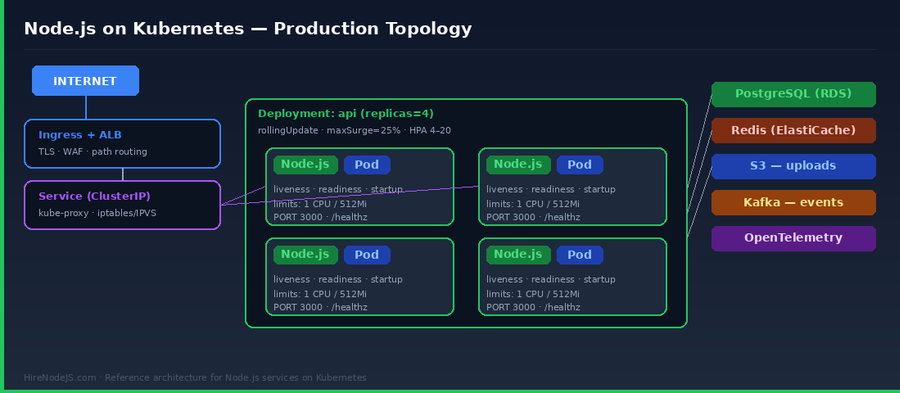
Probes are the single most misunderstood piece of running Node.js on Kubernetes. The defaults are dangerous, and the documentation rarely explains the event-loop subtlety: a CPU-pegged Node.js process can fail liveness even when it is perfectly healthy because the probe handler can't get on the queue. The fix is to give yourself enough headroom and to separate the three probe types intentionally.
The three probes, decoded
Startup probes guard slow boots — they run until the app is ready to receive other probes, then never run again. Readiness probes pull a pod out of the Service when it can't take traffic, but do not restart it. Liveness probes restart the pod when it is unrecoverable. A common mistake is to point liveness at the same endpoint as readiness — that turns a database hiccup into a restart cascade.
A correct probe setup
startupProbe:
  httpGet: { path: /healthz, port: 3000 }
  failureThreshold: 30   # 30 * 2s = 60s budget for cold start
  periodSeconds: 2

readinessProbe:
  httpGet: { path: /readyz, port: 3000 }
  periodSeconds: 5
  failureThreshold: 3
  timeoutSeconds: 2

livenessProbe:
  httpGet: { path: /healthz, port: 3000 }
  periodSeconds: 10
  failureThreshold: 5    # be generous — restarts are expensive
  timeoutSeconds: 2
Implement /healthz as a trivial process-alive check (return 200 if the event loop turned this tick), and /readyz as a deeper one that includes database, Redis and any critical downstream:
// src/health.js
import { Router } from 'express';
import { pool } from './db.js';
import { redis } from './redis.js';

export const health = Router();

health.get('/healthz', (req, res) => res.status(200).send('ok'));

health.get('/readyz', async (req, res) => {
  try {
    await Promise.all([
      pool.query('SELECT 1'),
      redis.ping(),
    ]);
    res.status(200).send('ready');
  } catch (err) {
    req.log?.warn({ err }, 'readiness check failed');
    res.status(503).send('degraded');
  }
});
4. Choosing a Deployment Strategy
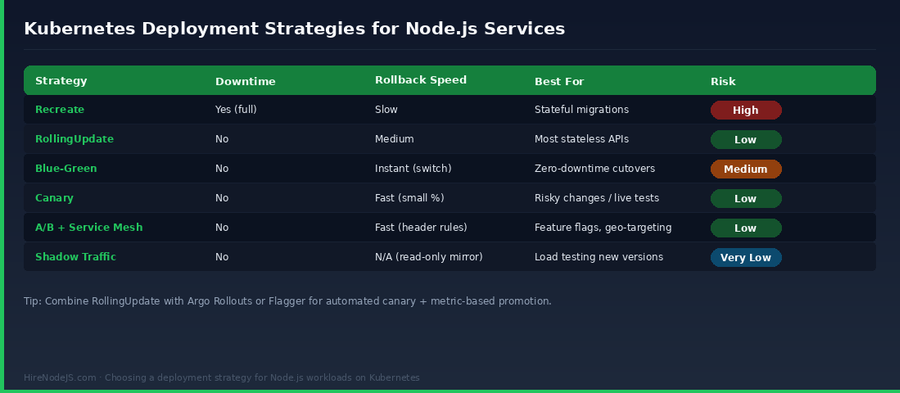
Most Node.js APIs do not need anything more exotic than a tuned RollingUpdate. But there are real cases where Blue-Green, Canary, or Shadow Traffic earn their keep — particularly during major upgrades, schema migrations, or risk-sensitive launches. Pick the strategy that matches the blast radius of the change.
Strategy at a glance
RollingUpdate, with safety
For 90% of Node.js services, RollingUpdate with maxSurge=25% and maxUnavailable=0 is correct. The catch: you must define a preStop hook so in-flight requests drain before the pod is killed. Without it, the kube-proxy iptables rule lags by a few hundred milliseconds and clients see resets.
strategy:
  type: RollingUpdate
  rollingUpdate:
    maxSurge: 25%
    maxUnavailable: 0
template:
  spec:
    terminationGracePeriodSeconds: 45
    containers:
      - name: api
        lifecycle:
          preStop:
            exec:
              command: ["sh","-c","sleep 10 && curl -s -X POST http://127.0.0.1:3000/internal/drain || true"]
Hire Pre-Vetted Node.js Developers
Skip the months-long search. Our exclusive talent network has senior Node.js experts ready to join your team in 48 hours.
5. Autoscaling: HPA, KEDA, and the Right Signals
CPU-based autoscaling is the wrong default for many Node.js APIs. Because the event loop blocks on I/O, a service can be 100% saturated at 35% CPU. The signals that actually correlate with user-visible degradation are p95 latency, queue depth, and request concurrency — not CPU.
HPA on custom metrics
Wire Prometheus + the prometheus-adapter into HPA and scale on requests-per-second per pod or in-flight concurrent requests. KEDA simplifies this further with native scalers for SQS, Kafka, RabbitMQ and Redis Streams — useful when your workers are queue-driven.
Cluster autoscaling: stop guessing node sizes
Karpenter (on AWS) or the cluster autoscaler bin-packs pending pods onto nodes that match their requests, and gracefully drains under-utilized nodes. The biggest 2026 cost win is right-sizing requests: most teams over-request CPU and memory by 2-3x. Use VPA in 'recommendation' mode to see what the workload actually needs.
6. Graceful Shutdown for Long-Lived Connections
If your Node.js service runs WebSockets, SSE, long-running HTTP downloads, or background jobs, the rolling update is the moment everything goes wrong. Kubernetes sends SIGTERM, the iptables rule is torn down, but the in-flight connection is just… killed. The fix is a deliberate shutdown sequence.
The sequence that works
On SIGTERM, immediately fail readiness so the Service stops sending new traffic. Sleep ~10 seconds to let kube-proxy converge. Stop the HTTP server's accept queue. Wait for in-flight requests to drain (with a hard deadline). Close database and Redis connections. Then exit.
// src/shutdown.js
import http from 'node:http';

export function attachShutdown(server, deps, opts = {}) {
  const { drainTimeoutMs = 25_000, preStopDelayMs = 10_000 } = opts;
  let shuttingDown = false;

  globalThis.__ready = true;

  async function shutdown(signal) {
    if (shuttingDown) return;
    shuttingDown = true;
    console.log(`[shutdown] received ${signal}`);

    // 1) flip readiness — kube-proxy will remove us from rotation
    globalThis.__ready = false;

    // 2) wait for kube-proxy convergence
    await new Promise(r => setTimeout(r, preStopDelayMs));

    // 3) stop accepting new connections
    server.close(() => console.log('[shutdown] http server closed'));

    // 4) wait for in-flight requests with a hard deadline
    const deadline = Date.now() + drainTimeoutMs;
    while (server._connections > 0 && Date.now() < deadline) {
      await new Promise(r => setTimeout(r, 250));
    }

    // 5) close downstreams
    await Promise.allSettled([
      deps.pg?.end(),
      deps.redis?.quit(),
      deps.kafka?.disconnect(),
    ]);

    process.exit(0);
  }

  for (const sig of ['SIGTERM', 'SIGINT']) process.on(sig, () => shutdown(sig));
}
7. Observability: Logs, Metrics, and Traces That Actually Help
Production Node.js on Kubernetes is opaque without three things: structured JSON logs from every pod (Pino is the de facto choice in 2026), Prometheus metrics for the event loop and HTTP layer (use prom-client + a histogram for latency), and OpenTelemetry traces propagated through every async call. Backend developers who own observability are dramatically more productive on incident calls — the difference between 'the API is slow' and 'pod-3 has 800ms of GC pauses every 30 seconds because it's leaking JWT decoders'.
The three signals, configured
Logs: ship them to stdout and let the cluster log forwarder (Fluent Bit, Vector) handle the rest. Never write to files. Metrics: expose /metrics on a separate port (e.g. 9100) so the Prometheus scrape doesn't compete with user traffic. Traces: instrument with @opentelemetry/sdk-node and propagate context via traceparent so a single user request can be followed across pods, the database, and Kafka.
8. Cost Control: Right-Sizing, Spot, and the Bill
Kubernetes is fantastic at hiding cost. A team can comfortably run pods over-provisioned by 3x and never notice because everything 'just works'. In 2026, with EKS at $0.10/hour per cluster and an unpredictable spot market, deliberate cost engineering pays for itself in weeks.
The four levers that matter
First: set requests close to the 95th percentile of actual usage and limits at 1.5x of that — VPA in recommendation mode tells you the numbers. Second: use spot/Karpenter for stateless API pods; the savings are 60-80%, and Node.js services restart cleanly. Third: scale down to 1 replica overnight in dev clusters with KEDA cron scalers. Fourth: track per-namespace cost with Kubecost or OpenCost and bill internal teams — visibility changes behavior.
Hire Expert Node.js Developers — Ready in 48 Hours
Building the right Kubernetes setup is only half the battle — you need engineers who have actually run Node.js in production at scale. HireNodeJS.com specialises exclusively in Node.js talent: every developer is pre-vetted on real projects covering API design, event-driven architecture, container orchestration, and zero-downtime deployments.
Unlike generalist platforms, our curated pool means you only speak to engineers who live and breathe Node.js. Most clients have their first developer working within 48 hours of getting in touch. Engagements start as short-term contracts and can convert to full-time hires with zero placement fee.
If you are running Node.js on Kubernetes and need experienced engineers — whether for a one-off cluster review, an SRE-on-demand engagement, or a long-term hire — HireNodeJS connects you with DevOps-savvy backend engineers who have shipped real production workloads on EKS, GKE, and AKS.
Wrapping Up: A Sane Kubernetes Stack for Node.js
The pattern is consistent across every Node.js service that runs reliably on Kubernetes in 2026: a small multi-stage image, three separate probes tuned for the event loop, a RollingUpdate with a real preStop hook, autoscaling on the metrics that actually correlate with user pain, graceful shutdown that respects in-flight work, full observability via OpenTelemetry, and aggressive right-sizing of every container. Skip any one of these and you trade a small piece of reliability or cost for a problem you'll meet at 3 a.m.
None of this is exotic any more — it is the 2026 baseline. The teams shipping fastest are the ones whose engineers internalised these patterns long before the production incident. If your team is missing that experience, hiring a senior Node.js developer who has already lived through the war stories is the cheapest path to a stable cluster.
Frequently Asked Questions
Is Kubernetes overkill for a small Node.js app in 2026?
For a single service with predictable traffic, managed platforms like Cloud Run or Fly.io are simpler. Kubernetes earns its complexity once you have multiple services, multiple environments, or specific compliance and networking needs.
What is the right CPU and memory request for a Node.js pod?
Measure the 95th percentile under realistic load. Most Node.js APIs need 250m–500m CPU and 256–512 MiB of memory. Set --max-old-space-size below the memory limit so V8 GC kicks in before the OOM killer.
Should I use liveness probes for Node.js?
Yes, but use them defensively. Point them at a trivial /healthz endpoint and set a generous failureThreshold. A liveness probe that hits the database can turn a transient outage into a restart storm.
How do I deploy a Node.js WebSocket service on Kubernetes without dropping connections?
Use a long terminationGracePeriodSeconds (60–120s), a preStop hook that flips readiness, and an in-app shutdown handler that drains in-flight WebSockets. Sticky sessions via the ingress are usually unnecessary if your app is stateless.
Does HPA work well for Node.js APIs?
CPU-based HPA is often misleading because Node.js can be saturated at 35% CPU. Scale on requests-per-second, in-flight concurrency, or p95 latency via custom metrics instead.
How do I cut my Kubernetes bill for Node.js workloads?
Right-size requests using VPA recommendations, run stateless pods on spot/Karpenter, use KEDA cron scalers for non-prod, and track per-namespace cost with OpenCost or Kubecost.
Vivek Singh is the founder of Witarist and HireNodeJS.com — a platform connecting companies with pre-vetted Node.js developers. With years of experience scaling engineering teams, Vivek shares insights on hiring, tech talent, and building with Node.js.
Need a DevOps-savvy Node.js engineer for your Kubernetes stack?
HireNodeJS connects you with senior Node.js developers who have shipped production workloads on EKS, GKE, and AKS — available within 48 hours, no recruiter fees.