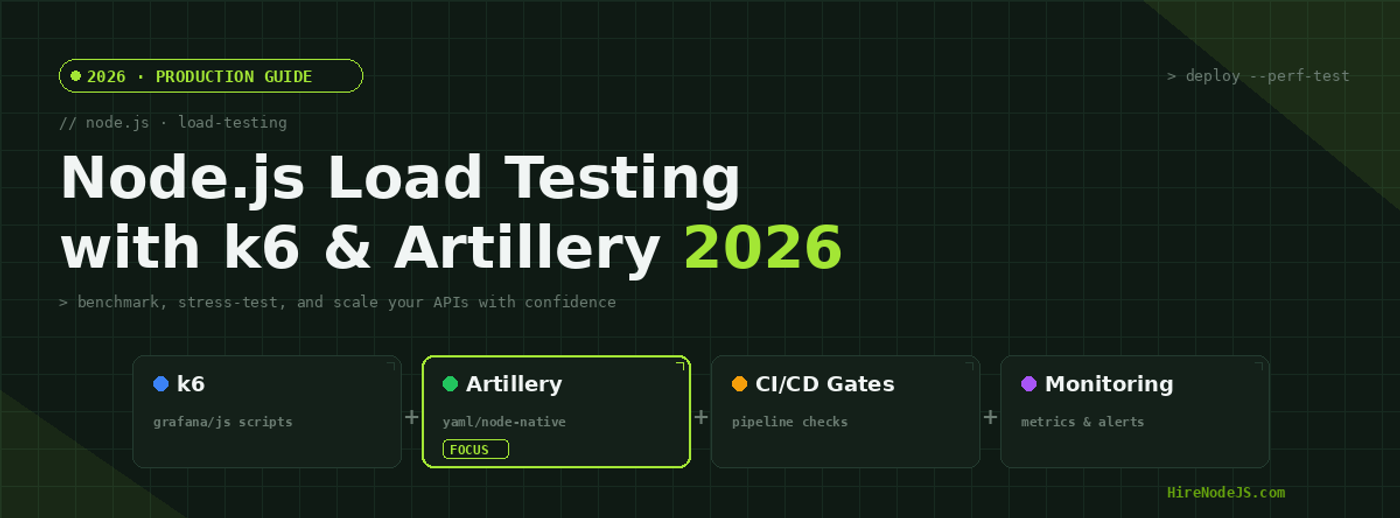
Node.js Load Testing with k6 and Artillery: 2026 Guide
Performance bottlenecks don't announce themselves — they surface under load, often at the worst possible time. For Node.js teams shipping APIs, microservices, and real-time applications in 2026, load testing is no longer a nice-to-have but a critical part of the deployment pipeline. A single undetected memory leak or slow database query can cascade into downtime that costs thousands per minute.
Two tools dominate the Node.js load testing landscape: k6 by Grafana Labs and Artillery. Both integrate natively with JavaScript ecosystems, both work in CI/CD pipelines, and both can simulate thousands of concurrent users. In this guide, we'll compare them head-to-head, walk through production-ready configurations, and show you how to build automated performance gates that catch regressions before they reach production. Whether you're a solo Node.js developer or leading a platform team, this is the definitive playbook for load testing in 2026.
Why Load Testing Matters for Node.js APIs
Node.js excels at handling concurrent I/O-bound workloads thanks to its event loop architecture. However, that single-threaded model is also its Achilles' heel under heavy compute loads. Without proper load testing, you're flying blind — guessing at capacity limits rather than measuring them. The difference between an API that handles 500 concurrent users gracefully and one that crashes at 200 is often a few configuration tweaks that only surface under realistic load conditions.
The Cost of Skipping Load Tests
Production outages caused by untested scaling limits are among the most expensive engineering failures. Industry data shows that the average cost of API downtime for mid-size SaaS companies exceeds $5,600 per minute. Load testing catches these issues during development when fixes are cheap, not during a traffic spike when your on-call engineer is scrambling at 3 AM.
k6 — The Developer-First Load Testing Tool
k6, developed by Grafana Labs, has rapidly become the go-to load testing tool for teams that value developer experience. Written in Go but scripted in JavaScript, k6 combines blazing performance with a familiar programming model. If you can write a Node.js module, you can write a k6 test — the learning curve is measured in minutes, not days.
Core Features and Architecture
k6 runs tests using a high-performance Go runtime, which means it can simulate thousands of virtual users on a single machine without the resource overhead of JMeter's JVM. Tests are written in ES6 JavaScript, making them version-controllable, reviewable, and composable. Built-in support for HTTP/1.1, HTTP/2, WebSockets, and gRPC means you can test virtually any Node.js API pattern.
k6 Key Advantages
The Grafana ecosystem integration is where k6 truly shines. Test results can be streamed in real-time to Grafana Cloud, Prometheus, InfluxDB, or Datadog. This means your load test metrics live alongside your production observability data — same dashboards, same alerting rules, same correlation capabilities. For teams already using Grafana for monitoring, k6 is the natural choice.
Artillery — YAML-First Simplicity for Node.js Teams
Artillery takes a fundamentally different approach: configuration over code. Test scenarios are defined in YAML files, making them readable by anyone on the team — from junior developers to engineering managers. For teams that need to get load testing up and running quickly without a steep learning curve, Artillery is the pragmatic choice. It's built on Node.js itself, which means it understands the ecosystem natively and integrates with tools like TypeScript and npm packages out of the box.
YAML-Driven Test Scenarios
Artillery's YAML configuration makes test scenarios self-documenting. You define phases (ramp-up, sustained load, spike), target URLs, and assertions in a single file that's easy to review in a pull request. Custom logic is handled through JavaScript processor functions, giving you escape hatches when YAML isn't enough. The built-in expect plugin lets you set performance thresholds directly in your test config.
Node.js Native Advantages
Because Artillery is a Node.js application, it can import and use any npm package in your processor functions. Need to generate realistic test data with Faker? Pull it in. Need to hash passwords with bcrypt before sending auth requests? Done. This native compatibility eliminates the impedance mismatch that plagues tools from other ecosystems.
Head-to-Head Comparison — k6 vs Artillery
Choosing between k6 and Artillery isn't about finding the objectively better tool — it's about matching the tool to your team's workflow, existing infrastructure, and testing requirements. Both tools are production-ready and actively maintained, but they optimize for different scenarios.
Performance and Resource Efficiency
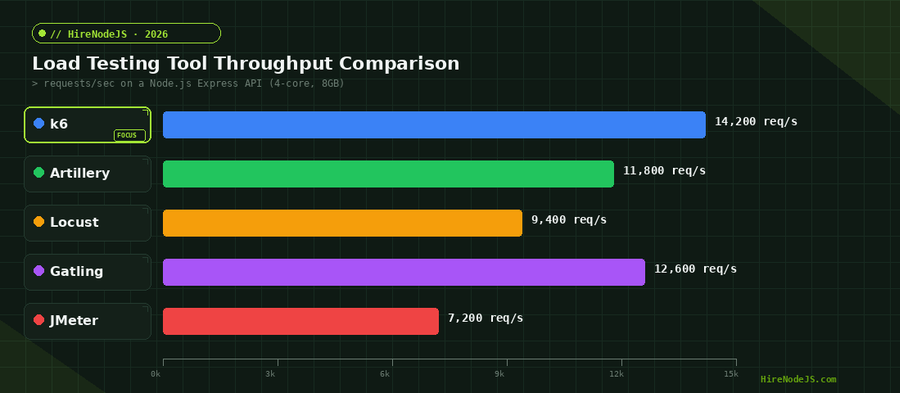
k6 wins on raw throughput. Its Go-based runtime can generate 14,000+ requests per second from a single machine, compared to Artillery's 11,800 on the same hardware. For teams running large-scale stress tests or simulating tens of thousands of concurrent users, k6's efficiency translates directly into lower cloud testing costs. However, for most Node.js API tests under 500 concurrent users, both tools perform comparably.
Developer Experience and Learning Curve
Artillery wins on time-to-first-test. A new team member can write a basic Artillery test in under 5 minutes using YAML. k6 requires JavaScript knowledge but rewards that investment with more powerful scripting capabilities — conditional logic, custom metrics, parametrized data, and protocol-level control that YAML can't express. Teams with strong JavaScript skills often prefer k6; mixed teams lean toward Artillery.
Hire Pre-Vetted Node.js Developers
Skip the months-long search. Our exclusive talent network has senior Node.js experts ready to join your team in 48 hours.
Production-Ready Load Test Examples
Theory is useful, but runnable code is better. Here are production-ready examples for both tools that you can adapt to your own Node.js API. These examples include realistic scenarios: authentication flows, parameterized data, threshold assertions, and proper ramp-up patterns.
k6 Example: API Endpoint Stress Test
import http from 'k6/http';
import { check, sleep } from 'k6';
import { Rate, Trend } from 'k6/metrics';

// Custom metrics
const errorRate = new Rate('errors');
const latencyP95 = new Trend('latency_p95');

export const options = {
  stages: [
    { duration: '30s', target: 20 },   // ramp up
    { duration: '1m',  target: 100 },  // sustained load
    { duration: '30s', target: 200 },  // spike
    { duration: '20s', target: 0 },    // ramp down
  ],
  thresholds: {
    http_req_duration: ['p(95)<200'],   // p95 under 200ms
    errors: ['rate<0.05'],              // error rate under 5%
  },
};

export default function () {
  const payload = JSON.stringify({
    query: 'Node.js developers',
    page: Math.floor(Math.random() * 10) + 1,
  });

  const params = {
    headers: { 'Content-Type': 'application/json' },
  };

  const res = http.post('https://api.example.com/search', payload, params);

  const success = check(res, {
    'status is 200': (r) => r.status === 200,
    'response time < 500ms': (r) => r.timings.duration < 500,
    'body has results': (r) => JSON.parse(r.body).results.length > 0,
  });

  errorRate.add(!success);
  latencyP95.add(res.timings.duration);

  sleep(Math.random() * 2 + 0.5); // realistic think time
}Artillery YAML: Soak Test Configuration
config:
  target: 'https://api.example.com'
  phases:
    - duration: 60
      arrivalRate: 5
      name: 'Warm up'
    - duration: 300
      arrivalRate: 50
      name: 'Sustained load'
    - duration: 60
      arrivalRate: 100
      name: 'Spike test'
  defaults:
    headers:
      Content-Type: 'application/json'
  ensure:
    thresholds:
      - http.response_time.p95: 200
      - http.codes.2xx: { gte: 95 }

scenarios:
  - name: 'Search and browse flow'
    flow:
      - post:
          url: '/search'
          json:
            query: 'Node.js backend developer'
            page: '{{ $randomNumber(1, 20) }}'
          capture:
            - json: '$.results[0].id'
              as: 'developerId'
          expect:
            - statusCode: 200
            - hasProperty: 'results'
      - think: 2
      - get:
          url: '/developers/{{ developerId }}'
          expect:
            - statusCode: 200
Integrating Load Tests into CI/CD Pipelines
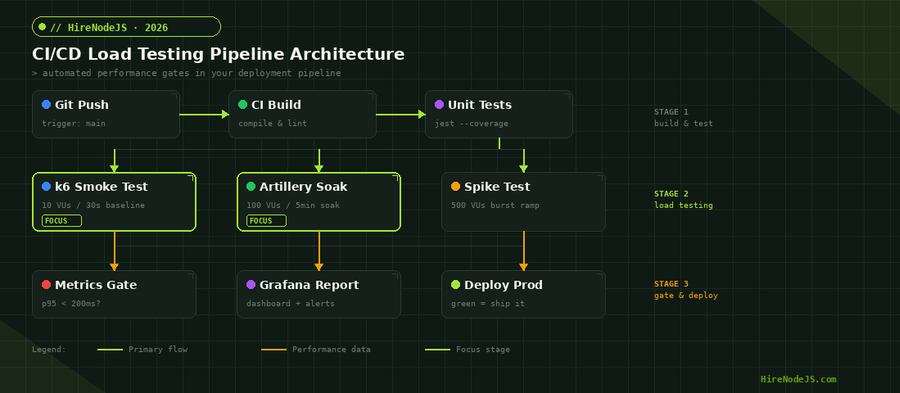
The real power of load testing emerges when it runs automatically on every deployment. Manual load tests are better than nothing, but automated performance gates catch regressions that humans miss. Both k6 and Artillery integrate with GitHub Actions, GitLab CI, Jenkins, and CircleCI. The goal is to make performance a first-class quality gate alongside unit tests and linting. If you're scaling your backend development team, automated load testing should be part of your onboarding checklist for every new engineer.
GitHub Actions: k6 Performance Gate
k6 offers an official GitHub Action that runs your load tests as a CI step. Configure thresholds in your test script, and k6 exits with a non-zero code if any threshold is breached — automatically failing the pipeline. Combine this with Grafana Cloud's k6 integration to get historical trend data across builds, making it easy to spot gradual performance degradation.
Artillery in GitLab CI
Artillery's CLI returns a non-zero exit code when ensure thresholds are violated, making pipeline integration straightforward. Add an artillery run command to your CI config, set your performance budget in the YAML file, and you've got an automated performance gate. The built-in HTML report generator creates shareable artifacts that stakeholders can review without needing CLI access.
Advanced Load Testing Patterns and Best Practices
Once you've mastered basic load testing, these advanced patterns help you extract more value from your testing investment. Each pattern addresses a specific class of performance issue that basic stress tests miss.
Soak Testing for Memory Leaks
Node.js applications are particularly susceptible to memory leaks caused by event listener accumulation, unclosed database connections, and growing caches. A soak test runs moderate load (50-100 VUs) for an extended period — 30 minutes to several hours — while monitoring memory consumption. If memory grows linearly rather than plateauing, you've found a leak. Pairing soak tests with Node.js's built-in memory diagnostics and heap snapshots pinpoints the exact source.
Chaos Engineering Meets Load Testing
Combine load testing with failure injection to understand how your system degrades gracefully. Run k6 at 70% of peak capacity, then kill a database replica or throttle the network to a downstream service. Does latency degrade linearly, or does the system cliff-edge into failure? This pattern reveals whether your circuit breakers, retry logic, and fallback caches actually work under pressure.
Hire Expert Node.js Developers — Ready in 48 Hours
Building the right system is only half the battle — you need the right engineers to build it. HireNodeJS.com specialises exclusively in Node.js talent: every developer is pre-vetted on real-world projects, API design, event-driven architecture, and production deployments.
Unlike generalist platforms, our curated pool means you speak only to engineers who live and breathe Node.js. Most clients have their first developer working within 48 hours of getting in touch. Engagements start as short-term contracts and can convert to full-time hires with zero placement fee.
Conclusion — Ship Faster by Testing Under Load
Load testing is the difference between hoping your Node.js API can handle production traffic and knowing it can. k6 gives you raw performance and deep Grafana integration for teams that live in dashboards. Artillery gives you YAML simplicity and Node.js-native compatibility for teams that value fast iteration. The best choice depends on your team — and many organizations use both: k6 for heavy stress tests and Artillery for quick smoke tests in CI. Whatever you choose, make it automated, make it part of every deploy, and make it non-negotiable. If you need experienced engineers who understand performance engineering at scale, explore HireNodeJS to find pre-vetted Node.js talent ready to ship.
Start with a 10-VU smoke test on your most critical endpoint today. Once you see that first latency chart, you'll wonder how you ever deployed without it.
Frequently Asked Questions
What is the best load testing tool for Node.js in 2026?
k6 and Artillery are the two leading choices. k6 offers superior raw throughput and Grafana integration, while Artillery provides YAML-based simplicity and native Node.js compatibility. Most teams benefit from using both.
How many virtual users should I use for load testing a Node.js API?
Start with 10-20 VUs for smoke tests, then gradually increase. Your target should match expected peak production traffic plus a 2-3x safety margin. A typical SaaS API should test at 200-500 concurrent users minimum.
Can I run k6 and Artillery in a CI/CD pipeline?
Yes, both tools support CI/CD integration out of the box. k6 has an official GitHub Action, and Artillery's CLI returns non-zero exit codes when performance thresholds are breached, making pipeline gating straightforward.
What is the difference between load testing and stress testing?
Load testing validates performance under expected traffic levels. Stress testing pushes beyond expected limits to find breaking points. Both are essential — load tests confirm daily capacity, stress tests reveal how your system fails gracefully.
How do I detect memory leaks with load testing in Node.js?
Use soak testing: run moderate load (50-100 VUs) for 30+ minutes while monitoring memory with Node.js diagnostics or Prometheus metrics. If memory grows linearly without plateauing, you have a leak.
How much does it cost to hire a Node.js developer for performance engineering?
Senior Node.js developers with performance engineering expertise typically command $80-150/hour depending on region. HireNodeJS.com connects you with pre-vetted performance-focused engineers starting within 48 hours.
Vivek Singh is the founder of Witarist and HireNodeJS.com — a platform connecting companies with pre-vetted Node.js developers. With years of experience scaling engineering teams, Vivek shares insights on hiring, tech talent, and building with Node.js.
Need a Node.js Engineer Who Understands Performance?
HireNodeJS connects you with pre-vetted senior Node.js engineers who know load testing, performance optimization, and production scaling. Available within 48 hours — no recruiter fees, no lengthy screening.