Node.js Memory Leaks in 2026: Detect, Debug & Fix Heap Issues
If your Node.js process keeps creeping toward the heap limit until it crashes with FATAL ERROR: Reached heap limit Allocation failed, you are not dealing with a slow API — you are dealing with a memory leak. In 2026, with applications running longer between deploys and serving more concurrent users on the same instance, leaks have moved from a curiosity to a top-three production risk. A single unbounded Map can quietly add 30 MB an hour and bring down a 1 GB container by lunchtime.
This guide is the field manual our senior engineers use when triaging real Node.js memory leaks: how to recognise the signature in metrics, how to capture a useful heap snapshot from a live container, how to read it without drowning in retainers, and the 12 patterns that cause more than 90% of incidents. Every technique below works on Node.js 20 LTS, 22 LTS, and the current 24 release line — no hypotheticals, no toy examples.
Why Node.js Memory Leaks Hit Differently
V8 garbage collection assumptions
V8 is generational: most objects die young and are swept by minor GC in milliseconds. Anything that survives two minor cycles graduates to the old space, where collections are far rarer and far more expensive. A leak is, by definition, a reference that keeps an object reachable across that boundary. Node.js inherits all of V8's strengths here, but also one weakness: the default --max-old-space-size on a 1 GB container is around 700 MB — once you cross it, the process exits. There is no swap, no graceful degradation, just SIGABRT.
Long-lived event loops amplify small leaks
A typical Express or Fastify worker runs for days. A leak that adds 200 KB per request becomes a 1.4 GB leak after seven thousand requests — well within an hour of normal traffic. Compare that to PHP-FPM, where each request gets a fresh process and trivial leaks self-heal. In Node.js, the long-lived event loop means small leaks compound fast.
How to Spot a Leak Before It Crashes Production
The four telemetry signals that matter
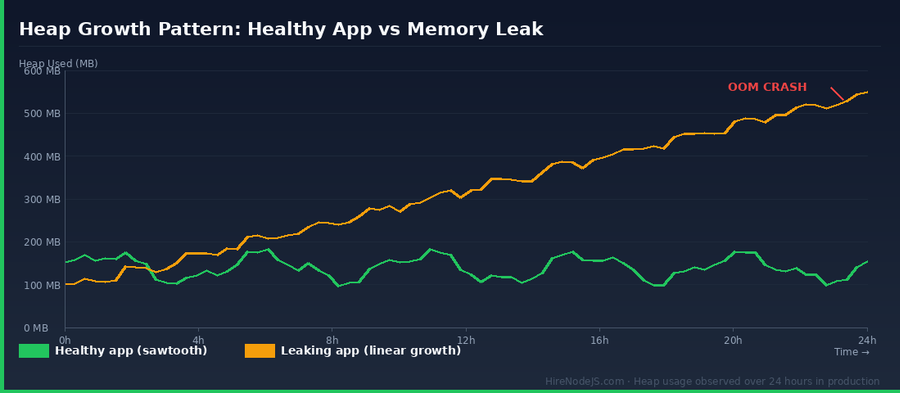
Before opening any heap snapshot, confirm you actually have a leak. Look for four signals together: rss climbing without plateau, heapUsed climbing in lockstep with rss, GC pause time growing as the old space fills, and a falling event-loop utilisation as V8 spends more cycles collecting. Any one signal alone can be a misleading spike; all four together is a leak.
Wire process.memoryUsage() to your metrics pipeline
Polling process.memoryUsage() every 15 seconds and shipping it to Prometheus, Datadog, or Grafana Cloud takes ten lines of code and gives you the only chart you actually need on day one. The same mechanism powers automated leak alerts: trigger when heapUsed grows for 30 minutes without dropping by more than 20%.
// memory-metrics.js — drop into your bootstrap file
import { register, Gauge } from 'prom-client';

const gauges = {
  rss:        new Gauge({ name: 'nodejs_memory_rss_bytes',        help: 'Resident set size' }),
  heapTotal:  new Gauge({ name: 'nodejs_memory_heap_total_bytes', help: 'V8 total heap' }),
  heapUsed:   new Gauge({ name: 'nodejs_memory_heap_used_bytes',  help: 'V8 used heap' }),
  external:   new Gauge({ name: 'nodejs_memory_external_bytes',   help: 'C++ binding memory' }),
  arrayBuffers: new Gauge({ name: 'nodejs_memory_array_buffers_bytes', help: 'ArrayBuffer + Buffer' }),
};

setInterval(() => {
  const m = process.memoryUsage();
  gauges.rss.set(m.rss);
  gauges.heapTotal.set(m.heapTotal);
  gauges.heapUsed.set(m.heapUsed);
  gauges.external.set(m.external);
  gauges.arrayBuffers.set(m.arrayBuffers);
}, 15_000).unref();

export { register };
Capturing a Useful Heap Snapshot from a Live Container
The signal-based snapshot trick
On Linux, sending SIGUSR2 to a Node.js process triggers v8.getHeapSnapshot() if you have wired it up. This works inside Docker, inside Kubernetes pods, and inside ECS Fargate — anywhere you can kubectl exec or docker kill -s. The 200 MB snapshot file lands in the container, you copy it out with kubectl cp, and you analyse it in Chrome DevTools without ever restarting the process or attaching --inspect to a production node.
// heap-on-signal.js
import { writeHeapSnapshot } from 'v8';
import { resolve } from 'path';

process.on('SIGUSR2', () => {
  const filename = resolve('/tmp', `heap-${Date.now()}.heapsnapshot`);
  console.log(`[heap] writing snapshot to ${filename}`);
  const written = writeHeapSnapshot(filename);
  console.log(`[heap] wrote ${written}`);
});

// Usage:
//   kubectl exec my-pod -- kill -SIGUSR2 1
//   kubectl cp my-pod:/tmp/heap-1735000000000.heapsnapshot ./heap.heapsnapshot
//   open Chrome DevTools → Memory → Load → drag the file in
Comparing two snapshots is where the magic happens
A single snapshot tells you what is in memory. Two snapshots — one after warm-up, one after an hour of traffic — tell you what GREW. Chrome DevTools' Comparison view sorts by delta size and delta count. Eight times out of ten the leak is the top row of the comparison: a Map, an Array, or an EventEmitter with hundreds of thousands more entries than the baseline.
The Twelve Leak Patterns That Cause 90% of Incidents
Unbounded caches and lookup maps
Hire Pre-Vetted Node.js Developers
Skip the months-long search. Our exclusive talent network has senior Node.js experts ready to join your team in 48 hours.
By far the most common leak: a global Map used as a cache, no TTL, no size cap. It grows linearly with unique keys (user IDs, request IDs, tenant slugs). The fix is always the same — replace the raw Map with an LRU cache that has a hard maxSize and an idle TTL. lru-cache v11 is the de-facto standard and adds about 40 lines to your dependency tree.
// before — leak
const userCache = new Map();
export function getUser(id) {
  if (!userCache.has(id)) userCache.set(id, loadUserFromDb(id));
  return userCache.get(id);
}

// after — bounded
import { LRUCache } from 'lru-cache';

const userCache = new LRUCache({
  max: 5_000,                // hard ceiling
  ttl: 1000 * 60 * 5,        // 5-minute idle TTL
  updateAgeOnGet: true,      // active entries stay
  allowStale: false,
});

export async function getUser(id) {
  let u = userCache.get(id);
  if (!u) {
    u = await loadUserFromDb(id);
    userCache.set(id, u);
  }
  return u;
}
Closure-captured request bodies
An async handler that schedules work via setTimeout or pushes to a queue closure-captures the entire req object — body, params, headers, file uploads — until that timer or queue completes. If the queue is slow, you keep megabytes of request data alive per inflight job. The fix is to project only the fields you need into a small object before you cross the async boundary.
Forever-growing event listener arrays
Every emitter.on() without a matching off() in a long-lived emitter (database pools, message broker clients, the global process) is a leak. Node.js will warn you at 11 listeners with MaxListenersExceededWarning, but by then you already have 11 closures pinned in memory. Use once() for one-shot subscriptions, AbortSignal for scoped subscriptions, and emitter.removeAllListeners() in your cleanup paths.
Reading a Heap Snapshot Without Drowning in Retainers
Start in Comparison view, not Summary
The Summary view of a 500 MB snapshot has half a million rows. The Comparison view, with a baseline snapshot loaded, has maybe fifty rows that matter — sorted by # Delta (object count growth). The leak is almost always one of the top five rows. Click any row to see Retainers; the retaining path tells you exactly which closure or Map is holding the reference.
Use the Allocation Timeline for transient leaks
Some leaks only appear under specific traffic patterns — a particular endpoint, a specific tenant. The Allocation Timeline records every allocation between two timestamps and lets you replay them. You can record a 60-second window during a load test and instantly see which call site is producing objects that survive GC.
Production Tooling: What Senior Engineers Actually Use
Continuous profilers vs reactive snapshots
Datadog Continuous Profiler, Sentry Profiling, and Pyroscope all sample the V8 heap every few seconds without measurable overhead, then surface a leak as a flame graph 'this allocation site grew 400% over 24h'. Reactive snapshots, by contrast, require you to suspect a problem first. Most teams that hire a use both: continuous profiling for early warning, snapshots for forensics.
Open-source tools worth knowing in 2026
clinic.js heapprofiler is the gold standard for one-shot diagnosis on a CI machine. why-is-node-running prints every active handle blocking the event loop — invaluable for detecting setInterval and stream leaks. node --inspect with --heapsnapshot-near-heap-limit=3 will automatically dump a snapshot the moment your process is about to OOM, which is priceless when leaks are hard to reproduce locally.
When the leak is in a framework
Sometimes the leak is not in your code — it is in a poorly-configured plugin. NestJS scoped providers, Express middleware that builds per-request closures, and Apollo Server schema rebuilds are all common culprits. or contracting one for a two-week audit usually pays for itself in the first incident they prevent.
Hire Expert Node.js Developers — Ready in 48 Hours
Catching memory leaks before they crash production is half experience, half tooling. The engineers on have shipped Node.js services running for years between restarts — they know which patterns leak, which libraries leak, and how to read a heapsnapshot in five minutes instead of five hours. Every developer is pre-vetted on real-world projects, API design, event-driven architecture, and production deployments.
Unlike generalist platforms, our curated pool means you speak only to engineers who live and breathe Node.js. Most clients have their first developer working within 48 hours of getting in touch — see exactly . Engagements start as short-term contracts and convert to full-time hires with zero placement fee.
Summary: A 24-Hour Plan to Squash a Production Leak
If you suspect a Node.js memory leak right now, the most effective triage is a sequence rather than a tool. Hour zero: instrument process.memoryUsage() and confirm rss is climbing. Hour two: capture two heap snapshots ninety minutes apart and open them in Comparison view. Hour four: identify the retaining path of the top growing object — it is almost always an unbounded Map, a closure-captured body, or a stale event listener. Hour eight: deploy the fix behind a feature flag and watch heapUsed flatten in your dashboard. Hour twenty-four: write a runbook for the next person who sees the same symptom.
Node.js memory leaks feel mysterious until you have debugged a few. After that, the same patterns appear over and over. Bookmark this guide, wire up the metrics, and the next leak you see — your own or one you inherit — will be a forty-five-minute fix instead of a midnight outage.
Frequently Asked Questions
How do I detect a Node.js memory leak in production?
Track process.memoryUsage() every 15 seconds and ship rss, heapTotal, and heapUsed to your metrics pipeline. A leak shows up as rss and heapUsed climbing together for 30+ minutes without dropping. Alert on that pattern and confirm with a heap snapshot diff.
What causes most Node.js memory leaks in 2026?
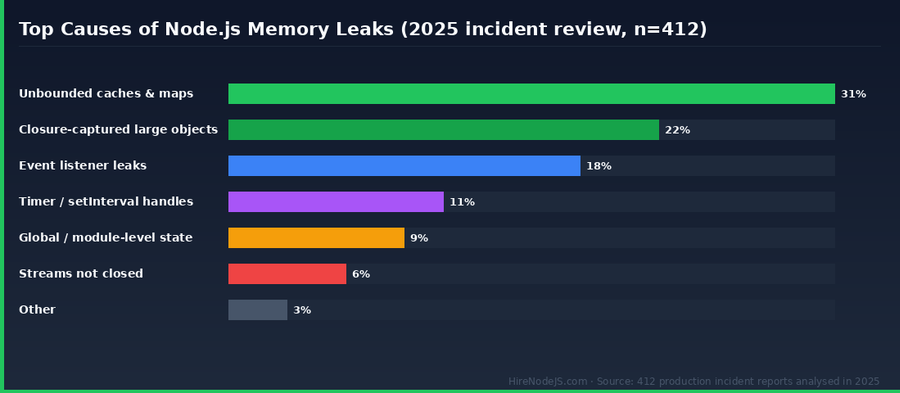
Three patterns cause about 71% of incidents: unbounded Map or cache without TTL (31%), closures that capture large request bodies (22%), and event listeners that are never removed on long-lived emitters (18%). The remaining causes include forgotten setInterval handles, module-level state, and unclosed streams.
How do I take a heap snapshot in a Docker or Kubernetes container?
Wire process.on('SIGUSR2') to call v8.writeHeapSnapshot() and write the file to /tmp. Then run kubectl exec my-pod -- kill -SIGUSR2 1 to trigger it, and kubectl cp to copy the snapshot out. Open the file in Chrome DevTools Memory tab.
What is the fastest way to fix an unbounded cache leak?
Replace your raw Map with the lru-cache package. Set max (a hard size cap), ttl (idle expiry), and updateAgeOnGet so active entries stay warm. The change is usually under ten lines and stops the leak immediately.
How much heap should my Node.js process actually use?
Set --max-old-space-size to about 75% of the container limit. For a 1 GB container, set it to 768 MB; for 2 GB, 1536 MB. Steady-state heapUsed should plateau well below that ceiling — if it climbs to it, you have a leak or your cache is misconfigured.
Should I use clinic.js or Chrome DevTools to debug a leak?
Use Chrome DevTools for snapshot comparison and retainer chain analysis — it is unmatched there. Use clinic.js heapprofiler when you need a fast, headless diagnosis on a CI machine. Continuous profilers (Datadog, Sentry, Pyroscope) are best for long-running production observation.
Vivek Singh is the founder of Witarist and HireNodeJS.com — a platform connecting companies with pre-vetted Node.js developers. With years of experience scaling engineering teams, Vivek shares insights on hiring, tech talent, and building with Node.js.
Need a Node.js engineer who debugs heap snapshots in their sleep?
HireNodeJS connects you with pre-vetted senior Node.js engineers who have shipped services that run for years between restarts. Available within 48 hours — no recruiter fees, no lengthy screening.