Node.js + MongoDB Production Guide: Schema, Indexing & Scale in 2026
MongoDB remains the most popular NoSQL database for Node.js applications in 2026, powering everything from nimble startup MVPs to enterprise platforms handling millions of daily transactions. Its document model maps naturally to JavaScript objects, and the Mongoose ODM has matured into a battle-tested abstraction layer that brings schema validation, middleware hooks, and a fluent query API to every project.
Yet the gap between a development-friendly MongoDB setup and a production-grade deployment is vast. Connection pooling misconfigurations, missing indexes, and naïve schema designs are among the most common reasons Node.js APIs buckle under real traffic. This guide walks you through every layer of a production MongoDB stack — from schema design and indexing to replica sets, sharding, and observability — so your next deployment ships with confidence.
Schema Design Patterns for Production
MongoDB's flexible schema is both its superpower and its footgun. In production, you need a deliberate strategy for how documents are structured, how relationships are modelled, and when to embed versus reference.
Embedding vs Referencing
The embedding pattern stores related data inside a single document, which eliminates joins and provides atomic reads. Use it when the child data is always accessed with the parent, the array is bounded (fewer than 100 items), and the total document stays well under MongoDB's 16 MB limit. A classic example is storing an order's line items directly inside the order document.
Referencing stores only an ObjectId and requires a second query or a $lookup aggregation to resolve the relationship. Choose this when the related collection is large, independently queried, or updated frequently. User profiles referencing their organisations is a textbook referencing scenario.
The Subset Pattern
When a document accumulates an unbounded array — like product reviews — the subset pattern keeps only the most recent N items embedded and stores the full history in a separate collection. This keeps working-set documents small and cache-friendly while still offering fast access to the data users see most often.
Connection Pooling and Mongoose Configuration
Every MongoDB driver maintains a pool of TCP connections to the server. In Node.js with Mongoose, the default maxPoolSize is 100 since Mongoose 7, but the optimal value depends on your workload, instance size, and concurrency patterns. Too few connections create a bottleneck; too many overwhelm the server's file descriptor and memory limits.
Recommended Connection Options
import mongoose from 'mongoose';

const MONGO_URI = process.env.MONGODB_URI || 'mongodb+srv://cluster0.example.net/myapp';

export async function connectDB() {
  await mongoose.connect(MONGO_URI, {
    maxPoolSize: 15,                // tune per workload — see chart below
    minPoolSize: 2,                 // keep warm connections ready
    serverSelectionTimeoutMS: 5000, // fail fast if cluster unreachable
    socketTimeoutMS: 45000,         // prevent zombie sockets
    heartbeatFrequencyMS: 10000,    // monitor replica set health
    retryWrites: true,              // automatic retry on transient errors
    w: 'majority',                  // write concern for durability
    readPreference: 'secondaryPreferred', // offload reads to replicas
  });

  mongoose.connection.on('error', (err) => {
    console.error('MongoDB connection error:', err);
    process.exit(1);
  });

  mongoose.connection.on('disconnected', () => {
    console.warn('MongoDB disconnected — attempting reconnect...');
  });

  console.log('MongoDB connected successfully');
}
Getting connection pooling right is one of the areas where experienced Node.js backend developers make a measurable difference. A senior engineer will benchmark pool sizes against your actual traffic patterns rather than relying on defaults.
Indexing Strategy That Scales
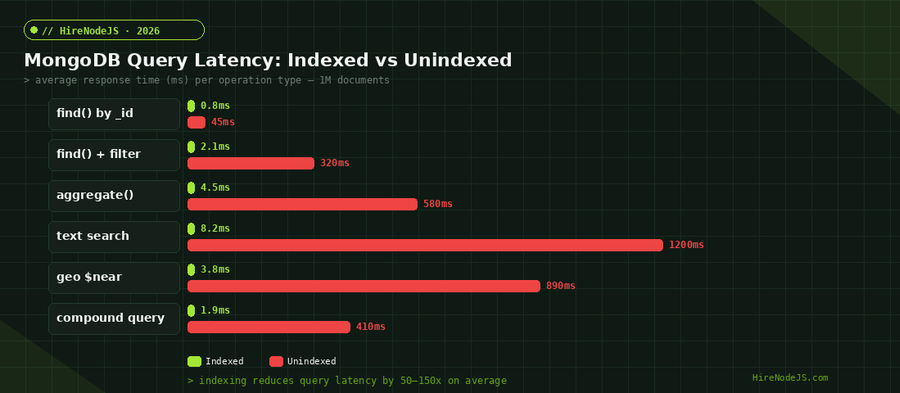
Indexes are the single biggest lever for MongoDB query performance. Without them, every query triggers a collection scan — fine for 1,000 documents, catastrophic for 10 million. A deliberate indexing strategy starts by identifying your most frequent query patterns and building indexes to cover them.
Compound Indexes and the ESR Rule
The ESR rule — Equality, Sort, Range — guides the field order in compound indexes. Fields used in equality conditions come first, followed by sort fields, and finally range filters. This order maximises the number of index entries the query planner can skip, producing the fastest possible scans.
Index Types at a Glance
MongoDB offers single-field indexes for simple lookups, compound indexes for multi-field queries, text indexes for full-text search, 2dsphere indexes for geospatial queries, hashed indexes for sharding, and TTL indexes for automatic document expiration. Each serves a distinct use case, and choosing the right type avoids redundant indexes that slow writes.
Replica Sets and High Availability
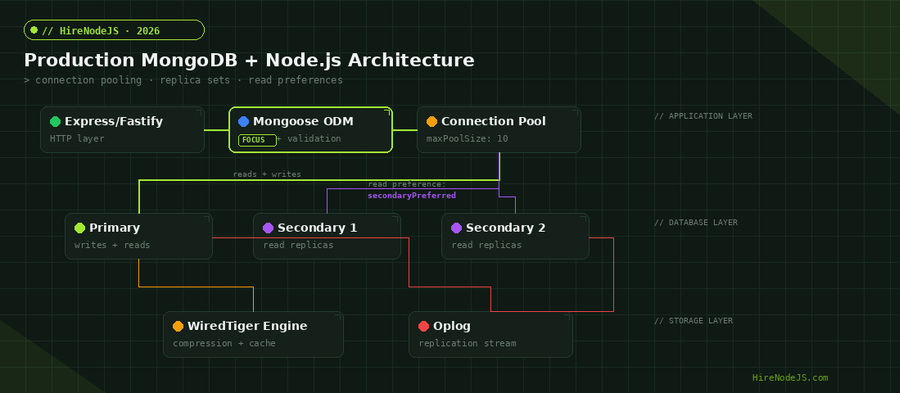
A production MongoDB deployment should always use a replica set — a group of mongod processes that maintain the same data set. The primary node receives all write operations; secondaries replicate the primary's oplog and can serve read traffic when configured with an appropriate read preference.
Read Preferences Explained
The primary read preference sends all reads to the primary, guaranteeing strong consistency. secondaryPreferred offloads reads to secondaries when available, reducing primary load but introducing eventual consistency. For analytics queries or reporting dashboards that can tolerate a few seconds of staleness, secondaryPreferred is the pragmatic choice.
Hire Pre-Vetted Node.js Developers
Skip the months-long search. Our exclusive talent network has senior Node.js experts ready to join your team in 48 hours.
Automatic Failover
When the primary becomes unreachable, the remaining members hold an election and a secondary is promoted to primary — typically within 10–12 seconds. Your Node.js driver handles this transparently if retryWrites and retryReads are enabled. The key is ensuring your application handles the brief election window gracefully, with retry logic and appropriate timeouts.
Sharding for Horizontal Scale
When a single replica set can no longer handle your data volume or throughput requirements, sharding distributes data across multiple shards — each itself a replica set. The shard key determines how documents are distributed, making it one of the most consequential decisions in your MongoDB architecture.
Choosing a Shard Key
A good shard key has high cardinality, low frequency per value, and is present in the majority of your queries (so the query router can target a single shard). Common patterns include hashed _id for uniform distribution, compound keys like {tenantId, createdAt} for multi-tenant SaaS platforms, and zone-based sharding for geographic data locality.
When to Shard
Sharding adds operational complexity — config servers, query routers (mongos), and cross-shard queries. Defer it until you have exhausted vertical scaling (bigger instances), optimised your indexes, and confirmed that your working set exceeds available RAM. For most applications, a well-tuned replica set on MongoDB Atlas M50 or M60 instances handles hundreds of thousands of operations per second.
Security Hardening for MongoDB in Production
Security is non-negotiable in production. MongoDB has shipped with authentication enabled by default since version 4.0, but there are additional layers every Node.js developer should implement to lock down a deployment.
Authentication and Authorization
Use SCRAM-SHA-256 authentication at minimum. For enterprise deployments, integrate with LDAP or x.509 certificates. Apply the principle of least privilege: your application's database user should have readWrite on its own database and nothing else. Never use the admin account for application connections.
Network Security
Enable TLS for all connections — both between your Node.js application and MongoDB, and between replica set members. Restrict network access with IP allowlists or VPC peering. On MongoDB Atlas, enable the network access audit log so you can trace every connection attempt.
Observability and Monitoring
A production database without monitoring is a ticking time bomb. Integrate MongoDB metrics into your Node.js observability stack from day one, using tools like OpenTelemetry, Datadog, or Prometheus with the MongoDB exporter.
Key Metrics to Track
Monitor operation counters (queries, inserts, updates, deletes per second), replication lag between primary and secondaries, connection pool utilisation, page faults (indicating the working set exceeds RAM), and slow query log entries. Set alerts on replication lag exceeding 10 seconds and connection pool utilisation above 80 percent.
Profiling Slow Queries
Enable the database profiler at level 1 to capture queries slower than a configurable threshold — typically 100ms. Review the system.profile collection regularly to identify missing indexes, inefficient aggregation pipelines, and queries that scan too many documents. Pair this with Mongoose's debug mode during development to see the exact queries being generated.
Hire Expert Node.js Developers — Ready in 48 Hours
Building the right system is only half the battle — you need the right engineers to build it. HireNodeJS.com specialises exclusively in Node.js talent: every developer is pre-vetted on real-world projects, API design, event-driven architecture, and production deployments.
Unlike generalist platforms, our curated pool means you speak only to engineers who live and breathe Node.js. Most clients have their first developer working within 48 hours of getting in touch. Engagements start as short-term contracts and can convert to full-time hires with zero placement fee.
Conclusion
Running MongoDB in production with Node.js is not about picking the right ODM and calling it a day. It demands thoughtful schema design, a deliberate indexing strategy, properly sized connection pools, replica sets for high availability, and a monitoring stack that catches problems before your users do.
Whether you are spinning up a new project or hardening an existing deployment, every decision in this guide compounds over time. And if you need engineers who have already navigated these production challenges, HireNodeJS connects you with pre-vetted senior Node.js developers who can hit the ground running — available within 48 hours.
Frequently Asked Questions
What is the best MongoDB driver for Node.js in 2026?
Mongoose remains the most popular ODM for Node.js and MongoDB, providing schema validation, middleware, and a fluent query API. For projects that prefer a thinner abstraction, the official MongoDB Node.js driver offers full access to all MongoDB features with lower overhead.
How many connections should my Node.js app open to MongoDB?
A maxPoolSize of 10–20 works well for most workloads. Benchmark your specific traffic pattern using the connection pool sizing chart above. Too many connections waste server resources; too few create bottlenecks under concurrent load.
Should I use MongoDB Atlas or self-host MongoDB?
MongoDB Atlas is the recommended option for most teams in 2026. It handles backups, security patches, replica set management, and scaling automatically. Self-hosting only makes sense when you have strict data residency requirements or a dedicated DBA team.
When should I shard my MongoDB database?
Shard only after you have exhausted vertical scaling, optimised indexes, and confirmed your working set exceeds available RAM. For most applications, a well-configured replica set handles hundreds of thousands of operations per second before sharding becomes necessary.
How do I prevent MongoDB injection attacks in Node.js?
Use Mongoose schemas with strict validation, sanitise user input with libraries like mongo-sanitize, and never pass raw user input directly into query objects. Enable MongoDB's authentication and role-based access control to limit what each connection can do.
How much does it cost to hire a Node.js MongoDB developer?
Senior Node.js developers with MongoDB expertise typically cost between $60–120/hour depending on location and engagement type. HireNodeJS offers pre-vetted developers with transparent pricing and no recruiter fees, with most placements starting within 48 hours.
Vivek Singh is the founder of Witarist and HireNodeJS.com — a platform connecting companies with pre-vetted Node.js developers. With years of experience scaling engineering teams, Vivek shares insights on hiring, tech talent, and building with Node.js.
Need a Node.js + MongoDB Expert on Your Team?
HireNodeJS connects you with pre-vetted senior Node.js engineers who ship production MongoDB deployments — schema design, indexing, replica sets, and all. Available within 48 hours, no recruiter fees.