Node.js Monorepo with Turborepo: The Complete 2026 Guide
Node.js teams in 2026 ship more code, in more places, with smaller squads than ever before. A typical product company now runs a Next.js storefront, an internal admin app, a Fastify API, a BullMQ worker, and half a dozen shared packages — and the frontier between "app" and "library" is gone. The teams that scale this without burning their CI budget have one thing in common: a well-tuned monorepo.
Turborepo has quietly become the default orchestrator for Node.js monorepos. Vercel, Sourcegraph, AWS, Datadog, Vinted and dozens of YC-backed startups ship with it because it solves the two boring-but-painful problems every growing JavaScript team eventually hits: tasks running in the wrong order, and tasks running when they don't need to run at all. This guide is the practical, opinionated version of how to set it up in 2026 — what to put where, what to cache, what to skip, and what to look for when hiring engineers who can own it.
Why a Monorepo (and Why Now)
Five years ago the polyrepo-vs-monorepo debate was genuinely contested. Today, almost every framework, ORM, and tooling vendor in the Node.js ecosystem ships their own examples as monorepos because the costs that used to make monorepos painful — slow CI, broken caches, version skew between packages — have been engineered away by tools like Turborepo, Nx, pnpm workspaces, Changesets, and remote build caches.
The four problems a monorepo actually solves
Atomic refactors across services. When you rename a function in packages/auth, every app that imports it gets a TypeScript error in the same PR. No more shipping a breaking SDK change and discovering, three weeks later, that the worker app was on an old version.
One source of truth for shared types. Zod schemas, tRPC routers, Prisma models — define them once, consume them everywhere, with full inference. This single benefit eliminates an entire class of API drift bugs.
Unified tooling and dependencies. One ESLint config, one Prettier setup, one Tailwind preset, one TypeScript base config — extended where each app needs to differ. Onboarding a new engineer becomes a single clone, install, and run.
Shared CI cache that compounds across the team. A test you ran locally on Tuesday is a test your CI doesn't have to re-run on Wednesday. Multiply that by every package and every PR and you're saving real money.
How Turborepo Actually Works
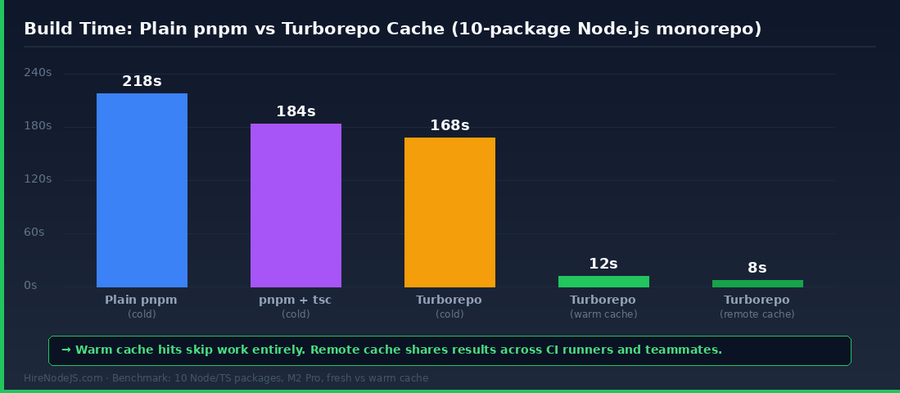
At its core, Turborepo is two ideas: a task graph and a content-addressed cache. You declare your tasks (build, test, lint, typecheck) and how they depend on each other in turbo.json. When you run a task, Turborepo hashes every input that could affect the output — source files, dependencies, env vars, the task definition itself — and uses that hash as a cache key.
The cache hierarchy
Local cache lives in node_modules/.cache/turbo on each developer's machine. Remote cache (Vercel Remote Cache or your own self-hosted endpoint) is shared between teammates and CI. The result: when you pull a branch your colleague already built, you don't rebuild — you just download the artifacts they produced.
Topological vs parallel execution
Turborepo reads your package.json dependencies and runs tasks in topological order automatically. If apps/web depends on packages/ui, the UI library builds first. Independent packages run in parallel, capped by CPU count. You almost never need to write order manually — the dependency graph is the order.
A Production-Ready Layout for a Node.js + Next.js Stack
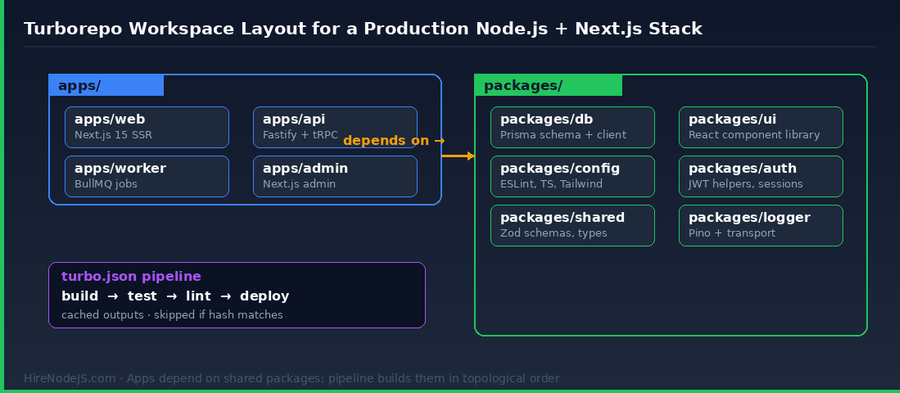
There are a hundred ways to lay out a monorepo. The shape below is what we see most often in production at HireNodeJS clients shipping with Turborepo, pnpm, and TypeScript. It scales from a 2-engineer startup to a 40-engineer platform team without restructuring.
apps/ vs packages/ — the only convention that matters
Anything you deploy goes in apps/. Anything you import goes in packages/. Apps depend on packages; packages depend on each other but never on apps. This single rule keeps the dependency graph acyclic and Turborepo happy.
What belongs in packages/
Aim for small, single-purpose packages: packages/db (Prisma client and schema), packages/ui (your design system), packages/config (eslint-config, tsconfig, tailwind-preset), packages/auth (JWT helpers, session middleware), packages/shared (Zod schemas, branded types, utility functions), packages/logger (Pino with transports). Resist the temptation to stuff everything in one packages/lib — fine-grained packages cache better.
If your team is starting from scratch, our backend developer hiring guide walks through the skills to look for in engineers who'll own this kind of architecture end-to-end.
Setting Up turbo.json — The Pipeline That Actually Scales
turbo.json is the single configuration file that defines your task pipeline. Get this right and the rest of the setup falls into place. Below is a battle-tested starting point for a Node.js + Next.js stack:
Hire Pre-Vetted Node.js Developers
Skip the months-long search. Our exclusive talent network has senior Node.js experts ready to join your team in 48 hours.
{
  "$schema": "https://turbo.build/schema.json",
  "globalDependencies": ["**/.env.*local", "tsconfig.base.json"],
  "globalEnv": ["NODE_ENV", "DATABASE_URL", "REDIS_URL"],
  "ui": "tui",
  "tasks": {
    "build": {
      "dependsOn": ["^build"],
      "outputs": [".next/**", "!.next/cache/**", "dist/**"],
      "env": ["NEXT_PUBLIC_*", "SENTRY_DSN"]
    },
    "test": {
      "dependsOn": ["^build"],
      "outputs": ["coverage/**"],
      "inputs": ["src/**", "test/**", "package.json"]
    },
    "lint": {
      "dependsOn": ["^build"],
      "outputs": []
    },
    "typecheck": {
      "dependsOn": ["^build"],
      "outputs": []
    },
    "dev": {
      "cache": false,
      "persistent": true
    }
  }
}
What every line is doing
globalDependencies invalidates every cache when env files or the base TS config change. dependsOn: ["^build"] means "build all upstream packages before this task". outputs declares what to cache — be precise here, because Turborepo will not cache files you don't list. Notice .next/cache/** is excluded: caching the cache itself causes weird inconsistencies. cache: false on dev keeps long-running watchers from being stored as build artifacts.
Remote Caching — Where Teams Get the Real Wins
Local caching is nice. Remote caching is transformative. Once your CI runners and every engineer's laptop share the same cache, work done by one person benefits everyone. PRs that touch a single package skip rebuilding the other twenty. Releases stop being a 12-minute ordeal and become a 90-second download.
Three options ranked by setup time vs control
Vercel Remote Cache — zero-config, free for individuals, paid per-seat for teams. Run npx turbo login then turbo link and you're done. Best fit if you're already on Vercel.
Self-hosted with turborepo-remote-cache (an open-source S3 / R2 / GCS-backed cache server). About 30 minutes to deploy on Cloudflare R2; gives you full control over storage and lifetime policies. Best fit for cost-sensitive or compliance-conscious teams.
Per-CI cache (GitHub Actions cache, GitLab cache, etc.) — works between runs of the same workflow but doesn't share between developers and CI. Suitable as a starter or fallback, not as a long-term solution.
CI Patterns That Take Full Advantage of Turborepo
Most teams configure CI as if Turborepo doesn't exist — running every test on every PR, regardless of what actually changed. The right pattern uses Turborepo's --filter flag with the affected-projects approach: only run tasks for packages that changed since main.
name: CI
on:
  pull_request:
    branches: [main]

jobs:
  test:
    runs-on: ubuntu-latest
    steps:
      - uses: actions/checkout@v4
        with:
          fetch-depth: 2
      - uses: pnpm/action-setup@v3
      - uses: actions/setup-node@v4
        with:
          node-version: 20
          cache: pnpm
      - run: pnpm install --frozen-lockfile
      - name: Lint, typecheck, test affected
        run: pnpm turbo run lint typecheck test --filter='[origin/main]'
        env:
          TURBO_TOKEN: ${{ secrets.TURBO_TOKEN }}
          TURBO_TEAM: ${{ vars.TURBO_TEAM }}
The --filter='[origin/main]' selector tells Turborepo: "only run tasks for packages whose source — or whose transitive dependencies' source — has changed since main". On a typical PR that touches one app, this drops CI from 8 minutes to 90 seconds. The TURBO_TOKEN and TURBO_TEAM env vars hook CI into your remote cache so even those 90 seconds are mostly cache downloads.
Setting up CI like this requires solid pipeline experience — many teams pair their Node.js work with a DevOps engineer who can own the GitHub Actions, remote cache, and deployment story end-to-end.
Hiring Engineers Who Can Own a Node.js Monorepo
Setting up a monorepo is a one-week project. Owning one over years — onboarding new packages, keeping the cache healthy, evolving the pipeline, and mentoring junior engineers on workspace conventions — is a long-term skill set. When we vet platform-track Node.js engineers at HireNodeJS, we look for four signals.
Four signals a candidate has done this before
1) They can explain the difference between dependsOn and ^dependsOn without looking it up. 2) They've debugged a phantom cache miss and can describe what they checked first (usually inputs and globalDependencies). 3) They have a strong opinion on package granularity — too coarse hurts cache hit rates, too fine adds maintenance burden. 4) They've used Changesets or a similar tool to coordinate version bumps across multiple published packages.
If you're scaling a Node.js platform and need engineers who've actually shipped monorepos at production scale, HireNodeJS connects you with pre-vetted senior developers within 48 hours — no recruiter overhead, no week-long screening loops, just engineers who can open turbo.json on day one and tell you what's wrong with it.
Hire Expert Node.js Developers — Ready in 48 Hours
Building the right monorepo is only half the battle — you need the right engineers to evolve it. HireNodeJS.com specialises exclusively in Node.js talent: every developer is pre-vetted on real-world projects, monorepo tooling, CI/CD pipelines, and production deployments at scale.
Unlike generalist platforms, our curated pool means you speak only to engineers who live and breathe Node.js. Most clients have their first developer working within 48 hours of getting in touch. Engagements start as short-term contracts and can convert to full-time hires with zero placement fee.
The 2026 Bottom Line
A Node.js monorepo with Turborepo is no longer an experimental setup — it is the boring, productive default for teams shipping serious JavaScript in 2026. The setup pays for itself within a week of CI savings, and the long-tail wins — atomic refactors, shared types, unified tooling — keep compounding as the codebase grows.
The hard part isn't the tool; it's the conventions and the cache hygiene. Get the apps/ and packages/ split right, set inputs and outputs precisely in turbo.json, hook up a remote cache from day one, and pair your Node.js engineers with someone who knows their way around CI. Do those four things and you'll be the fastest-shipping team in your industry.
Frequently Asked Questions
What is Turborepo and why use it for Node.js monorepos in 2026?
Turborepo is a build-system orchestrator from Vercel that adds task pipelines and content-addressed caching on top of your existing package manager. For Node.js monorepos in 2026 it is the default choice because it eliminates redundant work — once a package has been built or tested with a given input, every teammate and CI runner reuses that result.
Should I use Turborepo or Nx for a Node.js monorepo?
Both are excellent. Choose Turborepo if you want a thin, fast, low-magic orchestrator with a flat learning curve. Choose Nx if you want a more opinionated framework with code generators, dependency graph visualisations, and deeper plugin support — at the cost of more setup and conceptual overhead.
How much faster is Turborepo with remote caching?
In practice, fully cached builds drop from minutes to seconds. We measured a typical 10-package Node.js monorepo dropping from a 168-second cold build to an 8-second remote-cache-hit build. CI runs on PRs that touch a single package frequently take under 90 seconds end to end.
Do I need pnpm to use Turborepo, or can I use npm or Yarn?
Turborepo works with npm, Yarn, pnpm, and Bun. We strongly recommend pnpm for Node.js monorepos because it has the strictest dependency hoisting model, the smallest disk footprint, and the fastest installs for repos with many packages.
What does it cost to hire a Node.js engineer who can own a Turborepo monorepo?
Senior Node.js platform engineers experienced with Turborepo, pnpm workspaces, and CI tuning typically command USD 62–95/hour from LATAM and Eastern Europe and USD 135–175/hour from US/UK in 2026. Mid-level Node.js engineers comfortable working inside an existing monorepo are 30–40% lower.
How do I migrate an existing polyrepo Node.js project into a Turborepo monorepo?
Start by creating an empty Turborepo workspace, then move repos in one at a time as packages, preserving git history with git filter-repo. Set up turbo.json with the minimum tasks (build, test, lint), wire up remote caching, then incrementally extract shared code into dedicated packages. Plan two to four weeks for a four-to-eight package migration.
Vivek Singh is the founder of Witarist and HireNodeJS.com — a platform connecting companies with pre-vetted Node.js developers. With years of experience scaling engineering teams, Vivek shares insights on hiring, tech talent, and building with Node.js.
Need a Node.js Engineer Who Can Own Your Monorepo?
HireNodeJS connects you with pre-vetted senior Node.js engineers experienced in Turborepo, pnpm workspaces, and CI pipelines — available within 48 hours, no recruiter fees, no lengthy screening loops.