Node.js + Neon Serverless Postgres in 2026: The Driver Guide
Serverless and edge runtimes changed where Node.js code runs, but for years the database stayed stubbornly stateful. A traditional Postgres connection assumes a long-lived TCP socket and a pool that survives between requests — exactly what a function that spins up, answers one request, and disappears cannot provide. By 2026, the gap between ephemeral compute and connection-hungry databases is the single most common scaling headache backend teams report.
Neon closes that gap. It is serverless Postgres that separates storage from compute, autoscales on demand, scales to zero when idle, and branches like Git. Paired with the @neondatabase/serverless driver, it lets a Node.js app query Postgres over HTTP or WebSockets instead of raw TCP — which is precisely what serverless functions, edge workers, and short-lived containers need. This guide walks through how the driver works, when to use HTTP versus WebSocket, how to wire it into a real project, and how branching and autoscaling reshape your workflow and your bill.
Why Serverless Postgres Matters in 2026
The connection-limit wall
A single provisioned Postgres instance tops out at a few hundred connections. Each serverless function invocation that opens its own connection eats into that budget, and a traffic spike of even a few thousand concurrent requests will exhaust the pool and start returning errors. Teams have historically bolted on PgBouncer or RDS Proxy to multiplex connections, adding moving parts and latency. Serverless Postgres pushes that brokering into the platform itself.
Pay for what you query
Separating storage and compute means the compute layer can shrink to nothing during quiet periods and expand when load arrives. For spiky, bursty, or low-traffic workloads — preview environments, internal tools, early-stage products — this turns a fixed monthly bill into something closer to usage-based pricing. The architectural shift is what makes scale-to-zero and instant database branching possible at all.
How the Neon Serverless Driver Works
Postgres over HTTP and WebSockets
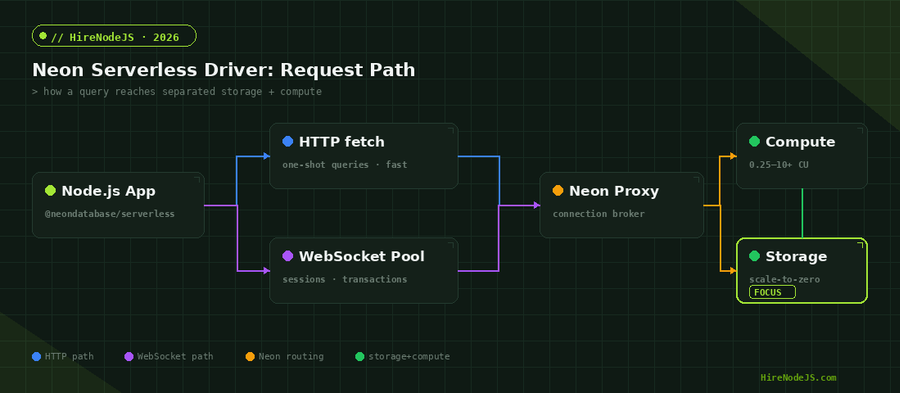
The @neondatabase/serverless driver is a drop-in-compatible reimagining of node-postgres that speaks to Neon over HTTP or WebSockets instead of a raw TCP socket. A WebSocket connection carries the full Postgres wire protocol, so it supports sessions, interactive transactions, and anything pg can do. An HTTP request, by contrast, sends a single SQL statement and gets a single result back — a one-shot query with no handshake to amortize.
Drop-in compatibility with pg
Because the driver exposes the same Pool and Client constructors as node-postgres, most existing query code keeps working unchanged. The GA driver (v1.0.0 and higher) requires Node.js 19 or newer, which gives it access to the platform WebSocket and fetch implementations rather than shimmed polyfills. That compatibility is what lets teams adopt it incrementally instead of rewriting their data layer.
HTTP vs WebSocket: Choosing a Connection Mode
When HTTP one-shot wins
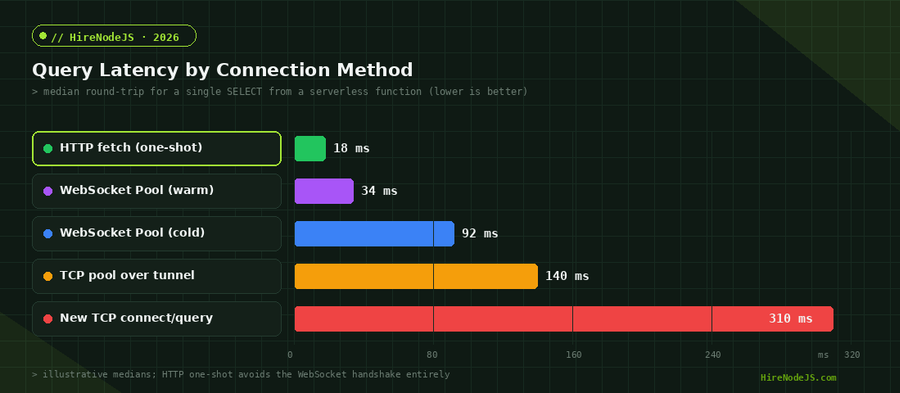
For the common serverless case — a function that runs one or two queries and exits — the HTTP path is the right default. There is no connection to establish or tear down, so the very first query is fast, and there is no idle socket to leak. If your handler does a single SELECT or INSERT and returns, reach for the HTTP query function.
When you need a WebSocket session
Interactive transactions, multiple statements that must share a session, LISTEN/NOTIFY, and full node-postgres compatibility all require a real session — which means the WebSocket Pool or Client. The trade-off is the handshake cost on a cold connection, which is why warm, reused WebSocket connections behave very differently from cold ones under load.
Setting Up Neon in a Node.js Project
Install and configure the driver
Add the package, point it at your Neon connection string, and you are querying in a few lines. The example below shows both modes side by side — the HTTP one-shot helper for simple queries and a WebSocket Pool for transactions. If you are standing up a new backend and want it reviewed by people who do this daily, our backend developers can help you get the data layer right from day one.
import { neon, Pool } from '@neondatabase/serverless';

// --- HTTP one-shot: ideal for serverless handlers ---
const sql = neon(process.env.DATABASE_URL);

export async function getUser(id) {
  // single round-trip, no connection to manage
  const [user] = await sql`SELECT id, email, plan FROM users WHERE id = ${id}`;
  return user;
}

// --- WebSocket Pool: for interactive transactions ---
const pool = new Pool({ connectionString: process.env.DATABASE_URL });

export async function transferCredits(fromId, toId, amount) {
  const client = await pool.connect();
  try {
    await client.query('BEGIN');
    await client.query(
      'UPDATE accounts SET credits = credits - $1 WHERE id = $2',
      [amount, fromId]
    );
    await client.query(
      'UPDATE accounts SET credits = credits + $1 WHERE id = $2',
      [amount, toId]
    );
    await client.query('COMMIT');
  } catch (err) {
    await client.query('ROLLBACK');
    throw err;
  } finally {
    client.release();
  }
}
Database Branching for Every Pull Request
Git-like branches for data
Hire Pre-Vetted Node.js Developers
Skip the months-long search. Our exclusive talent network has senior Node.js experts ready to join your team in 48 hours.
Neon branches your database the way Git branches your code. A branch is a copy-on-write fork of your data created in seconds, so every pull request or preview deployment can get its own isolated database seeded with production-like data. Migrations, destructive tests, and schema experiments run against a throwaway branch and are discarded when the PR closes.
Why it changes the workflow
Ephemeral branches eliminate the shared-staging-database bottleneck where one engineer's migration breaks everyone else's environment. Each branch has its own connection string, scales to zero independently, and costs nothing while idle — which is what makes per-PR databases economically sane. The cost picture below shows why bursty and preview-heavy teams see the biggest savings.
Autoscaling, Scale-to-Zero, and Cost
Compute that follows demand
Neon compute scales from a fraction of a compute unit up to ten or more units based on query load, then drops back down — and all the way to zero — when traffic stops. A function that runs a few times an hour pays essentially nothing between invocations. Under a burst, compute scales up automatically without you provisioning a bigger instance ahead of time.
The cold-resume trade-off
Scale-to-zero is not free of trade-offs: when compute has been suspended, the first query after an idle period pays a short resume latency while the compute endpoint wakes. For most workloads this is a worthwhile exchange for the cost savings, and you can keep a minimum compute size warm for latency-sensitive production endpoints where the first-request delay matters.
Framework and ORM Integration
Works with the tools you already use
You rarely write raw SQL strings by hand in a production codebase, and the serverless driver does not force you to. Because it mirrors the node-postgres interface, it slots in underneath the query builders and ORMs most Node.js teams already run. Drizzle ships a dedicated neon-http adapter that maps cleanly onto the one-shot HTTP path, and Prisma can talk to Neon through its driver adapter so you keep the schema and migration tooling you know while gaining serverless-friendly connections.
Edge and serverless runtimes
The driver was built for environments without a persistent TCP stack: Vercel and Netlify functions, AWS Lambda, Cloudflare Workers, and other edge runtimes. In those places the HTTP query path is not just convenient, it is often the only option, because the runtime forbids long-lived sockets entirely. The same code that runs in a traditional container therefore moves to the edge with little more than a connection-string change, which is a large part of why teams standardise on it across deployment targets.
One practical consequence is that you can keep a single data-access module that works identically in local development, in CI against an ephemeral branch, and in production at the edge. That uniformity removes a whole class of environment-specific bugs where code behaves differently because the connection layer differs between stages.
Production Best Practices
Pick the right driver path per workload
Treat the HTTP helper as your default and reserve WebSocket pools for transactional work. Cache the PostgreSQL connection objects at module scope so they are reused across warm invocations rather than recreated per request, and always set sensible statement timeouts to protect against runaway queries.
Observability and migrations
Instrument query latency and error rates so you can see cold-resume spikes distinctly from genuine slow queries. Run migrations against a dedicated branch in CI before promoting them, and use the per-branch connection strings to keep development, preview, and production fully isolated. These habits separate a hobby setup from a production-grade one.
If you are putting a serverless Postgres backend into production and want experienced engineers to own the data layer, HireNodeJS connects you with pre-vetted senior Node.js developers available within 48 hours — without the recruiter overhead. See exactly how it works.
Hire Expert Node.js Developers — Ready in 48 Hours
Building the right system is only half the battle — you need the right engineers to build it. HireNodeJS.com specialises exclusively in Node.js talent: every developer is pre-vetted on real-world projects, API design, event-driven architecture, and production deployments.
Unlike generalist platforms, our curated pool means you speak only to engineers who live and breathe Node.js. Most clients have their first developer working within 48 hours of getting in touch. Engagements start as short-term contracts and can convert to full-time hires with zero placement fee.
Conclusion: Serverless Postgres Is the New Default
The Neon serverless driver lets Node.js finally treat Postgres the way serverless and edge runtimes need it treated: queried over HTTP or WebSockets, with no long-lived sockets to manage and no connection-limit wall to crash into. HTTP one-shot queries cover the common serverless case with the lowest latency, while WebSocket pools handle transactions and sessions when you need them.
Combined with autoscaling, scale-to-zero, and Git-like branching, it turns the database from a fixed, fragile dependency into something that flexes with your traffic and your workflow. If you are starting a new backend in 2026, serverless Postgres deserves to be your default — and the patterns in this guide will keep it fast, isolated, and affordable as you grow.
Frequently Asked Questions
What is the Neon serverless driver for Node.js?
It is a node-postgres-compatible driver (@neondatabase/serverless) that queries Neon Postgres over HTTP or WebSockets instead of raw TCP. That makes it ideal for serverless functions, edge runtimes, and short-lived containers that cannot hold long-lived connections.
Should I use HTTP or WebSocket with the Neon driver?
Use the HTTP one-shot query function for single, non-interactive queries in serverless handlers — it is fastest because there is no handshake. Use a WebSocket Pool or Client when you need interactive transactions, sessions, or full node-postgres compatibility.
What Node.js version does the serverless driver require?
The GA driver, version 1.0.0 and higher, requires Node.js 19 or newer so it can use the platform's built-in WebSocket and fetch implementations rather than polyfills.
How does Neon scale-to-zero affect latency?
When compute has been idle and suspended, the first query pays a short resume latency while the endpoint wakes. For latency-sensitive production endpoints you can configure a minimum always-on compute size to avoid cold resumes.
What is database branching and why does it matter?
Branching creates a copy-on-write fork of your database in seconds, like a Git branch. Every pull request or preview deployment can get its own isolated, production-like database that scales to zero and costs nothing while idle.
Is Neon serverless Postgres cheaper than a provisioned instance?
For spiky, low-traffic, or preview-heavy workloads, autoscaling plus scale-to-zero usually costs far less than an always-on instance because you only pay for compute while queries run. Steady high-traffic services see smaller relative savings.
Vivek Singh is the founder of Witarist and HireNodeJS.com — a platform connecting companies with pre-vetted Node.js developers. With years of experience scaling engineering teams, Vivek shares insights on hiring, tech talent, and building with Node.js.
Need a Node.js engineer who knows serverless Postgres?
HireNodeJS connects you with pre-vetted senior Node.js developers who have shipped production Postgres on Neon, RDS, and edge runtimes — available within 48 hours, no recruiter fees.