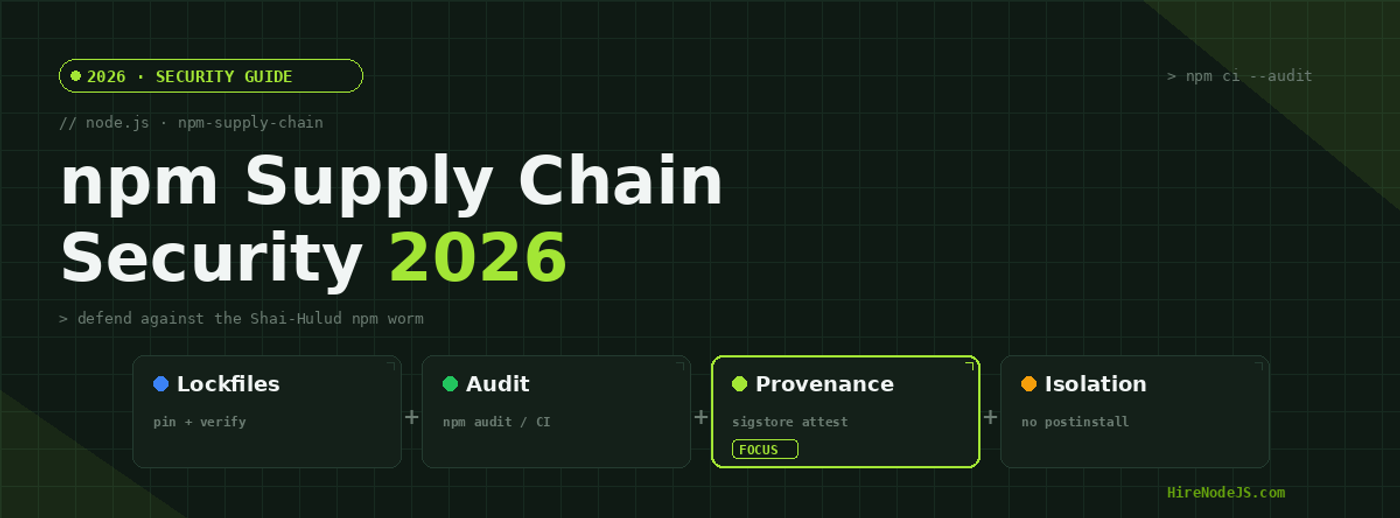
Node.js npm Supply Chain Security in 2026: Beat Shai-Hulud
In September 2025 a single compromised npm package quietly published a new version with a malicious install script. Within hours it had spread to hundreds of packages, harvested credentials from thousands of developer machines and CI runners, and republished itself through every maintainer token it could steal. The npm registry had seen typosquatting and the occasional rogue package before, but the Shai-Hulud worm was different: it was self-replicating. For Node.js teams, the lesson of 2025 carried straight into 2026 — your biggest production risk is no longer the code you write, it is the code you install.
npm supply chain security is the practice of controlling, verifying, and isolating the third-party dependencies your application pulls in at build and install time. A typical Node.js service ships with a node_modules tree of hundreds or thousands of transitive packages, any one of which runs with the same privileges as your build. This guide walks through how modern attacks actually work, and the concrete controls — lockfile integrity, disabled install scripts, provenance verification, scoped tokens, and runtime monitoring — that stop them. If you are scaling a backend team, it also pays to hire Node.js developers who treat dependency hygiene as a first-class concern rather than an afterthought.
Anatomy of a Modern npm Supply Chain Attack
Every npm install is an act of trust. When you run npm install, the package manager downloads tarballs from the registry, expands them into node_modules, and — by default — executes any preinstall, install, and postinstall lifecycle scripts those packages define. Those scripts run with full access to your environment variables, filesystem, and network. That is the entire attack surface in one sentence.
The four stages of compromise
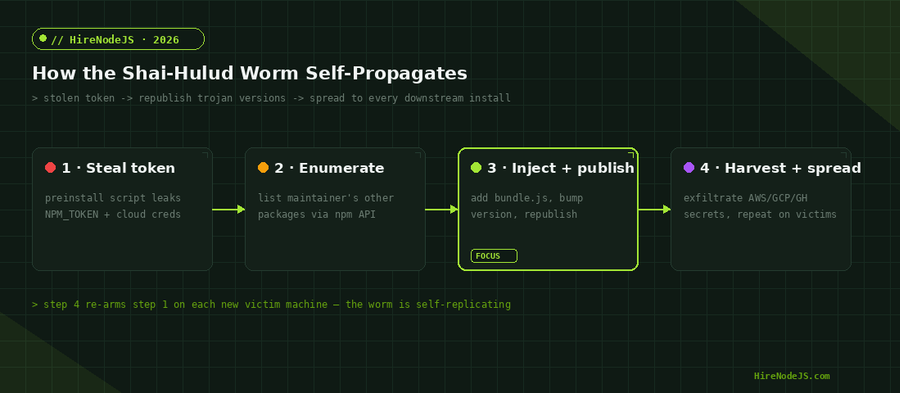
Modern campaigns follow a predictable arc. First, an attacker steals a maintainer's npm token — often from a leaked CI log, a phished login, or a previous compromise. Second, they use the registry API to enumerate every other package that maintainer owns. Third, they inject a malicious bundle into each package, bump the version, and republish. Fourth, the new version installs on every downstream project, harvests more secrets, and repeats. The diagram below traces that loop.
What makes this dangerous is leverage. A maintainer of even a moderately popular utility can have their package pulled into tens of thousands of projects. One stolen token becomes a foothold in every CI pipeline that runs an unpinned install.
The Shai-Hulud Worm: How Self-Replication Changed the Game
The Shai-Hulud worm, first identified in September 2025, was the moment npm attacks stopped being one-off incidents and became a propagating threat. The original wave backdoored hundreds of packages using a postinstall script. The November 2025 follow-up, Shai-Hulud 2.0, was far wider: it moved execution to the preinstall phase so the payload fired even earlier in the install, and it began harvesting cloud credentials from AWS, Google Cloud, and Azure as well as GitHub tokens.
Why preinstall execution made it worse
Postinstall scripts run after a package is unpacked; preinstall scripts run before, which means the malicious code executes the instant the dependency is touched — including in CI runners that fetch dependencies before any test or lint step. The worm also set up self-hosted GitHub Actions runners on victim machines, giving the attackers persistent remote code execution that survived reboots.
The blast radius
At peak, the 2.0 campaign compromised over 700 npm packages, created more than 27,000 malicious GitHub repositories, and exposed roughly 14,000 secrets across nearly 500 organizations. A May 2026 resurgence, nicknamed Mini Shai-Hulud, compromised another 170-plus packages. The interactive chart below shows the scale on a logarithmic axis.
Locking Down Your Dependency Tree
Your first and cheapest line of defense is a deterministic, verified dependency tree. The package-lock.json file records the exact resolved version and integrity hash of every package in your tree. When you use it correctly, an attacker cannot silently swap in a malicious version, because the integrity hash will not match.
Always install with npm ci
The difference between npm install and npm ci matters enormously in CI. npm install can mutate your lockfile and resolve new versions; npm ci installs strictly from the lockfile and fails if package.json and the lockfile disagree. In every automated pipeline, use npm ci. Pair it with committed lockfiles and you remove the entire category of "a fresh minor version slipped in overnight" attacks. Teams building containerized services should bake this into their Docker image build as well.
Killing the Install-Script Attack Surface
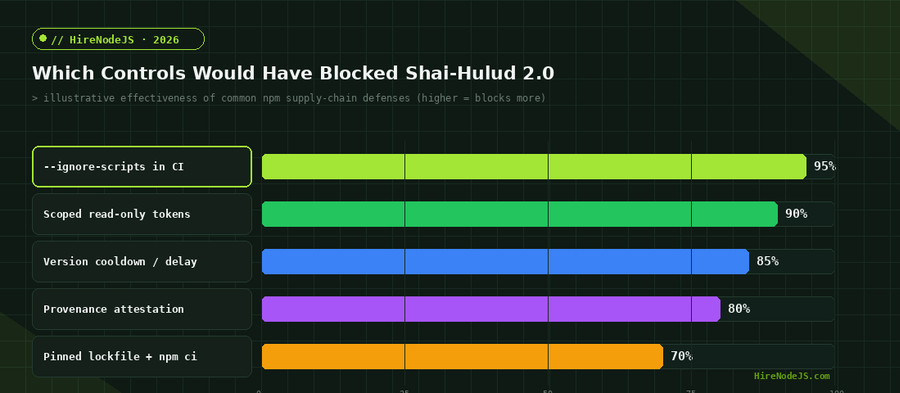
Almost every npm supply chain worm relies on lifecycle scripts to execute. If those scripts never run, the payload never fires. The single highest-leverage control you can apply is to disable install scripts by default and allow only the handful of packages that genuinely need them.
Disable scripts globally, allow-list the exceptions
You can pass --ignore-scripts on any install, or set it permanently in your project's .npmrc. The trade-off is that a few legitimate packages (native addons, for example) build via install scripts and will need to be rebuilt explicitly. For most application dependency trees, the number of packages that truly need install scripts is small and easy to audit.
Hire Pre-Vetted Node.js Developers
Skip the months-long search. Our exclusive talent network has senior Node.js experts ready to join your team in 48 hours.
The radar chart below contrasts a default Node.js setup with a hardened one across the five controls that matter most. The gap on install-script isolation and provenance verification is where most teams are still exposed.
Provenance, Attestation, and Verifying What You Install
Disabling scripts and pinning versions stops silent substitution, but it does not tell you whether a package was built from the source it claims. npm provenance — built on the Sigstore and SLSA frameworks — lets publishers attach a signed attestation linking a published package back to the exact GitHub Actions workflow and commit that produced it. Consumers can then verify that chain before trusting an update.
Auditing and verifying in one pass
The snippet below shows a practical hardening pass you can drop into a CI job: strict install, vulnerability audit, signature verification, and a check that nothing wrote outside node_modules. Run it before your build step and fail the pipeline on any anomaly.
import { execSync } from "node:child_process";

// Fail fast: deterministic install straight from the lockfile,
// with every lifecycle script disabled.
function run(cmd) {
  console.log(`\n$ ${cmd}`);
  return execSync(cmd, { stdio: "inherit", env: { ...process.env, npm_config_ignore_scripts: "true" } });
}

try {
  // 1. Strict, reproducible install (no script execution)
  run("npm ci --ignore-scripts");

  // 2. Block the install if any dependency has a known high/critical CVE
  run("npm audit --audit-level=high");

  // 3. Verify Sigstore/SLSA provenance attestations for installed packages
  run("npm audit signatures");

  console.log("\n✅ Supply-chain checks passed — safe to build.");
} catch (err) {
  console.error("\n❌ Supply-chain check failed. Halting pipeline.");
  process.exit(1);
}Hardening CI/CD and Token Hygiene
The currency of every npm worm is the stolen token. Shai-Hulud spread because maintainer tokens with broad publish rights were sitting in environments where malicious install scripts could read them. Tightening token scope and lifetime is what breaks the propagation loop.
Scope down, rotate often, prefer short-lived credentials
Use granular, read-only tokens wherever you only need to install, and reserve publish tokens for narrowly scoped, automation-only accounts. Better still, adopt trusted publishing with OIDC so CI never holds a long-lived npm token at all. Store whatever secrets remain in a managed vault rather than plain environment variables, and rotate on a schedule. These are exactly the operational disciplines a strong DevOps engineer brings to a team, and they are worth getting right before an incident, not after.
It also helps to introduce a deliberate delay before adopting brand-new releases. A version cooldown — refusing to install packages published in the last 24 to 72 hours — gives the ecosystem time to detect and unpublish a malicious release before it ever reaches your build. To understand how a vetted team applies these practices end to end, see how the HireNodeJS process works.
Detection and Incident Response When You Are Compromised
Prevention is never perfect, so assume a package in your tree will eventually go bad and plan for fast detection. Monitor for unexpected outbound network calls during installs, watch for new self-hosted CI runners you did not create, and alert on any npm publish from outside your release pipeline. If you discover a compromise, rotate every credential that touched the affected machines — npm tokens, cloud keys, and GitHub tokens — before anything else.
A practical response checklist
Pin the last known-good versions of affected packages, purge and rebuild node_modules from a clean lockfile, and audit your published packages for versions you did not release. Because the worm exfiltrates cloud credentials, treat a confirmed Shai-Hulud infection as a full cloud-credential compromise, not just an npm problem. Strong backend engineering matters here too — the same people who design your API security should own dependency incident response, which is why it is worth investing in experienced backend developers.
Supply chain defense is ongoing work: someone has to own lockfile policy, CI hardening, provenance checks, and incident playbooks, and keep them current as the threat evolves. If you are building a Node.js system and need engineers who treat this as core to the job, HireNodeJS connects you with pre-vetted senior developers available within 48 hours — without the recruiter overhead.
Hire Expert Node.js Developers — Ready in 48 Hours
Building secure systems is only half the battle — you need engineers who keep them secure. HireNodeJS.com specialises exclusively in Node.js talent: every developer is pre-vetted on real-world projects, API design, secure dependency management, and production deployments.
Unlike generalist platforms, our curated pool means you speak only to engineers who live and breathe Node.js. Most clients have their first developer working within 48 hours of getting in touch. Engagements start as short-term contracts and can convert to full-time hires with zero placement fee.
Conclusion: Treat Dependencies as Production Code
The Shai-Hulud worm proved that npm supply chain attacks are now self-propagating, credential-hungry, and fast. The good news is that the defenses are well understood and cheap to adopt: install strictly from pinned lockfiles with npm ci, disable lifecycle scripts by default, verify provenance with npm audit signatures, scope and rotate your tokens, and monitor installs for anomalies. None of these require new infrastructure — they require discipline.
Make dependency hygiene part of your definition of done, automate the checks in CI so they cannot be skipped, and rehearse your incident response before you need it. The teams that came through 2025 unscathed were not lucky; they had already locked their tree, killed install scripts, and scoped their tokens. In 2026, that posture is simply the baseline for running Node.js in production.
Frequently Asked Questions
What is npm supply chain security?
It is the practice of controlling and verifying the third-party packages your Node.js project installs, so that a compromised dependency cannot run malicious code, steal credentials, or alter your build. Core controls include pinned lockfiles, disabled install scripts, and provenance verification.
What was the Shai-Hulud npm worm?
Shai-Hulud was a self-replicating npm worm first seen in September 2025. It stole maintainer tokens, injected malicious code into every package those maintainers owned, and republished them automatically. At its peak it compromised over 700 packages and exposed roughly 14,000 secrets.
How do I stop malicious npm install scripts from running?
Run installs with the --ignore-scripts flag or set ignore-scripts=true in your .npmrc, then explicitly allow-list the few packages that genuinely need lifecycle scripts. This neutralises the main mechanism worms like Shai-Hulud rely on to execute.
What is the difference between npm install and npm ci?
npm install can resolve new versions and rewrite your lockfile, while npm ci installs strictly from the committed lockfile and fails on any mismatch. Always use npm ci in CI and production builds for deterministic, tamper-evident installs.
Does npm audit signatures protect against supply chain attacks?
Yes, in part. npm audit signatures verifies registry signatures and Sigstore/SLSA provenance attestations, catching unsigned or tampered packages. Combine it with disabled install scripts, pinned lockfiles, and scoped tokens for layered protection.
How should I respond if a dependency is compromised?
Rotate every credential that touched the affected machines — npm, cloud, and GitHub tokens — then pin known-good versions, rebuild node_modules from a clean lockfile, and audit your own published packages. Treat any Shai-Hulud infection as a full cloud-credential compromise.
Vivek Singh is the founder of Witarist and HireNodeJS.com — a platform connecting companies with pre-vetted Node.js developers. With years of experience scaling engineering teams, Vivek shares insights on hiring, tech talent, and building with Node.js.
Need Node.js developers with security-first thinking?
HireNodeJS connects you with pre-vetted senior Node.js engineers who treat dependency hygiene, CI hardening, and incident response as core to the job — available within 48 hours, no recruiter fees.