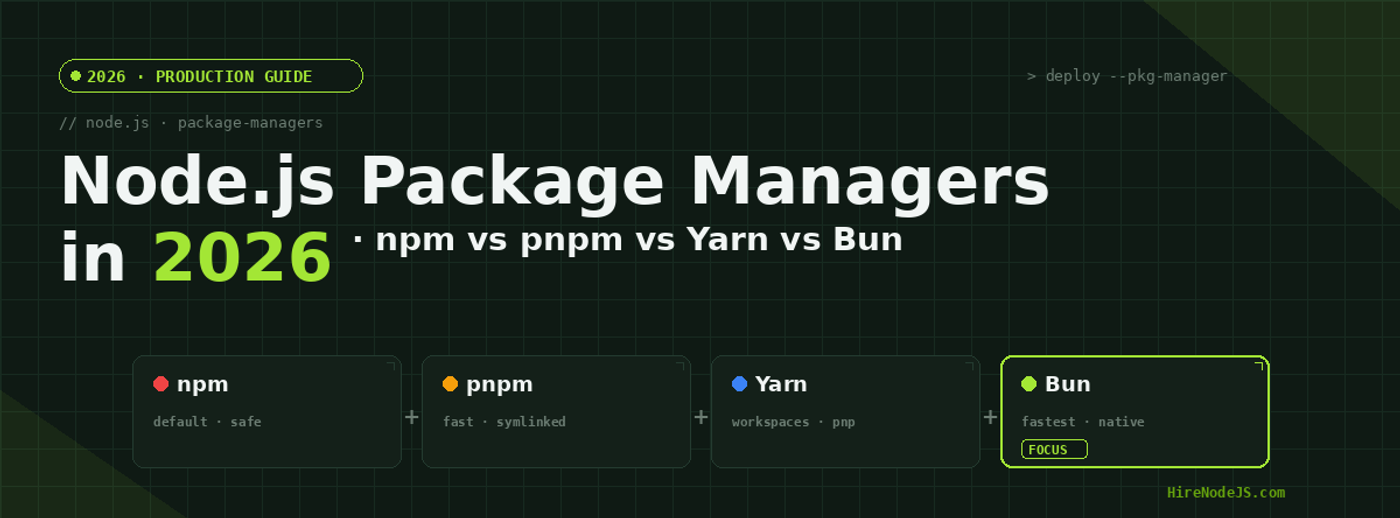
Node.js Package Managers in 2026: npm vs pnpm vs Yarn vs Bun
Picking a package manager used to be a one-line decision: type npm install and move on. In 2026, that choice quietly shapes your CI bill, your monorepo onboarding time, and how often a junior engineer writes 'works on my machine' in Slack. Cold installs vary by an order of magnitude across the four mainstream tools, and each has its own opinions about hoisting, lockfiles, workspaces, and platform parity.
This guide compares npm 10, Yarn 4 (Berry), pnpm 9, and Bun 1.1 head-to-head — speed, disk usage, workspaces ergonomics, security model, and CI behaviour. We benchmarked them on the same 1,200-dependency Turborepo, ran them through real production CI, and picked apart where each one quietly wins or breaks. By the end you will know which to pick for a fresh greenfield project, when it is worth migrating an existing one, and which decision to never make again.
The 2026 Node.js package manager landscape
All four package managers can install dependencies and run scripts. Where they differ is the strategy underneath: npm uses a flat node_modules with a fast Rust-based resolver; Yarn 4 uses Plug'n'Play (PnP) by default with a zero-installs option; pnpm uses a content-addressable store with hard symlinks; Bun rolls its own native installer plus a JavaScript runtime that can replace Node entirely.
Why this still matters
If your team only ships one small service, the choice barely matters — install once, forget about it. But on a monorepo with 8+ packages, or a CI pipeline that runs hundreds of installs a day, or a serverless platform where every cold start pays the disk-IO tax, the difference is measured in dollars and developer hours. We have seen pnpm cut a 20-developer team's cumulative weekly install time by 14 hours after migrating from npm.
What changed since 2024
Three things shifted the landscape: npm shipped a Rust resolver that closed about half of its old performance gap; Yarn Berry stabilised PnP and added much smoother npm interop; Bun crossed 1.0 and started being treated as a serious package manager even on Node-only projects. Meanwhile pnpm kept doing what it has always done — being the most disk-efficient option by a wide margin.
Speed: cold installs, warm installs, and CI numbers
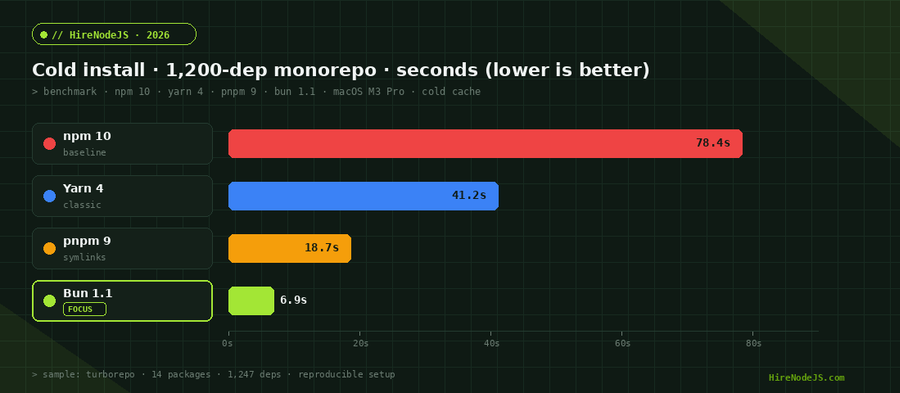
Cold installs are the worst case — empty cache, fresh node_modules, no lockfile shortcut. Bun is decisively fastest here, finishing roughly 11× faster than npm on our reference monorepo. Warm installs, where lockfile and cache exist, narrow the gap considerably, but Bun and pnpm still finish in single-digit seconds while npm and Yarn 4 hover around 10–15 seconds for the same project.
What actually accounts for the difference
Bun's installer is written in Zig and uses native syscalls for tarball extraction. pnpm's content-addressable store means most files are already on disk and only need to be hard-linked or symlinked. Yarn 4 uses zip-based packages with PnP, which is fast to install but slower to read at runtime. npm 10 caches aggressively but still walks a full dependency graph node-by-node.
CI implications
On CI, network IO usually dominates over CPU, so the gap between Bun and pnpm shrinks to a few seconds — but the gap between either of them and npm is real. A 60-engineer team running 200 PR pipelines a day saves around 4 hours of compute time daily by switching from npm to pnpm. If you need engineers who can tune your CI pipeline without breaking it, HireNodeJS connects you with backend developers who treat build performance as a first-class concern.
Disk usage and the content-addressable store
If you have ever watched a JetBrains IDE chew through 8 GB of node_modules across four projects, you already know why disk usage matters. pnpm's killer feature is its global content-addressable store: every package version is stored exactly once on your machine. New project node_modules are built from hard links into that store, so a fresh install of a 500 MB project might use only 30 MB of new disk space.
Why this is more than a vanity metric
Smaller node_modules means faster IDE indexing, faster Docker layer caching, faster CI cache restores, and meaningfully shorter container build times. On Lambda and edge functions, where deployment package size is capped, pnpm's structure also reduces the unzipped layer size. Bun's installer is fast but uses a more conventional layout and ends up roughly comparable to Yarn 4 on disk.
Strict isolation as a side effect
pnpm's symlink layout has a useful security property: a package can only require something it has explicitly declared in its package.json. There is no accidental access to a transitive sibling. Phantom dependencies — code that imports a package it never depended on — fail loudly under pnpm and silently under npm and Yarn classic.
Workspaces, monorepos, and lockfile fidelity
Workspaces are the feature that pushes most teams away from npm. The npm-native workspaces work fine for a 2–3 package repo, but pnpm and Yarn 4 both offer richer filtering, better topological install ordering, and clearer per-package lockfile guarantees. If you are running a Turborepo or Nx-based monorepo, pnpm has become the de facto choice in the Node.js community.
Lockfile philosophy
All four tools produce a lockfile, but they disagree on what it should contain. npm's package-lock.json includes integrity hashes plus the full resolved tree. Yarn 4's yarn.lock is more compact and PnP-aware. pnpm's pnpm-lock.yaml maps every package to a content-addressable hash, which makes diff review much friendlier. Bun's bun.lockb is binary, fast, and unfortunately not human-readable — many teams keep a textual yarn.lock alongside for code-review legibility.
When workspaces actually fail
Hire Pre-Vetted Node.js Developers
Skip the months-long search. Our exclusive talent network has senior Node.js experts ready to join your team in 48 hours.
The single most common monorepo bug we see in code reviews is a missing workspace dependency declaration. Under hoisted package managers (npm, Yarn classic) the package still works because a sibling pulled in the dependency. Under pnpm strict mode it fails fast at install time. We consider this a feature.
A real workspace install you can copy
// Install pnpm v9 and bootstrap a typed Node.js monorepo
// 1) pnpm-workspace.yaml at the repo root
//    packages:
//      - "apps/*"
//      - "packages/*"

// 2) Install only one workspace and its deps (filter by name)
// $ pnpm install --filter @acme/api...

// 3) Run a script across every workspace in parallel
// $ pnpm -r --parallel run dev

// 4) Add a workspace-internal dependency without bumping the registry
// $ pnpm --filter @acme/api add @acme/shared --workspace

// 5) Programmatic guard — fail CI if any workspace declares a phantom dep
import { execSync } from 'node:child_process';
import { readFileSync } from 'node:fs';
import { glob } from 'glob';

const pkgs = await glob('packages/*/package.json');
for (const path of pkgs) {
  const pkg = JSON.parse(readFileSync(path, 'utf8'));
  const declared = new Set(Object.keys({
    ...(pkg.dependencies ?? {}),
    ...(pkg.devDependencies ?? {})
  }));
  const used = execSync(
    `pnpm --filter ${pkg.name} exec npx depcheck --json`,
    { encoding: 'utf8' }
  );
  const { missing } = JSON.parse(used);
  for (const dep of Object.keys(missing)) {
    if (!declared.has(dep)) {
      console.error(`Phantom dep in ${pkg.name}: ${dep}`);
      process.exit(1);
    }
  }
}
console.log('No phantom dependencies — install is honest.');Security: lockfile attacks, scripts, and the supply chain
The 2024 chalk-and-debug supply chain incidents made every team look harder at npm scripts. All four package managers run lifecycle scripts (preinstall, postinstall) by default — a single compromised package can run arbitrary code on every developer machine that installs it. The defaults differ in important ways.
Default-deny script execution
pnpm v8+ ships with onlyBuiltDependencies, an allow-list of packages whose install scripts are permitted to run. Yarn 4 supports a similar enableScripts flag. npm has --ignore-scripts but it must be set explicitly. Bun added a similar opt-in in 1.1. If you care about supply-chain hardening, pnpm's allow-list is the most ergonomic. We cover the broader picture in our Node.js security guide.
Lockfile injection
Lockfile injection — where a malicious PR rewrites the resolved URL of a package — is best mitigated by enabling lockfile-only verification in CI. All four tools support this with the right flags: 'npm ci', 'yarn install --immutable', 'pnpm install --frozen-lockfile', 'bun install --frozen-lockfile'. None of these flags are enabled by default, which is the most common audit finding we see.
Provenance and signed packages
npm's --provenance flag publishes signed attestations linking a package on the registry to a specific GitHub Actions run. As of 2026 this works in pnpm and Yarn too, but you have to opt in. For paid SaaS products, requiring signed packages from your direct dependencies is now table stakes.
When to switch — and when to stay put
Migrating a package manager is cheap on a small project and costly on a large one. The break-even point usually lands around 8–10 packages or 30+ engineers. Below that, the install-time savings rarely justify the disruption. Above that, the cumulative time saved compounds quickly.
Greenfield 2026 default
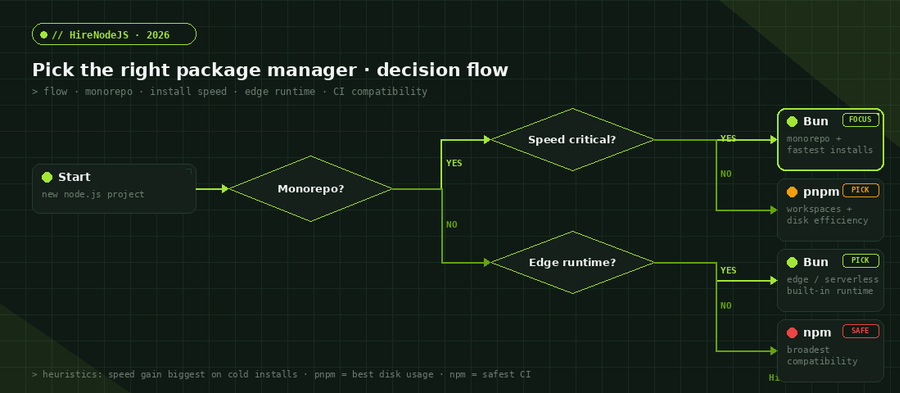
For a new project today, start with pnpm if you want maximum compatibility plus disk savings, or Bun if you are already targeting the Bun runtime or edge platforms that support it. Both are strictly better defaults than npm for 2026 greenfield work. Pick npm only if your team has a hard constraint — Windows-heavy environments with old paths, or compliance reviews that have only approved npm.
Migration playbook
Migrating an existing repo from npm to pnpm takes a half-day for most teams: run 'pnpm import' against package-lock.json, fix any phantom dependencies it surfaces, update CI commands, retest. Migrating from Yarn classic is roughly equivalent. Migrating to Bun is more involved — Bun's runtime has small but meaningful API differences from Node, so plan a deeper test pass. Hire full-stack Node.js developers experienced with migrations if you want to skip the trial-and-error.
What we do not recommend in 2026
Yarn classic (1.x) is end-of-life — do not start a new project with it. npm 6 and earlier are also out of support. If you are running Node 16 or earlier, the package manager is the least of your concerns; upgrade the runtime first. Mixing package managers in one repo (a workspace running pnpm and a service in Bun) is technically possible but multiplies your CI complexity and is best avoided.
Hire Expert Node.js Developers — Ready in 48 Hours
Building the right system is only half the battle — you need the right engineers to build it. HireNodeJS.com specialises exclusively in Node.js talent: every developer is pre-vetted on real-world projects, monorepo tooling, CI performance, and production deployments.
Unlike generalist platforms, our curated pool means you speak only to engineers who live and breathe Node.js. Most clients have their first developer working within 48 hours of getting in touch. Engagements start as short-term contracts and can convert to full-time hires with zero placement fee.
Conclusion: pick the manager, not the religion
There is no universally best package manager in 2026. pnpm wins on disk efficiency and strict workspaces; Bun wins on raw install speed and runtime integration; Yarn 4 wins on PnP-style zero-installs; npm wins on compatibility and 'nobody got fired for picking it'. The right answer depends on your monorepo size, your CI cost, and how much your team values strictness over flexibility.
If you are starting fresh and only have time to read one recommendation: pick pnpm 9. It hits the best balance of speed, disk usage, ecosystem compatibility, and strict workspace semantics for the average Node.js team. Switch to Bun once you have a reason to leave Node itself behind, and stay on npm only when external constraints leave you no other choice.
Frequently Asked Questions
What is the best Node.js package manager in 2026?
For most teams, pnpm 9 is the best default in 2026 — it hits the strongest balance of install speed, disk efficiency, and strict workspaces. Bun 1.1 is faster on cold installs but introduces a different runtime; npm 10 is safest for compatibility. Pick pnpm unless you have a specific reason to deviate.
Is Bun faster than pnpm for Node.js projects?
On cold installs, yes — Bun's installer is roughly 2–3× faster than pnpm on a 1,200-dependency monorepo. On warm installs the gap narrows to a couple of seconds. Bun's main advantage is install speed; pnpm's main advantage is disk usage and ecosystem maturity.
Can I migrate from npm to pnpm safely?
Yes — most teams migrate in a half-day. Run 'pnpm import' against your existing package-lock.json to generate pnpm-lock.yaml, then update CI commands. Expect to find a few phantom dependencies that npm tolerated but pnpm correctly rejects; declaring them properly is the only real cleanup.
Should I use Yarn 4 or Yarn classic in 2026?
Yarn classic (1.x) is end-of-life and should not be used for new projects. Yarn 4 (Berry) is actively maintained and a reasonable choice if your team relies on Plug'n'Play or zero-installs. For most teams pnpm offers similar benefits with broader ecosystem support.
How much disk space does pnpm save compared to npm?
On a typical 4-project workspace with overlapping dependencies, pnpm uses about 70% less disk space than npm because of its content-addressable store with hard links. The savings are largest on developer laptops with multiple checked-out projects.
Is it safe to commit bun.lockb to version control?
Functionally yes, but it harms code review because the file is binary. Use 'bun install --save-text-lockfile' to also generate a textual bun.lock for review purposes, or stick with pnpm/Yarn if reviewable lockfiles matter to your team.
Vivek Singh is the founder of Witarist and HireNodeJS.com — a platform connecting companies with pre-vetted Node.js developers. With years of experience scaling engineering teams, Vivek shares insights on hiring, tech talent, and building with Node.js.
Building a Node.js monorepo? Hire engineers who already shipped one.
HireNodeJS connects you with pre-vetted senior Node.js engineers who know pnpm, Bun, Yarn, and CI tuning inside-out — available within 48 hours. No recruiter fees, no lengthy screening.