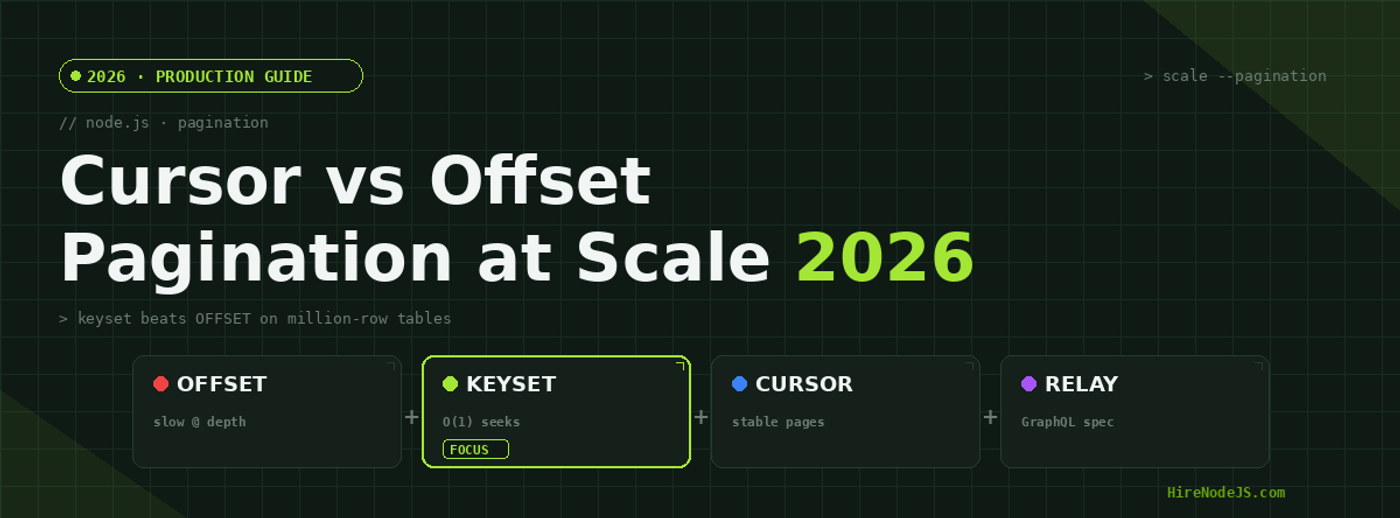
Node.js Pagination in 2026: Cursor vs Offset at Scale
Pagination looks trivial until your table crosses a few million rows. The classic LIMIT/OFFSET query that felt instant in development starts taking seconds in production, your infinite-scroll feed duplicates and skips items as users post new content, and your p99 latency chart develops an ugly upward slope. The culprit is almost always the pagination strategy you reached for on day one.
In 2026, the gap between offset pagination and keyset (cursor) pagination is wider than ever: tables are bigger, read replicas are more common, and GraphQL APIs increasingly expect Relay-style cursor connections. This guide explains exactly why OFFSET degrades, how keyset and cursor pagination fix it, and how to implement each correctly in Node.js with Postgres — including the edge cases that bite teams in production.
Why OFFSET Pagination Breaks at Scale
What the database actually does
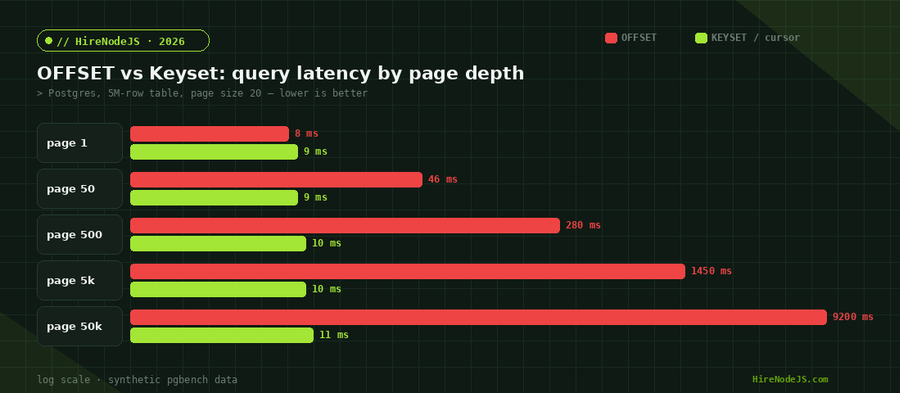
When you run SELECT ... ORDER BY created_at DESC LIMIT 20 OFFSET 100000, the database does not magically skip to row 100,000. It scans and orders rows from the beginning, counts off the first 100,000, throws them away, and only then returns the 20 you asked for. The work is proportional to OFFSET + LIMIT, so page 5,000 costs roughly 250x more than page 1. This is why deep pages feel like the application has frozen.
The duplicate-and-skip problem
Offset pagination also assumes the underlying data does not change between requests. On an active feed it always does. If a new row is inserted while a user is on page 2, every subsequent row shifts down by one, so page 3 repeats an item the user already saw — or skips one entirely. For dashboards and admin tables this is annoying; for public APIs and analytics it is a correctness bug.
When OFFSET is still fine
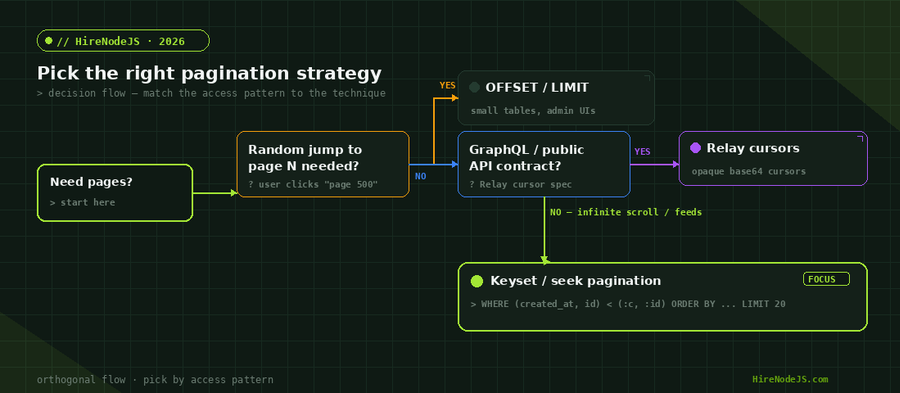
Offset is not evil. For small tables, internal admin UIs, and anything where users genuinely need to jump to an arbitrary page number, it is the simplest correct choice. The trouble starts when offsets grow large or the dataset mutates frequently under the reader.
Keyset Pagination: The Seek Method Explained
Paginate by value, not by position
Keyset pagination — also called the seek method — replaces OFFSET with a WHERE clause that filters on the last row the client saw. Instead of asking for "the next 20 rows after position 100,000", you ask for "the next 20 rows after this specific (created_at, id) value". Because the filter maps directly onto an index, the database seeks to the right spot in roughly constant time, no matter how deep the page is.
Why the index makes it O(1) per page
A composite B-tree index on (created_at, id) lets Postgres jump straight to the boundary row and read forward LIMIT rows. There is no count-and-discard phase, so page 50,000 costs essentially the same as page 1. The trade-off is that you give up the ability to jump to an arbitrary page number — keyset only moves forward and backward relative to a known cursor.
Keyset pagination pairs naturally with a well-indexed PostgreSQL schema, and it is one of the first things experienced backend developers reach for when an endpoint starts timing out on deep pages.
Cursor Pagination and the Relay Connection Spec
What a cursor really is
A cursor is just an opaque, encoded representation of the keyset values for a given row — typically the base64 of something like created_at:id. Clients treat it as a black box: they send back the cursor they were given and receive the next page. Encoding the keyset this way means you can change the underlying sort columns later without breaking client code that stored cursors.
The Relay connection shape
GraphQL APIs have largely standardised on the Relay Cursor Connections specification: a connection returns edges (each with a node and a cursor) plus a pageInfo object exposing hasNextPage, hasPreviousPage, startCursor, and endCursor. If you build a GraphQL layer, matching this shape lets Apollo Client, Relay, and urql handle pagination caching for you out of the box.
If your API speaks GraphQL, implementing Relay-style cursor connections on top of keyset queries gives you both spec compliance and constant-time deep paging.
Implementing Keyset Pagination in Node.js
Hire Pre-Vetted Node.js Developers
Skip the months-long search. Our exclusive talent network has senior Node.js experts ready to join your team in 48 hours.
A production-ready Postgres query
Here is a complete keyset pagination helper using the node-postgres (pg) driver. It paginates a posts table newest-first, uses a (created_at, id) composite cursor, requests one extra row to compute hasNextPage cheaply, and returns an opaque cursor for the client. No OFFSET appears anywhere.
import { Pool } from 'pg';

const pool = new Pool();
const PAGE_SIZE = 20;

// Cursor = base64("<iso timestamp>|<id>")
const encodeCursor = (row) =>
  Buffer.from(`${row.created_at.toISOString()}|${row.id}`).toString('base64url');

const decodeCursor = (cursor) => {
  const [ts, id] = Buffer.from(cursor, 'base64url').toString().split('|');
  return { createdAt: new Date(ts), id: Number(id) };
};

export async function getPosts({ after } = {}) {
  const params = [];
  let where = '';

  if (after) {
    const { createdAt, id } = decodeCursor(after);
    // Seek strictly past the last row the client saw.
    // The (created_at, id) tuple comparison maps onto the composite index.
    params.push(createdAt, id);
    where = 'WHERE (created_at, id) < ($1, $2)';
  }

  // Fetch one extra row to detect whether another page exists.
  params.push(PAGE_SIZE + 1);
  const limitParam = `$${params.length}`;

  const { rows } = await pool.query(
    `SELECT id, title, created_at
       FROM posts
       ${where}
       ORDER BY created_at DESC, id DESC
       LIMIT ${limitParam}`,
    params
  );

  const hasNextPage = rows.length > PAGE_SIZE;
  const page = hasNextPage ? rows.slice(0, PAGE_SIZE) : rows;

  return {
    nodes: page,
    pageInfo: {
      hasNextPage,
      endCursor: page.length ? encodeCursor(page[page.length - 1]) : null,
    },
  };
}Wiring it into an Express or Fastify route
Dropping this helper behind a Node.js route is straightforward: read the after cursor from the query string, call getPosts, and return nodes plus pageInfo as JSON. The same helper works unchanged behind REST, GraphQL, or tRPC.
Edge Cases: Ties, Deletions, and Bidirectional Paging
Stable ordering and tie-breakers
The single most important rule of keyset pagination is total ordering. Your ORDER BY must end in a unique column so that no two rows are ever considered equal. Without it, rows sharing a created_at value can appear on two pages or vanish between them. Always append the primary key.
Deletions and the disappearing cursor
Because cursors point at values rather than positions, a deleted row does not corrupt pagination the way it does with OFFSET. If the exact cursor row is deleted, the strict tuple comparison still seeks to the next row past that value, so the client simply continues from where it logically left off.
Paging backwards
Bidirectional pagination flips the comparison and the sort: to page backwards you use (created_at, id) > cursor with ascending order, then reverse the result set before returning it. Most teams expose this as before and after parameters mirroring the Relay spec.
Choosing the Right Strategy for Your API
Use offset only when users must jump to arbitrary page numbers and the table is small or rarely mutated — think admin back-office screens. Use keyset for any high-volume list, infinite scroll, or export job where deep paging and stability matter. Use Relay cursor connections when you expose a public GraphQL API and want client tooling to manage caching automatically. Most real systems end up mixing the two: keyset under the hood, dressed up as Relay cursors at the GraphQL boundary.
Whichever you choose, validate it under realistic data volumes. A pagination strategy that looks fine against 10,000 seeded rows can fall over at 10 million, and the failure mode — slowly rising tail latency — is easy to miss until it pages someone at 3am.
If you are redesigning a list API and want it right the first time, HireNodeJS connects you with pre-vetted senior Node.js engineers — people who have shipped keyset pagination, query-tuned Postgres indexes, and Relay connections at scale — available within 48 hours, without the recruiter overhead.
Hire Expert Node.js Developers — Ready in 48 Hours
Designing the query is only half the battle — you need engineers who know how indexes, replicas, and API contracts interact under load. HireNodeJS.com specialises exclusively in Node.js talent: every developer is pre-vetted on real-world projects, API design, database performance, and production deployments.
Unlike generalist platforms, our curated pool means you speak only to engineers who live and breathe Node.js. Most clients have their first developer working within 48 hours of getting in touch. Engagements start as short-term contracts and can convert to full-time hires with zero placement fee.
Key Takeaways
Offset pagination is simple but its cost grows with page depth and it breaks on mutating data. Keyset pagination filters by the last-seen value against a composite index, giving constant-time deep paging and stability under inserts and deletes. Cursor pagination wraps keyset values in opaque tokens and underpins the Relay connection spec that GraphQL clients expect.
For anything beyond a small admin table, default to keyset, add a unique tie-breaker to your sort, prefer row-value tuple comparisons, and benchmark against production-scale data. Get those four things right and your list endpoints will stay fast whether a user is on page 1 or page 50,000.
Frequently Asked Questions
What is the difference between offset and cursor pagination in Node.js?
Offset pagination uses LIMIT/OFFSET and scans then discards all rows before the requested page, so cost grows with page depth. Cursor (keyset) pagination filters by the last-seen value against an index, returning the next page in roughly constant time regardless of depth.
Is keyset pagination faster than OFFSET?
Yes, dramatically so on deep pages. Because keyset seeks directly to the boundary row via a composite index, page 50,000 costs about the same as page 1, while an equivalent OFFSET query can be hundreds or thousands of times slower.
What is a cursor in pagination?
A cursor is an opaque, encoded token (often base64 of the sort keys, like created_at:id) that represents a specific row's position in the ordered result. Clients send it back to fetch the next page without exposing or relying on absolute row positions.
Can I jump to an arbitrary page number with keyset pagination?
No. Keyset pagination only moves forward or backward relative to a known cursor, so it cannot jump straight to page 500. If random page access is a hard requirement, use offset for that view or precompute page boundaries.
How do I implement Relay-style cursor pagination in a Node.js GraphQL API?
Return a connection with edges (each containing a node and an opaque cursor) plus a pageInfo object exposing hasNextPage, hasPreviousPage, startCursor, and endCursor. Build the cursors from your keyset values so deep paging stays constant-time.
Do I always need a tie-breaker column for keyset pagination?
Yes. Your ORDER BY must end in a unique column such as the primary key so the ordering is total. Without a tie-breaker, rows sharing the same sort value (like an identical timestamp) can be duplicated across pages or skipped entirely.
Vivek Singh is the founder of Witarist and HireNodeJS.com — a platform connecting companies with pre-vetted Node.js developers. With years of experience scaling engineering teams, Vivek shares insights on hiring, tech talent, and building with Node.js.
Need a Node.js engineer who ships fast, scalable APIs?
HireNodeJS connects you with pre-vetted senior Node.js backend engineers — fluent in Postgres performance, keyset pagination, and GraphQL — available within 48 hours. No recruiter fees, no lengthy screening.