Node.js Passkeys & WebAuthn in 2026: The Production Guide
Passwords are the single biggest source of account takeovers, support tickets, and signup friction in 2026 — and the industry has finally agreed on the replacement. Passkeys, built on the WebAuthn standard and the FIDO2 protocol, give your users a phishing-resistant, cryptographic credential bound to their device. They sign in with Touch ID, Face ID, Windows Hello, or a hardware key, and your Node.js server never sees a password again.
Every major platform now ships passkey support out of the box: Apple, Google, Microsoft, 1Password, Bitwarden. Adoption inside Node.js backends used to be hard — the WebAuthn spec is dense and the wire format involves CBOR, COSE keys, and attestation chains. The @simplewebauthn/server library has changed that. This guide walks through everything a production Node.js team needs in 2026: how the ceremonies actually work, how to wire them into Express or Fastify, how to store credentials safely, how to handle account recovery, and how to roll passkeys out without breaking your existing password flow.
What Passkeys Actually Are (and Why WebAuthn Won)
A passkey is a public/private key pair generated on a user's device. The private key never leaves the secure enclave — your Node.js server only ever stores the matching public key, the credential ID, and a small amount of metadata. When the user signs in, the browser asks the authenticator to sign a server-issued challenge with the private key. Your server verifies the signature with the stored public key and the session is established. There is nothing to phish, nothing to replay, and nothing to leak in a database breach.
WebAuthn, FIDO2, CTAP — the alphabet soup
WebAuthn is the W3C browser API that exposes the authenticator. FIDO2 is the umbrella project at the FIDO Alliance that includes WebAuthn plus CTAP2 — the protocol browsers use to talk to roaming authenticators like YubiKeys. From your Node.js application's perspective, all of this is abstracted away. You issue challenges and verify responses; the browser, OS, and authenticator handle the rest. The hard part is doing the server-side verification correctly, which is exactly what SimpleWebAuthn solves.
Discoverable vs non-discoverable credentials
Modern passkeys are discoverable (resident) credentials — the authenticator stores the username, so users can sign in without typing anything. Older U2F keys produce non-discoverable credentials that require the server to send a credential ID list first. In a 2026 production system you should issue discoverable credentials by default and support both during authentication.
Setting Up @simplewebauthn/server in Node.js 24
SimpleWebAuthn is the de-facto Node.js library for WebAuthn. It handles challenge generation, attestation parsing, CBOR decoding, and signature verification — all the tedious parts of the spec. It is type-safe, has a tiny dependency footprint, and works identically on Express, Fastify, NestJS, Hono, and edge runtimes like Cloudflare Workers. The companion @simplewebauthn/browser package handles the client side.
Installation and core configuration
Install the server package, decide on your relying-party identity (the eTLD+1 domain of your app), and pick a challenge store. The challenge is a per-ceremony secret your server issues; in production you should store it in Redis with a 5-minute TTL, keyed by user ID, so it survives across a horizontally-scaled cluster.
npm install @simplewebauthn/server @simplewebauthn/browser
# Node.js 24+ is recommended for the built-in WebCrypto subtle module performanceimport {
generateRegistrationOptions,
verifyRegistrationResponse,
generateAuthenticationOptions,
verifyAuthenticationResponse,
} from '@simplewebauthn/server';
import { isoBase64URL } from '@simplewebauthn/server/helpers';
import { redis } from './lib/redis';
import { db } from './lib/db';
// Your relying party identity — must be the eTLD+1 of your app.
// In production: rpID = 'example.com', origins = ['https://example.com', 'https://app.example.com']
export const RP_ID = process.env.RP_ID!; // 'example.com'
export const RP_NAME = 'Acme';
export const ORIGINS = process.env.ORIGINS!.split(','); // multiple subdomains OK
export async function startRegistration(userId: string, username: string) {
// Pull any existing credentials so we don't issue duplicates on the same authenticator
const existing = await db.authenticators.findMany({ where: { userId } });
const options = await generateRegistrationOptions({
rpName: RP_NAME,
rpID: RP_ID,
userID: new TextEncoder().encode(userId),
userName: username,
attestationType: 'none', // 'direct' if you need MDS verification
authenticatorSelection: {
residentKey: 'required', // discoverable credentials — usernameless sign-in
userVerification: 'preferred', // biometric / PIN when available
},
excludeCredentials: existing.map(c => ({
id: c.credentialID,
transports: c.transports as AuthenticatorTransport[],
})),
timeout: 60_000,
});
// Store the challenge so we can verify it on the response
await redis.setex(`webauthn:reg:${userId}`, 300, options.challenge);
return options;
}Two things matter for production: pin your rpID to a domain you control, and let users sign in across all subdomains by listing every origin in ORIGINS. Get the rpID wrong and the browser will silently refuse to create or use credentials — there is no error visible to your Node.js code, which is the most common cause of "my passkey demo works locally but breaks in staging."
The Registration Ceremony, End to End
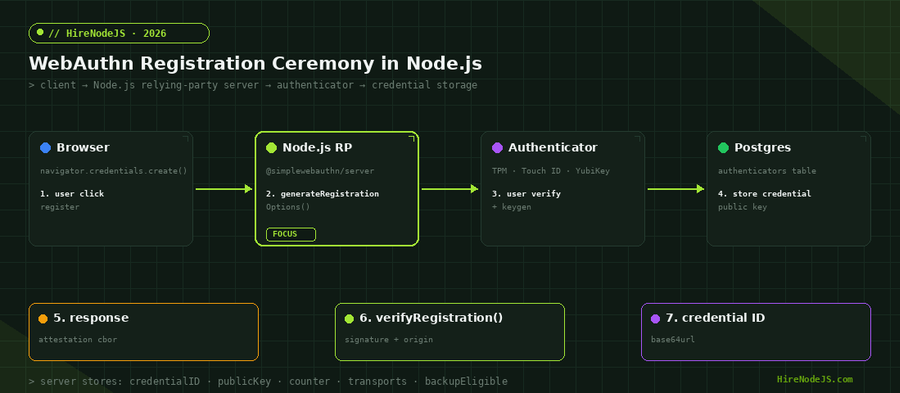
Registration is a single round trip: the server issues a challenge plus parameters, the browser asks the authenticator to create a key pair and sign the challenge, and the server verifies the response and stores the public key. The cryptography is heavy but the code is small — fewer than 30 lines on the server.
Verifying the registration response
export async function finishRegistration(userId: string, body: RegistrationResponseJSON) {
  const expectedChallenge = await redis.get(`webauthn:reg:${userId}`);
  if (!expectedChallenge) throw new Error('Registration expired');

  const verification = await verifyRegistrationResponse({
    response: body,
    expectedChallenge,
    expectedOrigin: ORIGINS,
    expectedRPID: RP_ID,
    requireUserVerification: false,   // set true if your risk model requires biometrics
  });

  if (!verification.verified || !verification.registrationInfo) {
    throw new Error('Registration verification failed');
  }

  const { credential, credentialDeviceType, credentialBackedUp } =
    verification.registrationInfo;

  await db.authenticators.create({
    data: {
      userId,
      credentialID: credential.id,                       // base64url
      credentialPublicKey: Buffer.from(credential.publicKey),
      counter: credential.counter,
      transports: credential.transports ?? [],
      deviceType: credentialDeviceType,                  // 'singleDevice' | 'multiDevice'
      backedUp: credentialBackedUp,                       // synced via iCloud/Google?
      createdAt: new Date(),
    },
  });

  await redis.del(`webauthn:reg:${userId}`);
  return { credentialID: credential.id };
}
Schema for credential storage
Each user can have multiple credentials (one per device). The minimum viable table needs the credential ID, public key, counter, transports list, and whether the credential is synced across devices. SimpleWebAuthn returns all of this on the verifyRegistrationResponse call — you just persist it.
CREATE TABLE authenticators (
  id                     SERIAL PRIMARY KEY,
  user_id                UUID NOT NULL REFERENCES users(id) ON DELETE CASCADE,
  credential_id          TEXT NOT NULL UNIQUE,        -- base64url, queried on auth
  credential_public_key  BYTEA NOT NULL,
  counter                BIGINT NOT NULL DEFAULT 0,
  transports             TEXT[] NOT NULL DEFAULT '{}', -- ['internal','hybrid','usb','nfc']
  device_type            TEXT NOT NULL,                -- 'singleDevice' | 'multiDevice'
  backed_up              BOOLEAN NOT NULL DEFAULT false,
  nickname               TEXT,                          -- 'iPhone 15', 'YubiKey 5C'
  created_at             TIMESTAMPTZ NOT NULL DEFAULT now(),
  last_used_at           TIMESTAMPTZ
);

CREATE INDEX idx_authenticators_user ON authenticators(user_id);
CREATE INDEX idx_authenticators_credential ON authenticators(credential_id);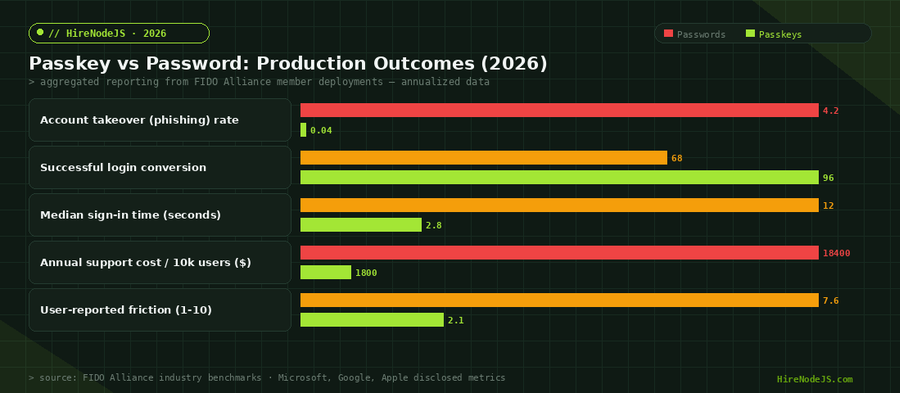
Authentication: Usernameless Sign-In with Discoverable Credentials
Hire Pre-Vetted Node.js Developers
Skip the months-long search. Our exclusive talent network has senior Node.js experts ready to join your team in 48 hours.
The authentication ceremony is even shorter. Issue a challenge, the user picks a passkey from their device, the browser signs the challenge, your Node.js server looks up the credential, verifies the signature, and updates the counter. Because you required residentKey: 'required' at registration, the user doesn't need to type their email — the authenticator already knows who they are.
export async function startAuthentication() {
  const options = await generateAuthenticationOptions({
    rpID: RP_ID,
    userVerification: 'preferred',
    allowCredentials: [],   // empty = discoverable credentials = usernameless flow
    timeout: 60_000,
  });

  // Keyed by challenge because we don't know who the user is yet
  await redis.setex(`webauthn:auth:${options.challenge}`, 300, '1');
  return options;
}

export async function finishAuthentication(body: AuthenticationResponseJSON) {
  const expectedChallenge = body.response.clientDataJSON
    ? JSON.parse(Buffer.from(body.response.clientDataJSON, 'base64url').toString()).challenge
    : null;

  if (!(await redis.get(`webauthn:auth:${expectedChallenge}`))) {
    throw new Error('Authentication expired or unknown challenge');
  }

  const auth = await db.authenticators.findUnique({ where: { credentialID: body.id } });
  if (!auth) throw new Error('Unknown credential');

  const verification = await verifyAuthenticationResponse({
    response: body,
    expectedChallenge,
    expectedOrigin: ORIGINS,
    expectedRPID: RP_ID,
    credential: {
      id: auth.credentialID,
      publicKey: auth.credentialPublicKey,
      counter: Number(auth.counter),
      transports: auth.transports as AuthenticatorTransport[],
    },
    requireUserVerification: false,
  });

  if (!verification.verified) throw new Error('Sign-in verification failed');

  // CRITICAL: update the counter to prevent replay attacks for non-synced authenticators
  await db.authenticators.update({
    where: { credentialID: body.id },
    data: { counter: verification.authenticationInfo.newCounter, lastUsedAt: new Date() },
  });
  await redis.del(`webauthn:auth:${expectedChallenge}`);

  return { userId: auth.userId };
}Wiring Passkeys into Express, Fastify, and NestJS
The functions above are framework-agnostic. The HTTP layer is a thin wrapper that calls them and returns the options or session token. Here is the Express version — Fastify and NestJS differ only in routing syntax.
import express from 'express';
import { startRegistration, finishRegistration,
         startAuthentication, finishAuthentication } from './auth/webauthn';
import { requireAuth, issueSession } from './auth/session';

const router = express.Router();

router.post('/webauthn/register/options', requireAuth, async (req, res) => {
  const options = await startRegistration(req.user.id, req.user.email);
  res.json(options);
});

router.post('/webauthn/register/verify', requireAuth, async (req, res) => {
  const result = await finishRegistration(req.user.id, req.body);
  res.json(result);
});

router.post('/webauthn/auth/options', async (_req, res) => {
  const options = await startAuthentication();
  res.json(options);
});

router.post('/webauthn/auth/verify', async (req, res) => {
  const { userId } = await finishAuthentication(req.body);
  const session = await issueSession(userId);
  res.cookie('sid', session.id, { httpOnly: true, secure: true, sameSite: 'lax' });
  res.json({ ok: true });
});

export default router;
If you're already running Fastify or NestJS, the same handlers drop straight into those frameworks — see our Fastify production guide and Better Auth deep-dive for framework-specific wiring and session management patterns.
Account Recovery, Multi-Device, and the Rollout Plan
Passkeys solve authentication, not account recovery. If a user loses every device that holds their credentials, you still need a way back in. In 2026 the canonical answer is a layered recovery flow: synced passkeys (the user restores from iCloud/Google), a backup recovery code shown once at registration, and an out-of-band channel like a verified email with a magic link as the final fallback.
Letting users add multiple passkeys
Every authenticated user should be able to register additional credentials from your settings page — a YubiKey at the desk, an iPhone for travel, a backup recovery code printed out. The same startRegistration / finishRegistration handlers work; just nest them behind your existing session middleware.
Rollout: hybrid passwords + passkeys
Don't force passkey-only on day one. Run both: existing users keep their password, new users see a passkey prompt first with password as fallback. Track the share of sessions that authenticated via passkey, and once you're above 80% you can start deprecating the password flow. Most teams hit that threshold in 3–4 months when they put the passkey CTA above the password form.
Security Hardening: Replay, Origin, and Counter Defences
WebAuthn is the most secure auth method most apps will ever ship, but only if you verify the response correctly. Three checks are non-negotiable: the origin must match your allow-list, the challenge must match the one you issued, and the counter must increase for non-synced authenticators. SimpleWebAuthn enforces all three when you pass the right parameters — the failure mode is silently bypassing one of them by passing the wrong value.
Beyond the WebAuthn-specific checks, treat the rest of your auth layer like any other backend: rate limit the verification endpoints, log all credential lifecycle events, and follow the broader Node.js security best practices — passkeys are not a substitute for input validation, CSRF protection, or session hardening.
Production Checklist Before You Launch
Before flipping passkeys to general availability, walk through a final checklist. The list looks short on paper but each item has burned at least one production team. Treat it as a release gate, not a suggestion.
Pin rpID to your eTLD+1 domain. List every subdomain origin in ORIGINS. Store challenges in Redis with a TTL of 5 minutes. Verify expectedChallenge on every response. Enforce the counter check only on singleDevice credentials. Allow users to register multiple credentials and to nickname them. Provide at least two recovery channels. Display a 'sign in with passkey' button above the password field. Instrument success/failure rates per device class. Re-run the full ceremony on staging behind your real domain — not localhost — before launch.
Hire Expert Node.js Developers — Ready in 48 Hours
Rolling out passkeys correctly is part WebAuthn spec, part session architecture, part account-recovery UX. HireNodeJS.com specialises exclusively in Node.js talent — every developer is pre-vetted on real-world authentication systems, API design, and production rollout work.
Unlike generalist platforms, our curated pool means you only speak to engineers who live and breathe Node.js. Most clients have their first developer working within 48 hours of getting in touch. Engagements start as short-term contracts and can convert to full-time hires with zero placement fee.
Wrapping Up
Passkeys are the rare upgrade that improves security, conversion, and user happiness at the same time. The WebAuthn spec used to be the moat — in 2026, with @simplewebauthn/server and the platform ubiquity of synced credentials, the moat is gone. A working passkey flow in Node.js is a few hundred lines of code, and the production benefits compound: fewer breaches, fewer support tickets, more completed signups.
Start by adding passkeys as an option on top of your existing password flow. Measure the adoption curve. Once most of your active users have at least one passkey, you can deprecate the password and graduate to a fully phishing-resistant authentication layer. Your users will notice — passkey sign-in feels instant in a way password+OTP never will.
Frequently Asked Questions
What is the difference between a passkey and WebAuthn?
WebAuthn is the W3C API browsers expose for cryptographic authentication. A passkey is a discoverable WebAuthn credential — usually synced across a user's devices via iCloud Keychain or Google Password Manager — that lets them sign in without a password.
Do I need to drop password login when I add passkeys to my Node.js app?
No. The recommended rollout is hybrid: keep password+OTP as a fallback, surface passkeys as the primary CTA, and deprecate passwords only after 80%+ of sessions are passkey-authenticated. Most teams reach that within a quarter.
Which Node.js library should I use for passkeys in 2026?
@simplewebauthn/server is the de-facto standard. It is type-safe, framework-agnostic, and abstracts CBOR/COSE parsing. Use the companion @simplewebauthn/browser package on the client. Both work on Node.js 18+ and edge runtimes.
What happens if a user loses every device that has their passkey?
Synced passkeys are restored automatically when they sign back into iCloud or Google. For everything else, give users a printed recovery code at registration and an out-of-band magic-link channel via a verified email as the final fallback.
Can I run passkeys on Cloudflare Workers or other edge runtimes?
Yes. SimpleWebAuthn ships an ESM build that runs on Workers, Deno, and Bun. The only thing to watch is challenge storage — use Redis, Upstash, or Cloudflare KV with a 5-minute TTL because the same challenge must be available across edge POPs.
How much engineering effort is a production passkey rollout?
A small team can ship a working end-to-end implementation in 1–2 sprints: schema migration, four endpoints, client integration, settings UI for credential management, and a recovery flow. The longer tail is rollout experiments, telemetry, and account-recovery edge cases.
Vivek Singh is the founder of Witarist and HireNodeJS.com — a platform connecting companies with pre-vetted Node.js developers. With years of experience scaling engineering teams, Vivek shares insights on hiring, tech talent, and building with Node.js.
Need Node.js Developers with Security-First Thinking?
HireNodeJS connects you with pre-vetted senior engineers who have shipped passkeys, OAuth, and zero-trust auth in production — available within 48 hours. No recruiter fees, no lengthy screening.