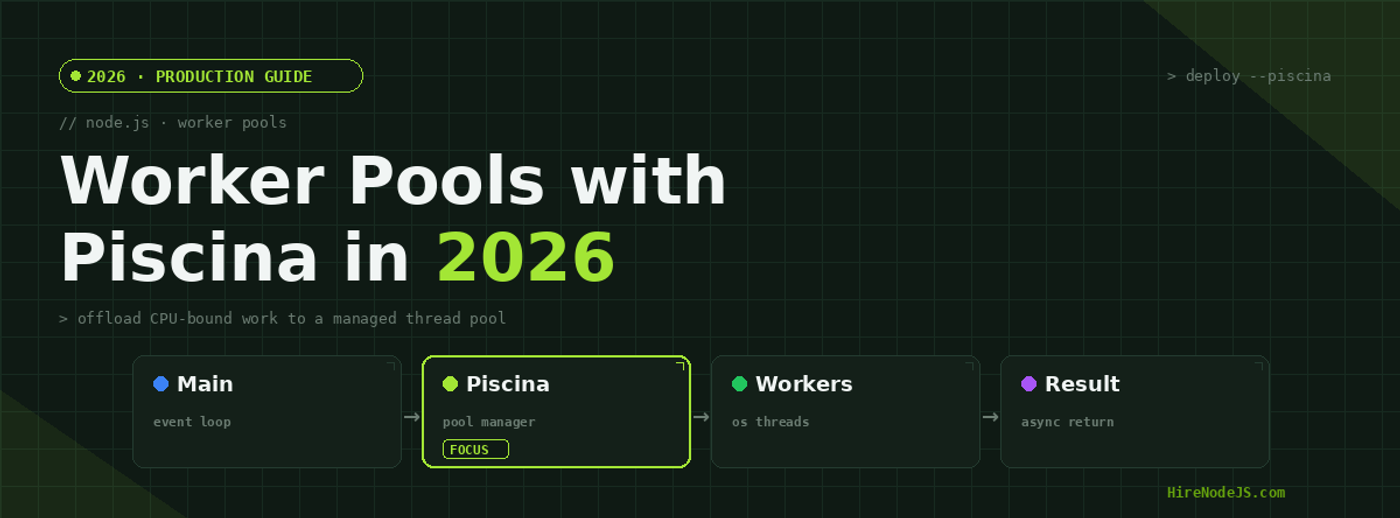
Node.js Worker Pools with Piscina in 2026: CPU at Scale
Node.js earned its reputation on I/O-bound workloads: thousands of concurrent connections handled by a single event loop that almost never blocks. But the moment you ask that same event loop to hash a password, resize an image, parse a multi-megabyte JSON document, or render a PDF, the model breaks down. CPU-bound work runs synchronously on the main thread, and while it runs, every other request waits. In 2026, with payloads getting heavier and AI-adjacent processing creeping into ordinary APIs, this is the single most common cause of mysterious tail-latency spikes in production Node services.
Worker threads solved the parallelism problem at the language level, but spinning up a fresh worker for every task is its own performance trap — the startup cost often dwarfs the work itself. Piscina, a small, battle-tested worker-thread pool library, gives you the missing piece: a managed pool that keeps threads warm, queues tasks, and hands results back as promises. This guide covers when to reach for it, how to wire it up correctly, how to size the pool, and how to avoid the mistakes that quietly cap your throughput.
Why the Event Loop Chokes on CPU-Bound Work
The Node.js event loop is cooperative: it can only move to the next task when the current one yields. Asynchronous I/O yields naturally because the kernel does the waiting. A tight CPU loop never yields — it holds the thread until it finishes. During a 200ms bcrypt hash, your server cannot accept connections, fire timers, or flush responses. Under concurrency, those 200ms stalls stack up into seconds of p95 latency.
The symptom: healthy averages, terrible tails
Average latency hides the problem because most requests don't hit the CPU path. It's the p95 and p99 that expose it — the requests unlucky enough to queue behind a synchronous computation. If your dashboards show a flat mean but a spiky tail under load, a blocking CPU task is the first thing to rule out.
The fix: move the work off the main thread
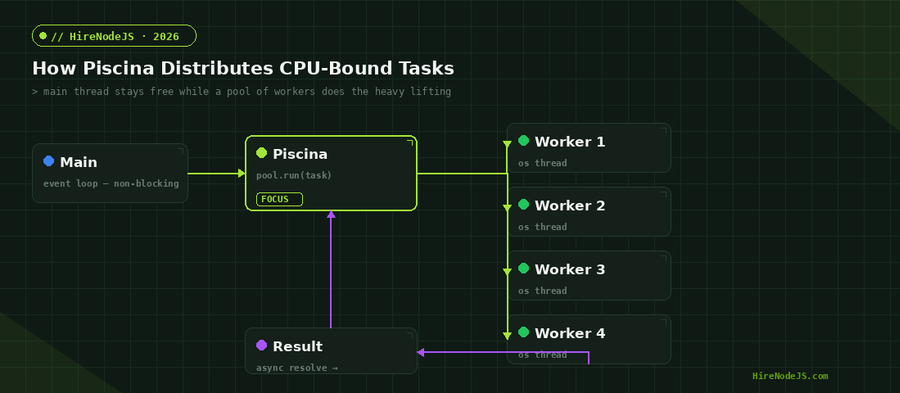
The answer is true parallelism via worker threads, which run on separate OS threads with their own V8 isolate. The main thread offloads the heavy computation, stays responsive, and collects the result when the worker is done. The diagram below shows the flow Piscina manages on your behalf.
Why a Pool Beats Spawning Workers On Demand
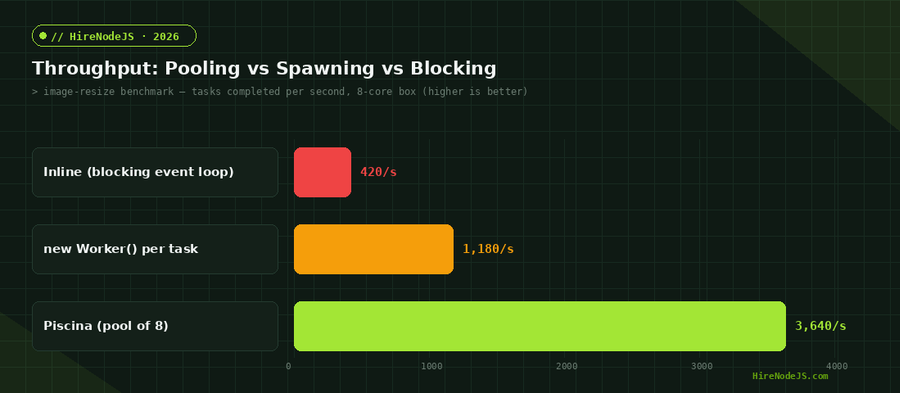
The naive approach is to create a new Worker for each task and terminate it afterward. It works in a demo and collapses in production. Each worker spin-up costs a fresh V8 isolate, module loading, and thread allocation — frequently tens of milliseconds before any useful work begins. Spawn one per request and you've simply moved the bottleneck.
A pool amortizes that cost. Threads are created once, kept warm, and reused across thousands of tasks. Piscina also queues work when every worker is busy, applies backpressure, and recycles workers after a configurable number of executions to guard against slow memory creep. The chart below shows how throughput scales as you grow the pool — and where it stops paying off.
Getting Started with Piscina
Piscina's API is deliberately small. You point it at a worker file, call run() with a payload, and await a promise. The worker file exports a single function — sync or async — and Piscina handles serialization, scheduling, and result delivery. Here is a complete, runnable setup for offloading image resizing.
import Piscina from 'piscina';
import { fileURLToPath } from 'node:url';

// Create ONE pool for the whole process — never per request.
const pool = new Piscina({
  filename: fileURLToPath(new URL('./resize-worker.js', import.meta.url)),
  minThreads: 2,
  maxThreads: 8,          // cap near your physical core count
  idleTimeout: 30_000,    // let idle workers retire under low load
  maxQueue: 1000,         // reject early instead of unbounded memory growth
});

export async function resizeImage(buffer, width) {
  // Returns a promise; the heavy work runs off the main thread.
  return pool.run({ buffer, width });
}

export default pool;import sharp from 'sharp';
// The default export is the task function Piscina invokes per job.
export default async function ({ buffer, width }) {
return sharp(buffer)
.resize(width)
.webp({ quality: 80 })
.toBuffer();
}Sizing the Pool and Reading the Latency Curve
Pool sizing is where most teams leave performance on the table. CPU-bound tasks are best served by a pool roughly equal to the number of physical cores — more threads than cores just means the OS scheduler thrashes context switches without adding real compute. Set maxThreads too low and tasks queue; set it too high and per-task latency degrades. Measure on your actual hardware rather than guessing.
Match maxThreads to available compute
Hire Pre-Vetted Node.js Developers
Skip the months-long search. Our exclusive talent network has senior Node.js experts ready to join your team in 48 hours.
A reasonable default is the core count reported by the runtime, leaving a little headroom for the main thread and GC. In containers, read the CPU quota rather than the host core count — a 4-core limit on a 64-core node will mislead you badly.
import { availableParallelism } from 'node:os';

// Leave one core for the event loop, GC, and libuv.
const cores = availableParallelism();
const maxThreads = Math.max(1, cores - 1);

export const poolOptions = {
  minThreads: Math.min(2, maxThreads),
  maxThreads,
  concurrentTasksPerWorker: 1, // CPU work: one task per thread at a time
};
The interactive chart below shows why this matters: across four common CPU tasks, moving from a blocking call to a Piscina pool of eight cut p95 latency by roughly an order of magnitude. The exact numbers depend on your workload, but the shape of the curve is consistent.
Production Concerns: Errors, Cancellation, and Backpressure
A pool in production needs more than a happy path. Tasks throw, clients disconnect, and traffic spikes. Piscina surfaces worker errors as rejected promises, so ordinary try/catch works. For long-running tasks you can pass an AbortSignal so a cancelled HTTP request doesn't keep burning a worker. And maxQueue lets you fail fast with a 503 instead of accumulating an unbounded backlog that eventually exhausts memory.
Wire cancellation and overflow handling
import express from 'express';
import { resizeImage } from './pool.js';

const app = express();

app.post('/resize', express.raw({ type: 'image/*', limit: '10mb' }), async (req, res) => {
  const controller = new AbortController();
  req.on('close', () => controller.abort()); // client gone -> stop the work

  try {
    const out = await resizeImage(req.body, Number(req.query.w) || 800);
    res.type('image/webp').send(out);
  } catch (err) {
    if (err.name === 'AbortError') return; // request already closed
    if (err.message?.includes('queue is full')) {
      return res.status(503).json({ error: 'Server busy, retry shortly' });
    }
    res.status(500).json({ error: 'Resize failed' });
  }
});

app.listen(3000);When Piscina Is the Wrong Tool
Worker pools are not free, and they are not always the answer. If your bottleneck is I/O — database queries, upstream HTTP calls, disk reads — threads buy you nothing, because that work already yields to the event loop. Reaching for Piscina there adds serialization overhead and complexity for no gain.
Genuinely heavy, sustained compute — video transcoding, large-scale ML inference, scientific simulation — often belongs in a dedicated service or a native addon rather than inside your API process. And if you simply need to scale out request handling, horizontal scaling with clustering may be a better fit than threading within one process. Piscina shines in the middle ground: frequent, bounded CPU tasks that sit on the request path and must not block it.
Getting worker pools right — sizing them to your hardware, handling cancellation, avoiding serialization traps — is the kind of production nuance that separates senior Node.js engineers from the rest. If you're building CPU-intensive services and want people who've done this at scale, HireNodeJS connects you with pre-vetted senior Node.js developers available within 48 hours, with no recruiter overhead. You can also see how the process works before you commit.
Hire Expert Node.js Developers — Ready in 48 Hours
Building the right system is only half the battle — you need the right engineers to build it. HireNodeJS.com specialises exclusively in Node.js talent: every developer is pre-vetted on real-world projects, performance engineering, event-driven architecture, and production deployments.
Unlike generalist platforms, our curated pool means you speak only to engineers who live and breathe Node.js. Most clients have their first developer working within 48 hours of getting in touch. Engagements start as short-term contracts and can convert to full-time hires with zero placement fee.
Conclusion: Keep the Event Loop Free
CPU-bound work is the quiet killer of Node.js tail latency, and a warm worker-thread pool is the cleanest fix. Piscina gives you that pool with a tiny API: keep one instance for the process, size maxThreads to your physical cores, handle cancellation and queue overflow, and reserve it for genuinely CPU-heavy tasks on the request path.
Get those fundamentals right and a single Node.js instance will hold a responsive event loop while saturating every core you give it — turning a service that buckles under heavy computation into one that scales predictably. Measure on your own hardware, watch the p95, and let the pool do the heavy lifting.
Frequently Asked Questions
What is a Node.js worker pool and why do I need one?
A worker pool is a fixed set of reusable worker threads that run CPU-bound tasks off the main event loop. You need one because spawning a new worker per task is expensive, and running heavy computation on the main thread blocks every other request.
What is Piscina in Node.js?
Piscina is a lightweight worker-thread pool library for Node.js. It keeps threads warm, queues tasks, applies backpressure, and returns results as promises, so you get true parallelism without managing raw worker lifecycles yourself.
How many threads should a Piscina pool have?
For CPU-bound work, size maxThreads close to your physical core count, leaving one core for the event loop and GC. In containers, base the number on the CPU quota rather than the host's core count.
When should I not use a worker pool?
Skip it for I/O-bound work like database queries or HTTP calls — that already yields to the event loop, so threads add overhead without benefit. Very long-running compute is usually better in a dedicated service.
Does passing data to a worker copy it?
Yes. Arguments are structured-cloned across the thread boundary by default, which copies the data. For large buffers, use Piscina's transferList option or a SharedArrayBuffer to transfer ownership and avoid the copy.
How do I cancel a running Piscina task?
Pass an AbortSignal to pool.run(). When the client disconnects, abort the controller so the task stops and the worker is freed for other work instead of wasting CPU on a discarded request.
Vivek Singh is the founder of Witarist and HireNodeJS.com — a platform connecting companies with pre-vetted Node.js developers. With years of experience scaling engineering teams, Vivek shares insights on hiring, tech talent, and building with Node.js.
Want a Node.js engineer who ships fast, optimised APIs?
HireNodeJS connects you with pre-vetted senior Node.js engineers who know performance engineering inside out — available within 48 hours. No recruiter fees, no lengthy screening.