Node.js + Playwright E2E Testing: The 2026 Production Guide
End-to-end testing has become non-negotiable for production Node.js applications. In 2026, Playwright has emerged as the clear frontrunner for E2E testing — offering cross-browser support, auto-waiting, parallel execution, and a developer experience that makes Selenium feel like a relic. Whether you are building a REST API with a React frontend or a server-rendered Next.js application, Playwright gives you the confidence that your entire system works from the user's perspective.
This guide covers everything you need to set up a production-grade Playwright testing pipeline for your Node.js project. We will walk through project configuration, the Page Object Model, API testing, CI integration with GitHub Actions, visual regression testing, and advanced patterns that experienced Node.js engineers use daily in production. By the end, you will have a battle-tested E2E setup ready to ship.
Why Playwright Dominates E2E Testing in 2026
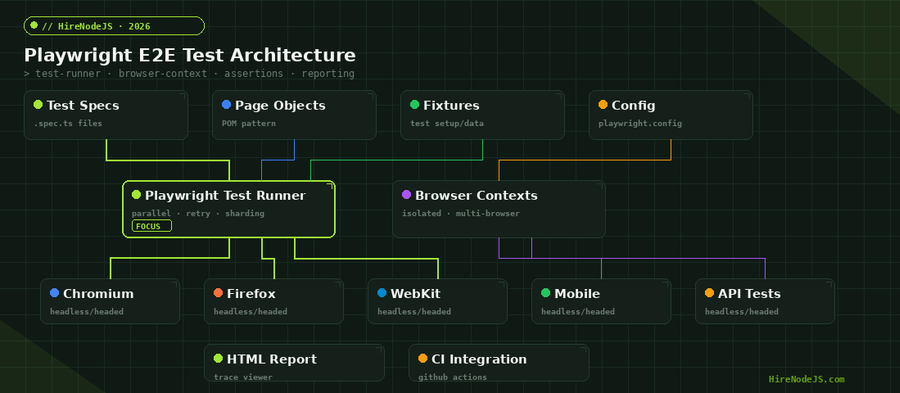
Playwright was built by Microsoft as a modern answer to the limitations of Selenium and the single-browser restriction of Cypress. In 2026, it supports Chromium, Firefox, and WebKit out of the box — meaning your tests cover the engines behind Chrome, Edge, Firefox, and Safari with zero extra configuration. Unlike Cypress, which runs tests inside the browser process, Playwright uses the Chrome DevTools Protocol and equivalent browser APIs for true out-of-process automation.
The auto-waiting mechanism is perhaps Playwright's most underrated feature. Every action — clicks, fills, assertions — automatically waits for the element to be actionable. No more explicit waits or sleep statements littering your test code. Combined with web-first assertions that retry until a condition is met or a timeout expires, flaky tests become the exception rather than the rule.
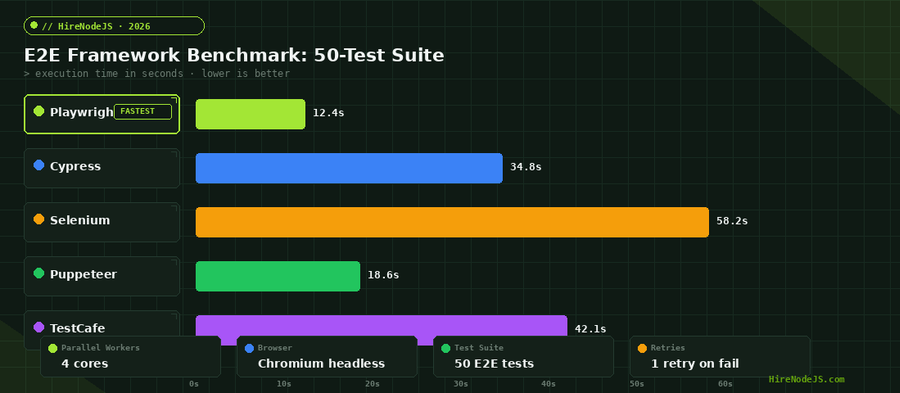
Parallel execution is built into the test runner. Playwright Test shards your test suite across multiple workers by default, cutting a 50-test suite from minutes to seconds. Add test sharding across CI machines and you can scale to hundreds of E2E tests without sacrificing pipeline speed.
Setting Up Playwright in a Node.js Project
Installation and Initial Configuration
Getting started with Playwright is straightforward. The init command scaffolds a complete testing setup including example tests, a configuration file, and a GitHub Actions workflow.
# Initialize Playwright in your Node.js project
npm init playwright@latest

# Or add to an existing project
npm install -D @playwright/test
npx playwright install

# Run tests
npx playwright test

# Run with UI mode for debugging
npx playwright test --ui
The playwright.config.ts File
The configuration file is where you define your test directory, browser projects, base URL, and global settings. A well-structured config is the foundation of a maintainable test suite.
import { defineConfig, devices } from '@playwright/test';

export default defineConfig({
  testDir: './e2e',
  fullyParallel: true,
  forbidOnly: !!process.env.CI,
  retries: process.env.CI ? 2 : 0,
  workers: process.env.CI ? 4 : undefined,
  reporter: [
    ['html', { open: 'never' }],
    ['json', { outputFile: 'test-results/results.json' }],
    process.env.CI ? ['github'] : ['list']
  ],
  use: {
    baseURL: process.env.BASE_URL || 'http://localhost:3000',
    trace: 'on-first-retry',
    screenshot: 'only-on-failure',
    video: 'retain-on-failure',
  },
  projects: [
    { name: 'chromium', use: { ...devices['Desktop Chrome'] } },
    { name: 'firefox', use: { ...devices['Desktop Firefox'] } },
    { name: 'webkit', use: { ...devices['Desktop Safari'] } },
    { name: 'mobile-chrome', use: { ...devices['Pixel 7'] } },
    { name: 'mobile-safari', use: { ...devices['iPhone 14'] } },
  ],
  webServer: {
    command: 'npm run dev',
    port: 3000,
    reuseExistingServer: !process.env.CI,
  },
});Page Object Model for Scalable Tests
The Page Object Model (POM) is the most important pattern for maintainable E2E tests. Instead of scattering selectors and interactions across test files, you encapsulate page-specific logic in dedicated classes. When the UI changes, you update one page object instead of dozens of tests.
// e2e/pages/login.page.ts
import { type Page, type Locator, expect } from '@playwright/test';

export class LoginPage {
  private readonly emailInput: Locator;
  private readonly passwordInput: Locator;
  private readonly submitButton: Locator;
  private readonly errorMessage: Locator;

  constructor(private readonly page: Page) {
    this.emailInput = page.getByLabel('Email address');
    this.passwordInput = page.getByLabel('Password');
    this.submitButton = page.getByRole('button', { name: 'Sign in' });
    this.errorMessage = page.getByRole('alert');
  }

  async goto() {
    await this.page.goto('/login');
  }

  async login(email: string, password: string) {
    await this.emailInput.fill(email);
    await this.passwordInput.fill(password);
    await this.submitButton.click();
  }

  async expectError(message: string) {
    await expect(this.errorMessage).toContainText(message);
  }

  async expectLoggedIn() {
    await expect(this.page).toHaveURL('/dashboard');
  }
}
Notice the use of user-facing locators like getByLabel and getByRole instead of CSS selectors. This makes tests resilient to implementation changes while keeping them readable. Hire full-stack developers who understand both the testing and implementation side of the stack — it makes a massive difference in test quality.
Fixtures and Test Isolation
Playwright fixtures are a powerful dependency injection system that replaces traditional setup and teardown hooks. They let you compose reusable test dependencies — authenticated pages, seeded databases, API clients — without the boilerplate of beforeEach and afterEach blocks.
// e2e/fixtures.ts
import { test as base, expect } from '@playwright/test';
import { LoginPage } from './pages/login.page';
import { DashboardPage } from './pages/dashboard.page';

type AppFixtures = {
  loginPage: LoginPage;
  dashboardPage: DashboardPage;
  authenticatedPage: Page;
};

export const test = base.extend<AppFixtures>({
  loginPage: async ({ page }, use) => {
    await use(new LoginPage(page));
  },
  dashboardPage: async ({ page }, use) => {
    await use(new DashboardPage(page));
  },
  authenticatedPage: async ({ page }, use) => {
    // Reuse auth state from storage
    const context = await page.context();
    await context.addCookies(JSON.parse(
      fs.readFileSync('.auth/cookies.json', 'utf-8')
    ));
    await use(page);
  },
});

export { expect };
Each test gets a fresh browser context by default. This means cookies, localStorage, and session data are completely isolated between tests. You never have to worry about one test polluting another's state — a common source of flaky tests in Selenium and older frameworks.
API Testing with Playwright
Playwright is not just a browser automation tool — it includes a full-featured API testing client through the APIRequestContext. You can test your REST endpoints directly without launching a browser, or combine API calls with UI tests for comprehensive end-to-end coverage.
Hire Pre-Vetted Node.js Developers
Skip the months-long search. Our exclusive talent network has senior Node.js experts ready to join your team in 48 hours.
import { test, expect } from '@playwright/test';

test.describe('User API', () => {
  let apiContext;

  test.beforeAll(async ({ playwright }) => {
    apiContext = await playwright.request.newContext({
      baseURL: 'http://localhost:3000/api',
      extraHTTPHeaders: {
        'Authorization': `Bearer ${process.env.API_TOKEN}`,
        'Content-Type': 'application/json',
      },
    });
  });

  test('GET /users returns paginated list', async () => {
    const response = await apiContext.get('/users?page=1&limit=10');
    expect(response.ok()).toBeTruthy();

    const body = await response.json();
    expect(body.data).toHaveLength(10);
    expect(body.pagination.total).toBeGreaterThan(0);
    expect(body.pagination.page).toBe(1);
  });

  test('POST /users creates new user', async () => {
    const response = await apiContext.post('/users', {
      data: { name: 'Test User', email: 'test@example.com', role: 'developer' }
    });
    expect(response.status()).toBe(201);

    const user = await response.json();
    expect(user.id).toBeDefined();
    expect(user.name).toBe('Test User');
  });

  test.afterAll(async () => {
    await apiContext.dispose();
  });
});
Combining API and UI tests in the same framework eliminates the overhead of maintaining separate tools. Your backend developers can write API tests while frontend engineers handle browser tests — all using the same runner, assertions, and CI pipeline.
CI/CD Integration with GitHub Actions
Running Playwright tests in CI is where the real value shows up. A failing E2E test on a pull request catches issues that unit tests and integration tests miss — broken user flows, misaligned API contracts, and CSS regressions that only appear in specific browser engines.
# .github/workflows/e2e.yml
name: E2E Tests
on: [push, pull_request]

jobs:
  e2e:
    runs-on: ubuntu-latest
    strategy:
      matrix:
        shard: [1/4, 2/4, 3/4, 4/4]
    steps:
      - uses: actions/checkout@v4
      - uses: actions/setup-node@v4
        with:
          node-version: 22
          cache: npm

      - run: npm ci
      - run: npx playwright install --with-deps chromium

      - name: Run E2E tests (shard ${{ matrix.shard }})
        run: npx playwright test --shard=${{ matrix.shard }}
        env:
          BASE_URL: http://localhost:3000
          CI: true

      - uses: actions/upload-artifact@v4
        if: failure()
        with:
          name: playwright-report-${{ matrix.shard }}
          path: playwright-report/
          retention-days: 7
The sharding strategy splits your test suite across four parallel CI jobs. A 200-test suite that takes 8 minutes sequentially can finish in under 2 minutes with four shards. The test artifacts — screenshots, traces, and videos — are uploaded only on failure, keeping your CI costs low while maintaining full debuggability.
Visual Regression Testing
Playwright includes built-in screenshot comparison testing. This catches CSS regressions, layout shifts, and visual bugs that functional assertions miss entirely. Each screenshot is compared pixel-by-pixel against a baseline, and differences are highlighted in a diff report.
import { test, expect } from '@playwright/test';

test('dashboard renders correctly', async ({ page }) => {
  await page.goto('/dashboard');

  // Wait for all data to load
  await page.waitForLoadState('networkidle');

  // Full page screenshot comparison
  await expect(page).toHaveScreenshot('dashboard-full.png', {
    fullPage: true,
    maxDiffPixelRatio: 0.01,  // Allow 1% pixel difference
  });
});

test('chart component renders with data', async ({ page }) => {
  await page.goto('/analytics');

  // Element-level screenshot
  const chart = page.locator('[data-testid="revenue-chart"]');
  await expect(chart).toHaveScreenshot('revenue-chart.png', {
    animations: 'disabled',  // Freeze animations for consistency
    mask: [page.locator('.timestamp')],  // Mask dynamic content
  });
});
The mask option is essential for dynamic content. Timestamps, user avatars, and live data counters will cause false positives if not masked. Playwright replaces masked areas with a solid color before comparison, giving you stable baselines without sacrificing coverage.
Advanced Patterns and Best Practices
Network Mocking and Interception
Playwright lets you intercept and mock network requests at the browser level. This is invaluable for testing error states, loading indicators, and edge cases that are difficult to reproduce against a live backend.
test('shows error state when API fails', async ({ page }) => {
  // Intercept the API call and return a 500 error
  await page.route('**/api/users', route => {
    route.fulfill({
      status: 500,
      contentType: 'application/json',
      body: JSON.stringify({ error: 'Internal Server Error' }),
    });
  });

  await page.goto('/users');

  // Verify error UI renders correctly
  await expect(page.getByText('Something went wrong')).toBeVisible();
  await expect(page.getByRole('button', { name: 'Retry' })).toBeVisible();
});
Authentication State Reuse
Logging in before every test wastes time and adds fragility. Playwright's storage state feature lets you authenticate once in a setup project and reuse the session across all tests.
Test Tagging and Selective Execution
As your test suite grows, you need the ability to run subsets of tests. Playwright supports test tagging with annotations, letting you run smoke tests on every PR and the full suite on merges to main.
Production-grade E2E testing requires more than just writing tests — it demands architecture. Teams that invest in proper test infrastructure, from CI pipelines to visual regression baselines, ship with significantly more confidence. If you are looking to hire Node.js developers who understand testing at this level, the difference shows up immediately in deployment frequency and incident rates.
Hire Expert Node.js Developers — Ready in 48 Hours
Building the right test infrastructure is only half the battle — you need the right engineers to build it. HireNodeJS.com specialises exclusively in Node.js talent: every developer is pre-vetted on real-world projects, API design, event-driven architecture, and production deployments.
Unlike generalist platforms, our curated pool means you speak only to engineers who live and breathe Node.js. Most clients have their first developer working within 48 hours of getting in touch. Engagements start as short-term contracts and can convert to full-time hires with zero placement fee.
Conclusion
Playwright has matured into the definitive E2E testing framework for Node.js applications in 2026. Its cross-browser support, parallel execution, auto-waiting, and built-in visual regression testing make it the most complete solution available. Combined with the Page Object Model, fixtures, API testing, and GitHub Actions integration, you have everything needed to build a testing pipeline that catches real bugs before they reach production.
Start with the basics — install Playwright, write your first test against a critical user flow, and integrate it into your CI pipeline. From there, layer on visual regression testing, network mocking, and authentication state reuse as your suite grows. The investment in E2E testing pays for itself with the first production bug it catches.
Frequently Asked Questions
Is Playwright better than Cypress for Node.js E2E testing?
Playwright offers faster execution, true cross-browser support (Chromium, Firefox, WebKit), and built-in parallelism. Cypress has a slightly easier learning curve and better component testing support. For production Node.js apps that need cross-browser coverage and CI speed, Playwright is the stronger choice in 2026.
How do I run Playwright tests in CI with GitHub Actions?
Install Playwright with npx playwright install --with-deps, then run npx playwright test. Use the matrix strategy with --shard flag to split tests across parallel jobs. Upload test artifacts on failure for debugging.
What is the Page Object Model in Playwright?
The Page Object Model (POM) encapsulates page-specific selectors and interactions in dedicated classes. This keeps test files focused on test logic rather than DOM details, and makes maintenance easier when the UI changes.
How fast is Playwright compared to Selenium?
In benchmark tests with 50 E2E tests on 4 parallel workers, Playwright completes in roughly 12 seconds compared to Selenium's 58 seconds. Playwright's auto-waiting and built-in parallelism are the primary speed advantages.
Can Playwright test APIs without a browser?
Yes. Playwright includes an APIRequestContext that lets you make HTTP requests directly without launching a browser. You can test REST endpoints, validate responses, and combine API calls with browser tests in the same test suite.
How much does it cost to hire a Node.js developer with Playwright experience?
Senior Node.js developers with strong E2E testing skills typically range from $60-120 per hour depending on region and experience. HireNodeJS.com connects you with pre-vetted engineers who have production Playwright experience, available within 48 hours.
Vivek Singh is the founder of Witarist and HireNodeJS.com — a platform connecting companies with pre-vetted Node.js developers. With years of experience scaling engineering teams, Vivek shares insights on hiring, tech talent, and building with Node.js.
Need a Node.js Engineer Who Ships Tested Code?
HireNodeJS connects you with pre-vetted senior Node.js engineers who build production-grade test suites from day one. No recruiter fees, no lengthy screening — just top talent ready to ship.