Node.js + PM2 in 2026: Production Process Management & Zero-Downtime Deploys
Node.js is single-threaded by design — and that single thread is the bottleneck that bites every team in production. You can write the cleanest async code in the world, but if your process crashes at 3am, drops connections during a deploy, or fails to use the other 7 cores on your $400/month VM, you have an availability problem, not a code problem.
PM2 has been the default answer for over a decade — and in 2026 it is still the fastest path from a working Node.js app to a production-grade service that uses every CPU core, restarts on crash, reloads with zero downtime, and ships logs and metrics out of the box. This guide is the production playbook our senior engineers run for every new client engagement.
Why PM2 Still Wins for Single-VM Node.js Deployments in 2026
Kubernetes gets the headlines, but the truth is most production Node.js apps run on a single VM (or two, behind a load balancer) because that is what the workload actually needs. Adding K8s to a 4,000-req/sec API is paying $1,000/month in operational tax for a problem you do not have. PM2 fills the same role — multi-core utilisation, supervision, monitoring — without the YAML, the control plane, or the on-call rotation.
What PM2 actually gives you
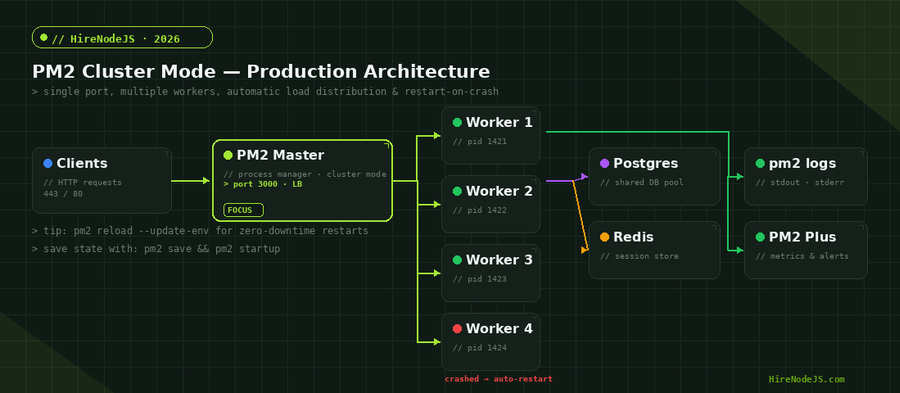
In one binary you get: a daemon that supervises your Node.js processes, a built-in cluster mode that uses every CPU core on a single port, automatic restart on crash with exponential backoff, log rotation and aggregation across workers, real-time CPU and memory metrics, zero-downtime reload, and a bootstrap script that survives reboots. The competitors — Forever, systemd, raw cluster module — each cover a slice of that, but PM2 covers the entire production checklist.
When PM2 is the wrong tool
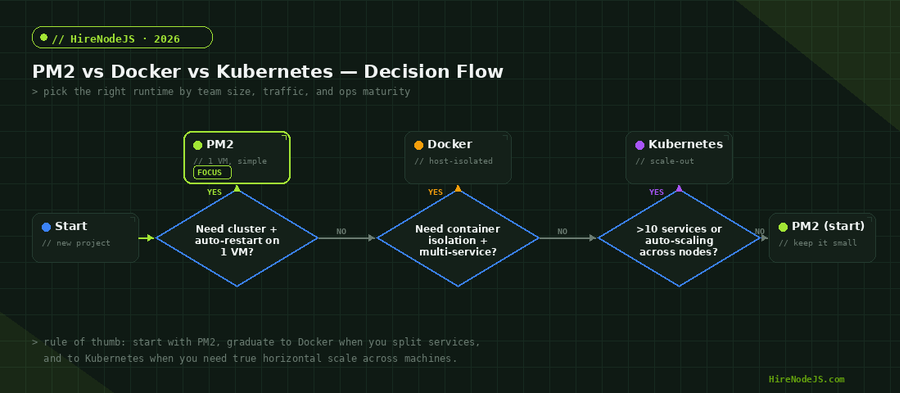
PM2 is for one host. The moment you need to run across multiple machines with auto-scaling, rolling deploys, or service mesh, you have outgrown PM2 and you should be looking at Docker + Kubernetes (or a PaaS like Fly.io or Render). The decision tree later in this article makes the boundary explicit.
Cluster Mode: Use Every Core Without Writing a Single Line of cluster.js
The Node.js cluster module is powerful but verbose. PM2 wraps it so you never write a master/worker spawn function again. `pm2 start app.js -i max` forks one worker per CPU core and round-robins incoming TCP connections across them on a single port. No reverse proxy reconfiguration, no per-worker port allocation, no IPC code.
The ecosystem.config.js file is the contract
Drop ad-hoc CLI flags. Define your topology declaratively in `ecosystem.config.js` and commit it. This file is the single source of truth for memory limits, env vars, log paths, and restart policy — and it is what your CI pipeline ships to production.
// ecosystem.config.js — production-ready PM2 config
module.exports = {
  apps: [{
    name: 'api',
    script: './dist/server.js',
    instances: 'max',          // one worker per CPU core
    exec_mode: 'cluster',      // round-robin LB on a single port
    max_memory_restart: '600M',// auto-restart leaky workers
    kill_timeout: 5000,        // SIGTERM grace before SIGKILL
    wait_ready: true,          // wait for process.send('ready')
    listen_timeout: 8000,      // fail fast if the app does not boot
    autorestart: true,
    max_restarts: 10,
    restart_delay: 4000,
    env: {
      NODE_ENV: 'production',
      PORT: 3000,
      LOG_LEVEL: 'info'
    },
    error_file:  '/var/log/api/err.log',
    out_file:    '/var/log/api/out.log',
    time: true                 // prefix logs with ISO timestamps
  }]
};

// Boot:
//   pm2 start ecosystem.config.js
//   pm2 save
//   pm2 startup systemd
Zero-Downtime Deploys: pm2 reload, Not pm2 restart
`pm2 restart` kills every worker simultaneously and starts new ones — your users see 502s during the boot window. `pm2 reload` does the right thing: it cycles workers one at a time, waits for the new one to signal ready, then takes the old one out of rotation. With `wait_ready: true` and `process.send("ready")` in your code, you get true zero-downtime deploys on a single VM. No load balancer choreography, no Kubernetes rolling update needed.
The graceful-shutdown pattern your code MUST implement
Reload only works if your app handles SIGINT correctly. Drain in-flight requests, close database pools, exit. Without this, `kill_timeout` ends in SIGKILL and you drop in-flight responses every deploy.
// src/server.js — graceful shutdown for PM2 reload
import http from 'node:http';
import { app } from './app.js';
import { db } from './db.js';

const server = http.createServer(app);

server.listen(process.env.PORT, () => {
  console.log(`worker ${process.pid} listening`);
  // Tell PM2 we are ready to receive traffic
  if (process.send) process.send('ready');
});

let shuttingDown = false;
const shutdown = async (signal) => {
  if (shuttingDown) return;
  shuttingDown = true;
  console.log(`worker ${process.pid} received ${signal}`);

  // Stop accepting new connections
  server.close(async () => {
    try {
      await db.end();        // close the pool
      console.log(`worker ${process.pid} drained`);
      process.exit(0);
    } catch (err) {
      console.error('shutdown error', err);
      process.exit(1);
    }
  });

  // Hard timeout — match PM2 kill_timeout
  setTimeout(() => process.exit(1), 4500).unref();
};

process.on('SIGINT',  () => shutdown('SIGINT'));
process.on('SIGTERM', () => shutdown('SIGTERM'));
Production Monitoring: PM2 Plus, Prometheus, or Both
Hire Pre-Vetted Node.js Developers
Skip the months-long search. Our exclusive talent network has senior Node.js experts ready to join your team in 48 hours.
PM2 ships with three layers of observability built in. The CLI gives you pm2 monit for live CPU and memory per worker — fine for debugging, useless for trend analysis. PM2 Plus (the paid SaaS) adds histograms, transaction tracing, and exception aggregation. For most teams the right answer is to scrape PM2 metrics with Prometheus and stream logs to your existing pipeline — same dashboard your other services live in.
Exposing metrics for Prometheus
The `prom-client` package exposes Node.js process metrics (event loop lag, GC pauses, heap usage) on a separate `/metrics` port. Combined with PM2 cluster mode, you scrape one endpoint per worker and aggregate with Prometheus relabeling rules. This is the same pattern that backs the dashboards we wire up for our backend engagements.
Five Production Pitfalls We See on Every PM2 Audit
1. Logs that grow unbounded
Default PM2 log paths under `~/.pm2/logs` will fill your disk in weeks under real traffic. Install `pm2-logrotate` (`pm2 install pm2-logrotate`), set a max file size of 50MB, and keep 7 rotated copies. This is a five-minute fix that prevents a 3am incident.
2. Forgotten pm2 save after the last deploy
PM2 only persists your process list when you run `pm2 save`. After a server reboot, anything you forgot to save is gone. Make `pm2 save` the last step of your deploy script — and add `pm2 startup` once during provisioning so the daemon comes back after a kernel update.
3. Memory limits set lower than V8 heap
A common mistake: setting `max_memory_restart: "512M"` on a process where the V8 heap is 1.5GB. PM2 will restart the worker on every GC pause and your latency p99 will look like an EKG. Set `max_memory_restart` 25% above your steady-state RSS, not below it.
4. exec_mode: "fork" used as the default
The PM2 docs include `fork` mode examples for legacy reasons. `fork` runs a single process — you lose all the cluster benefits and pay the same price for everything else. Unless you explicitly need a non-listening worker (cron, queue consumer), use `cluster`.
5. CI deploys that bypass `pm2 reload`
Teams sometimes write a deploy script that does `pm2 stop && git pull && pm2 start`. That is a guaranteed downtime window. The correct sequence is `git pull && npm ci --omit=dev && pm2 reload ecosystem.config.js --update-env`. The `--update-env` flag is essential — without it, your new env vars never reach the workers.
Where Senior Node.js Engineers Add the Most Value
Configuring PM2 is the easy part. The expensive part is the engineering judgement around it: choosing the right cluster size for your event loop profile, designing graceful-shutdown for stateful sockets, instrumenting metrics that catch leaks before they page on-call, and writing the deploy pipeline that reloads safely. HireNodeJS connects you with pre-vetted senior engineers who have shipped this exact stack at scale. Hire a backend developer or a DevOps engineer available within 48 hours — no lengthy screening, no recruiter overhead.
Hire Expert Node.js Developers — Ready in 48 Hours
Building the right system is only half the battle — you need the right engineers to build it. HireNodeJS.com specialises exclusively in Node.js talent: every developer is pre-vetted on real-world projects, API design, event-driven architecture, and production deployments.
Unlike generalist platforms, our curated pool means you speak only to engineers who live and breathe Node.js. Most clients have their first developer working within 48 hours of getting in touch. Engagements start as short-term contracts and can convert to full-time hires with zero placement fee.
Summary: PM2 in 2026 Is Still the Fastest Path to Production
For the median Node.js team in 2026 — single VM, sub-100k req/min, no in-house DevOps — PM2 remains the highest-leverage tool in the stack. Cluster mode delivers 3–4× throughput for free. Zero-downtime reload eliminates an entire class of deploy bugs. Built-in monitoring saves you a Datadog tier. The whole thing is one config file and three CLI commands.
Graduate to Docker when you split into multiple services, and to Kubernetes when you genuinely need horizontal scaling across machines. Until then, the boring answer is the right one: define your topology in `ecosystem.config.js`, implement graceful shutdown, set up `pm2-logrotate`, and reload — never restart — on every deploy.
Frequently Asked Questions
Is PM2 still relevant in 2026 with Docker and Kubernetes everywhere?
Yes — for any Node.js workload that fits on a single VM, PM2 is faster to set up and operate than containers. It delivers cluster mode, supervision, and zero-downtime reload in one binary. Most production Node.js apps do not need Kubernetes; they need PM2 plus a load balancer.
What is the difference between pm2 reload and pm2 restart?
`pm2 restart` kills every worker simultaneously, causing a brief outage. `pm2 reload` cycles workers one at a time, draining in-flight requests before replacement. Always use reload for production deploys.
How many PM2 workers should I run in cluster mode?
Start with `instances: "max"`, which spawns one worker per CPU core. For CPU-bound workloads this is optimal. For I/O-bound APIs, sometimes 2x cores can squeeze out 10–15% more throughput — benchmark before deciding.
Can I run PM2 inside Docker?
Yes — use `pm2-runtime` (the foreground variant) as the container CMD. This gives you supervision and clustering inside the container while Kubernetes or Docker Swarm handles cross-host orchestration.
Does PM2 work with TypeScript?
PM2 itself is language-agnostic. Compile TypeScript to JavaScript first (or use a runtime like tsx/ts-node) and point the `script` field at the compiled output. Production setups should always run compiled JS for performance.
Why does PM2 keep restarting my Node.js process?
The two most common causes are (1) `max_memory_restart` set lower than the steady-state RSS, and (2) the app crashing during boot before `process.send("ready")`. Check `pm2 logs` for exit codes, and tune `listen_timeout` and `max_memory_restart` to realistic values.
Vivek Singh is the founder of Witarist and HireNodeJS.com — a platform connecting companies with pre-vetted Node.js developers. With years of experience scaling engineering teams, Vivek shares insights on hiring, tech talent, and building with Node.js.
Need a Node.js engineer who ships zero-downtime deploys?
HireNodeJS connects you with pre-vetted senior backend engineers who have shipped PM2 + Node.js stacks at scale. Available within 48 hours — no recruiter fees, no lengthy screening.