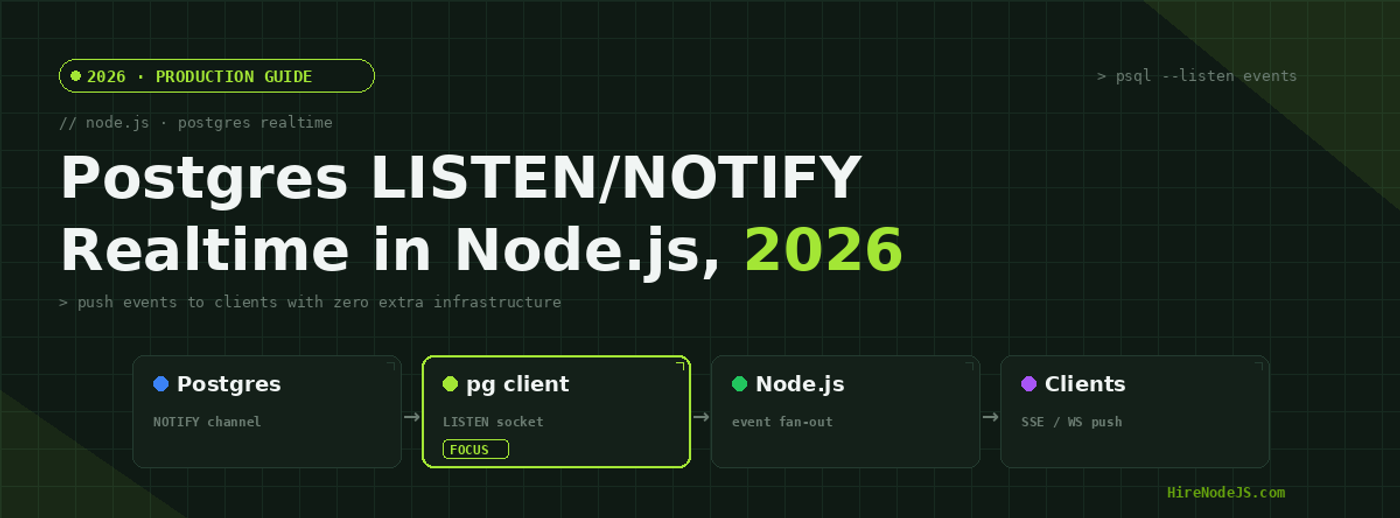
Node.js + Postgres LISTEN/NOTIFY in 2026: Realtime Without Redis
Real-time features used to mean spinning up extra infrastructure: a Redis instance for pub/sub, a message broker, maybe a whole streaming platform. But if your application already runs on PostgreSQL, you are sitting on a perfectly good event bus that ships in the box. Postgres LISTEN/NOTIFY lets one database transaction push a message straight to your Node.js process the instant data changes — no polling, no extra moving parts, and no eventual-consistency window between your write and the event.
In 2026, with Node.js drivers handling reconnection cleanly and Server-Sent Events resurging as the low-overhead way to stream to browsers, LISTEN/NOTIFY has quietly become the default choice for small and mid-sized real-time workloads. This guide walks through how it works, a production-grade Node.js listener with fan-out, how to deliver events to the browser, and — just as important — the exact point at which you should graduate to Redis or Kafka instead.
Why LISTEN/NOTIFY Matters in 2026
The cost of polling
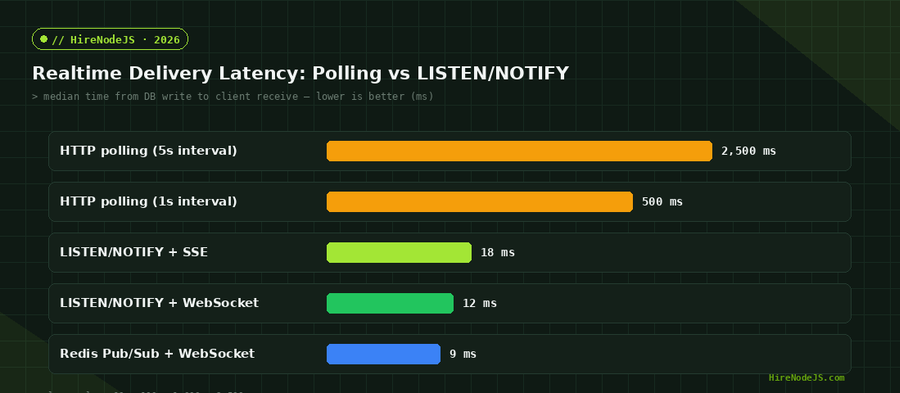
The naive way to surface fresh data is polling: the client asks “anything new?” every few seconds. Polling is simple but wasteful — most requests return nothing, the average event is delayed by half your interval, and the load scales with the number of clients rather than the number of actual changes. At a one-second interval, your median delivery latency is already 500ms before the network even gets involved, and ten thousand idle clients hammer your database for no reason.
Push instead of pull
LISTEN/NOTIFY flips the model. A client process registers interest in a named channel once, then waits. The moment a transaction calls NOTIFY on that channel, Postgres delivers the payload to every listening connection. Delivery is near-instant, traffic scales with real events, and the feature is built into a database you almost certainly already run. If you want engineers who can wire this up correctly, you can hire backend developers who have shipped it in production.
Less infrastructure, fewer failure modes
Every additional piece of infrastructure is something to provision, monitor, patch, and pay for. Reaching for LISTEN/NOTIFY before a broker means one fewer service in your architecture diagram, one fewer set of credentials to rotate, and one fewer thing that can be down at 3am. For a startup shipping its first real-time feature, that operational simplicity often matters more than raw throughput. You keep your event path inside the transaction boundary you already trust, and you avoid the dual-write problem where your database and your message bus disagree about what actually happened.
How LISTEN/NOTIFY Works Under the Hood
At the SQL level the feature is just three commands. A session runs LISTEN to subscribe to a channel, any session runs NOTIFY (or the pg_notify() function) to publish, and UNLISTEN unsubscribes. Notifications are tied to the transaction: if you NOTIFY inside a transaction that later rolls back, the message is never sent. That transactional coupling is the feature’s superpower — your event fires if and only if the data change actually committed.
-- subscribe (typically from your Node.js listener connection)
LISTEN order_events;

-- publish from anywhere, e.g. inside the same transaction that wrote the row
BEGIN;
INSERT INTO orders (id, status) VALUES (gen_random_uuid(), 'paid');
SELECT pg_notify('order_events', json_build_object('type','order.paid','id', currval('orders_id_seq'))::text);
COMMIT;

-- payloads are limited to 8000 bytes; send an id and re-fetch the full row if you need more
Channels are just strings
A channel is nothing more than an identifier you both publish and subscribe to, which makes the feature flexible but also easy to misuse. Keep channel names coarse — one channel per logical event stream, such as order_events or chat_room_updates — rather than spinning up a channel per user. Postgres delivers every notification on a channel to every listener of that channel, so routing to the right end user is a job for your Node.js process, not for the channel name. A handful of well-named channels is far easier to reason about than thousands of dynamically generated ones.
The 8000-byte payload limit
Postgres caps each notification payload at 8000 bytes. The idiomatic pattern is therefore to send a small envelope — an event type and a primary key — and let the listener fetch the full record if it needs more. This keeps notifications cheap and avoids coupling your event schema to your row schema. It also has a pleasant side effect: because the listener re-reads from the database, every subscriber sees the current committed state rather than a snapshot that may already be stale by the time it is processed.
Building a Production Fan-Out in Node.js
The single most important rule: use exactly one dedicated database connection for LISTEN, not one per subscriber. A LISTEN connection is long-lived and mostly idle, so opening one per browser tab would exhaust your connection pool almost immediately. Instead, dedicate a single client to LISTEN, then fan the events out to your subscribers in process using a plain EventEmitter.
import pg from 'pg';
import { EventEmitter } from 'node:events';

export const bus = new EventEmitter();
bus.setMaxListeners(0); // many SSE/WS subscribers

let client;
async function connectListener() {
  client = new pg.Client({ connectionString: process.env.DATABASE_URL });
  client.on('error', (err) => {
    console.error('listener connection error', err);
    retry();
  });
  await client.connect();
  await client.query('LISTEN order_events');

  client.on('notification', (msg) => {
    try {
      const payload = JSON.parse(msg.payload);
      bus.emit('order_events', payload); // fan out to every in-proc subscriber
    } catch (e) {
      console.error('bad notify payload', msg.payload, e);
    }
  });
  console.log('LISTEN order_events active');
}

let backoff = 500;
function retry() {
  setTimeout(async () => {
    try { await connectListener(); backoff = 500; }
    catch { backoff = Math.min(backoff * 2, 15000); retry(); }
  }, backoff);
}

connectListener().catch(retry);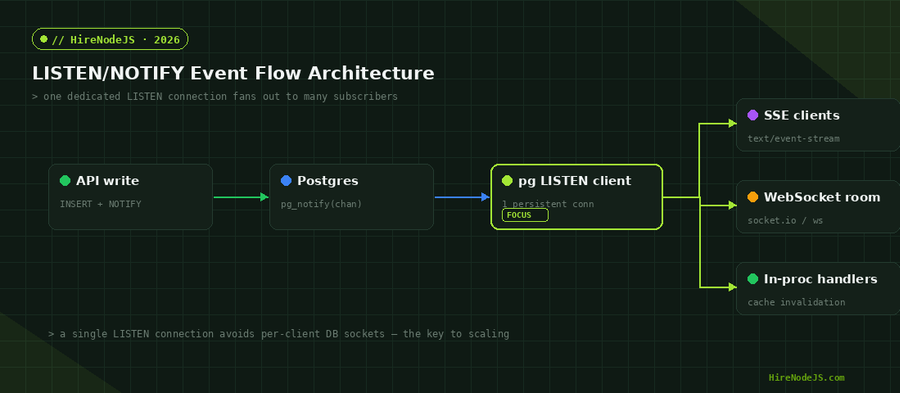
Delivering Events to the Browser
Hire Pre-Vetted Node.js Developers
Skip the months-long search. Our exclusive talent network has senior Node.js experts ready to join your team in 48 hours.
Server-Sent Events: the low-overhead default
For one-way server-to-client streams — notifications, live dashboards, progress bars — Server-Sent Events are the simplest fit. SSE runs over plain HTTP, reconnects automatically, and needs no extra protocol. Each browser opens an EventSource; your handler subscribes to the in-process bus and writes a line whenever an event arrives.
import express from 'express';
import { bus } from './listener.js';

const app = express();

app.get('/events/orders', (req, res) => {
  res.writeHead(200, {
    'Content-Type': 'text/event-stream',
    'Cache-Control': 'no-cache',
    Connection: 'keep-alive',
  });
  res.write('retry: 3000\n\n');

  const onEvent = (payload) => res.write(`data: ${JSON.stringify(payload)}\n\n`);
  bus.on('order_events', onEvent);

  const heartbeat = setInterval(() => res.write(': ping\n\n'), 25000);

  req.on('close', () => {
    clearInterval(heartbeat);
    bus.off('order_events', onEvent); // critical: prevent listener leaks
  });
});

app.listen(3000);
The one detail teams forget is cleanup. Every connected browser adds a listener to the in-process bus, and if you do not remove it when the request closes, you leak listeners until the process slows to a crawl or Node.js prints its max-listeners warning. The req.on('close') handler above is not optional — it is what keeps a long-running SSE server healthy. Pair it with a periodic heartbeat comment so proxies and load balancers do not silently drop idle connections.
When you need bidirectional traffic
If clients also send messages — chat, collaborative editing, multiplayer — reach for WebSockets instead. The fan-out pattern is identical: the WebSocket handler subscribes to the same in-process bus, so your LISTEN connection count never changes regardless of transport. This is the real elegance of the architecture: the database side stays constant — one connection, one LISTEN — while you are free to mix SSE, WebSockets, and in-process consumers on top of the same event stream however each feature demands.
Scaling, Reliability and the Gotchas
LISTEN/NOTIFY scales comfortably to thousands of subscribers per Node.js process because the database only ever talks to one connection. The real limits show up around durability and multi-instance deployments. Notifications are fire-and-forget: there is no replay, no acknowledgement, and no ordering guarantee across channels. If a message absolutely must be processed, persist it to an events table in the same transaction and use NOTIFY purely as a low-latency wake-up signal.
Running multiple Node.js instances
Every Postgres backend that issues LISTEN receives every NOTIFY on that channel, so if you run four Node.js instances behind a load balancer, all four get the event — which is usually exactly what you want, since each instance holds a different subset of connected clients. Just make sure idempotent handlers (cache invalidation, push) tolerate being invoked on instances with no interested clients.
The PgBouncer trap
This is the gotcha that bites teams in production. If your application connects through PgBouncer in transaction or statement pooling mode, LISTEN simply does not work — the pooler hands your connection to another client between statements, so the session-scoped subscription is lost and notifications silently vanish. The fix is to give your listener a direct connection to Postgres (or a PgBouncer pool configured in session mode), separate from the transaction-pooled connection your normal queries use. Because you only need one LISTEN connection per process, carving out that single direct connection costs almost nothing and saves hours of confused debugging.
When to Reach for Redis or Kafka Instead
LISTEN/NOTIFY is the right tool until one of three things becomes true: you need durable replay of missed events, your payloads routinely exceed 8KB, or your notification volume saturates the single delivery channel (tens of thousands per second). At that point a dedicated broker earns its keep. Redis Pub/Sub gives you lower latency and cross-service fan-out — see our Redis caching and pub/sub guide — while Kafka adds partitioned, replayable, durable streams for event-sourced systems. The decision is not LISTEN/NOTIFY versus a broker; it is using each where it shines.
If you are building real-time features on Postgres and want engineers who understand both the database internals and the Node.js event loop, HireNodeJS connects you with pre-vetted senior developers available within 48 hours — without the recruiter overhead.
Hire Expert Node.js Developers — Ready in 48 Hours
Building the right system is only half the battle — you need the right engineers to build it. HireNodeJS.com specialises exclusively in Node.js talent: every developer is pre-vetted on real-world projects, API design, event-driven architecture, and production deployments.
Unlike generalist platforms, our curated pool means you speak only to engineers who live and breathe Node.js. Most clients have their first developer working within 48 hours of getting in touch. Engagements start as short-term contracts and can convert to full-time hires with zero placement fee.
Conclusion
Postgres LISTEN/NOTIFY remains the highest-leverage real-time tool for teams already on Postgres: instant, transactional event delivery with zero additional infrastructure. Pair one dedicated LISTEN connection with an in-process fan-out and Server-Sent Events, back it with a transactional outbox for durability, and you have a system that handles thousands of subscribers cleanly.
Know its edges — the 8KB payload cap, fire-and-forget delivery, and no built-in replay — and you will know exactly when to graduate to Redis or Kafka. Used within those bounds, LISTEN/NOTIFY is one of the best returns on engineering effort you can get in a Node.js backend in 2026.
Frequently Asked Questions
What is Postgres LISTEN/NOTIFY used for in Node.js?
It lets a Postgres transaction push a message to a listening Node.js process the instant data changes. You use it to build real-time features — live dashboards, notifications, cache invalidation — without polling or a separate message broker.
Do I need Redis for real-time features if I use Postgres?
Not for small to mid-sized workloads. LISTEN/NOTIFY covers most real-time needs with zero extra infrastructure. Add Redis or Kafka only when you need durable replay, payloads larger than 8KB, or extremely high notification volume.
How many subscribers can LISTEN/NOTIFY handle?
Thousands per Node.js process, because the database only talks to one dedicated LISTEN connection. You fan events out in-process with an EventEmitter, so adding browser subscribers never adds database connections.
What is the payload size limit for pg_notify?
8000 bytes per notification. The standard pattern is to send a small envelope — an event type and a primary key — then let the listener re-fetch the full record from the database if it needs more data.
Are LISTEN/NOTIFY messages durable?
No. Notifications are fire-and-forget: anything sent while your listener is disconnected is lost. For at-least-once delivery, use a transactional outbox — write an events row and call pg_notify in the same transaction, then replay unprocessed rows on reconnect.
Should I use SSE or WebSockets to deliver events to the browser?
Use Server-Sent Events for one-way server-to-client streams; they run over plain HTTP and reconnect automatically. Use WebSockets when clients also need to send messages, such as chat or collaborative editing.
Vivek Singh is the founder of Witarist and HireNodeJS.com — a platform connecting companies with pre-vetted Node.js developers. With years of experience scaling engineering teams, Vivek shares insights on hiring, tech talent, and building with Node.js.
Need a Node.js + Postgres engineer who can ship realtime features?
HireNodeJS connects you with pre-vetted senior Node.js and PostgreSQL engineers available within 48 hours. No recruiter fees, no lengthy screening — just talent ready to ship.