Prisma ORM for Node.js: The Complete Production Guide 2026
Prisma has become the default ORM for TypeScript and Node.js projects, and 2026 marks a turning point. With the release of Prisma 7 — a complete architectural rewrite that dropped the Rust query engine in favour of a pure TypeScript core — the framework is faster, lighter, and finally viable on edge runtimes. If you are building production Node.js applications backed by PostgreSQL, MySQL, or MongoDB, understanding how to use Prisma effectively is no longer optional.
This guide covers everything you need to take Prisma from a local prototype to a production-grade data layer: schema design patterns, migration workflows, query optimisation, connection pooling, type-safe patterns, and common pitfalls. Whether you are evaluating Prisma for a new project or looking to hire Node.js developers who already know the stack, this is the reference you need.
What Changed in Prisma 7 — The TypeScript Rewrite
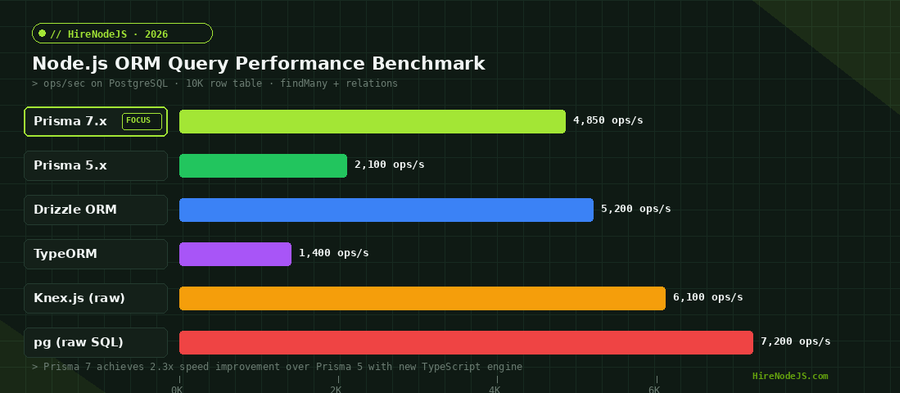
Prisma 7 represents the most significant release in the project's history. The query engine, previously written in Rust and shipped as a separate binary, has been rewritten entirely in TypeScript. This single change cascades into measurable improvements across bundle size, cold-start latency, and developer experience.
Key Performance Gains
The numbers speak for themselves. Bundle size dropped by 90 percent because the Rust binary is gone. Query execution for large result sets is up to 3x faster thanks to reduced serialisation overhead between the Rust process and the Node.js runtime. Type-checking a Prisma schema now requires 98 percent fewer type evaluations, making IDE responsiveness noticeably better on large schemas with 50 or more models.
Cold-start performance on serverless platforms like AWS Lambda improved dramatically. Without the Rust binary to load, Prisma 7 initialises in under 200ms on a 512MB Lambda function — down from 800ms or more with Prisma 5.
Edge Runtime Compatibility
One of the most requested features was first-class edge support. Prisma 7 runs natively on Cloudflare Workers, Vercel Edge Functions, and Deno Deploy without adapters or workarounds. This eliminates the old rule of thumb where teams chose Drizzle for edge and Prisma for traditional Node.js backend development. Both now work everywhere.
Schema Design Patterns for Production
A well-designed Prisma schema is the foundation of a maintainable data layer. Production schemas need to handle soft deletes, audit trails, polymorphic relationships, and multi-tenant isolation — none of which are obvious from the getting-started tutorial.
Model Organisation and Naming
Keep your schema.prisma file under 500 lines. For larger applications, Prisma supports multi-file schemas as of version 5.15. Split by domain: auth.prisma, billing.prisma, content.prisma. Use PascalCase for models, camelCase for fields, and always add @map and @@map attributes to decouple your TypeScript naming from your database column and table names.
Soft Deletes and Audit Fields
// schema.prisma — base audit pattern
model User {
  id        String   @id @default(cuid())
  email     String   @unique
  name      String?

  // Audit fields — add to every model
  createdAt DateTime @default(now()) @map("created_at")
  updatedAt DateTime @updatedAt      @map("updated_at")
  deletedAt DateTime?                @map("deleted_at")

  // Relations
  posts     Post[]

  @@map("users")
  @@index([deletedAt])
}

model Post {
  id        String   @id @default(cuid())
  title     String
  content   String?
  published Boolean  @default(false)

  authorId  String   @map("author_id")
  author    User     @relation(fields: [authorId], references: [id])

  createdAt DateTime @default(now()) @map("created_at")
  updatedAt DateTime @updatedAt      @map("updated_at")
  deletedAt DateTime?                @map("deleted_at")

  @@map("posts")
  @@index([authorId])
  @@index([deletedAt])
}Migration Workflows — Dev vs Production
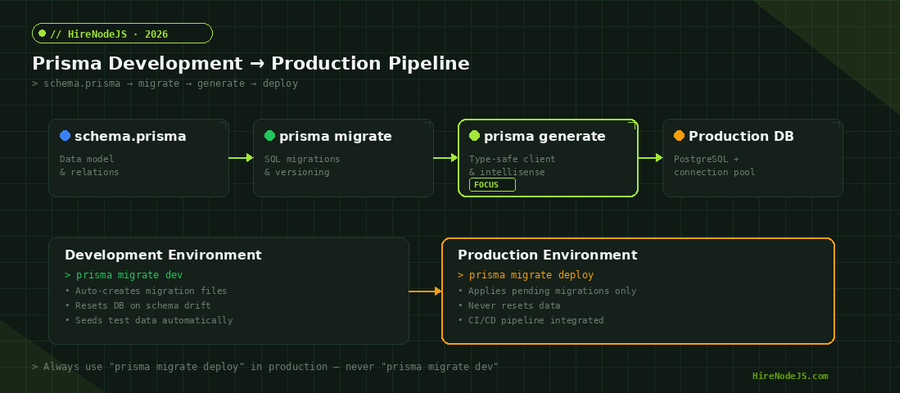
Prisma migrations are one of its strongest features, but the difference between development and production workflows trips up many teams. Using the wrong command in the wrong environment can wipe your database.
Development: prisma migrate dev
In development, prisma migrate dev is your daily driver. It compares your current schema.prisma against the migration history, generates a new SQL migration file, applies it, and re-runs prisma generate to update the client. If your database has drifted from the migration history, it will reset the database entirely — which is fine in development but catastrophic in production.
Production: prisma migrate deploy
In production and CI/CD pipelines, always use prisma migrate deploy. This command applies only pending migrations without generating new ones or resetting data. It is safe, idempotent, and should be the only migration command your deployment pipeline ever calls.
Query Optimisation and N+1 Prevention
Prisma's declarative API makes it easy to write clean queries, but that abstraction can hide performance problems. The most common issue is the N+1 query problem, where fetching a list of records and then accessing a relation on each one triggers a separate database query per record.
Hire Pre-Vetted Node.js Developers
Skip the months-long search. Our exclusive talent network has senior Node.js experts ready to join your team in 48 hours.
Use include and select Strategically
The include option eagerly loads relations in a single query. The select option lets you pick only the fields you need, reducing data transfer. In production, always use select when you do not need every column — especially on models with large text or JSON fields.
// Bad: N+1 problem — 1 query for users + N queries for posts
const users = await prisma.user.findMany();
for (const user of users) {
  const posts = await prisma.post.findMany({
    where: { authorId: user.id }
  });
}

// Good: Single query with eager loading
const users = await prisma.user.findMany({
  include: {
    posts: {
      where: { published: true },
      select: { id: true, title: true, createdAt: true },
      orderBy: { createdAt: 'desc' },
      take: 10
    }
  }
});

// Better: Only fetch what you need
const userSummaries = await prisma.user.findMany({
  select: {
    id: true,
    name: true,
    email: true,
    _count: { select: { posts: true } }
  }
});
Raw Queries for Complex Operations
For queries that Prisma's API cannot express efficiently — window functions, CTEs, complex aggregations — use Prisma's $queryRaw method. This gives you full SQL power while still returning typed results. Teams building high-performance APIs often combine Prisma for standard CRUD with raw queries for reporting and analytics endpoints. If your team needs engineers who understand both, HireNodeJS can connect you with Node.js developers experienced in production Prisma deployments.
Connection Pooling for Serverless and High-Traffic Apps
Connection management is where most Prisma production deployments go wrong. PostgreSQL has a hard limit on concurrent connections (typically 100 by default on managed services), and serverless environments can exhaust this limit in seconds during traffic spikes.
PgBouncer Integration
The industry-standard solution is PgBouncer, a lightweight connection pooler that sits between your application and PostgreSQL. Configure your Prisma datasource URL to point at PgBouncer, and add a directUrl for migrations that bypasses the pooler. This is critical because prisma migrate uses features like advisory locks that require a direct connection.
// schema.prisma — connection pooling setup
datasource db {
  provider  = "postgresql"
  url       = env("DATABASE_URL")         // Points to PgBouncer
  directUrl = env("DIRECT_DATABASE_URL")  // Direct connection for migrations
}

// .env
DATABASE_URL="postgresql://user:pass@pgbouncer-host:6432/mydb?pgbouncer=true"
DIRECT_DATABASE_URL="postgresql://user:pass@db-host:5432/mydb"
Serverless Connection Limits
On AWS Lambda or similar platforms, each function instance creates its own Prisma client and database connection. With hundreds of concurrent invocations, you can easily hit PostgreSQL's connection ceiling. Use Prisma Accelerate or an external pooler, and always set the connection_limit parameter in your URL. For complex serverless architectures, consider working with a DevOps engineer experienced in Node.js who can configure the infrastructure properly.
TypeScript Type Safety — Beyond the Basics
Prisma's generated types are its killer feature. Every model, relation, and query result is fully typed, giving you autocomplete and compile-time error checking across your entire data layer. But there are advanced patterns that most tutorials skip.
Prisma Client Extensions
Client extensions, stabilised in Prisma 5 and refined in Prisma 7, let you add custom methods, computed fields, and middleware-like behaviour directly to the Prisma client. This is the recommended way to implement soft deletes, logging, and row-level security.
import { PrismaClient } from '@prisma/client';

const prisma = new PrismaClient().$extends({
  query: {
    $allModels: {
      async findMany({ model, operation, args, query }) {
        args.where = { ...args.where, deletedAt: null };
        return query(args);
      },
      async findFirst({ model, operation, args, query }) {
        args.where = { ...args.where, deletedAt: null };
        return query(args);
      }
    }
  },
  result: {
    user: {
      displayName: {
        needs: { name: true, email: true },
        compute(user) {
          return user.name ?? user.email.split('@')[0];
        }
      }
    }
  }
});

// Usage — soft deletes and computed fields work automatically
const users = await prisma.user.findMany();
// users[0].displayName is typed and availableUtility Types for API Layers
Use Prisma's generated utility types — Prisma.UserCreateInput, Prisma.UserWhereInput, and Prisma.UserSelect — in your API route handlers and service layers. This ensures your API validation matches your database schema exactly, eliminating an entire class of bugs. For teams using TypeScript with Node.js, this pattern dramatically improves code reliability.
Hire Expert Node.js Developers — Ready in 48 Hours
Building the right system is only half the battle — you need the right engineers to build it. HireNodeJS.com specialises exclusively in Node.js talent: every developer is pre-vetted on real-world projects, API design, event-driven architecture, and production deployments.
Unlike generalist platforms, our curated pool means you speak only to engineers who live and breathe Node.js. Most clients have their first developer working within 48 hours of getting in touch. Engagements start as short-term contracts and can convert to full-time hires with zero placement fee.
Conclusion — Prisma in 2026 Is Production-Ready
Prisma 7 addresses the performance and portability concerns that held teams back in previous years. The pure TypeScript engine eliminates the Rust binary overhead, edge runtime support removes deployment constraints, and client extensions provide a clean API for production patterns like soft deletes and row-level security.
The key takeaways for production deployments are straightforward: design your schema with audit fields and soft deletes from day one, always use prisma migrate deploy in production, configure connection pooling through PgBouncer or Prisma Accelerate, use select instead of include when you do not need full relation data, and adopt client extensions for cross-cutting concerns. Follow these patterns and Prisma becomes a reliable, type-safe foundation for any Node.js backend.
Frequently Asked Questions
Is Prisma ORM good for production Node.js applications?
Yes. Prisma 7's TypeScript rewrite delivers 3x faster query execution, 90% smaller bundles, and edge runtime support. Combined with features like type-safe queries, automated migrations, and client extensions, it is production-ready for most Node.js backends.
How does Prisma 7 compare to Drizzle ORM in 2026?
Prisma 7 leads in type safety, migration tooling, and ecosystem maturity. Drizzle remains faster on raw query benchmarks and offers a more SQL-like API. Both now support edge runtimes, so the choice depends on whether you value DX and tooling (Prisma) or raw performance and SQL control (Drizzle).
How do I prevent N+1 queries in Prisma?
Use the include option to eagerly load relations in a single query, or use select with _count for summary data. For complex reporting queries, use Prisma's $queryRaw to write optimised SQL directly.
Can Prisma run on serverless platforms like AWS Lambda?
Yes. Prisma 7 initialises in under 200ms on Lambda, down from 800ms with Prisma 5. Configure connection pooling via PgBouncer or Prisma Accelerate to prevent connection exhaustion during concurrent invocations.
What is the best way to handle migrations in production with Prisma?
Always use 'prisma migrate deploy' in production and CI/CD pipelines. Never use 'prisma migrate dev' outside local development, as it can reset your database. Set up a directUrl in your schema for migrations to bypass connection poolers.
How much does it cost to hire a Prisma-experienced Node.js developer?
Rates for senior Node.js developers with Prisma experience range from $45-85/hour for staff augmentation through platforms like HireNodeJS. Full-time salaries vary by region, with US-based engineers earning $130K-180K annually.
Vivek Singh is the founder of Witarist and HireNodeJS.com — a platform connecting companies with pre-vetted Node.js developers. With years of experience scaling engineering teams, Vivek shares insights on hiring, tech talent, and building with Node.js.
Need a Node.js Developer Who Knows Prisma Inside and Out?
HireNodeJS connects you with pre-vetted senior Node.js engineers experienced in Prisma, TypeScript, and production database architecture. Available within 48 hours — no recruiter fees, no lengthy screening.