Node.js + RabbitMQ: Production Message Queues Guide 2026
Message queues are the backbone of resilient, scalable Node.js systems. Whether you are decoupling microservices, smoothing traffic spikes, or guaranteeing delivery of critical events, a well-configured message broker turns fragile point-to-point calls into reliable asynchronous pipelines. In 2026, RabbitMQ remains one of the most battle-tested options available — powering everything from e-commerce order processing to real-time notification systems at companies of every size.
This guide walks you through everything a Node.js team needs to run RabbitMQ in production: exchange types and routing patterns, consumer reliability with acknowledgements and prefetch tuning, dead-letter queues for graceful failure handling, quorum queues for high availability, and monitoring strategies that keep your message pipelines healthy. Every code example uses amqplib — the standard Node.js AMQP 0-9-1 client — and is ready to drop into a real project.
Why RabbitMQ for Node.js in 2026
RabbitMQ implements the AMQP 0-9-1 protocol, which gives you fine-grained control over message routing, acknowledgement, and retry logic — features that simpler queues like Redis lists or Amazon SQS do not offer natively. With RabbitMQ you get exchanges that route messages to queues based on binding keys, per-message acknowledgements that guarantee at-least-once delivery, built-in dead-letter exchanges for handling poison messages, and quorum queues that replicate data across a cluster for fault tolerance.
For Node.js specifically, the event-loop architecture pairs naturally with AMQP consumers — each message callback is non-blocking, which means a single Node.js process can handle thousands of messages per second without spawning threads. Combined with the lightweight amqplib client, you get a production-ready messaging stack with minimal overhead.
When to Choose RabbitMQ Over Kafka or BullMQ
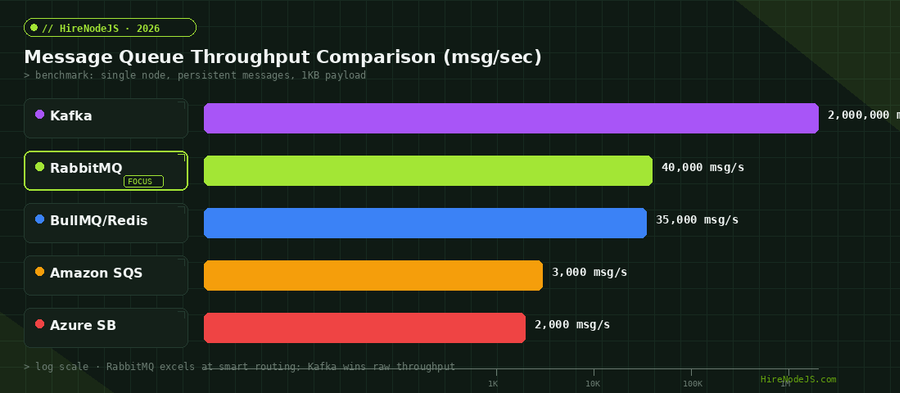
RabbitMQ excels when you need complex routing logic (topic-based, header-based), strict message ordering per queue, request-reply patterns (RPC over AMQP), or transactional publishing with publisher confirms. If your primary need is ultra-high-throughput log streaming or event replay, Kafka is the better fit. For simple job queues backed by Redis, BullMQ is lighter. RabbitMQ sits in the middle — more powerful routing than BullMQ, more operational simplicity than Kafka.
Setting Up RabbitMQ with Node.js and amqplib
The fastest way to get RabbitMQ running locally is Docker. In production, most teams use a managed service like CloudAMQP or Amazon MQ, or deploy RabbitMQ on Kubernetes with the official operator. Either way, your Node.js code connects via the same amqp:// or amqps:// connection string.
Installing amqplib and Connecting
import amqplib from 'amqplib';

const RABBITMQ_URL = process.env.RABBITMQ_URL || 'amqp://localhost:5672';

let connection = null;
let channel = null;

export async function getChannel() {
  if (channel) return channel;

  connection = await amqplib.connect(RABBITMQ_URL, {
    heartbeat: 30,
    timeout: 10_000,
  });

  connection.on('error', (err) => {
    console.error('[RabbitMQ] Connection error:', err.message);
    channel = null;
    connection = null;
  });

  connection.on('close', () => {
    console.warn('[RabbitMQ] Connection closed — reconnecting in 5s');
    channel = null;
    connection = null;
    setTimeout(() => getChannel(), 5000);
  });

  channel = await connection.createChannel();
  console.log('[RabbitMQ] Channel ready');
  return channel;
}

export async function publishMessage(exchange, routingKey, payload) {
  const ch = await getChannel();
  ch.publish(
    exchange,
    routingKey,
    Buffer.from(JSON.stringify(payload)),
    { persistent: true, contentType: 'application/json' }
  );
}Exchange Types Deep Dive: Direct, Topic, and Fanout
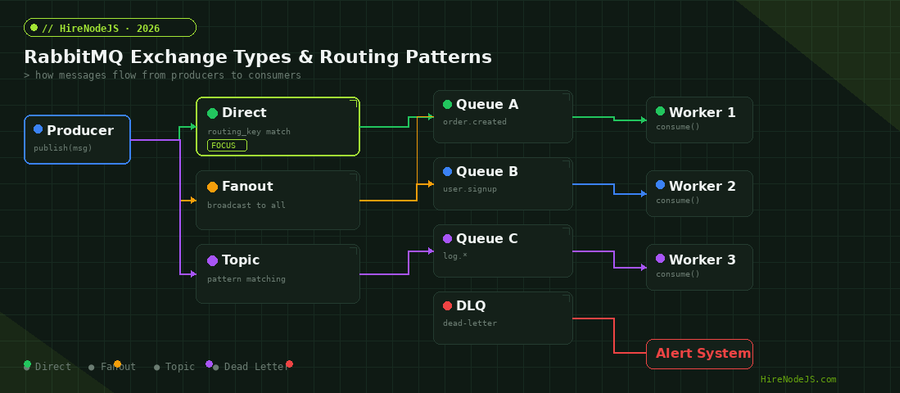
Understanding exchanges is the key to effective RabbitMQ usage. An exchange receives messages from producers and routes them to one or more queues based on bindings and routing keys. The exchange type determines the routing algorithm — and choosing the right one for each use case is critical for both performance and correctness.
Direct Exchanges for Point-to-Point Routing
Direct exchanges route messages to queues whose binding key exactly matches the message routing key. This is the most common pattern for task distribution — for example, routing order.created events to the order processing queue, or user.signup events to the welcome email queue. In a typical Node.js microservice architecture, each service declares its own queue and binds it with specific routing keys it cares about.
Topic Exchanges for Pattern-Based Routing
Topic exchanges support wildcard matching with * (one word) and # (zero or more words). A binding key of order.* matches order.created, order.updated, and order.cancelled, while audit.# matches any routing key starting with audit regardless of depth. This pattern is perfect for event-driven architectures where services need to subscribe to categories of events without knowing every specific event type upfront.
Fanout Exchanges for Broadcasting
Fanout exchanges ignore the routing key entirely and broadcast every message to all bound queues. This is the right choice for scenarios where multiple consumers need to process the same event independently — cache invalidation, real-time notifications, and analytics ingestion are classic examples.
Consumer Reliability: Acknowledgements, Prefetch, and Error Handling
Hire Pre-Vetted Node.js Developers
Skip the months-long search. Our exclusive talent network has senior Node.js experts ready to join your team in 48 hours.
The difference between a toy implementation and a production system comes down to how you handle message acknowledgement and failure. A skilled backend developer knows that every consumer must explicitly ack or nack each message — auto-ack mode risks silent data loss when a consumer crashes mid-processing.
Tuning Prefetch Count for Optimal Throughput
The prefetch count controls how many unacknowledged messages RabbitMQ will push to a consumer at once. Setting it too low (prefetch=1) means the consumer idles waiting for the next message after each ack. Setting it too high floods the consumer with messages it cannot process quickly, increasing memory usage and latency. For most Node.js workloads, prefetch values between 10 and 25 hit the sweet spot — high enough for batching efficiency, low enough for fair distribution across workers.
Dead Letter Queues: Handling Poison Messages Gracefully
A dead-letter queue (DLQ) catches messages that cannot be processed successfully. Without a DLQ, failed messages either loop endlessly (if you requeue them) or vanish silently (if you nack without requeue). Neither outcome is acceptable in production. RabbitMQ supports dead-letter exchanges natively — when a message is nacked with requeue=false, exceeds its TTL, or the queue exceeds its max-length, the message is automatically routed to the configured dead-letter exchange.
Implementing Retry Logic with Exponential Backoff
A common production pattern combines dead-letter exchanges with message TTL to create automatic retry with exponential backoff. You create a retry queue with a TTL and a dead-letter exchange pointing back to the original queue. When a message fails, you nack it to the DLQ. After the TTL expires, RabbitMQ routes it back to the original queue for another attempt. After a maximum number of retries (tracked via a custom header), the message lands in a final parking-lot queue for manual inspection.
Quorum Queues for High Availability and Data Safety
Quorum queues replaced classic mirrored queues as the recommended HA queue type in RabbitMQ. They use the Raft consensus protocol to replicate messages across an odd number of nodes (typically 3 or 5), ensuring that data survives node failures without manual intervention. For any queue carrying business-critical messages — payment processing, order fulfillment, audit logging — quorum queues are non-negotiable in 2026.
Deploying a quorum queue cluster is straightforward with Docker or Kubernetes. You spin up three RabbitMQ nodes, cluster them, and declare your queues with x-queue-type: quorum. The Raft leader handles writes, and followers replicate asynchronously. If the leader fails, a follower is elected within seconds — your Node.js consumers reconnect and resume processing without data loss.
Monitoring RabbitMQ in Production
A production RabbitMQ deployment without monitoring is a ticking time bomb. At minimum, you need to track queue depth (messages ready + unacked), consumer count per queue, publish and delivery rates, memory and disk usage, and connection/channel counts. A capable DevOps engineer will set up Prometheus with the rabbitmq-prometheus plugin, pipe metrics into Grafana, and configure alerts for queue depth spikes, consumer drops, and memory high-watermarks.
Key Metrics and Alert Thresholds
The most critical alert is queue depth growing faster than consumers can drain it. Set a warning threshold at 10,000 messages and a critical threshold at 50,000. If consumer count drops to zero on any queue, that is an immediate page — it means your processing service has crashed or lost connectivity. Memory alarms (RabbitMQ blocks publishers when memory exceeds its high watermark) and disk alarms (similar, for disk space) should trigger before RabbitMQ enters flow control, because flow control means your entire publishing pipeline stalls.
Hire Expert Node.js Developers — Ready in 48 Hours
Building the right system is only half the battle — you need the right engineers to build it. HireNodeJS.com specialises exclusively in Node.js talent: every developer is pre-vetted on real-world projects, API design, event-driven architecture, and production deployments.
Unlike generalist platforms, our curated pool means you speak only to engineers who live and breathe Node.js. Most clients have their first developer working within 48 hours of getting in touch. Engagements start as short-term contracts and can convert to full-time hires with zero placement fee.
Conclusion: Building Resilient Message Pipelines
RabbitMQ with Node.js gives you a production-grade messaging foundation that handles complex routing, guarantees delivery, and scales horizontally. The key takeaways are: use direct or topic exchanges for precise routing, always enable manual acknowledgements, tune prefetch to balance throughput and latency, set up dead-letter queues for every production queue, deploy quorum queues for data-critical workloads, and monitor queue depth and consumer health relentlessly. If you need experienced Node.js engineers who understand message-driven architectures, learn how HireNodeJS works and get your first developer within 48 hours.
Message queues are not a luxury — they are table stakes for any Node.js system that needs to be reliable at scale. Start with the patterns in this guide, invest in observability from day one, and your message pipelines will serve you well for years to come.
Frequently Asked Questions
What is the best Node.js library for RabbitMQ?
amqplib is the standard AMQP 0-9-1 client for Node.js. It supports all RabbitMQ features including publisher confirms, consumer acknowledgements, and channel-level flow control. For higher-level abstractions, rascal wraps amqplib with connection recovery and configuration management.
How much does it cost to run RabbitMQ in production?
Self-hosted RabbitMQ on a 3-node cluster costs roughly $150-300/month on AWS (t3.medium instances). Managed services like CloudAMQP start at $19/month for small workloads and scale to $500+/month for high-throughput production clusters with SLA guarantees.
What is the difference between RabbitMQ and Kafka for Node.js?
RabbitMQ excels at smart routing with multiple exchange types and per-message acknowledgement. Kafka is designed for high-throughput event streaming with log-based storage and replay capability. Choose RabbitMQ for task queues and complex routing, Kafka for event sourcing and high-volume data pipelines.
How do I handle RabbitMQ connection failures in Node.js?
Implement automatic reconnection with exponential backoff in your connection error handler. Use the connection close and error events to detect failures, null out your channel reference, and schedule a reconnection attempt. Libraries like amqp-connection-manager provide this out of the box.
What prefetch value should I use for RabbitMQ consumers in Node.js?
Start with prefetch=10 for most workloads. This balances throughput (enough messages in-flight to keep the consumer busy) with fairness (not overloading a single worker). For CPU-heavy processing, lower to 1-5. For I/O-bound tasks with fast acks, increase to 25-50.
How do I set up dead letter queues in RabbitMQ with Node.js?
Declare a dead-letter exchange and bind a DLQ to it. When declaring your main queue, set the x-dead-letter-exchange argument to point to this exchange. Messages that are nacked with requeue=false, expire via TTL, or overflow the queue max-length are automatically routed to the DLQ.
Vivek Singh is the founder of Witarist and HireNodeJS.com — a platform connecting companies with pre-vetted Node.js developers. With years of experience scaling engineering teams, Vivek shares insights on hiring, tech talent, and building with Node.js.
Building Microservices with RabbitMQ? Hire Node.js Architects.
HireNodeJS connects you with pre-vetted senior Node.js engineers experienced in message-driven architectures, AMQP, and production RabbitMQ deployments. No recruiter fees, no lengthy screening — just top talent ready to ship.