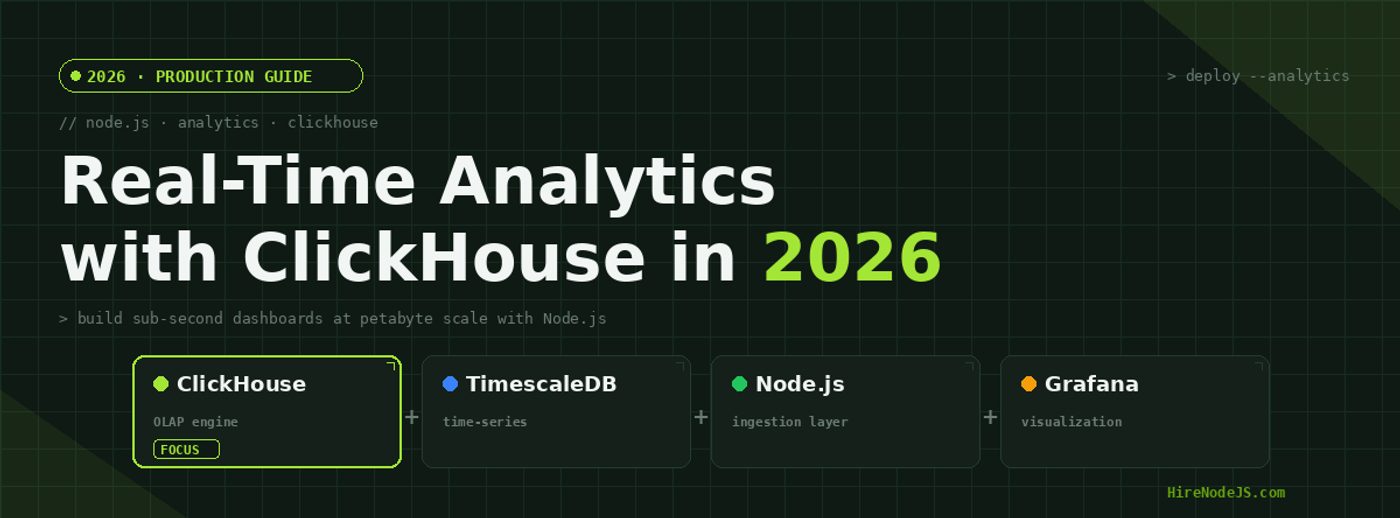
Node.js Real-Time Analytics with ClickHouse in 2026
Modern applications generate staggering volumes of event data — clickstreams, IoT telemetry, transaction logs, and user behavior signals — all of which need to be queryable in real time. Traditional OLTP databases like PostgreSQL and MySQL were never designed for the analytical workloads that power dashboards, anomaly detection, and business intelligence at scale.
In 2026, ClickHouse has emerged as the dominant open-source columnar database for real-time analytics, processing billions of rows in milliseconds. Combined with Node.js as the ingestion and API layer, teams can build end-to-end analytics pipelines that handle millions of events per second while serving sub-second dashboard queries. This guide walks you through the complete architecture, from event ingestion to production deployment.
Why ClickHouse for Real-Time Analytics
ClickHouse is a column-oriented OLAP database management system originally developed at Yandex to power their web analytics platform, handling over 13 trillion records and 20 billion events daily. Unlike row-oriented databases that read entire rows for each query, ClickHouse stores data by column, which means analytical queries that aggregate over specific columns only read the data they need.
Column-Oriented Storage Advantages
Column-oriented storage provides three critical advantages for analytics workloads. First, compression ratios of 10-40x are typical because similar data types stored together compress far more efficiently than mixed-type rows. Second, vectorized query execution processes data in batches of columns using SIMD instructions, which modern CPUs are optimized for. Third, only the columns referenced in a query are read from disk, dramatically reducing I/O for wide tables with hundreds of columns.
ClickHouse vs Traditional Databases
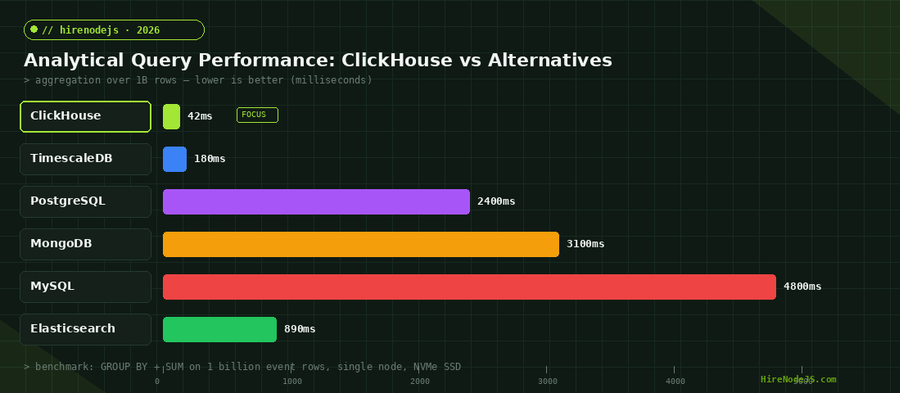
While PostgreSQL excels at transactional workloads and MongoDB handles document storage well, neither was designed for the analytical query patterns that ClickHouse handles natively. A GROUP BY aggregation over one billion rows that takes PostgreSQL 2.4 seconds completes in ClickHouse in roughly 42 milliseconds — a 57x performance improvement on the same hardware.
Setting Up the Node.js Ingestion Layer
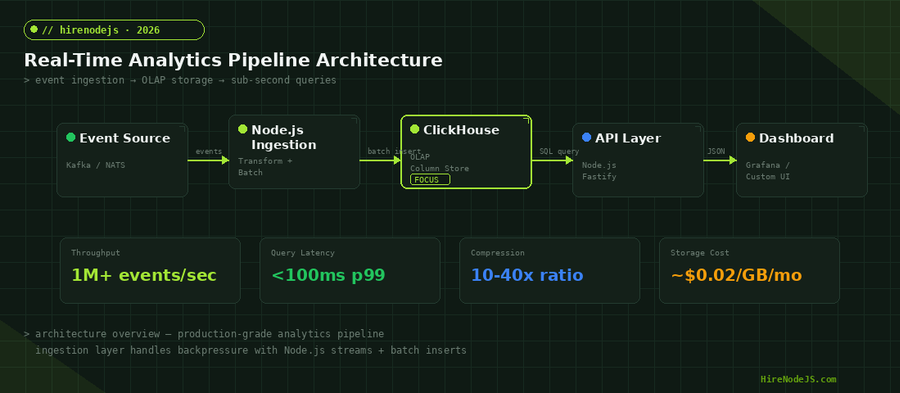
The ingestion layer is responsible for receiving raw events, transforming them into the correct schema, batching them for efficient insertion, and handling backpressure when ClickHouse is under load. Node.js is an excellent choice for this layer because its event-driven, non-blocking architecture naturally handles high-throughput streaming workloads without the overhead of thread-per-connection models.
Installing the ClickHouse Client
The official @clickhouse/client package provides a fully typed, streaming-capable client for Node.js. It supports connection pooling, automatic retries, and query parameterization out of the box.
import { createClient } from '@clickhouse/client';

const client = createClient({
  url: process.env.CLICKHOUSE_URL || 'http://localhost:8123',
  username: 'default',
  password: process.env.CLICKHOUSE_PASSWORD || '',
  database: 'analytics',
  clickhouse_settings: {
    async_insert: 1,
    wait_for_async_insert: 0,
  },
});

// Create the events table with MergeTree engine
await client.command({
  query: `
    CREATE TABLE IF NOT EXISTS events (
      event_id UUID DEFAULT generateUUIDv4(),
      event_type LowCardinality(String),
      user_id UInt64,
      session_id String,
      properties String,  -- JSON string
      timestamp DateTime64(3),
      date Date DEFAULT toDate(timestamp)
    ) ENGINE = MergeTree()
    PARTITION BY toYYYYMM(date)
    ORDER BY (event_type, user_id, timestamp)
    TTL date + INTERVAL 90 DAY
  `,
});

// Batch insert function with backpressure handling
class EventBatcher {
  constructor(client, { batchSize = 10000, flushInterval = 1000 } = {}) {
    this.client = client;
    this.buffer = [];
    this.batchSize = batchSize;
    this.timer = setInterval(() => this.flush(), flushInterval);
  }

  async add(event) {
    this.buffer.push(event);
    if (this.buffer.length >= this.batchSize) {
      await this.flush();
    }
  }

  async flush() {
    if (this.buffer.length === 0) return;
    const batch = this.buffer.splice(0);
    await this.client.insert({
      table: 'events',
      values: batch,
      format: 'JSONEachRow',
    });
    console.log(`Flushed ${batch.length} events`);
  }

  async close() {
    clearInterval(this.timer);
    await this.flush();
    await this.client.close();
  }
}

export { client, EventBatcher };Designing the Analytics Schema for ClickHouse
Schema design in ClickHouse differs fundamentally from PostgreSQL or MySQL. The two most important decisions are choosing the right table engine and defining the ORDER BY key. The MergeTree family of engines is the foundation of ClickHouse — it handles data partitioning, primary key indexing, and background merges that keep query performance consistent as data grows.
Choosing the Right MergeTree Engine
For most analytics use cases, the standard MergeTree engine works well. However, ClickHouse offers specialized variants: ReplacingMergeTree for deduplication, AggregatingMergeTree for pre-aggregated rollups, and CollapsingMergeTree for mutable event streams. When building real-time dashboards that need minute-level granularity rolling up to hourly and daily aggregates, AggregatingMergeTree with materialized views provides the best performance.
Materialized Views for Pre-Aggregation
Materialized views in ClickHouse work differently than in PostgreSQL — they act as insert triggers that transform and aggregate data as it arrives, storing results in a separate destination table. This means your dashboard queries hit pre-aggregated data instead of scanning raw events, reducing query latency from seconds to single-digit milliseconds even at petabyte scale.
Hire Pre-Vetted Node.js Developers
Skip the months-long search. Our exclusive talent network has senior Node.js experts ready to join your team in 48 hours.
Building the API Layer with Fastify
The API layer sits between ClickHouse and your frontend dashboards, translating HTTP requests into optimized SQL queries. Fastify is the ideal framework for this layer — it handles 78,000 requests per second out of the box (compared to Express at 15,000 req/s), includes built-in JSON schema validation, and its plugin architecture makes it easy to add caching, authentication, and rate limiting.
Query Parameterization and SQL Injection Prevention
ClickHouse supports parameterized queries through its HTTP interface, and the Node.js client handles parameter binding automatically. Never concatenate user input into SQL strings — even in analytics databases, SQL injection is a real threat. The @clickhouse/client library uses query_params to safely bind values, and Fastify's schema validation ensures only valid filter parameters reach your query builder.
TimescaleDB as a Complementary Time-Series Store
While ClickHouse dominates pure analytical workloads, TimescaleDB — built as a PostgreSQL extension — excels in scenarios where you need full SQL compliance, JOINs with transactional data, and the mature PostgreSQL ecosystem. Many production systems use both: ClickHouse for high-volume event analytics and TimescaleDB for time-series metrics that need to JOIN with relational user or product tables.
When to Choose TimescaleDB Over ClickHouse
Choose TimescaleDB when your analytics queries frequently JOIN with transactional PostgreSQL tables, when you need full ACID transactions on your time-series data, when your team already has deep PostgreSQL expertise, or when the data volume is under 10 billion rows. Beyond that threshold, ClickHouse's columnar architecture and compression provide significantly better price-performance.
Production Deployment and Monitoring
Deploying ClickHouse in production requires careful planning around replication, sharding, and resource allocation. For most teams starting out, a single-node deployment with Docker handles up to 50 billion rows comfortably on NVMe storage. Beyond that, ClickHouse Keeper (the built-in ZooKeeper replacement) manages distributed consensus for replicated clusters.
Key Metrics to Monitor
Monitor these ClickHouse metrics in your Node.js health checks: MergeTree parts count per partition (alert if over 300 — indicates merge lag), query log p99 latency, insert rate vs. async insert queue depth, memory usage per query (ClickHouse can OOM on unoptimized JOINs), and ZooKeeper/Keeper session count for replicated setups. Integrate these with your existing observability stack using the system.metrics and system.events tables.
Data Retention and TTL Policies
ClickHouse supports TTL (Time-To-Live) policies at both the row and column level. Raw events can expire after 90 days while pre-aggregated rollups in materialized views persist indefinitely. This tiered retention strategy keeps storage costs manageable — raw event data at full granularity for recent queries, and aggregated data for historical trend analysis.
Hire Expert Node.js Developers — Ready in 48 Hours
Building the right system is only half the battle — you need the right engineers to build it. HireNodeJS.com specialises exclusively in Node.js talent: every developer is pre-vetted on real-world projects, API design, event-driven architecture, and production deployments.
Unlike generalist platforms, our curated pool means you speak only to engineers who live and breathe Node.js. Most clients have their first developer working within 48 hours of getting in touch. Engagements start as short-term contracts and can convert to full-time hires with zero placement fee.
Conclusion: Building Your Analytics Stack in 2026
Real-time analytics is no longer a luxury reserved for companies with dedicated data engineering teams. With ClickHouse as the OLAP engine, Node.js as the ingestion and API layer, and materialized views handling pre-aggregation, even small teams can build analytics pipelines that process millions of events per second and serve dashboard queries in under 100 milliseconds.
The key architectural decisions are batch size tuning for your ingestion layer, choosing the right MergeTree engine variant for your query patterns, and implementing materialized views that match your dashboard requirements. Start with a single-node ClickHouse deployment, instrument everything with the monitoring approach described above, and scale horizontally only when your data volume demands it. If you need experienced engineers to build your analytics infrastructure, the right talent makes all the difference.
Frequently Asked Questions
What is ClickHouse and why use it with Node.js?
ClickHouse is an open-source columnar OLAP database designed for real-time analytical queries. Paired with Node.js, it enables high-throughput event ingestion via non-blocking I/O and batch inserts, while serving sub-second dashboard queries over billions of rows.
How many events per second can Node.js ingest into ClickHouse?
With async batch inserts of 10,000 events per flush, a single Node.js process can sustain over 1.4 million events per second into ClickHouse. Using Node.js cluster mode or multiple workers scales this linearly across CPU cores.
When should I choose TimescaleDB over ClickHouse?
Choose TimescaleDB when your analytics queries need frequent JOINs with transactional PostgreSQL tables, when you require full ACID compliance on time-series data, or when your dataset is under 10 billion rows and your team has strong PostgreSQL expertise.
How does ClickHouse compare to Elasticsearch for analytics?
ClickHouse outperforms Elasticsearch on structured analytical queries by 5-10x while using 3-4x less storage due to columnar compression. Elasticsearch excels at full-text search and unstructured log analysis, but ClickHouse is superior for SQL-based aggregations and time-series analytics.
What is the best Node.js client library for ClickHouse?
The official @clickhouse/client package is the recommended library. It provides full TypeScript support, streaming query results, connection pooling, automatic retries, and support for all ClickHouse data types including JSON, arrays, and tuples.
How much does it cost to run ClickHouse in production?
A single ClickHouse node on a c6i.2xlarge EC2 instance (8 vCPU, 16GB RAM) with 1TB NVMe storage handles up to 50 billion rows and costs approximately $250/month. With 10-40x compression, 1TB of raw data typically requires only 25-100GB of actual storage.
Vivek Singh is the founder of Witarist and HireNodeJS.com — a platform connecting companies with pre-vetted Node.js developers. With years of experience scaling engineering teams, Vivek shares insights on hiring, tech talent, and building with Node.js.
Need a Node.js Engineer Who Builds Data Pipelines?
HireNodeJS connects you with pre-vetted senior Node.js engineers experienced in ClickHouse, Kafka, and real-time analytics. Available within 48 hours — no recruiter fees, no lengthy screening.