Node.js File Uploads to S3 in 2026: Presigned URLs & Security
File uploads are the part of every Node.js application that quietly ruins production. They look trivial during the demo — a multer middleware, an S3 client, a few hundred lines of TypeScript — but they are the single biggest source of memory pressure, bandwidth bills and security incidents in modern backends. In 2026, the patterns have hardened into something the senior engineers we vet at HireNodeJS expect every candidate to know cold: presigned URLs by default, multipart uploads for anything over 100 MB, and zero raw bytes flowing through your API tier.
This guide walks through the three production-grade upload strategies for Node.js + Amazon S3, the AWS SDK v3 code that implements them, the security and validation work that has to wrap them, and the concrete benchmarks that decide which one belongs in your stack. Whether you are shipping a SaaS platform, a video pipeline, or a document portal, the trade-offs in this post are the same ones our pre-vetted Node.js engineers debate before writing a single line of upload code.
Why proxying uploads through Node.js is a tax you pay forever
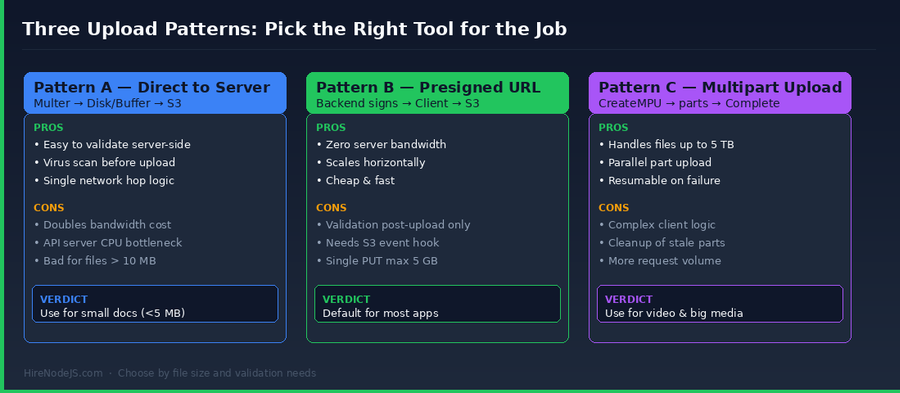
The textbook tutorial for S3 uploads in Node.js routes the file through your API: client → multer → buffer or temp file → s3.upload(). It works on a laptop with a 5 MB sample. It quietly destroys your service when traffic goes up.
Every megabyte that passes through your Node.js process consumes RAM (multer.memoryStorage), disk I/O (multer.diskStorage), or both. Your event loop blocks on socket reads, your egress bandwidth doubles (client to API, then API to S3), and your auto-scaling policies start firing because CPU climbs whenever a user uploads a 200 MB recording. Worse, you end up paying twice — once for ingress to your VPC, once for the second hop to S3 — and you cap maximum file size at whatever your API tier can buffer.
The hidden costs almost no Node.js team measures
Three numbers most teams never put on a dashboard: (1) the percentage of API request time spent on body parsing, (2) p99 memory while uploads are in flight, and (3) the egress bytes leaving your API EC2/Fargate tier versus the bytes leaving S3. When you start measuring, the result is always the same — the API server is doing thankless work that S3 was designed to handle directly.
Pattern 1: Presigned URLs — the right default in 2026
A presigned URL is a short-lived, signed S3 URL that lets the client upload (or download) a single object directly to S3 without touching your API tier. Your Node.js service authenticates the user, decides what they are allowed to upload, and hands back a URL the browser PUTs the file to. Bandwidth, CPU and memory cost on the API tier: zero.
Generating a presigned URL with AWS SDK v3
The `@aws-sdk/s3-request-presigner` package signs an S3 command into a URL. Set the expiry tight — 60 to 300 seconds is plenty for an interactive upload, longer if you are batching from a worker.
import { S3Client, PutObjectCommand } from "@aws-sdk/client-s3";
import { getSignedUrl } from "@aws-sdk/s3-request-presigner";
import { randomUUID } from "node:crypto";

const s3 = new S3Client({ region: "us-east-1" });
const BUCKET = process.env.S3_BUCKET;
const ALLOWED_TYPES = new Set(["image/png", "image/jpeg", "image/webp", "application/pdf"]);
const MAX_BYTES = 25 * 1024 * 1024; // 25 MB

export async function presignUpload(req, res) {
  const { filename, contentType, contentLength } = req.body;

  if (!ALLOWED_TYPES.has(contentType)) {
    return res.status(400).json({ error: "Unsupported content type" });
  }
  if (contentLength > MAX_BYTES) {
    return res.status(400).json({ error: "File too large" });
  }

  const key = `uploads/${req.user.id}/${randomUUID()}-${filename}`;
  const cmd = new PutObjectCommand({
    Bucket: BUCKET,
    Key: key,
    ContentType: contentType,
    ContentLength: contentLength,
    ServerSideEncryption: "AES256",
    Metadata: { "user-id": String(req.user.id) }
  });

  const url = await getSignedUrl(s3, cmd, { expiresIn: 120 });
  return res.json({ url, key, expiresIn: 120 });
}Wiring this into a real frontend is straightforward — the browser PUTs the file to the URL, then notifies your API. If your team needs help shipping this end to end, HireNodeJS connects you with senior Node.js engineers who have built the same pattern for SaaS, fintech and healthcare clients.
Pattern 2: Multipart uploads — when single PUT is not enough
A single S3 PUT (presigned or otherwise) maxes out at 5 GB and gives you no resumability. Multipart upload splits the file into parts (5 MB minimum, 5 GB maximum each, up to 10,000 parts), uploads them in parallel, and assembles them server-side. It is how Dropbox-style clients, video transcoders and backup tools move terabytes through Node.js without falling over.
The three-step API (CreateMultipartUpload → UploadPart → CompleteMultipartUpload)
From the Node.js side, you can either use the high-level `@aws-sdk/lib-storage` Upload helper, which handles parallelism for you, or coordinate signed part URLs that the browser uploads directly. The browser-direct approach is what you want for any user-facing file picker — it keeps your API tier out of the data path.
import {
  S3Client,
  CreateMultipartUploadCommand,
  UploadPartCommand,
  CompleteMultipartUploadCommand,
  AbortMultipartUploadCommand
} from "@aws-sdk/client-s3";
import { getSignedUrl } from "@aws-sdk/s3-request-presigner";

const s3 = new S3Client({ region: "us-east-1" });

// 1) Initiate
export async function startMultipart({ key, contentType }) {
  const { UploadId } = await s3.send(new CreateMultipartUploadCommand({
    Bucket: process.env.S3_BUCKET,
    Key: key,
    ContentType: contentType,
    ServerSideEncryption: "AES256"
  }));
  return { uploadId: UploadId, key };
}

// 2) Sign each part URL the browser will PUT directly
export async function signPartUrls({ key, uploadId, partCount }) {
  const urls = [];
  for (let partNumber = 1; partNumber <= partCount; partNumber++) {
    const cmd = new UploadPartCommand({
      Bucket: process.env.S3_BUCKET,
      Key: key, UploadId: uploadId, PartNumber: partNumber
    });
    urls.push({ partNumber, url: await getSignedUrl(s3, cmd, { expiresIn: 3600 }) });
  }
  return urls;
}

// 3) Complete or abort
export async function completeMultipart({ key, uploadId, parts }) {
  return s3.send(new CompleteMultipartUploadCommand({
    Bucket: process.env.S3_BUCKET, Key: key, UploadId: uploadId,
    MultipartUpload: { Parts: parts.sort((a,b)=>a.PartNumber-b.PartNumber) }
  }));
}

export async function abortMultipart({ key, uploadId }) {
  return s3.send(new AbortMultipartUploadCommand({
    Bucket: process.env.S3_BUCKET, Key: key, UploadId: uploadId
  }));
}
Validation, virus scanning and content sniffing
Hire Pre-Vetted Node.js Developers
Skip the months-long search. Our exclusive talent network has senior Node.js experts ready to join your team in 48 hours.
Direct-to-S3 uploads have one weakness: validation only happens after the bytes are in your bucket. That is fine, as long as you treat the bucket as a quarantine zone and validate before promoting the object.
S3 event notifications + Lambda or SQS
The pattern that scales: configure your bucket to fire `s3:ObjectCreated:*` events to an SQS queue. A worker (Node.js, of course) drains the queue, runs MIME sniffing with `file-type`, virus scanning with ClamAV, image dimension checks with `sharp`, and only then copies the object to a clean public/private bucket and writes the database record. Anything that fails moves to a quarantine bucket and pages a human.
If you want this stack reviewed by someone who has shipped it for fintech and healthcare clients, our backend engineers walk through it as part of every architecture review. We also have DevOps specialists who can wire the IAM policies and bucket lifecycle rules.
Edge cases that bite teams in production
CORS, signature mismatches and clock skew
Most presigned-URL bug reports trace to one of three root causes. CORS misconfiguration on the bucket — the browser PUT is rejected because the bucket does not allow your origin's `PUT` and the right headers. Signature mismatch — the client sent a `Content-Type` header that does not match what the URL was signed with. Clock skew — the client clock is off by more than five minutes, so AWS rejects the signed request. The fix for each is in your bucket CORS config, your fetch call, and your monitoring respectively.
Idempotency and retry semantics
S3 PUTs are idempotent only if you control the key. Generate the key (UUID + filename) on the server, return it with the presigned URL, and have the client retry with the same URL on transient network failures. For multipart uploads, a part can be re-uploaded with the same `PartNumber` — S3 keeps the most recent ETag.
Bucket policies that prevent the obvious mistakes
Default-deny everything except what your application needs. Block public access at the account level. Force `aws:SecureTransport` so HTTPS-only is enforced. Require `s3:x-amz-server-side-encryption = AES256` on every PutObject. Limit `s3:PutObject` actions to specific key prefixes per role. Enable S3 access logs to a separate logging account.
Transfer Acceleration, CloudFront, and the global upload story
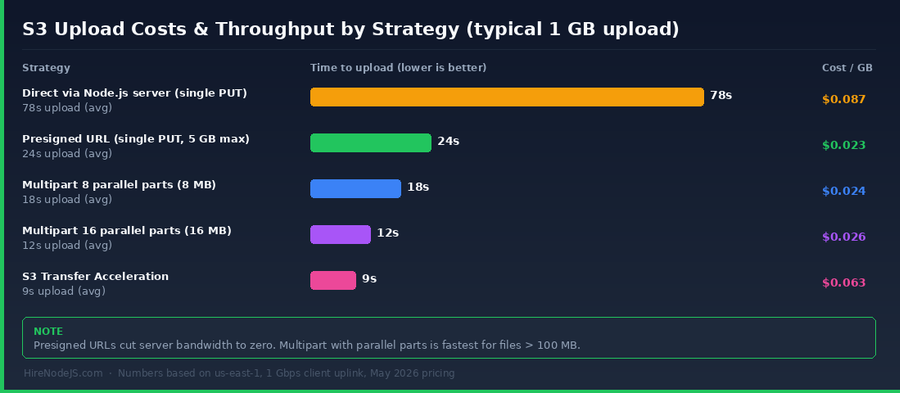
If your users are spread across continents, the round-trip latency to a single S3 region eats into upload throughput. S3 Transfer Acceleration uses the CloudFront edge network to push bytes to the closest POP, then forwards them to your bucket on AWS's backbone. It costs an extra $0.04/GB but can halve upload time for users in Asia or South America connecting to a us-east-1 bucket.
CloudFront signed URLs vs presigned S3 URLs
Use CloudFront signed URLs when you want a custom domain in front of your bucket, edge caching, or WAF rules in front of the upload endpoint. Use plain presigned S3 URLs when you do not need any of those — they are simpler and have one less moving part.
Cost-per-GB sanity check
At May 2026 list prices: S3 standard storage is around $0.023/GB-month, PUT requests are $0.005 per 1,000, multipart parts each count as a PUT, and Transfer Acceleration adds $0.04/GB on top of standard data transfer. For a typical SaaS with 100 GB ingest per month, that is $2.30 storage + a few cents in requests — almost free compared with what proxying through your API tier would cost in compute.
Hire Expert Node.js Developers — Ready in 48 Hours
Building the right system is only half the battle — you need the right engineers to build it. HireNodeJS.com specialises exclusively in Node.js talent: every developer is pre-vetted on real-world projects, API design, event-driven architecture, and production deployments — including production-grade S3 upload pipelines like the one in this guide.
Unlike generalist platforms, our curated pool means you speak only to engineers who live and breathe Node.js. Most clients have their first developer working within 48 hours of getting in touch. Engagements start as short-term contracts and can convert to full-time hires with zero placement fee.
Conclusion: the playbook for Node.js + S3 in 2026
The senior engineers we hire at HireNodeJS converge on the same answer when asked how they would build file upload today. Default to presigned URLs. Reach for multipart whenever a file might exceed 100 MB. Treat the upload bucket as a quarantine zone and validate post-upload via S3 events. Lock down IAM, bucket policy and CORS before shipping. Measure throughput, cost and error rate per strategy and revisit the choice quarterly.
Get those five things right and uploads stop being the embarrassing part of your stack. They become the unglamorous, boring, reliable layer that everyone forgets about — which is exactly what production code is supposed to feel like.
Frequently Asked Questions
What is the best way to upload large files to S3 from Node.js in 2026?
Use multipart upload with parallel parts of 8–16 MB. The AWS SDK v3 lib-storage Upload helper or browser-direct signed part URLs both work. Anything over 100 MB should default to multipart for resumability and throughput.
Should I use presigned URLs or proxy uploads through my Node.js API?
Presigned URLs are the right default. They cut server bandwidth to zero, scale horizontally, and are simpler to reason about. Only proxy through your API for small files where server-side validation must happen synchronously, like virus scanning small documents.
How do I validate a file uploaded directly to S3 with a presigned URL?
Use S3 event notifications. Configure the bucket to fire ObjectCreated events to SQS or Lambda, then a Node.js worker validates content type, scans for malware with ClamAV, checks dimensions with sharp, and either promotes the object or quarantines it.
What is the maximum file size for an S3 upload from Node.js?
A single PUT (including presigned) maxes out at 5 GB. Multipart upload supports objects up to 5 TB across 10,000 parts. For anything over 5 GB you must use multipart.
How much do S3 file uploads cost in 2026?
At May 2026 list prices, you pay roughly $0.023 per GB-month for standard storage, $0.005 per 1,000 PUT requests, and $0.04 per GB extra if you enable Transfer Acceleration. Multipart parts each count as a PUT.
Should I worry about CORS when uploading from a browser to S3?
Yes. The bucket must allow your origin's PUT method and the headers your client sends. CORS misconfiguration is the most common cause of presigned URL failures. Test with the bucket's S3 console CORS playground before going live.
Vivek Singh is the founder of Witarist and HireNodeJS.com — a platform connecting companies with pre-vetted Node.js developers. With years of experience scaling engineering teams, Vivek shares insights on hiring, tech talent, and building with Node.js.
Need a Node.js engineer who has shipped S3 upload pipelines?
HireNodeJS connects you with pre-vetted senior Node.js engineers available within 48 hours. Backend, full-stack and DevOps specialists who have built production-grade upload, validation and storage systems for SaaS, fintech and healthcare clients.