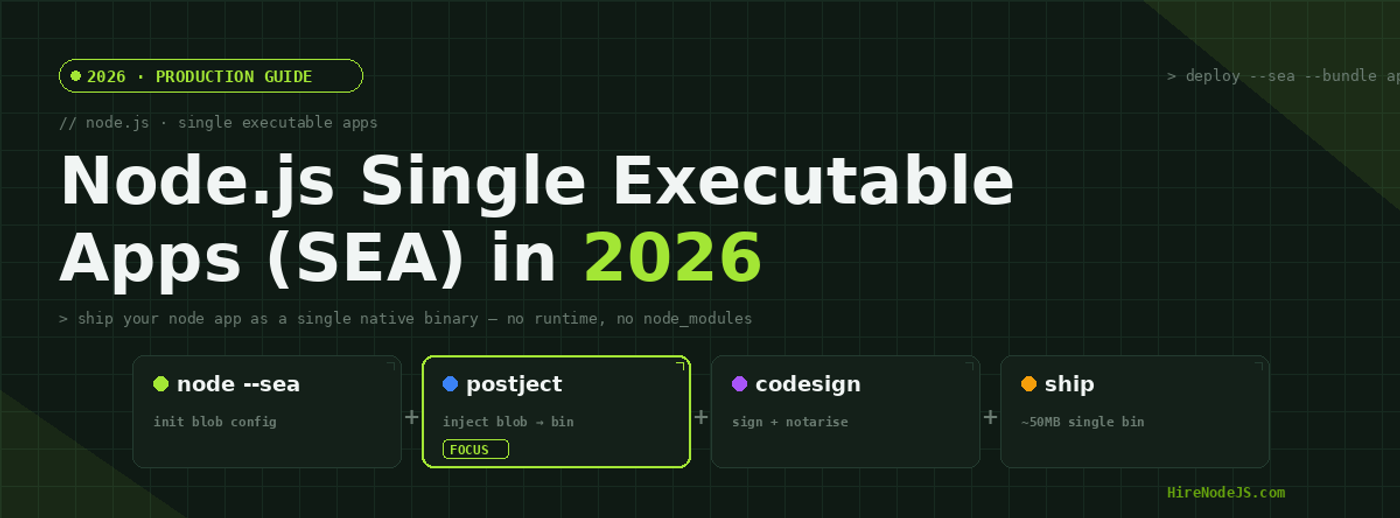
Node.js Single Executable Apps (SEA) in 2026: The Production Guide
For most of Node.js's history, shipping a backend or CLI meant shipping a folder: source files, a node_modules tree, and an expectation that the target machine has the right Node runtime installed. In 2026 that contract is finally optional. Node's Single Executable Applications (SEA) feature — stable since Node 22 and significantly improved in Node 24 — lets you compile a Node app into one native binary that runs without Node, npm, or a node_modules directory anywhere in sight.
This guide walks through how SEA actually works under the hood, how it compares to Bun's --compile flag and older tools like vercel/pkg and nexe, and how to use it in production — multi-platform builds, code signing, native modules, auto-updates, and size tuning. By the end you'll know exactly when SEA is the right packaging choice for your Node.js team — and when a container image is still the better answer.
What is a Node.js Single Executable Application?
A Single Executable Application is a copy of the Node.js binary that has your bundled JavaScript embedded inside it as a 'blob' resource. When you run the binary, Node detects the blob at startup, loads it as the entry script, and runs your app — same V8, same libuv, same Node API surface, just with a different way of finding the entry point.
Crucially, this is not a 'compile to native code' story — your JavaScript still runs through V8 like it always has. What you're shipping is the engine and your bundled program glued into a single file. That distinction matters: SEA inherits Node's full compatibility profile, including native addons (.node files) and the entire Node standard library, which sets it apart from runtimes that ship their own JS engines.
When SEA replaces Docker — and when it doesn't
SEA is a great fit for CLIs, desktop tools, IoT services, customer-installed servers, and on-prem distributions where 'docker run' is not on the table. It's also handy for serverless or edge workers where cold start matters and a smaller surface area is desirable. SEA does not replace Docker for orchestrated cloud deployments where you want immutable images, layered caching, and Kubernetes scheduling — for those, a Node slim image is still the right tool.
Building your first SEA binary, step by step
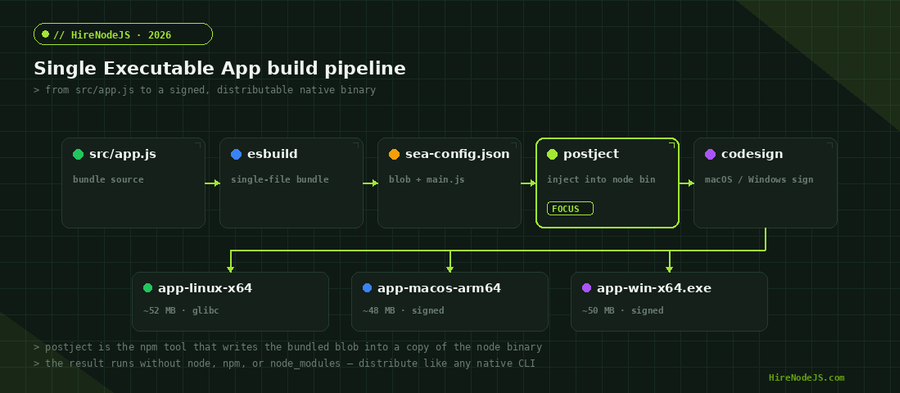
The SEA workflow has four stages: write a config, generate a blob, copy the Node binary, and inject the blob into that copy with the postject tool. None of this requires special compilation toolchains — every Node install (22+) ships the pieces you need.
1. Bundle your app to a single file
SEA expects exactly one entry script — no node_modules resolution at runtime. The easiest path is esbuild, which bundles ESM, CJS, dynamic imports, and most native-free dependencies into one file in milliseconds.
# install esbuild as a dev dependency
npm i -D esbuild

# bundle src/app.js into a single CJS file, including all node_modules deps
npx esbuild src/app.js \
  --bundle \
  --platform=node \
  --target=node22 \
  --outfile=dist/app.cjs \
  --minify \
  --external:better-sqlite3      # any native modules must stay external
2. Write sea-config.json
The SEA config tells Node which file to embed and a few runtime options. Disable experimental warnings if you're shipping to non-developers — the warning prints to stderr on every invocation otherwise.
{
  "main": "dist/app.cjs",
  "output": "dist/sea-prep.blob",
  "disableExperimentalSEAWarning": true,
  "useSnapshot": false,
  "useCodeCache": true
}
3. Generate the blob and inject it
Node ships a built-in command to turn the config into a binary blob, and postject (an npm tool maintained by the Node project) writes that blob into a copy of your Node binary as a resource section. On macOS you also need to clear the existing code signature before injection and re-sign afterwards.
# 1. generate the SEA blob from the config
node --experimental-sea-config sea-config.json

# 2. copy the local node binary into ./dist as our base
cp $(command -v node) dist/app

# 3. (macOS only) strip the existing signature so postject can rewrite the binary
codesign --remove-signature dist/app

# 4. inject the blob into the binary as a Mach-O / ELF / PE section
npx postject dist/app NODE_SEA_BLOB dist/sea-prep.blob \
  --sentinel-fuse NODE_SEA_FUSE_fce680ab2cc467b6e072b8b5df1996b2 \
  --macho-segment-name NODE_SEA

# 5. (macOS only) sign again with your Developer ID for distribution
codesign --sign "Developer ID Application: Your Org" dist/app

# done — ./dist/app is a standalone Node app
./dist/appSEA vs Bun --compile vs pkg vs nexe
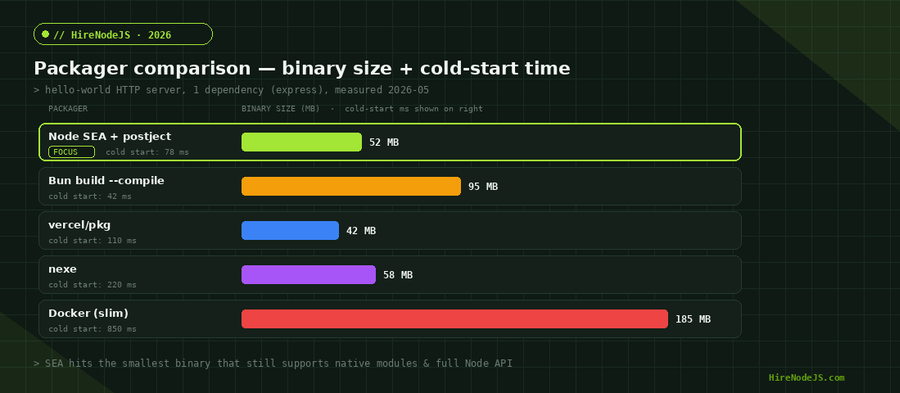
SEA is not the only way to ship a Node program as a single binary. The serious alternatives in 2026 are Bun's --compile (Bun is its own JS runtime), vercel/pkg (legacy but still widely used), and nexe (active again after a 2024 refresh). Each makes different trade-offs.
The choice usually comes down to two questions: (1) do you need Node's exact API surface and ecosystem of native modules, and (2) how much do you care about binary size? If you need everything Node does, SEA is the safest pick. If your code is pure JS and you want the smallest fastest binary, Bun --compile is hard to beat — but you're swapping runtimes, which is a different conversation. For the broader hiring picture of who can build and ship both, see our Bun vs Node.js benchmarks.
Side-by-side comparison
The bar chart above (Figure 2) gives you raw binary sizes; the radar chart below scores each packager across the dimensions that actually matter when you're picking one for production work — size, cold start, native module support, cross-platform builds, build speed, and long-term support.
Production hardening — signing, native modules, and updates
Code signing on macOS and Windows
An unsigned binary on macOS Sequoia or Windows 11 will be flagged by Gatekeeper or SmartScreen and your users will see scary warnings. macOS needs Developer ID Application signing and ideally notarisation; Windows needs an EV or OV code-signing certificate. Budget for this — code-signing certs run $200–$700/year and are not optional for any serious distribution.
# macOS: sign + notarise
codesign --sign "Developer ID Application: ACME Inc" \
         --options runtime --timestamp dist/app
xcrun notarytool submit dist/app.zip \
  --keychain-profile "notarisation-profile" --wait
xcrun stapler staple dist/app

# Windows (run on a Windows builder)
signtool sign /f cert.pfx /p $env:CERT_PASS \
  /tr http://timestamp.digicert.com /td sha256 /fd sha256 dist\app.exe
Shipping native modules with your SEA
Native modules (anything that depends on a .node file at runtime — better-sqlite3, sharp, bcrypt, node-canvas) cannot be embedded in the blob. They must ship alongside the binary in a directory you control, and you load them via createRequire. The pattern looks like this:
Hire Pre-Vetted Node.js Developers
Skip the months-long search. Our exclusive talent network has senior Node.js experts ready to join your team in 48 hours.
// inside your bundled app.cjs — runs inside the SEA binary
const { createRequire } = require('node:module');
const path = require('node:path');
const fs = require('node:fs');

// __dirname inside a SEA points to the directory of the binary
const binDir = path.dirname(process.execPath);

// resolve native modules from a sibling ./native folder
const requireNative = createRequire(path.join(binDir, 'native/'));
const Database = requireNative('better-sqlite3');

const db = new Database(path.join(binDir, 'data/app.db'));
console.log(db.prepare('SELECT 1 as ok').get());Auto-updates without an app store
Once you ship a SEA, you need a story for updating it. The well-trodden path is to bundle a tiny updater that checks a manifest URL, downloads a new binary to a temp directory, atomically swaps the old binary, and restarts. For Electron-style desktop apps, electron-updater works once you've vendored it. For CLIs, a 50-line shell script invoked from your binary works fine. Whatever you do, sign every update payload — an unsigned auto-updater is a remote-code-execution vulnerability waiting to happen.
Cutting binary size and improving cold start
The baseline Node binary is around 48 MB on Linux x64, ~46 MB on macOS arm64, and ~50 MB on Windows x64. Your bundled code adds a few MB on top. Most teams accept that — disk space is cheap. But if you're shipping to bandwidth-constrained environments (edge devices, mobile sidecars, embedded systems), there are several levers worth pulling.
Strip debug symbols and unused build flags
Build your own Node from source with --without-intl, --without-npm, and --without-corepack if you genuinely don't need those features. ICU alone is a 30 MB win. The custom build process is well-documented in the Node project but adds ~20 minutes to your CI; weigh that against the bandwidth savings.
Use V8 snapshots and code cache
Setting useCodeCache: true in your sea-config caches compiled JavaScript bytecode in the blob, which trims 30–60% off cold start time. For larger apps, useSnapshot: true goes further — it captures a heap snapshot at the end of your module-load phase. Snapshots are powerful but finicky: any code that touches the network, filesystem, or environment variables at module load will misbehave.
{
  "main": "dist/app.cjs",
  "output": "dist/sea-prep.blob",
  "disableExperimentalSEAWarning": true,
  "useCodeCache": true,
  "useSnapshot": true,
  "assets": {
    "templates/email.html": "dist/email-template.html",
    "data/migrations.sql": "dist/migrations.sql"
  }
}
The assets map is one of SEA's underrated features: any file listed there can be read at runtime via sea.getAsset() without unpacking to disk. Use it for templates, SQL migrations, embedded help text, and small data files. The blob compression means assets often add less to the binary than you'd expect.
Multi-platform SEA builds in CI/CD
Building a SEA on your laptop is fine for development; for production you want reproducible multi-platform builds that run in CI on every tag. GitHub Actions makes this straightforward with a matrix strategy across linux, macos, and windows runners.
name: Build SEA
on:
  push:
    tags: ['v*']

jobs:
  build:
    strategy:
      matrix:
        include:
          - os: ubuntu-latest
            target: linux-x64
            ext: ''
          - os: macos-14   # Apple Silicon
            target: macos-arm64
            ext: ''
          - os: windows-latest
            target: win-x64
            ext: '.exe'
    runs-on: ${{ matrix.os }}
    steps:
      - uses: actions/checkout@v4
      - uses: actions/setup-node@v4
        with: { node-version: '22' }

      - run: npm ci
      - run: npm run bundle           # esbuild your app

      - run: node --experimental-sea-config sea-config.json

      - name: Copy node binary
        shell: bash
        run: cp $(command -v node) dist/app${{ matrix.ext }}

      - name: Inject blob
        shell: bash
        run: |
          if [[ "${{ matrix.os }}" == "macos-14" ]]; then
            codesign --remove-signature dist/app${{ matrix.ext }}
          fi
          npx postject dist/app${{ matrix.ext }} NODE_SEA_BLOB dist/sea-prep.blob \
            --sentinel-fuse NODE_SEA_FUSE_fce680ab2cc467b6e072b8b5df1996b2 \
            --macho-segment-name NODE_SEA

      - uses: actions/upload-artifact@v4
        with:
          name: app-${{ matrix.target }}
          path: dist/app${{ matrix.ext }}
If you're already running a GitHub Actions pipeline for Node.js, adding SEA builds is a single matrix job. Most teams attach the binaries to the GitHub Release and let users download platform-specific artifacts. For organisations distributing through their own update server, push the signed binaries to S3 or Cloudflare R2 and have the auto-updater fetch from there.
Common SEA pitfalls and how to avoid them
process.argv[0] is your binary, not 'node'
Code that hard-codes 'node script.js' for child process spawns will break inside a SEA. The fix is to spawn process.execPath with your own arguments — and if you're spawning Node-the-runtime, you should know that SEA binaries cannot themselves act as a Node interpreter. Move that logic into your bundled code instead.
Module resolution doesn't work the way you think
There is no node_modules folder inside a SEA. Anything that uses require.resolve() or __dirname-based lookups will need to be handled at bundle time by esbuild. If you have a plugin system that loads code at runtime, you'll need to ship those plugins as separate files alongside the binary and load them with createRequire.
Anti-virus false positives
Windows Defender, Bitdefender, and a few other AV products flag fresh SEA binaries as suspicious because they look like 'a modified Node.exe with embedded data' — which is exactly what they are. Code signing fixes most of these, and submitting your binary to Microsoft's clean-file submission portal helps with the rest. Plan for a 2–4 week feedback loop on this for new binaries.
Hire Expert Node.js Developers — Ready in 48 Hours
Packaging a Node.js app correctly for distribution is the last 10% that decides whether your tool feels professional or feels like a hobby project. HireNodeJS.com connects you with senior Node.js engineers who have shipped SEAs, Docker images, Lambda functions, and edge workers in production — not just spun them up on localhost.
Every developer in our pool is pre-vetted on real-world systems work: build pipelines, code signing, native modules, cross-platform CI, and the operational fundamentals that turn a working prototype into a deployable product. Most clients have a developer working within 48 hours. Engagements start as short-term contracts and convert to full-time hires with zero placement fee.
If your project needs Docker and Kubernetes expertise as well as SEA-style native distribution, our DevOps-savvy Node.js engineers cover the full operational surface from local builds to production rollouts.
Summary — when to reach for SEA
Single Executable Applications are the right choice when you need to hand someone a single file and have it just run — CLI tools, customer-installable services, IoT firmware updates, sidecar binaries, and any context where 'install Node first' is friction you can't impose. SEA inherits Node's full compatibility profile and long-term support story, which makes it the conservative choice for distribution work that has to last.
For orchestrated cloud workloads, a slim Docker image is still the better answer — you keep layered caching, fast rolling updates, and a clean separation between runtime and application. The decision isn't SEA-or-nothing; most production teams use both: SEA for everything that ships to a customer's machine, containers for everything that runs in their own infrastructure.
Frequently Asked Questions
What is a Node.js Single Executable Application (SEA)?
A SEA is a copy of the Node.js binary with your bundled JavaScript embedded inside it as a resource. When the binary runs, Node loads your code from the embedded blob and executes it — no node_modules, no separate runtime install required.
Is SEA stable in production in 2026?
Yes. SEA has been stable since Node.js 22 (April 2024) and received significant improvements in Node 24, including better code cache support and an improved assets API. It is suitable for production CLIs, on-prem distributions, and customer-installed servers.
How big is a typical SEA binary?
The baseline Node.js binary is ~48 MB on Linux x64, ~46 MB on macOS arm64, and ~50 MB on Windows x64. Your bundled application typically adds 1–10 MB on top, depending on dependencies.
Can I use native modules like better-sqlite3 inside a SEA?
Yes, but native modules cannot be embedded in the blob. They must ship as separate .node files alongside the binary and be loaded via createRequire pointing at their directory.
How does SEA compare to Bun --compile?
Bun --compile produces faster cold starts and smaller binaries but uses the Bun runtime, not Node — so you trade some ecosystem compatibility for size and speed. SEA gives you the full Node.js API surface and long-term support guarantees.
Do I need to code-sign my SEA binary?
For macOS and Windows distribution, effectively yes. Unsigned binaries trigger Gatekeeper and SmartScreen warnings that scare end users away. Budget $200–$700/year for a code-signing certificate and notarisation.
Vivek Singh is the founder of Witarist and HireNodeJS.com — a platform connecting companies with pre-vetted Node.js developers. With years of experience scaling engineering teams, Vivek shares insights on hiring, tech talent, and building with Node.js.
Need a Node.js engineer who ships production-ready binaries?
HireNodeJS connects you with pre-vetted senior Node.js engineers available within 48 hours. Whether you're packaging CLIs with SEA, deploying containers to Kubernetes, or running serverless functions — get the right developer without recruiter fees.