Node.js Streams in 2026: Backpressure, Pipelines & Async Iterators
Streams are arguably the single most underused feature in Node.js — and in 2026, that's a problem worth fixing. Modern backends move multi-gigabyte CSVs, video uploads, log archives, and real-time event firehoses every day. If your code still loads everything into memory before processing it, you're paying for it in cloud bills, P95 latency, and 3 a.m. OOMKilled alerts.
This guide walks through the four stream types, how backpressure actually works under the hood, and the three modern APIs that have effectively replaced the old on("data") era: pipeline(), async iterators (for-await-of), and the Web Streams compatibility layer. Whether you're building a file uploader, a CSV ETL job, an SSE endpoint, or a streaming LLM proxy, the patterns here apply.
Why Streams Still Matter in 2026
Node.js was designed around streams. The HTTP server, the file system module, child processes, sockets, zlib, and crypto — every I/O primitive in the standard library produces or consumes a stream. That design choice is what lets Node serve thousands of concurrent connections from a single process: instead of buffering an entire 4 GB upload before responding, the runtime moves bytes through your handler in chunks and applies backpressure when the consumer can't keep up.
The Four Stream Types
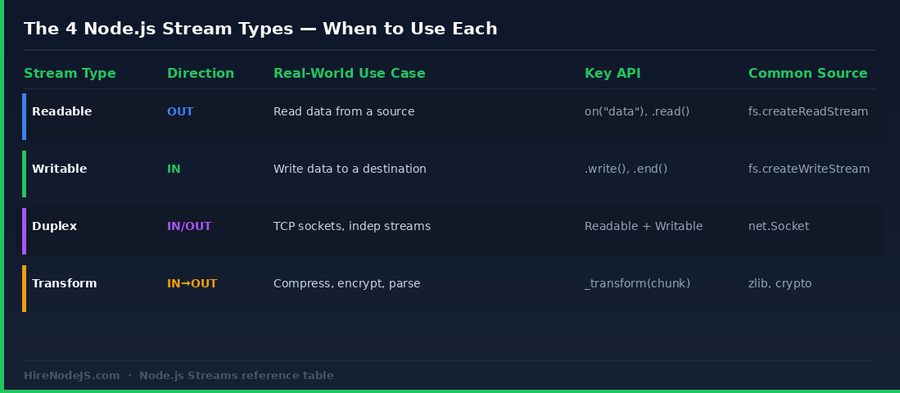
All Node.js streams are one of four types: Readable (data flows out), Writable (data flows in), Duplex (independent in and out, like a TCP socket), and Transform (a Duplex where output is a function of input — gzip, encryption, JSON parsing). The table below summarises when to reach for each.
Object Mode vs Buffer Mode
By default, streams move Buffers or strings. Pass { objectMode: true } and they move arbitrary JavaScript objects — useful when you want to pipe parsed CSV rows through a Transform without serialising back to bytes between steps. Pure object-mode pipelines are how libraries like csv-parse, JSONStream, and Mongoose's cursor.stream() work.
Backpressure Explained — The One Concept That Matters Most
Backpressure is what happens when the consumer of a stream is slower than the producer. Without it, fast producers blow up memory: imagine reading a 10 GB file at 1 GB/s and writing to S3 at 100 MB/s — without backpressure, ~9 GB will sit in your Node process's heap before the first byte ever leaves the network card. With backpressure, the producer is paused the moment the consumer's internal buffer fills.
The highWaterMark Threshold
Every Writable stream has a highWaterMark — 16 KB for byte streams, 16 objects for object-mode streams by default. When the internal buffer crosses that threshold, .write() returns false. That return value is the contract: the producer is supposed to stop writing and wait for the 'drain' event before continuing. The vast majority of memory bugs in Node services come from ignoring this return value.
What pipeline() Does For You
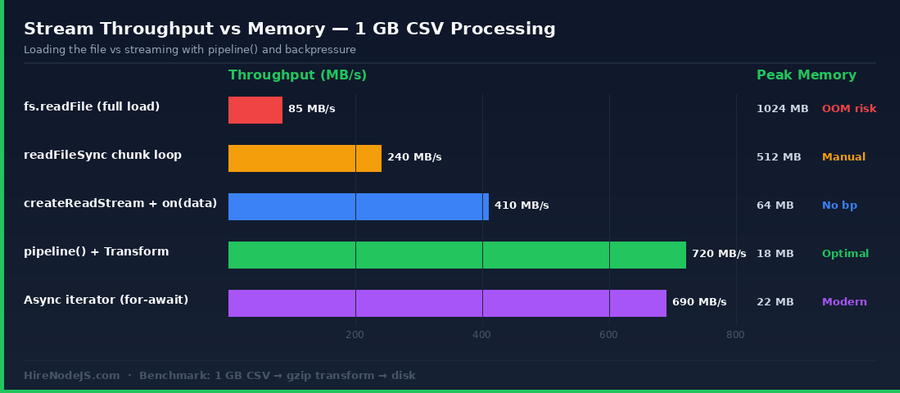
stream.pipeline() — and its promisified version pipelinePromise — wires up backpressure, error propagation, and cleanup automatically. If any stage throws, every other stage in the chain is destroyed, file descriptors are released, and the returned promise rejects. You almost never need to manage drain events by hand anymore.
import { pipeline } from 'node:stream/promises';
import { createReadStream, createWriteStream } from 'node:fs';
import { createGzip } from 'node:zlib';
import { Transform } from 'node:stream';

// A tiny Transform that uppercases every chunk.
const upper = new Transform({
  transform(chunk, _enc, cb) {
    cb(null, chunk.toString().toUpperCase());
  }
});

// pipeline() handles backpressure, errors, and cleanup automatically.
await pipeline(
  createReadStream('input.csv'),
  upper,
  createGzip(),
  createWriteStream('output.csv.gz')
);

console.log('Done — peak memory stayed under ~20 MB regardless of file size.');Three Modern APIs: pipeline(), Async Iterators, and Web Streams
If you learned Node streams before 2018, you probably learned the on('data') / pause() / resume() pattern. It still works, but it's been superseded by three cleaner APIs that compose better with async/await.
1. stream.pipeline() — the workhorse
Best for byte pipelines and any chain where you want guaranteed cleanup. Available as a callback API on stream and as a promise on node:stream/promises. Use this for file → transform → file, HTTP body → S3, kafka → transform → DB, and similar shapes.
2. Async iterators (for-await-of) — the readable one
Every Readable in Node.js is an async iterator. That means you can write `for await (const chunk of stream) { ... }` and the runtime handles backpressure for you — pulling the next chunk only after your loop body completes. Brilliant for one-off scripts, parsing logic, and any code where readability matters more than maximum throughput.
3. Web Streams — the cross-runtime API
Node 18+ ships a native Web Streams implementation that mirrors the browser ReadableStream / WritableStream / TransformStream API. This is the same API the Fetch spec uses, and it's how you write code that runs unchanged on Node, Deno, Bun, Cloudflare Workers, and Vercel Edge. You can convert between Node streams and Web Streams via Readable.toWeb() and Readable.fromWeb().
Building Custom Transform Streams
Hire Pre-Vetted Node.js Developers
Skip the months-long search. Our exclusive talent network has senior Node.js experts ready to join your team in 48 hours.
A Transform stream is the right primitive whenever you have a chain like "read records → modify → write records" and the input/output rates can differ. Examples: CSV row → DB row, log line → JSON, audio chunk → encoded frame, LLM token → SSE message.
Object-mode CSV → JSON example
import { Transform } from 'node:stream';

// Splits incoming buffer chunks into newline-terminated records.
export class LineSplitter extends Transform {
  constructor(opts = {}) {
    super({ ...opts, readableObjectMode: true });
    this._buffer = '';
  }
  _transform(chunk, _enc, cb) {
    this._buffer += chunk.toString();
    const lines = this._buffer.split('\n');
    this._buffer = lines.pop();      // keep last partial line
    for (const line of lines) if (line) this.push(line);
    cb();
  }
  _flush(cb) {
    if (this._buffer) this.push(this._buffer);
    cb();
  }
}
Two important details: the constructor sets readableObjectMode: true so downstream consumers receive strings rather than Buffers, and _flush() drains any partial line left at end-of-stream. Forgetting _flush is the second most common bug after ignoring backpressure.
Common Pitfalls and How to Fix Them
Ignoring the .write() return value
If you're writing manually rather than using pipeline(), you must respect the boolean return of .write(). When it returns false, stop writing and wait for 'drain'. Failing to do this is the single most common cause of unbounded memory growth in Node services.
Forgetting to handle 'error' on every stream
Each individual stream can emit 'error' independently. If you wire streams up with .pipe() and don't attach an error listener to every stage, Node will crash the process with an unhandled error. pipeline() avoids this entirely — another reason to use it by default.
Mixing object mode with byte mode
Piping an object-mode Readable into a byte-mode Writable will throw a TypeError on the first chunk. The two ends must agree. Use objectMode: true on both ends, or insert a Transform that JSON.stringifies your objects into bytes.
Interop with Fetch, S3, and the Web Streams Ecosystem
Node 18 added a fetch() implementation built on top of Web Streams. That means response.body is a ReadableStream — the W3C kind, not the Node kind. To pipe a fetched response into a Node Writable (a file, S3 multipart upload, or a TCP socket), wrap it with Readable.fromWeb().
import { Readable } from 'node:stream';
import { pipeline } from 'node:stream/promises';
import { createWriteStream } from 'node:fs';

// Stream a 5 GB download directly to disk — no buffering.
const res = await fetch('https://example.com/dataset.csv.gz');
if (!res.ok || !res.body) throw new Error('Bad response');

await pipeline(
  Readable.fromWeb(res.body),
  createWriteStream('dataset.csv.gz')
);
The same trick works going the other way: Readable.toWeb(myReadable) gives you a ReadableStream you can hand to fetch() in a request body, the AWS S3 v3 SDK's Body parameter, or any framework expecting a standard ReadableStream.
Where Streams Show Up in Real Production Systems
Streams underpin practically every high-traffic Node service in 2026. CSV ETL jobs, video transcoding, S3 multipart uploads, server-sent events, gRPC streaming, AI token streaming, real-time analytics ingestion — all of them use the same primitives covered above. If you need a backend engineer comfortable with these patterns, HireNodeJS connects you with vetted Node.js developers who have shipped streaming systems in production.
For real-time use cases specifically, streams pair naturally with WebSockets, SSE, and message brokers. Our companion piece on Node.js + Kafka event streaming walks through how to apply the same backpressure principles to distributed log architectures, while the Node.js gRPC guide covers bidirectional streaming RPC.
If your team is shipping data-heavy backends, you'll often want a specialist who has handled multi-GB pipelines. Browse our pre-vetted backend developers — every engineer is screened on system design, async patterns, and production debugging before being added to the platform.
Hire Expert Node.js Developers — Ready in 48 Hours
Building a high-throughput streaming backend is only half the battle — you need engineers who understand backpressure, memory management, and production observability. HireNodeJS.com specialises exclusively in Node.js talent: every developer is pre-vetted on real-world projects, streaming and event-driven architecture, and production deployments at scale.
Unlike generalist platforms, our curated pool means you speak only to engineers who live and breathe Node.js. Most clients have their first developer working within 48 hours of getting in touch. Engagements start as short-term contracts and can convert to full-time hires with zero placement fee.
Wrapping Up — The 2026 Streams Cheat Sheet
If you remember nothing else: use stream.pipeline() (or its promise version) by default, lean on for-await-of when you need readability inside a single async function, and reach for Web Streams only when cross-runtime portability is a requirement. Always respect the highWaterMark, always provide _flush() in custom Transforms, and never ship .pipe() to production.
Streams reward investment. Once they click, half the performance problems you see in real Node codebases — runaway memory, latency cliffs, GC pauses on hot endpoints — disappear. Spend an afternoon reading the node:stream source if you want to go deep; you'll come out understanding the runtime in a fundamentally different way.
Frequently Asked Questions
What is backpressure in Node.js streams?
Backpressure is the mechanism that pauses a fast producer when its consumer cannot keep up. In Node.js, the .write() method returns false once a Writable's internal buffer crosses highWaterMark; the producer should then wait for the 'drain' event before resuming.
Should I use pipe() or pipeline() in 2026?
Always pipeline() (or its promise version from node:stream/promises). pipe() does not propagate errors backwards through the chain and silently leaks file descriptors when stages fail. pipeline() handles backpressure, error propagation, and cleanup automatically.
Can I use for-await-of on every Node.js Readable stream?
Yes. Every Readable stream in Node.js is an async iterable, so for await (const chunk of stream) works out of the box. The runtime handles backpressure for you — the next chunk is only pulled when your loop body completes.
What is the difference between Node streams and Web Streams?
Node streams are the original Node.js API (Readable, Writable, Duplex, Transform). Web Streams are the W3C standard (ReadableStream, WritableStream, TransformStream) that ships in browsers, Deno, and Bun. Node 18+ supports both and provides Readable.toWeb() and Readable.fromWeb() to convert between them.
What is the best highWaterMark value for performance?
For byte streams, the default 16 KB is well-tuned for most workloads. Bumping it to 64 KB or 256 KB can help on high-throughput file or network operations. For object-mode streams, the default of 16 objects is usually fine — increase it only if you have measured GC pressure from constant pause/resume cycles.
Are Node.js streams memory safe by default?
Only if you use them correctly. pipeline() and for-await-of are memory safe out of the box because they implement backpressure. Manual on('data') handlers without pause()/resume() bookkeeping, or .write() loops that ignore the return value, are the most common cause of unbounded memory growth.
Vivek Singh is the founder of Witarist and HireNodeJS.com — a platform connecting companies with pre-vetted Node.js developers. With years of experience scaling engineering teams, Vivek shares insights on hiring, tech talent, and building with Node.js.
Need a Node.js engineer who ships fast, streaming-first APIs?
HireNodeJS connects you with pre-vetted senior Node.js engineers experienced with streams, backpressure, and high-throughput pipelines — available within 48 hours. No recruiter fees.