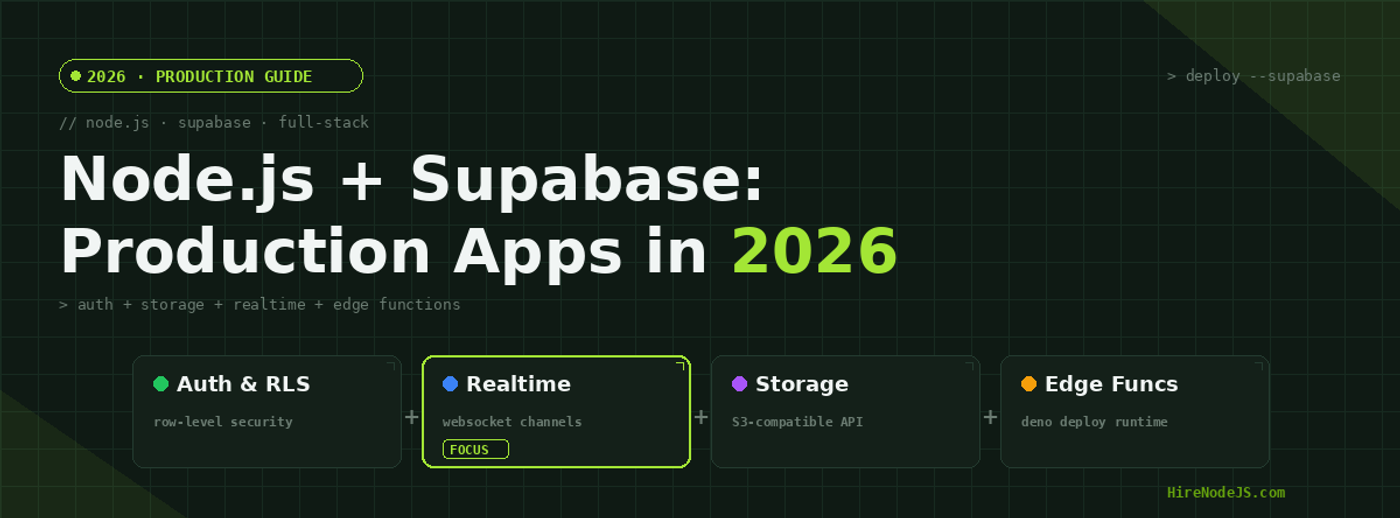
Node.js + Supabase: Build Production Apps in 2026
Supabase has rapidly evolved from a Firebase alternative into a full-fledged backend platform that pairs naturally with Node.js. In 2026, its combination of PostgreSQL, built-in authentication, row-level security, realtime subscriptions, S3-compatible storage, and edge functions makes it one of the most compelling choices for teams building production applications without managing infrastructure.
Whether you're a startup shipping an MVP or an established team looking to hire Node.js developers who can move fast, understanding how Supabase fits into a Node.js architecture is essential. This guide covers everything from initial setup to production hardening, with real code, performance benchmarks, and architectural patterns you can deploy today.
Why Supabase and Node.js Are a Perfect Match
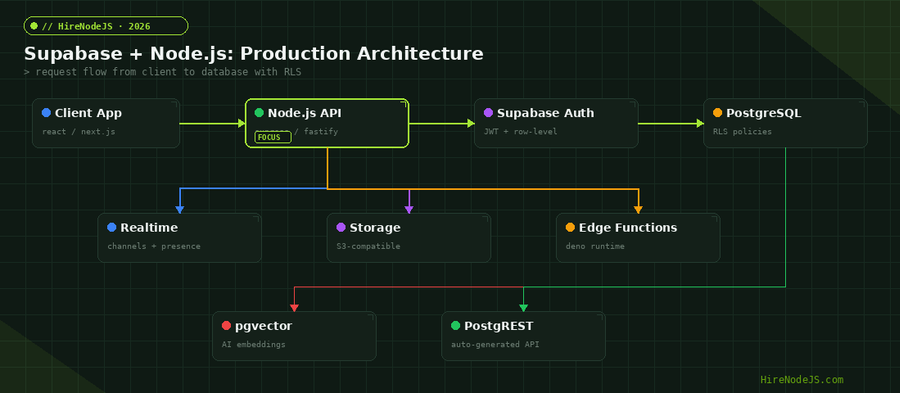
The Node.js ecosystem thrives on composability — small modules that do one thing well. Supabase follows the same philosophy but at the infrastructure level. Instead of a monolithic proprietary backend, it gives you PostgreSQL with superpowers: authentication baked into the database via RLS policies, a PostgREST layer that auto-generates REST APIs from your schema, and realtime change feeds powered by PostgreSQL's WAL replication.
For Node.js developers, this means you can build a production-ready API server using Express or Fastify that delegates authentication, authorization, file storage, and realtime subscriptions to Supabase — while keeping full control over your business logic, custom endpoints, and deployment pipeline. You get the speed of a BaaS with the flexibility of a custom backend.
The Open-Source Advantage
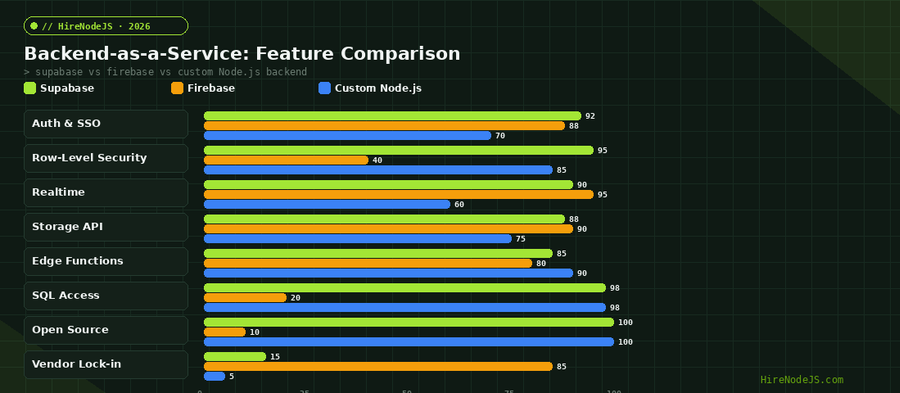
Unlike Firebase, Supabase is fully open-source. Every component — GoTrue for auth, PostgREST for API generation, Realtime for subscriptions, and Storage for file management — can be self-hosted. This eliminates vendor lock-in concerns and gives your team the ability to inspect, fork, and contribute to the tools they depend on. For enterprises evaluating backend platforms, this is often the deciding factor.
Setting Up Supabase in a Node.js Project
Getting started with Supabase in a Node.js project takes minutes, but doing it right for production requires understanding the client library architecture. The @supabase/supabase-js package provides two distinct client modes: the anon client for browser-safe operations that respect RLS policies, and the service role client for server-side operations that bypass RLS entirely.
Project Initialization and Client Configuration
import { createClient } from '@supabase/supabase-js';
import type { Database } from './types/supabase';

// Server-side client with service role key (bypasses RLS)
const supabaseAdmin = createClient<Database>(
  process.env.SUPABASE_URL!,
  process.env.SUPABASE_SERVICE_ROLE_KEY!,
  {
    auth: { autoRefreshToken: false, persistSession: false }
  }
);

// Per-request client that respects RLS (pass user's JWT)
export function createUserClient(accessToken: string) {
  return createClient<Database>(
    process.env.SUPABASE_URL!,
    process.env.SUPABASE_ANON_KEY!,
    {
      global: {
        headers: { Authorization: `Bearer ${accessToken}` }
      },
      auth: { autoRefreshToken: false, persistSession: false }
    }
  );
}The type-safe approach shown above uses Supabase's CLI-generated TypeScript types. Run supabase gen types typescript to create a Database type that gives you autocomplete and compile-time checks across every table, view, and RPC function in your schema. This eliminates an entire category of runtime errors.
Authentication Patterns for Production
Supabase Auth (GoTrue) handles the complete authentication lifecycle — signup, login, password reset, OAuth, magic links, and phone OTP — with minimal configuration. For Node.js teams building APIs, the critical piece is validating JWTs on every request and extracting user context for row-level security policies.
JWT Validation Middleware
Every request to your Node.js API should validate the Supabase JWT and attach the user to the request context. Here is a production-ready middleware pattern that works with Express, Fastify, or any framework that supports middleware:
import { FastifyRequest, FastifyReply } from 'fastify';
import { createClient } from '@supabase/supabase-js';

export async function authMiddleware(
  request: FastifyRequest,
  reply: FastifyReply
) {
  const token = request.headers.authorization?.replace('Bearer ', '');

  if (!token) {
    return reply.status(401).send({ error: 'Missing authorization token' });
  }

  const supabase = createClient(
    process.env.SUPABASE_URL!,
    process.env.SUPABASE_ANON_KEY!,
    {
      global: { headers: { Authorization: `Bearer ${token}` } },
      auth: { autoRefreshToken: false, persistSession: false }
    }
  );

  const { data: { user }, error } = await supabase.auth.getUser(token);

  if (error || !user) {
    return reply.status(401).send({ error: 'Invalid or expired token' });
  }

  request.user = user;
  request.supabase = supabase;
}
OAuth and Social Login Integration
Supabase supports over 20 OAuth providers out of the box, including Google, GitHub, Apple, Azure AD, and Slack. The integration is straightforward: configure the provider in the Supabase dashboard, and the client library handles the redirect flow, token exchange, and session management. For server-side flows in Node.js, you typically redirect the user to Supabase's OAuth endpoint and handle the callback with a token exchange.
Row-Level Security: The Production Superpower
Row-level security is what separates Supabase from every other BaaS. Instead of implementing authorization logic in your Node.js application code — where a single missed check means a data breach — RLS policies are enforced at the database level. Even if your API has a bug that accidentally exposes a query, PostgreSQL itself prevents unauthorized data access.
Writing Effective RLS Policies
A well-designed RLS policy uses the auth.uid() function to compare the requesting user's ID against a column in the table. For multi-tenant applications, you can use auth.jwt() to extract custom claims like organization IDs, roles, or plan tiers and enforce access at the row level.
-- Users can only read their own profile
CREATE POLICY "users_read_own" ON profiles
  FOR SELECT USING (auth.uid() = user_id);

-- Users can update their own profile
CREATE POLICY "users_update_own" ON profiles
  FOR UPDATE USING (auth.uid() = user_id)
  WITH CHECK (auth.uid() = user_id);

-- Organization members can read org data
CREATE POLICY "org_members_read" ON org_data
  FOR SELECT USING (
    org_id IN (
      SELECT org_id FROM org_members
      WHERE user_id = auth.uid()
    )
  );

-- Admins can manage all org data
CREATE POLICY "org_admins_manage" ON org_data
  FOR ALL USING (
    EXISTS (
      SELECT 1 FROM org_members
      WHERE user_id = auth.uid()
        AND org_id = org_data.org_id
        AND role = 'admin'
    )
);Hire Pre-Vetted Node.js Developers
Skip the months-long search. Our exclusive talent network has senior Node.js experts ready to join your team in 48 hours.
Realtime Subscriptions in Node.js
Supabase Realtime uses PostgreSQL's write-ahead log to stream database changes to connected clients via WebSockets. For Node.js applications using WebSockets, this replaces the need to build custom change-data-capture pipelines or poll for updates. You get realtime functionality with a few lines of configuration.
Channel-Based Architecture
Supabase Realtime v2 introduces channels as a first-class concept. Instead of subscribing to raw database changes, you create named channels and broadcast custom events — similar to Socket.io rooms but backed by PostgreSQL and CDN-level distribution. This pattern works well for chat applications, collaborative editing, live dashboards, and multiplayer games.
The Presence feature adds ephemeral state tracking — you can see which users are currently online, their cursor positions, or their current status without persisting this data to the database. Combined with broadcast channels, this gives you a complete realtime toolkit without managing WebSocket infrastructure.
Handling Reconnection and Backpressure
In production, realtime subscriptions must handle network interruptions gracefully. The Supabase client automatically reconnects with exponential backoff, but your Node.js server needs to track subscription state and re-sync any missed events. For high-throughput applications, implement a message queue like BullMQ between Supabase Realtime and your processing logic to handle backpressure.
Storage: S3-Compatible File Management
Supabase Storage provides an S3-compatible API for file uploads, downloads, and transformations. It supports RLS policies on buckets — meaning you can enforce per-user file access at the storage layer, not just in your application code. For Node.js backends that handle user-uploaded content like avatars, documents, or media files, this eliminates the need for a separate S3 configuration.
Presigned URLs and Direct Uploads
For production applications, always use presigned URLs for client-side uploads. This offloads the file transfer from your Node.js server to Supabase's CDN edge, reducing bandwidth costs and latency. If you need to process files after upload — generating thumbnails, scanning for malware, or extracting metadata — use Supabase Edge Functions or a webhook-triggered Node.js worker.
Image transformations are built in: you can request resized, cropped, or format-converted images by appending query parameters to the public URL. This eliminates the need for a separate image processing pipeline for common use cases like generating responsive image sets or avatar thumbnails.
Edge Functions for Serverless Logic
Supabase Edge Functions run on Deno Deploy, giving you TypeScript-first serverless functions that execute at the edge — close to your users. While your main Node.js API handles core business logic, Edge Functions are ideal for webhooks, scheduled tasks, third-party API integrations, and lightweight processing that benefits from low latency. Teams that hire full-stack developers often use this hybrid architecture to balance performance with development speed.
When to Use Edge Functions vs Node.js
Use Edge Functions for stateless, fast operations: webhook handlers for Stripe or SendGrid, image processing triggers, scheduled cleanup tasks, and API proxies that need to be close to end users. Keep complex business logic, database transactions, and long-running processes in your Node.js backend where you have full control over the runtime, dependencies, and connection pooling.
Production Hardening and Performance
Moving a Supabase + Node.js application to production requires attention to connection pooling, query optimization, monitoring, and security hardening. The most common production issues stem from exhausting database connections, unoptimized RLS policies on large tables, and missing indexes on columns referenced in policies.
Connection Pooling with PgBouncer
Supabase includes PgBouncer for connection pooling, but you need to configure your Node.js client to use the pooled connection string (port 6543) instead of the direct connection (port 5432). This is critical for serverless or horizontally scaled Node.js deployments where each instance might open dozens of connections. Production Node.js backend developers should always use the pooled connection for application queries and reserve direct connections for migrations and admin tasks.
Monitoring and Observability
Enable Supabase's built-in log drains to forward PostgreSQL logs, auth events, and storage operations to your observability stack. Pair this with OpenTelemetry instrumentation in your Node.js API to get end-to-end traces from HTTP request to database query and back. The Supabase dashboard provides query performance insights, but production systems need alerting on slow queries, connection pool saturation, and auth failure spikes.
Hire Expert Node.js Developers — Ready in 48 Hours
Building the right system is only half the battle — you need the right engineers to build it. HireNodeJS.com specialises exclusively in Node.js talent: every developer is pre-vetted on real-world projects, API design, event-driven architecture, and production deployments.
Unlike generalist platforms, our curated pool means you speak only to engineers who live and breathe Node.js. Most clients have their first developer working within 48 hours of getting in touch. Engagements start as short-term contracts and can convert to full-time hires with zero placement fee.
Conclusion: Ship Faster with Supabase and Node.js
Supabase transforms the Node.js backend development experience by handling the infrastructure-heavy pieces — authentication, authorization, realtime, storage, and edge compute — while giving you full PostgreSQL access and zero vendor lock-in. The combination lets small teams ship production-quality applications at a pace that was previously only possible with much larger engineering organizations.
The key to success is understanding which responsibilities to delegate to Supabase and which to keep in your Node.js API layer. Use RLS for authorization, Supabase Auth for identity, Storage for files, and Edge Functions for lightweight serverless tasks. Keep your core business logic, complex queries, background jobs, and external integrations in Node.js where you have full control. This hybrid architecture gives you the best of both worlds: speed of development and depth of customization.
Frequently Asked Questions
Can Supabase replace a custom Node.js backend entirely?
For simple CRUD applications, yes — Supabase's auto-generated PostgREST API with RLS policies can handle most use cases. However, complex business logic, multi-step transactions, and integrations with external services still benefit from a dedicated Node.js API layer.
How does Supabase row-level security affect query performance?
RLS adds a small overhead to each query — typically 10-20% for properly indexed tables. The performance impact grows with table size and policy complexity. Always add indexes on columns referenced in your RLS policies, and benchmark with realistic data volumes.
Is Supabase free for production applications?
Supabase offers a generous free tier suitable for MVPs and small apps. Production applications typically need the Pro plan ($25/month) for higher connection limits, daily backups, and 8GB database storage. Enterprise plans offer dedicated compute, SLA guarantees, and priority support.
How do I handle file uploads with Supabase and Node.js?
Use Supabase Storage with presigned URLs for direct client-side uploads. This bypasses your Node.js server entirely, reducing bandwidth costs and latency. For server-side processing, upload via the service role client and trigger post-processing with Edge Functions or webhooks.
Can I self-host Supabase instead of using the managed service?
Yes. Supabase is fully open-source and provides Docker Compose configurations for self-hosting. You get all features — auth, realtime, storage, and edge functions — on your own infrastructure. Many enterprises self-host for compliance reasons while using the managed platform for development environments.
What is the best way to hire Node.js developers with Supabase experience?
Look for developers with strong PostgreSQL skills, experience with RLS policies, and familiarity with TypeScript. Platforms like HireNodeJS.com pre-vet developers on real-world backend projects, so you can find Supabase-experienced Node.js engineers within 48 hours.
Vivek Singh is the founder of Witarist and HireNodeJS.com — a platform connecting companies with pre-vetted Node.js developers. With years of experience scaling engineering teams, Vivek shares insights on hiring, tech talent, and building with Node.js.
Need a Node.js + Supabase Engineer?
HireNodeJS connects you with pre-vetted senior Node.js developers experienced in Supabase, PostgreSQL, and production backend architecture — available within 48 hours. No recruiter fees, no lengthy screening.