Node.js + Vercel AI SDK in 2026: The Production Streaming Guide
The Vercel AI SDK has quietly become the default way to build streaming, tool-calling AI features on Node.js. By 2026 it powers production endpoints at Vercel, Shopify, Linear, and Notion — anywhere a team needs to ship an LLM-backed feature without writing a streaming parser from scratch or maintaining four provider adapters in parallel.
This guide is the production playbook. It covers the @ai-sdk/core APIs (streamText, generateObject, tool calling), how to wire them into an Express, Fastify, or Next.js route, how to handle backpressure on Node's Readable streams, what the provider-by-provider trade-offs really look like, and the hiring signals you should look for if you are bringing on a developer to own this surface.
Why Vercel AI SDK Has Become the Standard in 2026
In 2024 the choice was essentially "roll your own SSE parser" or pin yourself to one provider's official SDK. Both routes age badly. The Vercel AI SDK solved the unification problem by exposing a single set of primitives — streamText, generateText, generateObject, embed — that swap providers with a one-line change. The SDK shipped its 5.x line in late 2025 with strict TypeScript inference, first-class tool calling, and a Node.js runtime story that no longer assumes you are on the Edge.
What the SDK Actually Gives You
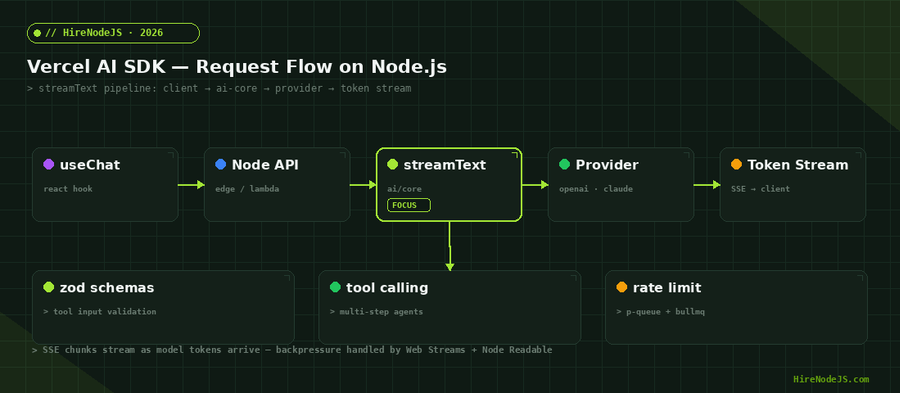
At its core, the SDK is three layers: a thin transport layer that speaks each provider's wire format, a normalization layer that turns deltas into a uniform stream of TextStreamPart events, and an integration layer (useChat, useCompletion, toDataStreamResponse) that bridges to React on the client. On a Node.js backend you mostly interact with the middle layer — streamText returns an object whose .textStream is an AsyncIterable<string> you can pipe straight into res.write() or a Web ReadableStream.
Why "just call OpenAI" stops scaling
Once you need a fallback when a provider is down, structured JSON output via tool calling, retries with exponential backoff, or to compare two models on the same prompt, the official provider SDKs force you into adapter code that is almost identical for each. The Vercel SDK already wrote that adapter code, has it under @ai-sdk/openai, @ai-sdk/anthropic, @ai-sdk/google, and @ai-sdk/groq, and tests it on every release.
streamText() in Production Node.js Routes
The single most important API in the SDK is streamText(). It is provider-agnostic, supports tool calls, and returns multiple consumption surfaces (textStream, fullStream, toDataStreamResponse, toTextStreamResponse) so it fits whatever transport your route already speaks.
A production-grade Express handler
The pattern below is what most teams converge on after their first three production incidents: abortable streams tied to the client connection, structured logging on every token, and a fail-fast timeout so a stuck stream never leaks a worker.
import express from 'express';
import { streamText } from 'ai';
import { openai } from '@ai-sdk/openai';

const app = express();
app.use(express.json());

app.post('/api/chat', async (req, res) => {
  // Tie the upstream LLM call to the client connection
  const ac = new AbortController();
  req.on('close', () => ac.abort());

  // Hard ceiling so we never leak a worker on a stuck stream
  const killer = setTimeout(() => ac.abort('timeout'), 30_000);

  try {
    const result = streamText({
      model: openai('gpt-4o-mini'),
      messages: req.body.messages,
      abortSignal: ac.signal,
      // 5.x: explicit token + cost limits
      maxOutputTokens: 1024,
      temperature: 0.4,
    });

    // Headers for SSE-friendly buffering off
    res.setHeader('Content-Type', 'text/plain; charset=utf-8');
    res.setHeader('X-Accel-Buffering', 'no');

    for await (const delta of result.textStream) {
      // Important: handle backpressure
      if (!res.write(delta)) {
        await new Promise((r) => res.once('drain', r));
      }
    }
    res.end();
  } catch (err) {
    if (err.name !== 'AbortError') {
      console.error('stream failure', err);
      res.status(500).end('stream failed');
    }
  } finally {
    clearTimeout(killer);
  }
});

app.listen(3000);Picking a Provider — and Knowing When to Swap
The SDK's portability is only valuable if you actually use it. In practice teams settle into a two- or three-provider rotation: one cheap, fast model for the 80% of traffic where any frontier model works, one premium model for harder tasks, and one redundancy model for outages. The fact that the switch is a one-line change in the model() call makes this rotation pattern trivial to implement.
Cost vs latency vs reliability
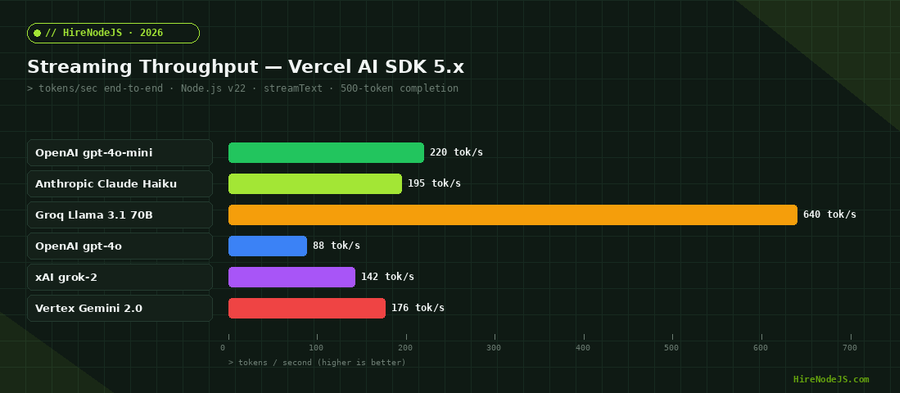
Groq's LPU hardware is the latency outlier for open models — under 200ms TTFT for Llama 3.1 70B is unusual enough that it changes UX assumptions. OpenAI's gpt-4o-mini remains the best price-to-quality point for general assistants. Anthropic's Claude models lead on long-context reasoning and on refusing nonsense gracefully, which matters more for B2B contracts than benchmarks tell you.
Provider-by-provider tradeoffs
The chart below scores the four most-deployed providers on the dimensions you actually care about in production: tool calling fidelity, streaming speed, structured output reliability, cost per million tokens, and uptime over the previous 12 months.
Tool Calling: Where the SDK Pulls Ahead
Tool calling is the feature that turns a chat endpoint into an agent. The SDK's implementation is meaningfully better than rolling your own: tools are defined with Zod schemas, the SDK enforces them on the way back from the model, and multi-step orchestration (model → tool → model → tool → final answer) is handled by a single maxSteps parameter instead of a hand-written loop.
A Zod-validated tool
Below is the canonical tool calling pattern. Note three things: the parameters Zod schema is the single source of truth for input shape (the SDK derives both the JSON schema sent to the model and the TypeScript types of the execute function from it), execute() returns whatever JSON-serialisable result you like, and the SDK automatically loops back to the model up to maxSteps times.
import { streamText, tool } from 'ai';
import { openai } from '@ai-sdk/openai';
import { z } from 'zod';

const result = streamText({
  model: openai('gpt-4o-mini'),
  messages,
  maxSteps: 5,        // multi-step agent loop
  tools: {
    searchOrders: tool({
      description: 'Search orders by customer email or order number.',
      parameters: z.object({
        query: z.string().describe('email or order id'),
        limit: z.number().int().min(1).max(20).default(5),
      }),
      execute: async ({ query, limit }) => {
        const rows = await db.orders.find({
          $or: [{ email: query }, { id: query }],
        }).limit(limit).toArray();
        return rows;          // returned to the model as tool result
      },
    }),
    refundOrder: tool({
      description: 'Issue a refund for an order. Requires manager approval.',
      parameters: z.object({
        orderId: z.string(),
        reason: z.string().min(10),
      }),
      execute: async ({ orderId, reason }) => {
        return await refundService.refund(orderId, reason);
      },
    }),
  },
});Structured Output with generateObject()
Hire Pre-Vetted Node.js Developers
Skip the months-long search. Our exclusive talent network has senior Node.js experts ready to join your team in 48 hours.
generateObject() is the SDK's answer to "I want JSON, not text". You pass a Zod schema, the SDK asks the model in the right format for that provider (OpenAI structured outputs, Anthropic tool calling fallback, Gemini schema mode), and validates the result on the way out. The TypeScript return type is inferred from the schema, so the rest of your code stays type-safe.
Why this beats prompt-engineered JSON
Asking the model nicely for JSON and then JSON.parse-ing the result is the single most fragile pattern in LLM code. generateObject() removes the JSON.parse problem entirely; the SDK either returns a validated object or throws a ZodError you can handle. It also adds a retry-with-error-feedback loop when a model produces invalid JSON — typically resolving the issue on the second try.
Streaming structured output
streamObject() is the streaming variant — it emits incremental partial objects as the model generates JSON, which is excellent for forms or dashboards that should populate progressively. Pair it with React Server Components or the useObject hook for a UX that feels two seconds faster than the equivalent generateObject call.
Backpressure, Nginx Buffering, and Other Node-Specific Footguns
Once you push streaming into production, Node.js stream semantics start to matter. The SDK's Web Streams adapters interop with both Node Readable and the Fetch API's Response body. If you are deploying behind Nginx as a reverse proxy, you need to disable proxy buffering — otherwise the upstream sees the entire response in one chunk and your streaming UX becomes a long pause followed by a wall of text.
Backpressure on res.write()
Node's writable streams return false from .write() when their internal buffer is full. Most code ignores this, which works fine on a fast client and explodes on a slow one (think mobile clients on cell networks). The for await loop you saw earlier handles this correctly by awaiting the "drain" event when the buffer is full. Skip this and a slow client can pin a worker for minutes.
Why your stream looks chunky behind Nginx
Add proxy_buffering off; in your Nginx location block, plus X-Accel-Buffering: no on the response. Cloudflare, Vercel's Node runtime, and most load balancers handle this correctly by default; bare Nginx in front of PM2 does not.
Observability — Logs, Costs, and Per-Token Tracing
You cannot operate an LLM endpoint without three numbers per request: input tokens, output tokens, and end-to-end latency. The SDK exposes all three via the .usage promise on the streamText result. Pipe them into your existing OpenTelemetry, Datadog, or Sentry stack and you have everything you need for a cost dashboard.
import { streamText } from 'ai';
import { openai } from '@ai-sdk/openai';
import { trace, SpanStatusCode } from '@opentelemetry/api';

const tracer = trace.getTracer('ai-sdk');

export async function chat(messages, userId) {
  return tracer.startActiveSpan('ai.chat', async (span) => {
    span.setAttribute('user.id', userId);
    try {
      const result = streamText({
        model: openai('gpt-4o-mini'),
        messages,
        onFinish: ({ usage, finishReason }) => {
          span.setAttribute('ai.tokens.input', usage.inputTokens);
          span.setAttribute('ai.tokens.output', usage.outputTokens);
          span.setAttribute('ai.finish.reason', finishReason);
        },
      });
      return result;
    } catch (e) {
      span.recordException(e);
      span.setStatus({ code: SpanStatusCode.ERROR });
      throw e;
    } finally {
      span.end();
    }
  });
}
If you are running multiple Node.js services that talk to model providers, centralising this in a single AI gateway pays off quickly. The same pattern that works for backend microservices applies — one service owns auth, rate limits, fallbacks, and observability, while feature teams call a typed client.
Security, Prompt Injection, and Rate Limiting
A streaming AI endpoint is just an HTTP endpoint, and the usual production checks apply double. Rate limiting is non-negotiable — without it a single bad actor with a script can burn through your monthly token budget in an afternoon. Token-aware rate limiters (Upstash, BullMQ, or a Redis-backed sliding window) are the right shape because requests vary in cost by 100x.
Prompt injection in tool-calling agents
When a tool returns data that originated from a user (an email body, a help-desk ticket, a CMS page), that data becomes part of the next prompt the model sees. Treat every tool return value as untrusted: never put it in a system message, mark it explicitly as user-provided in the content field, and have a separate verification step before any destructive action (refund, delete, transfer). The SDK's experimental_continueSteps callback is the right hook for this gate.
What to Look For When Hiring AI SDK Developers
AI SDK expertise looks different from generic Node.js expertise. The mistakes are different: people who can ship a CRUD API can still ship a streaming endpoint that leaks workers on slow clients, has no abort handling, no token budget, and treats tool return values as trusted input. A good screening loop tests for the streaming concurrency model and the LLM-specific failure modes, not just "can you call the OpenAI SDK".
Screening questions that actually work
Ask candidates to walk through what happens when a user closes their browser tab mid-stream on a streamText endpoint. The good answer mentions AbortController bound to req.on("close"), the fact that without it the worker keeps generating and you keep paying, and the need for a timeout fallback. Ask what they would do if a model started returning malformed JSON intermittently. The good answer is generateObject() with Zod and the SDK's built-in retry, not a try/catch around JSON.parse with manual fixups.
Hire Expert Node.js Developers — Ready in 48 Hours
Building the right system is only half the battle — you need the right engineers to build it. HireNodeJS.com specialises exclusively in Node.js talent: every developer is pre-vetted on real-world projects, AI SDK integrations, streaming architectures, and production deployments on Vercel, AWS Lambda, and bare Node.
Unlike generalist platforms, our curated pool means you speak only to engineers who live and breathe Node.js. Most clients have their first developer working within 48 hours of getting in touch — see how it works. Engagements start as short-term contracts and can convert to full-time hires with zero placement fee.
Wrapping Up — The 2026 AI SDK Stack
The Vercel AI SDK has become the keep-it-boring choice for AI features on Node.js, and that is exactly the point. streamText, generateObject, and tool calling cover ninety percent of what a production AI endpoint actually needs to do. The remaining ten percent — abort handling, backpressure, rate limiting, observability, and prompt-injection hygiene — are exactly the topics a senior Node.js engineer brings to the table.
Start with streamText and a single provider, add the abort and timeout pattern from this guide, move tool calls into Zod schemas, and only then start optimising the provider mix. That order ships fastest and exposes the fewest bugs in production.
Frequently Asked Questions
What is the Vercel AI SDK and why use it on Node.js?
The Vercel AI SDK is a TypeScript-first library that gives you a uniform API for streaming text, structured objects, and tool calls across OpenAI, Anthropic, Google, and Groq. On Node.js it replaces hand-rolled SSE parsers and provider-specific adapter code with a single typed interface.
Does the Vercel AI SDK only work on Vercel?
No. Despite the name, the SDK runs anywhere Node.js 18+ runs — Express, Fastify, AWS Lambda, Cloudflare Workers, Docker, bare metal. The Vercel-specific helpers (toDataStreamResponse for Edge runtime) are optional and only used when deploying to Vercel.
How does streamText handle backpressure on Node streams?
streamText returns an AsyncIterable that yields text deltas as the model produces them. You read with for-await and write to your response stream; if res.write returns false, await the drain event before continuing. The SDK does not buffer the full response in memory at any point.
Is tool calling provider-agnostic in the Vercel AI SDK?
Yes. You define tools with Zod schemas in one place, and the SDK translates them into each provider's native format — OpenAI function calling, Anthropic tools, Gemini function declarations. Switching providers does not require rewriting your tool definitions.
How much does it cost to hire a Node.js developer with Vercel AI SDK experience in 2026?
Senior Node.js engineers with production AI SDK experience typically range from $70–$140/hour for contract work in North America and Europe, with offshore senior talent available from $40–$80/hour through vetted platforms like HireNodeJS.com.
When should I use generateObject instead of streamText?
Use generateObject when the consumer needs a complete, validated JSON object — search filters, form filling, database queries derived from natural language. Use streamText when you are showing prose to a human and time-to-first-token matters more than waiting for a final structured payload.
Vivek Singh is the founder of Witarist and HireNodeJS.com — a platform connecting companies with pre-vetted Node.js developers. With years of experience scaling engineering teams, Vivek shares insights on hiring, tech talent, and building with Node.js.
Need a Node.js engineer who has shipped AI SDK in production?
HireNodeJS connects you with pre-vetted senior Node.js engineers experienced with the Vercel AI SDK, streaming endpoints, tool-calling agents, and production observability. Available within 48 hours — no recruiter fees.