Node.js vs Deno 2 in 2026: Should You Switch?
For most of the last decade, the runtime question had a boring answer: you shipped on Node.js. In 2026 that is no longer automatic. Deno 2 has matured into a genuine production runtime with native TypeScript, a permissions-based security model, and — crucially — near-complete npm compatibility. The objection that killed Deno 1 for most teams ("but my packages won't run") is largely gone.
This guide compares Node.js and Deno 2 across the dimensions that actually decide a stack: throughput, npm compatibility, security, developer experience, and the real cost of migration. If you are weighing the switch — or trying to staff a team that can make the call — read on, and when you are ready to hire a Node.js developer who knows both runtimes, the platform makes it fast.
Why the Runtime Question Matters Again in 2026
Deno 2 closed the compatibility gap
Deno 2 runs the npm registry through npm: specifiers and a standard package.json. In practice that covers roughly 90-95% of packages — Express, Fastify, Next.js, and Prisma all run unmodified. The packages that still break tend to be native C++ addons and ones that reach deep into Node internals. For the average API or web service, the ecosystem is no longer a blocker.
The decision is now about trade-offs, not feasibility
Because both runtimes can run your code, the choice comes down to priorities. A useful framing from the community: Node.js is the stability-first choice, Bun is the performance-first choice, and Deno is the security-first choice. The rest of this article puts numbers behind that statement.
Performance: Throughput, Startup, and Real-World Latency
Synthetic throughput
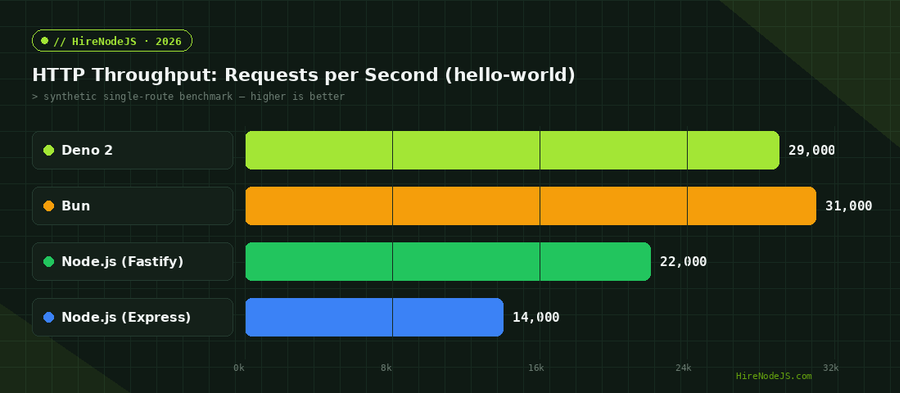
On a single hello-world route, Deno 2 reaches around 29,000 requests per second versus roughly 14,000 for Node.js on Express. Swap Express for Fastify and Node closes much of that gap. Bun still leads raw synthetic numbers, but the headline figure rarely survives contact with a real workload.
What happens in production
Once you add routing, validation, serialization, and a database round-trip, the runtime stops being the bottleneck — your I/O does. Independent real-world benchmarks routinely show under a 3% spread between runtimes on representative API workloads. Treat the chart below as a ceiling, not a forecast of your p99.
npm Compatibility and the Ecosystem Question
How Deno 2 loads npm packages
Deno 2 supports over two million npm packages via npm: import specifiers, and it reads a conventional package.json so existing projects mostly "just work." If your codebase leans heavily on TypeScript, Deno's native type support removes an entire build step — there is no separate tsc process to wire up.
Where it still bites
The 5-10% of packages that fail are usually native addons (node-gyp builds) or libraries that monkey-patch Node internals. Audit your dependency tree before committing — a single unsupported native module can dictate the whole decision. The radar below summarizes how the two runtimes stack up across five dimensions teams actually weigh.
Security: Permissions by Default
Opt-out vs opt-in
This is Deno's signature feature. A Deno program has no file, network, or environment access until you grant it explicitly with flags like --allow-net or --allow-read. Node.js runs with full ambient authority unless you adopt its newer experimental permission model. For teams running untrusted code or chasing supply-chain hardening, default-deny is a meaningful advantage.
Hire Pre-Vetted Node.js Developers
Skip the months-long search. Our exclusive talent network has senior Node.js experts ready to join your team in 48 hours.
Granular permissions in Deno 2
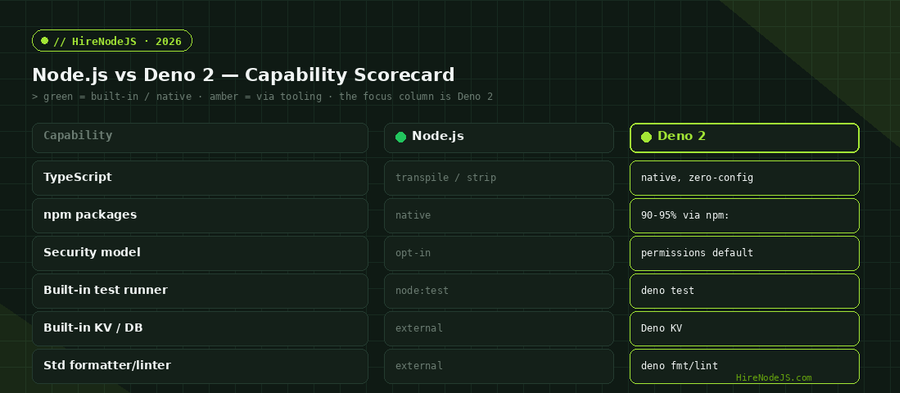
Deno 2 tightened permissions further — you can scope network access to specific hosts and file access to specific paths, which limits the blast radius of a compromised dependency. The scorecard below maps common capabilities to each runtime.
Developer Experience and Tooling
Batteries included
Deno ships a formatter, linter, test runner, and bundler in the box: deno fmt, deno lint, deno test. Node.js now has a native test runner (node:test) but still leans on the broader ecosystem — Prettier, ESLint, tsx — for the rest. Fewer moving parts means faster onboarding and less config drift across a team.
Startup and CI cost
Native TypeScript also shows up in CI time: skipping a separate transpile-and-typecheck pass shortens the feedback loop. The interactive chart below compares process startup and clean CI install across setups.
Migration: Moving a Node.js Service to Deno 2
Migration is usually incremental. Point Deno at your existing entrypoint, resolve any native-addon gaps, then progressively replace external tooling with the built-ins. Here is a minimal Express service running unmodified under Deno 2, plus the equivalent with Deno's native HTTP server.
// 1) Your existing Express app runs unchanged under Deno 2 via npm: compat.
//    Run with: deno run --allow-net --allow-env server.ts
import express from "npm:express@4";

const app = express();

app.get("/health", (_req, res) => {
  res.json({ status: "ok", runtime: "deno", ts: Date.now() });
});

app.listen(3000, () => console.log("Express on Deno 2 → http://localhost:3000"));

// 2) The same endpoint using Deno's native server (zero dependencies):
//    Deno.serve respects --allow-net and needs no framework.
Deno.serve({ port: 3001 }, (req) => {
  const url = new URL(req.url);
  if (url.pathname === "/health") {
    return Response.json({ status: "ok", runtime: "deno-native" });
  }
  return new Response("Not found", { status: 404 });
});Which Should You Choose — and Who Should You Hire?
Choose Node.js when you value maximum ecosystem certainty, a deep hiring pool, and battle-tested LTS stability — most existing production systems have no reason to move. Choose Deno 2 for greenfield services where native TypeScript, default-deny security, and an all-in-one toolchain pay off from day one. Many teams run both: Node for legacy services, Deno for new edge functions and internal tools.
Whichever way you lean, the deciding factor is people. If you are building a Node.js or Deno system and need engineers who can evaluate the trade-offs honestly, HireNodeJS connects you with pre-vetted senior developers available within 48 hours — without the recruiter overhead. For deeper backend work, see our backend developer hiring page or the Node.js skill profile.
Hire Expert Node.js Developers — Ready in 48 Hours
Building the right system is only half the battle — you need the right engineers to build it. HireNodeJS.com specialises exclusively in Node.js talent: every developer is pre-vetted on real-world projects, API design, event-driven architecture, and production deployments.
Unlike generalist platforms, our curated pool means you speak only to engineers who live and breathe Node.js — and increasingly Deno. Most clients have their first developer working within 48 hours of getting in touch. Engagements start as short-term contracts and can convert to full-time hires with zero placement fee.
Conclusion: Stability or Security-First?
In 2026 the runtime decision is no longer about whether your code will run — Deno 2's npm compatibility settled that. It is about trade-offs: Node.js gives you the deepest ecosystem and the largest hiring pool, while Deno 2 gives you native TypeScript, default-deny security, and a unified toolchain. For existing systems, stay on Node and adopt its newer security primitives. For greenfield work where security and DX matter from line one, Deno 2 has earned a real seat at the table.
Benchmark your own workload, audit your native dependencies, and let priorities — not hype — drive the choice. Then staff the team that can execute it.
Frequently Asked Questions
Is Deno 2 production-ready in 2026?
Yes. Deno 2 is used in production by companies like Netlify, Slack, and Deco.cx. It offers native TypeScript, broad npm compatibility, and a stable permissions model, making it suitable for real workloads.
Can Deno 2 run existing npm packages?
Mostly. Deno 2 supports over two million npm packages via npm: specifiers and a standard package.json, covering roughly 90-95% of the registry. Native C++ addons and packages that depend on Node internals are the main exceptions.
Is Deno 2 faster than Node.js?
On synthetic single-route benchmarks Deno 2 often beats Node.js on Express. In real-world API workloads with database access, the difference is usually under 3% because I/O dominates the request.
Should I migrate my Node.js app to Deno 2?
For existing, stable systems there is rarely a strong reason to migrate. Deno 2 shines for greenfield projects that benefit from native TypeScript, default-deny security, and an all-in-one toolchain.
What is the main advantage of Deno over Node.js?
Its security model. Deno denies file, network, and environment access by default, requiring explicit permission flags — a meaningful advantage for supply-chain hardening and running untrusted code.
Do I need to know TypeScript to use Deno 2?
No, but Deno is built for it. TypeScript runs natively with zero configuration and no separate build step, so TypeScript-heavy teams get the most value from Deno 2.
Vivek Singh is the founder of Witarist and HireNodeJS.com — a platform connecting companies with pre-vetted Node.js developers. With years of experience scaling engineering teams, Vivek shares insights on hiring, tech talent, and building with Node.js.
Need a Node.js engineer who can evaluate Deno 2 for you?
HireNodeJS connects you with pre-vetted senior Node.js and Deno engineers available within 48 hours. No recruiter fees, no lengthy screening — just top talent ready to ship.