Building Real-Time Apps with Node.js WebSockets & Socket.io in 2026
Table of Contents
1. What Are WebSockets and Why They Matter
2. Setting Up Node.js with Socket.io
3. Architecture Patterns for Real-Time Applications
4. Performance Optimization and Scaling
5. Security Best Practices
6. When to Use WebSockets vs. Alternatives
7. FAQ
Real-time functionality has become a baseline expectation in modern web applications. Users expect live chat, instant notifications, collaborative editing, and live dashboards — and they expect these features to feel instantaneous. In 2026, Node.js combined with the WebSocket protocol remains the dominant stack for building these experiences, thanks to its event-driven, non-blocking I/O model that aligns perfectly with the demands of persistent, bidirectional connections.
This guide covers everything you need to know about building production-grade real-time applications with Node.js WebSockets and Socket.io — from initial setup and architecture patterns through performance tuning, horizontal scaling, and security hardening.
What Are WebSockets and Why They Matter in 2026
HTTP is a request-response protocol — the client asks, the server answers, and the connection closes. For real-time use cases this is fundamentally inefficient: polling the server every few seconds wastes bandwidth and introduces latency. WebSockets solve this by establishing a persistent, full-duplex TCP connection that allows both client and server to send data at any time without re-establishing the connection.
The WebSocket Handshake
A WebSocket connection starts as a standard HTTP upgrade request. The client sends an HTTP/1.1 request with an `Upgrade: websocket` header, and if the server accepts, it responds with a 101 Switching Protocols status. From that point forward, the connection speaks the WebSocket framing protocol defined in RFC 6455. The overhead of this handshake is paid just once per connection, making subsequent message exchange extremely lightweight.
Node.js and the Event Loop Advantage
Node.js is uniquely suited to WebSocket servers because its single-threaded event loop handles thousands of concurrent connections without spawning a new thread per connection. Each open WebSocket is simply another file descriptor that the event loop monitors for incoming data. This is why a modest Node.js server can handle tens of thousands of simultaneous WebSocket connections on commodity hardware — a task that would exhaust a thread-per-connection server far sooner.
Socket.io vs. Raw WebSockets
The native `ws` package gives you raw WebSocket access, but Socket.io adds a higher-level abstraction that most production teams prefer. Socket.io provides automatic reconnection, rooms and namespaces for grouping connections, fallback to HTTP long-polling for environments where WebSockets are blocked, and a clean event-based API. In 2026, Socket.io v4 is the production standard, with support for horizontal scaling via adapters.
Setting Up Node.js with Socket.io
Getting a basic Socket.io server running takes fewer than 20 lines of code, but production deployments require careful attention to authentication, error handling, and configuration. Here is a complete starting point:
const express = require('express');
const { createServer } = require('http');
const { Server } = require('socket.io');
const { createClient } = require('redis');
const { createAdapter } = require('@socket.io/redis-adapter');

const app = express();
const httpServer = createServer(app);

const io = new Server(httpServer, {
  cors: {
    origin: process.env.ALLOWED_ORIGINS?.split(',') ?? ['http://localhost:3000'],
    methods: ['GET', 'POST'],
    credentials: true,
  },
  // Ping every 25s, disconnect after 60s without pong
  pingInterval: 25000,
  pingTimeout: 60000,
  // Limit payload size to prevent abuse
  maxHttpBufferSize: 1e6, // 1 MB
});

// Redis adapter for horizontal scaling
async function initRedisAdapter() {
  const pubClient = createClient({ url: process.env.REDIS_URL });
  const subClient = pubClient.duplicate();
  await Promise.all([pubClient.connect(), subClient.connect()]);
  io.adapter(createAdapter(pubClient, subClient));
  console.log('Redis adapter initialized');
}

// Middleware: authenticate every connection
io.use((socket, next) => {
  const token = socket.handshake.auth.token;
  if (!token) return next(new Error('Authentication required'));
  try {
    // Replace with your actual JWT verification
    const payload = verifyJWT(token);
    socket.data.userId = payload.sub;
    next();
  } catch {
    next(new Error('Invalid token'));
  }
});

io.on('connection', (socket) => {
  const { userId } = socket.data;
  console.log(`User ${userId} connected [${socket.id}]`);

  // Join a personal room to allow targeted messages
  socket.join(`user:${userId}`);

  socket.on('join-room', (roomId) => {
    socket.join(roomId);
    socket.to(roomId).emit('user-joined', { userId, roomId });
  });

  socket.on('message', ({ roomId, text }) => {
    // Validate and sanitize before broadcasting
    if (typeof text !== 'string' || text.length > 1000) return;
    io.to(roomId).emit('message', { userId, text, ts: Date.now() });
  });

  socket.on('disconnect', (reason) => {
    console.log(`User ${userId} disconnected: ${reason}`);
  });
});

async function start() {
  await initRedisAdapter();
  httpServer.listen(process.env.PORT ?? 3001, () => {
    console.log(`WebSocket server running on port ${process.env.PORT ?? 3001}`);
  });
}
start().catch(console.error);
Client-Side Connection
On the client side, Socket.io's CDN build or npm package handles all reconnection logic. A React hook that wraps a Socket.io connection might look like: `const { socket, isConnected } = useSocket(token)` — where the hook creates the socket on mount, attaches event listeners, and tears down cleanly on unmount. The key is always calling `socket.disconnect()` in the cleanup function to avoid memory leaks.
Environment Configuration
Never hard-code WebSocket server URLs or tokens. Use environment variables for CORS origins, Redis connection strings, JWT secrets, and port numbers. In containerized deployments (Docker, Kubernetes), these come from secrets management rather than .env files. The Socket.io server should also respect `TRUST_PROXY=1` when deployed behind a load balancer so it can read the real client IP from the `X-Forwarded-For` header.
Architecture Patterns for Real-Time Applications
The architecture of your WebSocket layer determines how easily you can scale, debug, and maintain your real-time system. Three patterns dominate production systems in 2026.
The Hub-and-Spoke Pattern
In this pattern, all WebSocket connections terminate at a dedicated Socket.io gateway service. This service receives events, validates them, and then publishes to an internal message broker (Redis Pub/Sub, NATS, or Kafka) which fans out to other microservices. Background services process the events and emit results back through the broker, which the gateway then emits to the appropriate Socket.io rooms. This separation keeps your business logic out of the WebSocket layer and makes each component independently scalable.
CQRS with Event Sourcing
For applications like collaborative editors or financial dashboards where the state must be auditable and reproducible, CQRS (Command Query Responsibility Segregation) pairs well with WebSockets. Commands arrive via REST or WebSocket events, get validated and appended to an event log, and the resulting state changes are broadcast to subscribers. If a client reconnects, it can replay events from its last known sequence number — a pattern popularized by tools like Liveblocks and Yjs.
Room-Based Channel Architecture
Socket.io rooms map naturally to entities in your domain: a chat room, a document, a game session, a live dashboard. Joining a room is cheap (it's just a Set membership in memory), and broadcasting to a room is O(n) where n is the number of members. Design your room naming scheme carefully — `document:${docId}`, `org:${orgId}:notifications` — so you can target broadcasts precisely and revoke access by having the server call `socket.leave(roomId)` when permissions change.
Performance Optimization and Scaling WebSocket Servers
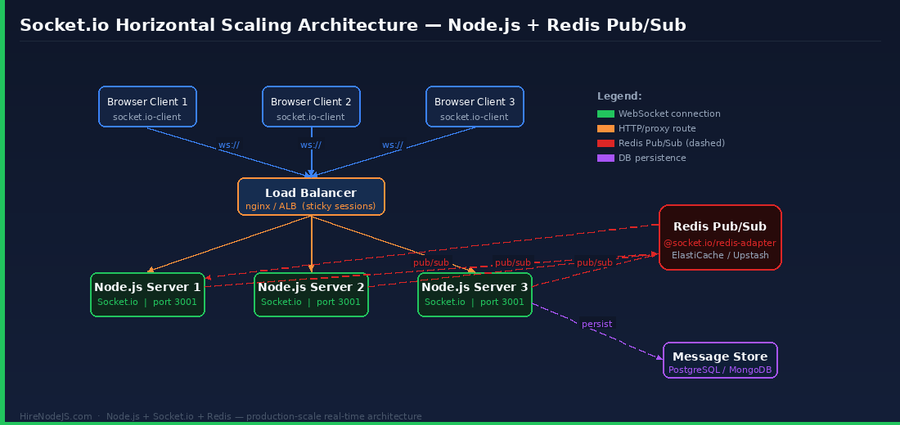
A single Node.js process can handle 50,000–100,000 concurrent WebSocket connections on a well-provisioned server, but production applications quickly need more. Here is how to go beyond a single instance.
Horizontal Scaling with Redis Adapter
Hire Pre-Vetted Node.js Developers
Skip the months-long search. Our exclusive talent network has senior Node.js experts ready to join your team in 48 hours.
Socket.io's Redis adapter uses Redis Pub/Sub to synchronize events across multiple server instances. When a client connected to Server A sends a message to a room, Server A publishes the event to Redis, which forwards it to Servers B and C so they can deliver it to their local clients in that room. The setup requires a low-latency Redis instance (ElastiCache, Upstash, or a managed Redis) and adds roughly 1–3 ms of broadcast latency — acceptable for almost all use cases.
Connection Load Balancing
WebSocket connections are long-lived and stateful, so your load balancer must use sticky sessions (IP hash or session cookie affinity). Without sticky sessions, Socket.io's HTTP long-polling fallback breaks because upgrade requests land on a different server than the initial handshake. AWS ALB, nginx, and HAProxy all support sticky sessions. See the Socket.io clustering documentation for step-by-step configuration.
Reducing Payload Size
By default, Socket.io serializes event data as JSON, which is verbose. For high-frequency events (cursor positions, sensor data), switch to MessagePack serialization via the `@socket.io/msgpack-parser` package. This reduces payload size by 20–40% and cuts CPU time spent on serialization. Additionally, compress infrequent but large payloads using Socket.io's built-in `perMessageDeflate` option — but disable it for high-frequency small messages where the compression overhead outweighs the benefit.
Security Best Practices for Node.js WebSocket Servers
WebSocket servers face a distinct set of security challenges. Because the connection is persistent, a single compromised session can do far more damage than a single malicious HTTP request. The OWASP WebSocket Security Cheat Sheet is the authoritative reference — here are the most important points.
Authentication and Authorization
Authenticate on the handshake, not after. Use the `io.use()` middleware to verify a JWT or session token before allowing the connection to proceed. Re-verify permissions on every sensitive event — do not assume that because a client was authorized at connection time they are still authorized 20 minutes later. Implement token refresh over WebSocket or disconnect and force re-authentication when tokens expire.
Rate Limiting and Abuse Prevention
Without rate limiting, a single malicious client can flood your server with events and exhaust CPU or memory. Track the number of events per socket per second in middleware and call `socket.disconnect(true)` (immediate close, no drain) if the limit is exceeded. Libraries like `socket.io-rate-limiter` make this straightforward. Also set a maximum reconnection backoff on the client so that a thundering herd of reconnecting clients after a server restart does not immediately overwhelm the new instance.
Input Validation and Sanitization
Every event payload is user-controlled data. Validate schemas using Zod or Joi before processing any event. Reject unexpected fields, enforce string length limits, and never pass raw event data directly to a database query or shell command. Socket.io events can carry binary data — validate that the type and size match your expectations before processing.
When to Use WebSockets vs. Server-Sent Events, HTTP/2, or Polling
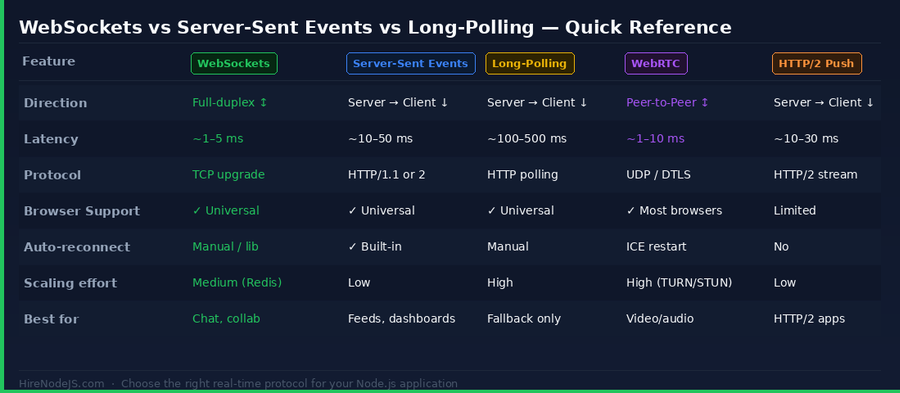
WebSockets are powerful but not always the right tool. Understanding when alternatives are better saves architectural complexity.
Server-Sent Events (SSE)
Server-Sent Events are a simpler, HTTP-native mechanism for pushing data from server to client. They are unidirectional (server → client only), automatically reconnect, and work through standard HTTP/2 connections without a protocol upgrade. Use SSE for feeds where the client only consumes data: live score updates, log streaming, CI build progress. The MDN EventSource documentation covers the API thoroughly. SSE is often the right choice if you are already on HTTP/2, since it multiplexes over existing connections.
HTTP Long-Polling
Long-polling is a fallback, not a first choice. It works where WebSockets are blocked (some corporate firewalls, older mobile networks), and Socket.io uses it automatically when the WebSocket upgrade fails. The downsides are higher latency (one request-response cycle per message), more HTTP overhead, and more complex server-side logic to hold open requests. In 2026, the vast majority of environments support WebSockets, so long-polling should be an automatic fallback rather than the primary transport.
WebRTC for Peer-to-Peer
For video conferencing, voice chat, and low-latency peer-to-peer data transfer, WebRTC is the right protocol. Your Node.js server becomes a signaling server (often using WebSockets) that helps clients exchange offer/answer SDP and ICE candidates, but the actual media data flows peer-to-peer. If you are building a video product on top of Node.js, evaluate managed services like LiveKit (open source) or Daily.co before rolling your own WebRTC infrastructure.
Hire Expert Node.js Developers — Ready in 48 Hours
Building the right thing is only half the battle — you need the right engineers to build it. HireNodeJS.com specialises exclusively in Node.js talent, which means every developer in our network has been pre-vetted on real-world Node.js projects: API design, event-driven architecture, performance tuning, and production deployments.
Unlike generalist platforms where you sift through hundreds of irrelevant profiles, our curated pool means you speak only to engineers who live and breathe Node.js. Most clients have their first developer working within 48 hours of getting in touch.
Whether you need a senior engineer to architect a greenfield system, a mid-level developer to accelerate your current team, or a specialist to tackle a specific challenge like real-time features or microservices migration — HireNodeJS.com has the talent. Engagements start as short-term contracts and can convert to full-time hires with no placement fee.
Frequently Asked Questions
Vivek Singh is the founder of Witarist and HireNodeJS.com — a platform connecting companies with pre-vetted Node.js developers. With years of experience scaling engineering teams, Vivek shares insights on hiring, tech talent, and building with Node.js.
Ready to Hire Node.js Developers?
Browse our pre-vetted talent network and get matched with senior Node.js developers in 48 hours.